Mailtrap Reviews 2026: Details, Pricing, & Features | Subscribed.fyi
Sign in to review
Join our community of software reviewers on Subscribed.fyi

Continue With Google
Continue With LinkedIn
Continue Review with Email
Continue with Email
Enter your email to continue.
Continue
Enter your password
Enter your password to finish setting up your account.
Continue
Activate your email
Enter activation code we sent to your email.
Submit
Reset your password
Enter activation code we sent to your email.
Submit
Set your new password
Enter a new password for your account.
Submit
✨ Ask AI Search
Categories
For Business
Log in
Provide My Insights

Mailtrap

4.5/5
(2)

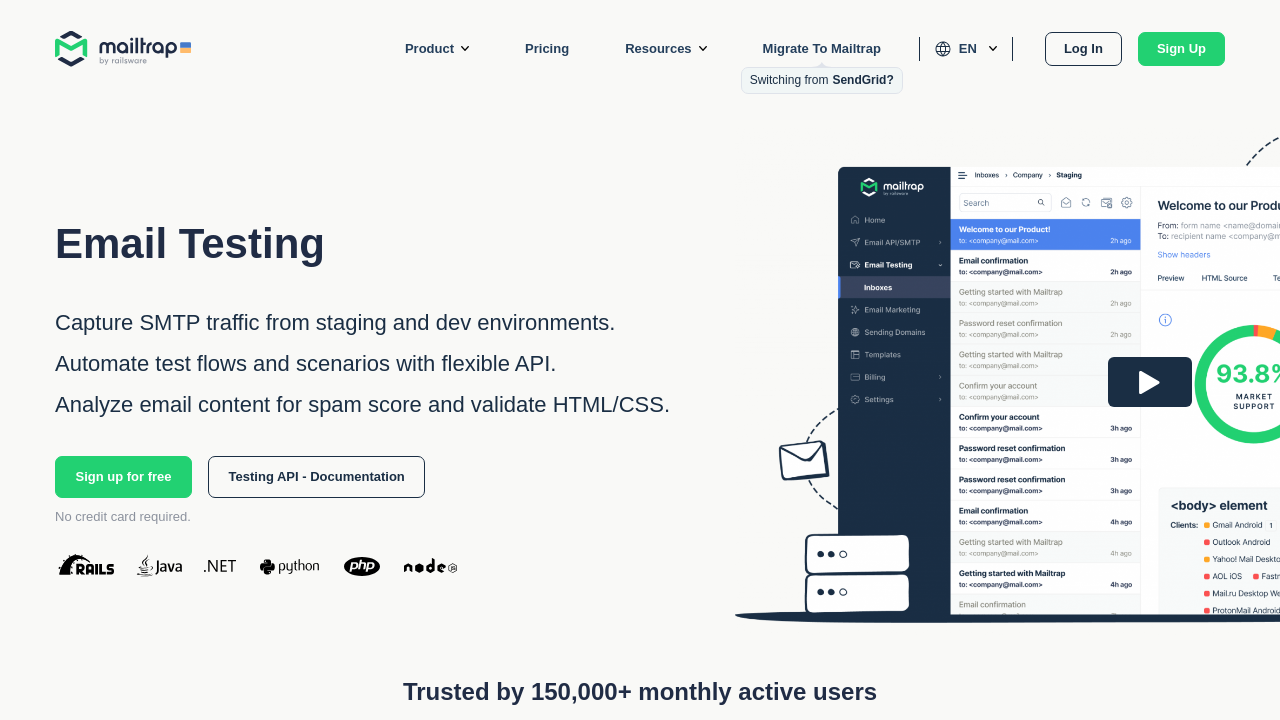
Mailtrap is an all-in-one email delivery platform for testing, sending, and monitoring emails. It provides developers with tools to debug and improve email functionality in secure environments and ensure high deliverability rates in production. The platform offers actionable analytics, comprehensive dashboards, and email logs to streamline workflows and enhance performance. Ideal for dev teams, Mailtrap simplifies managing email infrastructure with reliability and efficiency.

Mailtrap

4.5
2
Reviews
86%
Subscribed Score

Available for Claim - This listing is available to be claimed
Claim For Free

Unclaimed

Curated and listed by Subscribed Team

Claim For Free
Eco-Friendly
Eco-Friendly
Designed with sustainability in mind.
Expert Support
Expert Support
Help available when you need it.
Works Anywhere
Works Anywhere
Accessible from any device, anytime.

Mailtrap is a comprehensive Email Delivery Platform built specifically for development teams that need to test, send, and control their email infrastructure from a single, unified interface. Designed with both individuals and businesses in mind, Mailtrap streamlines the email process by offering a safe testing environment, reliable production email sending, and actionable analytics to monitor performance. It empowers developers and product managers to refine email functionality quickly and confidently.

At its core, Mailtrap offers a secure email testing environment where sending real emails is replaced by a simulated process using a fake SMTP server. This zero-risk testing ensures that email templates, design elements, and deliverability aspects are thoroughly influenced before moving to production. With the ability to capture SMTP traffic, validate CSS/HTML, and check spam scores, developers can accelerate the debugging process and optimize campaigns in a controlled setting.

Once emails have been perfected in the test phase, Mailtrap’s production email sending solution steps in. Integrating seamlessly with your applications, it provides a robust SMTP and API-based approach that drives high deliverability rates. This two-step process—from testing to production sending—ensures that emails reach recipients’ inboxes reliably, eliminating the stress associated with email errors and deliverability issues.

Mailtrap also equips users with actionable analytics to take control of their entire email infrastructure. Featuring a centralized dashboard with drill-down reports, 60-day email logs, and regular weekly summaries, the platform delivers deep insights into email performance. These insights empower technical teams to monitor trends, respond to critical alerts, and continuously improve email strategies.

Key Features and Benefits

  • Email Testing: Experience a secure, sandbox environment to simulate all aspects of email delivery without risk.
  • Email Sending: Transition seamlessly from testing to production with an efficient sending interface that integrates easily with your applications.
  • Actionable Analytics: Utilize a comprehensive dashboard, detailed reports, and historical logs to keep track of email performance and improvements.
  • Custom Integrations: Leverage customizable domains, dedicated IP configurations, webhooks, and APIs to tailor the platform to your workflow.

Mailtrap falls under the Software Testing Tools category, making it a powerful asset for teams seeking to enhance both email quality and overall application performance. Its robust set of features makes email management straightforward, offering everything from template creation and custom unsubscribe options to domain reputation management and spam filter testing.

For exclusive deals, explore the dedicated Mailtrap deals page. If you’re considering alternative tools, MailerLite is a noteworthy option. Embrace the comprehensive capabilities of Mailtrap to streamline email workflows, improve deliverability, and optimize overall performance in a single cohesive platform.


Mailtrap Summary

Mailtrap is a comprehensive Email Delivery Platform built specifically for development teams that need to test, send, and control their email infrastructure from a single, unified interface. Designed with both individuals and businesses in mind, Mailtrap streamlines the email process by offering a safe testing environment, reliable production email sending, and actionable analytics to monitor performance. It empowers developers and product managers to refine email functionality quickly and confidently.

At its core, Mailtrap offers a secure email testing environment where sending real emails is replaced by a simulated process using a fake SMTP server. This zero-risk testing ensures that email templates, design elements, and deliverability aspects are thoroughly influenced before moving to production. With the ability to capture SMTP traffic, validate CSS/HTML, and check spam scores, developers can accelerate the debugging process and optimize campaigns in a controlled setting.

Once emails have been perfected in the test phase, Mailtrap’s production email sending solution steps in. Integrating seamlessly with your applications, it provides a robust SMTP and API-based approach that drives high deliverability rates. This two-step process—from testing to production sending—ensures that emails reach recipients’ inboxes reliably, eliminating the stress associated with email errors and deliverability issues.

Mailtrap also equips users with actionable analytics to take control of their entire email infrastructure. Featuring a centralized dashboard with drill-down reports, 60-day email logs, and regular weekly summaries, the platform delivers deep insights into email performance. These insights empower technical teams to monitor trends, respond to critical alerts, and continuously improve email strategies.

Key Features and Benefits

  • Email Testing: Experience a secure, sandbox environment to simulate all aspects of email delivery without risk.
  • Email Sending: Transition seamlessly from testing to production with an efficient sending interface that integrates easily with your applications.
  • Actionable Analytics: Utilize a comprehensive dashboard, detailed reports, and historical logs to keep track of email performance and improvements.
  • Custom Integrations: Leverage customizable domains, dedicated IP configurations, webhooks, and APIs to tailor the platform to your workflow.

Mailtrap falls under the Software Testing Tools category, making it a powerful asset for teams seeking to enhance both email quality and overall application performance. Its robust set of features makes email management straightforward, offering everything from template creation and custom unsubscribe options to domain reputation management and spam filter testing.

For exclusive deals, explore the dedicated Mailtrap deals page. If you’re considering alternative tools, MailerLite is a noteworthy option. Embrace the comprehensive capabilities of Mailtrap to streamline email workflows, improve deliverability, and optimize overall performance in a single cohesive platform.

Mailtrap reviews

Learn what people say about Mailtrap

4.5
2 Reviews
86%
Subscribed Score

Lear more here about the Subscribed score on how it is composed. Learn more Click here

Overall rating

5
4
3
2
1
CX 6/6

How good is the customer support based on subscribed’s assessment

CX Icon
Security 5/6

How secure is the product based on Subscribed’s assessment?

Security Icon
Ease of Use 6/6

How easy is the product to use, based on Subscribed’s assessment?

EOU Icon
Value 5/6

What is the value for money based on Subscribed’s assessment?

coin Icon
Integration 4/6

How many integrations does the product offer?

gear Icon
Popularity 5/6

How popular is the product?

star
shakeeb ahmad Organic
web developer
See My Portfolio
16 hours ago
Share
What exceeded your expectations?
Mailtrap exceeded my expectations with how effortless it makes testing email workflows without sending real emails to users. The virtual inbox and debugging tools help catch issues early and save a lot of development time.
Have you experienced any bugs or errors?
It’s generally stable, but occasionally the test inbox can show delayed updates if many emails are processed at once. This rarely affects core testing, but it can be slightly annoying during heavy iterations.
What problem did this product solve for you?
Mailtrap solved the challenge of safely testing transactional and marketing emails during development without risking accidental sends to real users. It ensures email formatting and delivery logic work correctly before going live.
Final thoughts, wrap up what you think
It makes email testing reliable and developer‑friendly, saving time and avoiding common mistakes. Its simplicity and clear tools are especially valuable for quality assurance and development teams.
Upvote
M Raza Akhter Invitation
QA Engineer
20 hours ago
Share
What exceeded your expectations?
What I liked most was how easy Mailtrap made email testing. I could check emails before they went live without worrying about sending them to real users by mistake.
What slows you down when using it?
Sometimes it takes time to find a few settings or move around the interface. A couple of parts could also be clearer.
What problem did this product solve for you?
It helped me test emails before release and catch issues early. That was useful because I could check everything first instead of finding problems after sending.
Final thoughts, wrap up what you think
I would recommend Mailtrap because it makes email testing easier and safer. It helps catch mistakes before anything goes live.
Upvote

Mailtrap User Reviews

2 User Reviews

shakeeb ahmad Organic
web developer
See My Portfolio
16 hours ago
Share
What exceeded your expectations?
Mailtrap exceeded my expectations with how effortless it makes testing email workflows without sending real emails to users. The virtual inbox and debugging tools help catch issues early and save a lot of development time.
Have you experienced any bugs or errors?
It’s generally stable, but occasionally the test inbox can show delayed updates if many emails are processed at once. This rarely affects core testing, but it can be slightly annoying during heavy iterations.
What problem did this product solve for you?
Mailtrap solved the challenge of safely testing transactional and marketing emails during development without risking accidental sends to real users. It ensures email formatting and delivery logic work correctly before going live.
Final thoughts, wrap up what you think
It makes email testing reliable and developer‑friendly, saving time and avoiding common mistakes. Its simplicity and clear tools are especially valuable for quality assurance and development teams.
Upvote
M Raza Akhter Invitation
QA Engineer
20 hours ago
Share
What exceeded your expectations?
What I liked most was how easy Mailtrap made email testing. I could check emails before they went live without worrying about sending them to real users by mistake.
What slows you down when using it?
Sometimes it takes time to find a few settings or move around the interface. A couple of parts could also be clearer.
What problem did this product solve for you?
It helped me test emails before release and catch issues early. That was useful because I could check everything first instead of finding problems after sending.
Final thoughts, wrap up what you think
I would recommend Mailtrap because it makes email testing easier and safer. It helps catch mistakes before anything goes live.
Upvote
Reviews from G2, Capterra, Trustpilot
info Icon

These ratings come directly from third-party platforms like G2, Capterra, and Trustpilot. They reflect real user feedback collected independently on those sites.

Mailtrap

Pricing Range
info Icon

This only an estimated pricing range, visit Mailtrap pricing page to access all the information by clicking “Visit Now”.

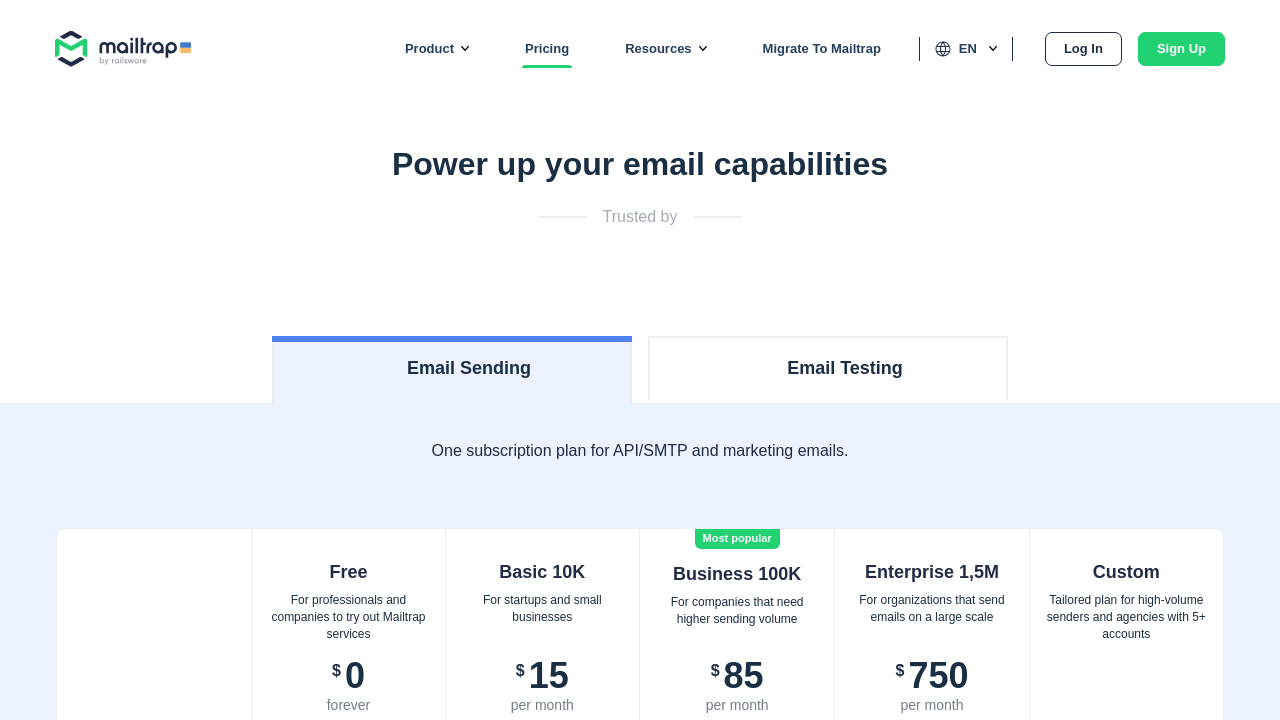
$9.99-299.99 / Month
Deals Available

This product comes with a special deal, see details

Visit Now
✨ Ask AI about pricing
86% Subscribed Score
info Icon

The Subscribed Score is an independent rating that combines user reviews, features, and value-for-money from multiple trusted sources. It’s designed as a quick benchmark, not a guarantee of individual experience.

Analysis

Mailtrap is a comprehensive Email Delivery Platform built specifically for development teams that need to test, send, and control their email infrastructure from a single, unified interface. Designed with both individuals and businesses in mind, Mailtrap streamlines the email process by offering a safe testing environment, reliable production email sending, and actionable analytics to monitor performance. It empowers developers and product managers to refine email functionality quickly and confidently.

At its core, Mailtrap offers a secure email testing environment where sending real emails is replaced by a simulated process using a fake SMTP server. This zero-risk testing ensures that email templates, design elements, and deliverability aspects are thoroughly influenced before moving to production. With the ability to capture SMTP traffic, validate CSS/HTML, and check spam scores, developers can accelerate the debugging process and optimize campaigns in a controlled setting.

Once emails have been perfected in the test phase, Mailtrap’s production email sending solution steps in. Integrating seamlessly with your applications, it provides a robust SMTP and API-based approach that drives high deliverability rates. This two-step process—from testing to production sending—ensures that emails reach recipients’ inboxes reliably, eliminating the stress associated with email errors and deliverability issues.

Mailtrap also equips users with actionable analytics to take control of their entire email infrastructure. Featuring a centralized dashboard with drill-down reports, 60-day email logs, and regular weekly summaries, the platform delivers deep insights into email performance. These insights empower technical teams to monitor trends, respond to critical alerts, and continuously improve email strategies.

Key Features and Benefits

  • Email Testing: Experience a secure, sandbox environment to simulate all aspects of email delivery without risk.
  • Email Sending: Transition seamlessly from testing to production with an efficient sending interface that integrates easily with your applications.
  • Actionable Analytics: Utilize a comprehensive dashboard, detailed reports, and historical logs to keep track of email performance and improvements.
  • Custom Integrations: Leverage customizable domains, dedicated IP configurations, webhooks, and APIs to tailor the platform to your workflow.

Mailtrap falls under the Software Testing Tools category, making it a powerful asset for teams seeking to enhance both email quality and overall application performance. Its robust set of features makes email management straightforward, offering everything from template creation and custom unsubscribe options to domain reputation management and spam filter testing.

For exclusive deals, explore the dedicated Mailtrap deals page. If you’re considering alternative tools, MailerLite is a noteworthy option. Embrace the comprehensive capabilities of Mailtrap to streamline email workflows, improve deliverability, and optimize overall performance in a single cohesive platform.

Pros
  • Easy to use with a user-friendly interface
  • Comprehensive analytics for email performance
  • Reliable support team with quick responses
  • High deliverability and detailed email logs
Cons
  • Limited storage on lower-tier plans
  • API documentation can be confusing at first
  • High pricing for some users
  • Search functionality in email logs needs improvement
Subscribed Score Metrics
31/36 Metric achieved
MetricsScore
Customer Support6/6
Security5/6
Ease of Use6/6
Value of Money5/6
Integration4/6
Popularity5/6
Radar Chart Table View
Ease of Use
Measures how simple and intuitive the product is to use, including setup, navigation, and overall user experience
6/6 Metric Checks
Security
Compares the product`s features, quality, and pricing to determine its overall cost-effectiveness.
5/6 Metric Checks
Value of Money
Assesses the product`s ability to protect data, prevent breaches, and comply with industry standards.
5/6 Metric Checks
Customer Support
Reflects the responsiveness, helpfulness, and quality of assistance provided by the product`s support team.
6/6 Metric Checks
Integrations
Evaluates how well the product connects with other tools and platforms, enabling seamless workflows.
4/6 Metric Checks
Mailtrap Pricing Range
$9.99-299.99 / Month

Mailtrap Showcase
info Icon

A curated gallery of real screenshots and use cases from the product, so you can see how it works before trying it.

Mailtrap Full Screen Icon
https://www.youtube.com/watch?v=UhbjbzolTdQ
Full Screen Icon
https://www.youtube.com/watch?v=vAfUyKpWj_M
Full Screen Icon
Mailtrap
Mailtrap

What else exists next to Mailtrap
info Icon

A list of platforms similar to Mailtrap, helping you evaluate which tool best matches your needs.

Need to cancel Mailtrap? Here is how
info Icon

Thinking about how to cancel Mailtrap this is how you do it!

To cancel a Mailtrap product, follow these steps:

  1. Email API/SMTP Plans: Go to Billing > Email API/SMTP Plans, select the Free plan, and click Select.
  2. Email Testing Plans: Go to Billing > Email Testing Plans, click on "Want to cancel your subscription?" and follow the prompts.
  3. Cancellation takes effect at the end of the billing cycle.

How to Cancel the Mailtrap

To cancel a Mailtrap product, follow these steps:

  1. Email API/SMTP Plans: Go to Billing > Email API/SMTP Plans, select the Free plan, and click Select.
  2. Email Testing Plans: Go to Billing > Email Testing Plans, click on "Want to cancel your subscription?" and follow the prompts.
  3. Cancellation takes effect at the end of the billing cycle.
Every else you need to know about Mailtrap
info Icon

A collection of FAQs, guides, alternatives, and comparisons to help you quickly understand if Mailtrap is right for you.

Pricing Range
info Icon

This only an estimated pricing range, visit Mailtrap pricing page to access all the information by clicking “Visit Now”.

$9.99-299.99 / Month
Visit Now
Deals Available

This product comes with a special deal, see details

This product comes with a special deal, see details