SpringCharts EHR Reviews 2026: Details, Pricing, & Features | Subscribed.fyi
Sign in to review
Join our community of software reviewers on Subscribed.fyi

Continue With Google
Continue With LinkedIn
Continue Review with Email
Continue with Email
Enter your email to continue.
Continue
Enter your password
Enter your password to finish setting up your account.
Continue
Activate your email
Enter activation code we sent to your email.
Submit
Reset your password
Enter activation code we sent to your email.
Submit
Set your new password
Enter a new password for your account.
Submit
✨ Ask AI Search
Categories
For Business
Log in
Provide My Insights

SpringCharts EHR

SpringCharts EHR is a cloud-based electronic health records solution designed for seamless management of patient data, appointments, prescriptions, and office workflows. It supports customization with templates and efficient charting, making it suitable for small to mid-sized healthcare facilities. While user-friendly and cost-effective, it has received mixed reviews on customer support and functionality upgrades.

SpringCharts EHR

N/A
0
Reviews
31%
Subscribed Score

Available for Claim - This listing is available to be claimed
Claim For Free

Unclaimed

Curated and listed by Subscribed Team

Claim For Free
Exclusive Perks
Exclusive Perks
Special offers and discounts available.
Fast & Efficient
Fast & Efficient
Optimized for speed and performance.
Seamless Integrations
Connect easily with your favorite tools.

SpringCharts EHR is a comprehensive, cloud-based Electronic Health Records (EMR) solution designed to help clinicians and support staff gain instant access to up-to-date patient charts, manage office status, and streamline internal communications. This robust platform supports a wide range of healthcare facilities—from individual practices to larger medical centers—by simplifying daily workflow and improving the efficiency of patient care management.

Key Features of SpringCharts EHR

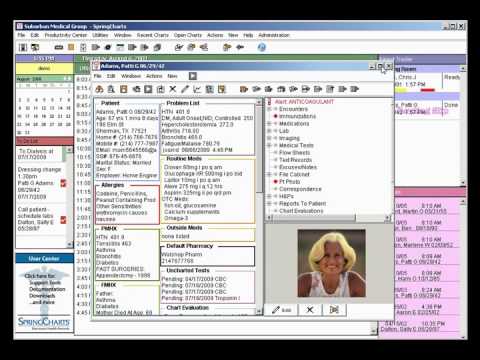
  • Instant Patient Data Access: Quickly retrieve current patient charts that display historical data, diagnostic information, lab results, referrals, prescriptions, and more.
  • Streamlined Workflow: Enjoy a user-friendly interface with customizable templates and color-coded displays that help clinicians easily navigate through patient notes and encounter histories.
  • Template Customization: Create and integrate personalized note templates for progress notes, specialist letters, and other documentation, helping you save time and reduce repetitive data entry.
  • Centralized Communication: Keep track of internal office communications and appointment scheduling to ensure seamless practice management.

SpringCharts EHR is built with the modern healthcare environment in mind. It offers a visually appealing design that organizes patient data into clearly labeled tabs, making it easy to locate important patient information at a glance. The system is designed to adapt to various medical specialties—ranging from pediatrics to internal medicine—allowing for a flexible approach to documentation tailored to your practice’s needs.

Why Choose SpringCharts EHR?

  • Ease of Use: Its intuitive layout minimizes learning curves and helps clinicians quickly locate information, improving overall office efficiency.
  • Enhanced Patient Care: By providing immediate access to comprehensive patient records and history, SpringCharts EHR allows for more informed decision-making and improved quality of care.
  • Customizable & Adaptable: The platform’s flexible note-taking and template features cater to specific practice requirements, enhancing the overall user experience.
  • Cost-Effective: With a focus on reducing redundant administrative tasks, it assists in maximizing practice revenue, making it an economical solution for healthcare providers.

Discover exclusive deals at the SpringCharts EHR deal page and explore how this solution can drive efficiency and accuracy throughout your practice. For more information on Electronic Health Records (EMR) software, visit the Electronic Health Records (EMR) category page.

Alternatives

SpringCharts EHR is an ideal solution for healthcare professionals seeking a reliable, intuitive, and customizable tool for efficient record management. Its cloud-based design, comprehensive features, and focus on everyday usability make it a valuable asset in today’s fast-paced medical environment.


SpringCharts EHR Summary

SpringCharts EHR is a comprehensive, cloud-based Electronic Health Records (EMR) solution designed to help clinicians and support staff gain instant access to up-to-date patient charts, manage office status, and streamline internal communications. This robust platform supports a wide range of healthcare facilities—from individual practices to larger medical centers—by simplifying daily workflow and improving the efficiency of patient care management.

Key Features of SpringCharts EHR

  • Instant Patient Data Access: Quickly retrieve current patient charts that display historical data, diagnostic information, lab results, referrals, prescriptions, and more.
  • Streamlined Workflow: Enjoy a user-friendly interface with customizable templates and color-coded displays that help clinicians easily navigate through patient notes and encounter histories.
  • Template Customization: Create and integrate personalized note templates for progress notes, specialist letters, and other documentation, helping you save time and reduce repetitive data entry.
  • Centralized Communication: Keep track of internal office communications and appointment scheduling to ensure seamless practice management.

SpringCharts EHR is built with the modern healthcare environment in mind. It offers a visually appealing design that organizes patient data into clearly labeled tabs, making it easy to locate important patient information at a glance. The system is designed to adapt to various medical specialties—ranging from pediatrics to internal medicine—allowing for a flexible approach to documentation tailored to your practice’s needs.

Why Choose SpringCharts EHR?

  • Ease of Use: Its intuitive layout minimizes learning curves and helps clinicians quickly locate information, improving overall office efficiency.
  • Enhanced Patient Care: By providing immediate access to comprehensive patient records and history, SpringCharts EHR allows for more informed decision-making and improved quality of care.
  • Customizable & Adaptable: The platform’s flexible note-taking and template features cater to specific practice requirements, enhancing the overall user experience.
  • Cost-Effective: With a focus on reducing redundant administrative tasks, it assists in maximizing practice revenue, making it an economical solution for healthcare providers.

Discover exclusive deals at the SpringCharts EHR deal page and explore how this solution can drive efficiency and accuracy throughout your practice. For more information on Electronic Health Records (EMR) software, visit the Electronic Health Records (EMR) category page.

Alternatives

SpringCharts EHR is an ideal solution for healthcare professionals seeking a reliable, intuitive, and customizable tool for efficient record management. Its cloud-based design, comprehensive features, and focus on everyday usability make it a valuable asset in today’s fast-paced medical environment.

SpringCharts EHR reviews

Learn what people say about SpringCharts EHR

N/A
0 Reviews
31%
Subscribed Score

Lear more here about the Subscribed score on how it is composed. Learn more Click here

Overall rating

5
4
3
2
1
CX 1/6

How good is the customer support based on subscribed’s assessment

CX Icon
Security 2/6

How secure is the product based on Subscribed’s assessment?

Security Icon
Ease of Use 3/6

How easy is the product to use, based on Subscribed’s assessment?

EOU Icon
Value 2/6

What is the value for money based on Subscribed’s assessment?

coin Icon
Integration 1/6

How many integrations does the product offer?

gear Icon
Popularity 2/6

How popular is the product?

star

No Reviews Yet!

Be the first to share your experience and help others in the community.

SpringCharts EHR User Reviews

0 User Reviews

Reviews from G2, Capterra, Trustpilot
info Icon

These ratings come directly from third-party platforms like G2, Capterra, and Trustpilot. They reflect real user feedback collected independently on those sites.

SpringCharts EHR

Pricing Range
info Icon

This only an estimated pricing range, visit SpringCharts EHR pricing page to access all the information by clicking “Visit Now”.

Not specified
Deals Available

This product comes with a special deal, see details

Visit Now
✨ Ask AI about pricing
31% Subscribed Score
info Icon

The Subscribed Score is an independent rating that combines user reviews, features, and value-for-money from multiple trusted sources. It’s designed as a quick benchmark, not a guarantee of individual experience.

Analysis

SpringCharts EHR is a comprehensive, cloud-based Electronic Health Records (EMR) solution designed to help clinicians and support staff gain instant access to up-to-date patient charts, manage office status, and streamline internal communications. This robust platform supports a wide range of healthcare facilities—from individual practices to larger medical centers—by simplifying daily workflow and improving the efficiency of patient care management.

Key Features of SpringCharts EHR

  • Instant Patient Data Access: Quickly retrieve current patient charts that display historical data, diagnostic information, lab results, referrals, prescriptions, and more.
  • Streamlined Workflow: Enjoy a user-friendly interface with customizable templates and color-coded displays that help clinicians easily navigate through patient notes and encounter histories.
  • Template Customization: Create and integrate personalized note templates for progress notes, specialist letters, and other documentation, helping you save time and reduce repetitive data entry.
  • Centralized Communication: Keep track of internal office communications and appointment scheduling to ensure seamless practice management.

SpringCharts EHR is built with the modern healthcare environment in mind. It offers a visually appealing design that organizes patient data into clearly labeled tabs, making it easy to locate important patient information at a glance. The system is designed to adapt to various medical specialties—ranging from pediatrics to internal medicine—allowing for a flexible approach to documentation tailored to your practice’s needs.

Why Choose SpringCharts EHR?

  • Ease of Use: Its intuitive layout minimizes learning curves and helps clinicians quickly locate information, improving overall office efficiency.
  • Enhanced Patient Care: By providing immediate access to comprehensive patient records and history, SpringCharts EHR allows for more informed decision-making and improved quality of care.
  • Customizable & Adaptable: The platform’s flexible note-taking and template features cater to specific practice requirements, enhancing the overall user experience.
  • Cost-Effective: With a focus on reducing redundant administrative tasks, it assists in maximizing practice revenue, making it an economical solution for healthcare providers.

Discover exclusive deals at the SpringCharts EHR deal page and explore how this solution can drive efficiency and accuracy throughout your practice. For more information on Electronic Health Records (EMR) software, visit the Electronic Health Records (EMR) category page.

Alternatives

SpringCharts EHR is an ideal solution for healthcare professionals seeking a reliable, intuitive, and customizable tool for efficient record management. Its cloud-based design, comprehensive features, and focus on everyday usability make it a valuable asset in today’s fast-paced medical environment.

Pros
  • Customizable templates for notes and letters
  • Colorful, organized display with clear data layout
  • Ease of note access and intuitive chart navigation
  • Low cost compared to other options
Cons
  • Poor customer support and delayed response times
  • Limited CMS compliance and outdated features
  • Frequent system glitches and freezing
  • Minimal updates for coding and quality measures
Subscribed Score Metrics
11/36 Metric achieved
MetricsScore
Customer Support1/6
Security2/6
Ease of Use3/6
Value of Money2/6
Integration1/6
Popularity2/6
Radar Chart Table View
Ease of Use
Measures how simple and intuitive the product is to use, including setup, navigation, and overall user experience
3/6 Metric Checks
Security
Compares the product`s features, quality, and pricing to determine its overall cost-effectiveness.
2/6 Metric Checks
Value of Money
Assesses the product`s ability to protect data, prevent breaches, and comply with industry standards.
2/6 Metric Checks
Customer Support
Reflects the responsiveness, helpfulness, and quality of assistance provided by the product`s support team.
1/6 Metric Checks
Integrations
Evaluates how well the product connects with other tools and platforms, enabling seamless workflows.
1/6 Metric Checks
SpringCharts EHR Pricing Range
Not specified

SpringCharts EHR Showcase
info Icon

A curated gallery of real screenshots and use cases from the product, so you can see how it works before trying it.

SpringCharts EHR Full Screen Icon
https://www.youtube.com/watch?v=IPI4YUsXdsw
Full Screen Icon
https://www.youtube.com/watch?v=dtCQWhZfWf8
Full Screen Icon
SpringCharts EHR

What else exists next to SpringCharts EHR
info Icon

A list of platforms similar to SpringCharts EHR, helping you evaluate which tool best matches your needs.

Need to cancel SpringCharts EHR? Here is how
info Icon

Thinking about how to cancel SpringCharts EHR this is how you do it!

To cancel a SpringCharts EHR product, contact their support team via their website or call them during office hours. They will guide you through the cancellation process. For more details, visit their contact page.

How to Cancel the SpringCharts EHR

To cancel a SpringCharts EHR product, contact their support team via their website or call them during office hours. They will guide you through the cancellation process. For more details, visit their contact page.

Every else you need to know about SpringCharts EHR
info Icon

A collection of FAQs, guides, alternatives, and comparisons to help you quickly understand if SpringCharts EHR is right for you.

Pricing Range
info Icon

This only an estimated pricing range, visit SpringCharts EHR pricing page to access all the information by clicking “Visit Now”.

Not specified
Visit Now
Deals Available

This product comes with a special deal, see details

This product comes with a special deal, see details