Usersnap Reviews 2026: Details, Pricing, & Features | Subscribed.fyi
Sign in to review
Join our community of software reviewers on Subscribed.fyi

Continue With Google
Continue With LinkedIn
Continue Review with Email
Continue with Email
Enter your email to continue.
Continue
Enter your password
Enter your password to finish setting up your account.
Continue
Activate your email
Enter activation code we sent to your email.
Submit
Reset your password
Enter activation code we sent to your email.
Submit
Set your new password
Enter a new password for your account.
Submit
✨ Ask AI Search
Categories
For Business
Log in
Provide My Insights

Usersnap

4.5/5
(2)

Usersnap is a visual feedback and bug tracking platform designed for development teams, designers, project managers, and QA teams. It streamlines communication by allowing users to capture and annotate screenshots, report bugs, and provide feedback directly within the context of websites or applications.

Usersnap

4.5
2
Reviews
84%
Subscribed Score

Available for Claim - This listing is available to be claimed
Claim For Free

Unclaimed

Curated and listed by Subscribed Team

Claim For Free
Save Time
Save Time
Focus on impact, not repetitive tasks.
Real-Time Updates
Real-Time Updates
See changes instantly, no delays.
Smart Automation
Smart Automation
Save time with AI-powered workflows.

Usersnap, a leader in the User Experience category, is a visual feedback and bug tracking platform designed to enhance communication between development teams and stakeholders. It emphasizes visual collaboration by enabling users to capture and annotate screenshots, report bugs, and offer feedback directly within the context of a website or application, thus optimizing the feedback loop in the development process. Explore exclusive deals. For more user experience tools, consider SketchInVisionAdobe XD, and Figma.

Why Use Usersnap?

In the realm of visual feedback and bug tracking, Usersnap excels by:

  • Visual Bug Reporting: Usersnap enables users to capture and annotate screenshots, highlight issues, and add comments, providing clear and visual bug reports for development teams.
  • Feedback Collaboration: Usersnap fosters collaboration between teams and stakeholders by allowing them to communicate directly on visual elements of a website or application, reducing the chances of miscommunication.
  • Cross-browser Testing: Usersnap supports cross-browser testing, allowing users to capture and compare screenshots across different browsers to ensure a consistent user experience.
  • Integration: Usersnap integrates seamlessly with project management tools, issue trackers, and collaboration platforms, streamlining the workflow between design, development, and project management teams.

Who is Usersnap For?

Usersnap is suitable for a variety of users, including:

  • Development Teams: Development teams use Usersnap to receive clear visual bug reports and feedback, facilitating efficient bug resolution and improving collaboration with stakeholders.
  • Designers: Designers leverage Usersnap to collaborate with development teams and clients by providing visual feedback on design elements directly within the context of the website or application.
  • Project Managers: Project managers utilize Usersnap to streamline communication between teams, track bugs and issues, and ensure efficient collaboration throughout the development process.
  • Quality Assurance (QA) Teams: QA teams benefit from Usersnap’s visual bug reporting capabilities to identify and communicate issues in a clear and concise manner, leading to faster issue resolution.

Usersnap offers a powerful solution for visual feedback and bug tracking, enhancing collaboration between development teams and stakeholders. Whether you’re a developer, designer, project manager, or part of a QA team, Usersnap provides the tools needed to streamline the feedback and bug tracking process in the development lifecycle.


Usersnap Summary

Usersnap, a leader in the User Experience category, is a visual feedback and bug tracking platform designed to enhance communication between development teams and stakeholders. It emphasizes visual collaboration by enabling users to capture and annotate screenshots, report bugs, and offer feedback directly within the context of a website or application, thus optimizing the feedback loop in the development process. Explore exclusive deals. For more user experience tools, consider SketchInVisionAdobe XD, and Figma.

Why Use Usersnap?

In the realm of visual feedback and bug tracking, Usersnap excels by:

  • Visual Bug Reporting: Usersnap enables users to capture and annotate screenshots, highlight issues, and add comments, providing clear and visual bug reports for development teams.
  • Feedback Collaboration: Usersnap fosters collaboration between teams and stakeholders by allowing them to communicate directly on visual elements of a website or application, reducing the chances of miscommunication.
  • Cross-browser Testing: Usersnap supports cross-browser testing, allowing users to capture and compare screenshots across different browsers to ensure a consistent user experience.
  • Integration: Usersnap integrates seamlessly with project management tools, issue trackers, and collaboration platforms, streamlining the workflow between design, development, and project management teams.

Who is Usersnap For?

Usersnap is suitable for a variety of users, including:

  • Development Teams: Development teams use Usersnap to receive clear visual bug reports and feedback, facilitating efficient bug resolution and improving collaboration with stakeholders.
  • Designers: Designers leverage Usersnap to collaborate with development teams and clients by providing visual feedback on design elements directly within the context of the website or application.
  • Project Managers: Project managers utilize Usersnap to streamline communication between teams, track bugs and issues, and ensure efficient collaboration throughout the development process.
  • Quality Assurance (QA) Teams: QA teams benefit from Usersnap’s visual bug reporting capabilities to identify and communicate issues in a clear and concise manner, leading to faster issue resolution.

Usersnap offers a powerful solution for visual feedback and bug tracking, enhancing collaboration between development teams and stakeholders. Whether you’re a developer, designer, project manager, or part of a QA team, Usersnap provides the tools needed to streamline the feedback and bug tracking process in the development lifecycle.

Usersnap reviews

Learn what people say about Usersnap

4.5
2 Reviews
84%
Subscribed Score

Lear more here about the Subscribed score on how it is composed. Learn more Click here

Overall rating

5
4
3
2
1
CX 6/6

How good is the customer support based on subscribed’s assessment

CX Icon
Security 5/6

How secure is the product based on Subscribed’s assessment?

Security Icon
Ease of Use 6/6

How easy is the product to use, based on Subscribed’s assessment?

EOU Icon
Value 5/6

What is the value for money based on Subscribed’s assessment?

coin Icon
Integration 5/6

How many integrations does the product offer?

gear Icon
Popularity 4/6

How popular is the product?

star
Mishal Anwar Invitation
Quality Analyst
3 weeks ago
Share
What’s the biggest benefit you’ve noticed?
With the help of Usersnap, it is easy to take screen shots and also file bugs on the site. It makes teams know their problems more quickly and resolve them in a short time.
What feels confusing or hard to use?
Usersnap is slightly disorienting in the initial stages of the use. The lower pricing plans are restricted to some of the advanced features.
If you could change one thing, what would it be?
More integrations with popular testing and project management tools might make Usersnap even better. A more basic dashboard would be nice, too, to monitor and control the bugs with less trouble.
Final thoughts, wrap up what you think
I would rate Usersnap 8 out of 10. It is quite convenient to report bugs in a short period of time and include screenshots and understandable information.
Upvote
M Raza Akhter Organic
QA Engineer
3 weeks ago
Share
What do you like best about this product?
The visual feedback capture, screen shot annotation, and straightforward bug reporting process are some unique features of the usersnap. The best part is that it is easy and convenient to gather user feedback with context that is helpful to the team.
What slows you down when using it?
The interface is a bit restricting when working with more substantial amounts of feedback. Pricing can also be limiting to smaller teams that are used more often.
What could make it even better?
The analytics and wiser issue prioritization tools might be enhanced by Usernap. It would be even better when it is more closely integrated with testing and project management systems.
Final thoughts, wrap up what you think
I would give it 5 stars since Usersnap simplifies the process of collecting feedback and reporting bugs significantly. I would suggest it to other colleagues and friends who like a simple way of capturing user issues with use of visual contex
Upvote

Usersnap User Reviews

2 User Reviews

Mishal Anwar Invitation
Quality Analyst
3 weeks ago
Share
What’s the biggest benefit you’ve noticed?
With the help of Usersnap, it is easy to take screen shots and also file bugs on the site. It makes teams know their problems more quickly and resolve them in a short time.
What feels confusing or hard to use?
Usersnap is slightly disorienting in the initial stages of the use. The lower pricing plans are restricted to some of the advanced features.
If you could change one thing, what would it be?
More integrations with popular testing and project management tools might make Usersnap even better. A more basic dashboard would be nice, too, to monitor and control the bugs with less trouble.
Final thoughts, wrap up what you think
I would rate Usersnap 8 out of 10. It is quite convenient to report bugs in a short period of time and include screenshots and understandable information.
Upvote
M Raza Akhter Organic
QA Engineer
3 weeks ago
Share
What do you like best about this product?
The visual feedback capture, screen shot annotation, and straightforward bug reporting process are some unique features of the usersnap. The best part is that it is easy and convenient to gather user feedback with context that is helpful to the team.
What slows you down when using it?
The interface is a bit restricting when working with more substantial amounts of feedback. Pricing can also be limiting to smaller teams that are used more often.
What could make it even better?
The analytics and wiser issue prioritization tools might be enhanced by Usernap. It would be even better when it is more closely integrated with testing and project management systems.
Final thoughts, wrap up what you think
I would give it 5 stars since Usersnap simplifies the process of collecting feedback and reporting bugs significantly. I would suggest it to other colleagues and friends who like a simple way of capturing user issues with use of visual contex
Upvote
Reviews from G2, Capterra, Trustpilot
info Icon

These ratings come directly from third-party platforms like G2, Capterra, and Trustpilot. They reflect real user feedback collected independently on those sites.

Usersnap

Pricing Range
info Icon

This only an estimated pricing range, visit Usersnap pricing page to access all the information by clicking “Visit Now”.

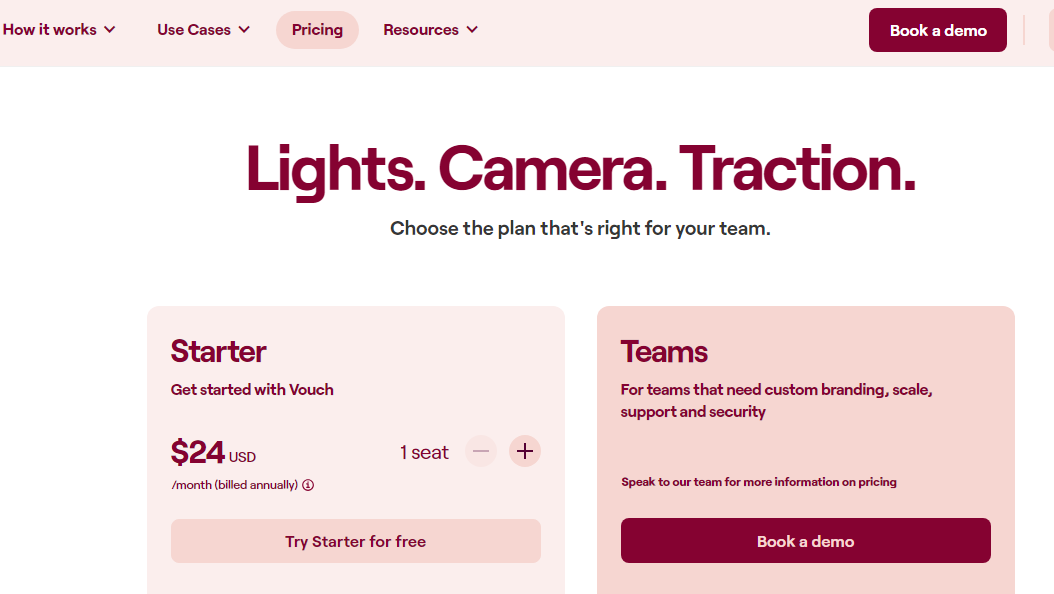
$99-2.4k / Month
Deals Available

This product comes with a special deal, see details

Visit Now
✨ Ask AI about pricing
84% Subscribed Score
info Icon

The Subscribed Score is an independent rating that combines user reviews, features, and value-for-money from multiple trusted sources. It’s designed as a quick benchmark, not a guarantee of individual experience.

Analysis

Usersnap, a leader in the User Experience category, is a visual feedback and bug tracking platform designed to enhance communication between development teams and stakeholders. It emphasizes visual collaboration by enabling users to capture and annotate screenshots, report bugs, and offer feedback directly within the context of a website or application, thus optimizing the feedback loop in the development process. Explore exclusive deals. For more user experience tools, consider SketchInVisionAdobe XD, and Figma.

Why Use Usersnap?

In the realm of visual feedback and bug tracking, Usersnap excels by:

  • Visual Bug Reporting: Usersnap enables users to capture and annotate screenshots, highlight issues, and add comments, providing clear and visual bug reports for development teams.
  • Feedback Collaboration: Usersnap fosters collaboration between teams and stakeholders by allowing them to communicate directly on visual elements of a website or application, reducing the chances of miscommunication.
  • Cross-browser Testing: Usersnap supports cross-browser testing, allowing users to capture and compare screenshots across different browsers to ensure a consistent user experience.
  • Integration: Usersnap integrates seamlessly with project management tools, issue trackers, and collaboration platforms, streamlining the workflow between design, development, and project management teams.

Who is Usersnap For?

Usersnap is suitable for a variety of users, including:

  • Development Teams: Development teams use Usersnap to receive clear visual bug reports and feedback, facilitating efficient bug resolution and improving collaboration with stakeholders.
  • Designers: Designers leverage Usersnap to collaborate with development teams and clients by providing visual feedback on design elements directly within the context of the website or application.
  • Project Managers: Project managers utilize Usersnap to streamline communication between teams, track bugs and issues, and ensure efficient collaboration throughout the development process.
  • Quality Assurance (QA) Teams: QA teams benefit from Usersnap’s visual bug reporting capabilities to identify and communicate issues in a clear and concise manner, leading to faster issue resolution.

Usersnap offers a powerful solution for visual feedback and bug tracking, enhancing collaboration between development teams and stakeholders. Whether you’re a developer, designer, project manager, or part of a QA team, Usersnap provides the tools needed to streamline the feedback and bug tracking process in the development lifecycle.

Pros
  • Easy to use and implement
  • Integration with tools like Jira and Slack
  • Improves feedback organization
  • Supports screenshots and video feedback
Cons
  • Limited customization options
  • Pricing may not suit smaller teams
  • Inconsistent screenshot accuracy
  • Dashboard interface needs improvement
Subscribed Score Metrics
31/36 Metric achieved
MetricsScore
Customer Support6/6
Security5/6
Ease of Use6/6
Value of Money5/6
Integration5/6
Popularity4/6
Radar Chart Table View
Ease of Use
Measures how simple and intuitive the product is to use, including setup, navigation, and overall user experience
6/6 Metric Checks
Security
Compares the product`s features, quality, and pricing to determine its overall cost-effectiveness.
5/6 Metric Checks
Value of Money
Assesses the product`s ability to protect data, prevent breaches, and comply with industry standards.
5/6 Metric Checks
Customer Support
Reflects the responsiveness, helpfulness, and quality of assistance provided by the product`s support team.
6/6 Metric Checks
Integrations
Evaluates how well the product connects with other tools and platforms, enabling seamless workflows.
5/6 Metric Checks
Usersnap Pricing Range
$99-2.4k / Month

Usersnap Showcase
info Icon

A curated gallery of real screenshots and use cases from the product, so you can see how it works before trying it.

Full Screen Icon
Full Screen Icon
Full Screen Icon
Full Screen Icon
Full Screen Icon
Full Screen Icon
https://www.youtube.com/watch?v=vGEHmHGbALc?feature=oembed
Full Screen Icon

What else exists next to Usersnap
info Icon

A list of platforms similar to Usersnap, helping you evaluate which tool best matches your needs.

Need to cancel Usersnap? Here is how
info Icon

Thinking about how to cancel Usersnap this is how you do it!

Steps to Cancel Usersnap Subscription.
If you want to cancel your Usersnap subscription, you can do it easily by following these steps. You can also switch to a different plan or downgrade to the free version if you wish. For more information, please visit Usersnap Cancellation Guide.

How to Cancel the Usersnap

Steps to Cancel Usersnap Subscription.
If you want to cancel your Usersnap subscription, you can do it easily by following these steps. You can also switch to a different plan or downgrade to the free version if you wish. For more information, please visit Usersnap Cancellation Guide.

Every else you need to know about Usersnap
info Icon

A collection of FAQs, guides, alternatives, and comparisons to help you quickly understand if Usersnap is right for you.

Pricing Range
info Icon

This only an estimated pricing range, visit Usersnap pricing page to access all the information by clicking “Visit Now”.

$99-2.4k / Month
Visit Now
Deals Available

This product comes with a special deal, see details

This product comes with a special deal, see details