Sign in to review
Join our community of software reviewers on Subscribed.fyi

Continue With Google
Continue With LinkedIn
Continue Review with Email
Continue with Email
Enter your email to continue.
Continue
Enter your password
Enter your password to finish setting up your account.
Continue
Activate your email
Enter activation code we sent to your email.
Submit
Reset your password
Enter activation code we sent to your email.
Submit
Set your new password
Enter a new password for your account.
Submit
Log in
Provide My Insights
UPDF logo
UPDF logo

UPDF Reviews, Pricing, Features & Alternatives (2026)

UPDF is an innovative all-in-one PDF solution designed for seamless editing, annotating, converting, and managing PDF files across Windows, Mac, iOS, and Android platforms. It offers advanced features like OCR, secure document signing, and AI-powered tools for enhanced productivity. UPDF combines ease of use, affordability, and robust functionality, making it a powerful alternative to traditional PDF editors.

UPDF logo
UPDF logo
UPDF logo

UPDF Overview

What is UPDF?

N/A
★ ★ ★ ★ ★
0
Reviews

Available for Claim - This listing is available to be claimed
Claim Profile

Unclaimed

Claim this profile to manage it.

Claim Profile

Why teams choose UPDF

Key Features

Real-Time Updates
Real-Time Updates
See changes instantly, no delays.
Fast & Efficient
Fast & Efficient
Optimized for speed and performance.
Eco-Friendly
Eco-Friendly
Designed with sustainability in mind.

Who is UPDF for?

UPDF is a cutting-edge PDF solution within the PDF Editing and Management category, designed to deliver comprehensive PDF functionalities at an affordable price point. As an all-in-one tool, UPDF simplifies handling PDFs by allowing users to edit, annotate, convert, organize, and secure PDF files effortlessly across Windows, macOS, iOS, and Android platforms.

Why Use UPDF?

Choosing UPDF offers numerous benefits, making it invaluable for personal, business, and enterprise use:

  • Comprehensive PDF Features: UPDF includes editing functionalities for text, images, and links, secure document signing, OCR text recognition, and batch processing tools such as merging, splitting, or compressing PDFs.
  • AI-Powered Features: With UPDF AI integration, users can summarize, translate, or interact with PDF content and even generate creatives through AI-based tools, enhancing productivity.
  • Cross-Platform Support with a Single License: Access your PDF tools seamlessly across multiple devices without incurring additional licensing costs.
  • User-Friendly Interface: An intuitive design ensures quick navigation and efficient workflows, even for users new to PDF editing software.
  • Cost-Effective Plans: UPDF offers perpetual and subscription pricing models, including free trials, ensuring it fits varying customer budgets and needs.

Who is UPDF For?

UPDF serves a diverse range of users:

  • Small Businesses: Ideal for managing client documents, creating PDFs, and securing sensitive files. Features like centralized license management make it scalable for teams.
  • Enterprises: Advanced features, including SSO and online license management dashboards, allow admin-level control for managing a large-scale workforce.
  • Students and Professionals: Whether summarizing lecture PDFs, managing project paperwork, or creating polished forms, UPDF supports diverse academic and professional needs.
  • Designers and Creatives: Incorporate images, create mind maps, and utilize templates to deliver visually appealing outputs.

Discover exclusive offers on UPDF deals. For alternative solutions, explore iLovePDF and Foxit PDF Editor.

UPDF Summary

UPDF is a cutting-edge PDF solution within the PDF Editing and Management category, designed to deliver comprehensive PDF functionalities at an affordable price point. As an all-in-one tool, UPDF simplifies handling PDFs by allowing users to edit, annotate, convert, organize, and secure PDF files effortlessly across Windows, macOS, iOS, and Android platforms.

Why Use UPDF?

Choosing UPDF offers numerous benefits, making it invaluable for personal, business, and enterprise use:

  • Comprehensive PDF Features: UPDF includes editing functionalities for text, images, and links, secure document signing, OCR text recognition, and batch processing tools such as merging, splitting, or compressing PDFs.
  • AI-Powered Features: With UPDF AI integration, users can summarize, translate, or interact with PDF content and even generate creatives through AI-based tools, enhancing productivity.
  • Cross-Platform Support with a Single License: Access your PDF tools seamlessly across multiple devices without incurring additional licensing costs.
  • User-Friendly Interface: An intuitive design ensures quick navigation and efficient workflows, even for users new to PDF editing software.
  • Cost-Effective Plans: UPDF offers perpetual and subscription pricing models, including free trials, ensuring it fits varying customer budgets and needs.

Who is UPDF For?

UPDF serves a diverse range of users:

  • Small Businesses: Ideal for managing client documents, creating PDFs, and securing sensitive files. Features like centralized license management make it scalable for teams.
  • Enterprises: Advanced features, including SSO and online license management dashboards, allow admin-level control for managing a large-scale workforce.
  • Students and Professionals: Whether summarizing lecture PDFs, managing project paperwork, or creating polished forms, UPDF supports diverse academic and professional needs.
  • Designers and Creatives: Incorporate images, create mind maps, and utilize templates to deliver visually appealing outputs.

Discover exclusive offers on UPDF deals. For alternative solutions, explore iLovePDF and Foxit PDF Editor.

UPDF reviews and insights

Learn what people say about UPDF

N/A ★ ★ ★ ★ ★
0 Reviews

No Reviews Yet!

Be the first to share your experience and help others in the community.

UPDF logo

UPDF User Reviews

0 User Reviews

Reviews from G2, Capterra, Trustpilot
info Icon

These ratings come directly from third-party platforms like G2, Capterra, and Trustpilot. They reflect real user feedback collected independently on those sites.

UPDF pricing

Pricing model

UPDF logo
Pricing Range
info Icon

This only an estimated pricing range, visit UPDF pricing page to access all the information by clicking “Visit Now”.

Not specified
Deals Available

This product comes with a special deal, see details

Visit Now

Overview

UPDF is a cutting-edge PDF solution within the PDF Editing and Management category, designed to deliver comprehensive PDF functionalities at an affordable price point. As an all-in-one tool, UPDF simplifies handling PDFs by allowing users to edit, annotate, convert, organize, and secure PDF files effortlessly across Windows, macOS, iOS, and Android platforms.

Why Use UPDF?

Choosing UPDF offers numerous benefits, making it invaluable for personal, business, and enterprise use:

  • Comprehensive PDF Features: UPDF includes editing functionalities for text, images, and links, secure document signing, OCR text recognition, and batch processing tools such as merging, splitting, or compressing PDFs.
  • AI-Powered Features: With UPDF AI integration, users can summarize, translate, or interact with PDF content and even generate creatives through AI-based tools, enhancing productivity.
  • Cross-Platform Support with a Single License: Access your PDF tools seamlessly across multiple devices without incurring additional licensing costs.
  • User-Friendly Interface: An intuitive design ensures quick navigation and efficient workflows, even for users new to PDF editing software.
  • Cost-Effective Plans: UPDF offers perpetual and subscription pricing models, including free trials, ensuring it fits varying customer budgets and needs.

Who is UPDF For?

UPDF serves a diverse range of users:

  • Small Businesses: Ideal for managing client documents, creating PDFs, and securing sensitive files. Features like centralized license management make it scalable for teams.
  • Enterprises: Advanced features, including SSO and online license management dashboards, allow admin-level control for managing a large-scale workforce.
  • Students and Professionals: Whether summarizing lecture PDFs, managing project paperwork, or creating polished forms, UPDF supports diverse academic and professional needs.
  • Designers and Creatives: Incorporate images, create mind maps, and utilize templates to deliver visually appealing outputs.

Discover exclusive offers on UPDF deals. For alternative solutions, explore iLovePDF and Foxit PDF Editor.

Where UPDF performs best

What users like
  • User-friendly interface and navigation
  • Affordable pricing compared to competitors
  • Supports advanced PDF editing features
  • Seamless use across multiple devices

Where UPDF falls short

What users dislike
  • Slow load times reported by few users
  • OCR functionality could be improved
  • Limited customization options
  • Occasional issues with signing out frequently
UPDF Pricing Range
Not specified

UPDF in action
info Icon

A curated gallery of real screenshots and use cases from the product, so you can see how it works before trying it.

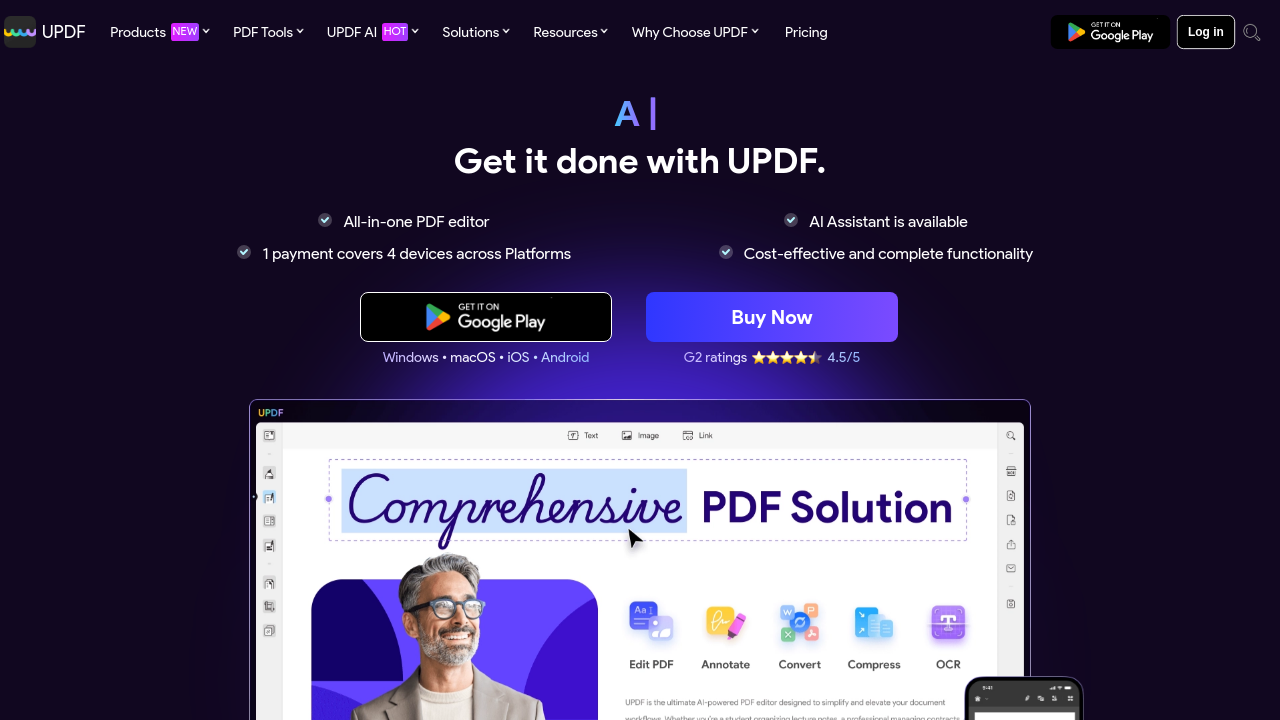
UPDF screenshot 1 Full Screen Icon
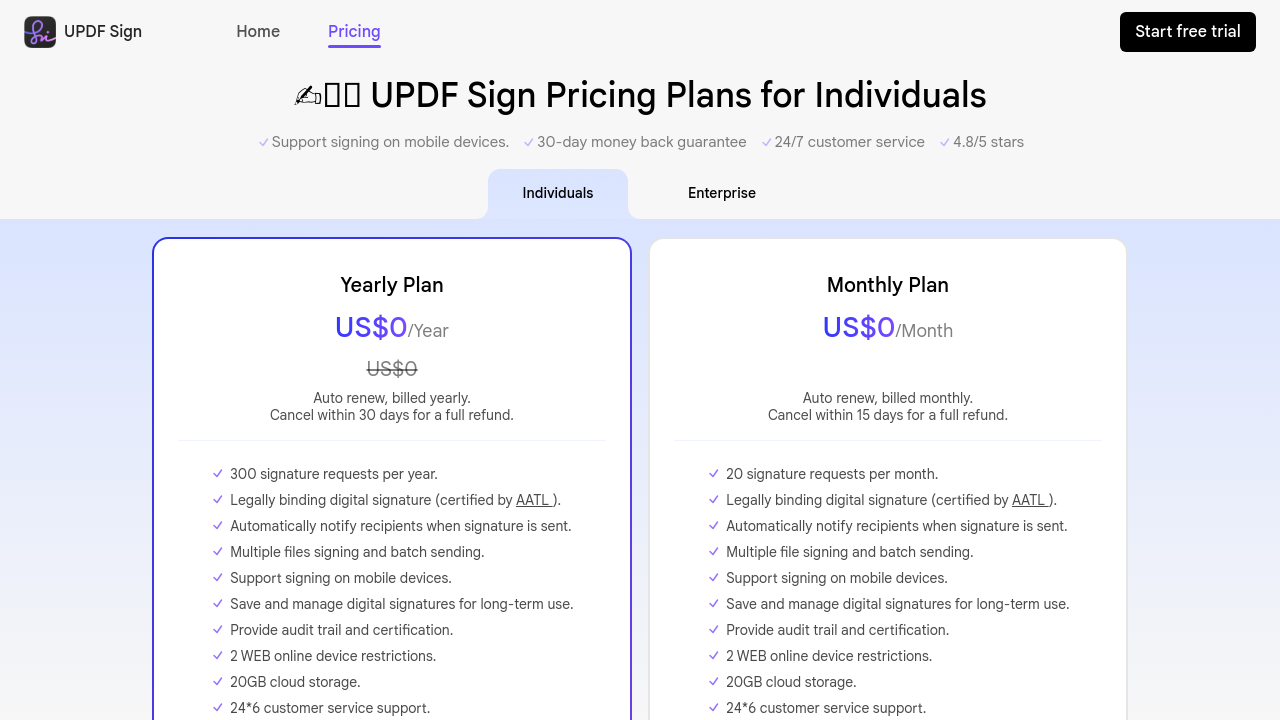
UPDF screenshot 2 Full Screen Icon
https://www.youtube.com/watch?v=3f-C22BtXck
Full Screen Icon
https://www.youtube.com/watch?v=QXH_bgFphxc
Full Screen Icon
UPDF screenshot 1
UPDF screenshot 2
Video thumbnail
Video thumbnail
UPDF screenshot 1
UPDF screenshot 2

Alternatives to UPDF
info Icon

A list of platforms similar to UPDF, helping you evaluate which tool best matches your needs.

How to cancel UPDF

Need to cancel UPDF? Here is how
info Icon

Thinking about how to cancel UPDF this is how you do it!

To cancel a UPDF subscription:

  • Log in to your UPDF account.
  • Go to the Account Center.
  • Click "Cancel Subscription" under your plan.
    For App Store or Google Play purchases, follow their guidelines.

How to Cancel the UPDF

To cancel a UPDF subscription:

  • Log in to your UPDF account.
  • Go to the Account Center.
  • Click "Cancel Subscription" under your plan.
    For App Store or Google Play purchases, follow their guidelines.

Manage your UPDF profile

Create profile

Want to list your product on Subscribed.fyi? Create a profile to reach more buyers.

Pricing Range
info Icon

This only an estimated pricing range, visit UPDF pricing page to access all the information by clicking “Visit Now”.

Not specified
Visit Now
Deals Available

This product comes with a special deal, see details

This product comes with a special deal, see details