Clipify Overview of Reviews & Product Details - 2025
Sign in to review
Join our community of software reviewers on Subscribed.fyi

Continue With Google
Continue With LinkedIn
Continue Review with Email
Continue with Email
Enter your email to continue.
Continue
Enter your password
Enter your password to finish setting up your account.
Continue
Activate your email
Enter activation code we sent to your email.
Submit
Reset your password
Enter activation code we sent to your email.
Submit
Set your new password
Enter a new password for your account.
Submit
✨ Ask AI Search
Categories
For Business
Log in
Provide Insight

Build your reputation. Monitor every review and mention across 23+ platforms in one place

Learn More
Platforms

Subscribed Profile

Create Profile

Add your software and get discovered.

Claim Profile

Take ownership of your Subscribed.fyi listing.

Learn More

Clipify

Clipify is an intuitive video editing software designed for users of all skill levels to create stunning videos effortlessly. With tools like chroma keying, transitions, speed control, and over 160 effects, it supports 50+ formats for importing clips, images, and audio. Suitable for personal and professional projects, Clipify offers budget-friendly solutions without sacrificing quality.

Clipify

N/A
0
Reviews
53%
Subscribed Score

Available for Claim - This listing is available to be claimed
Claim Profile

Unclaimed

Curated and listed by Subscribed Team

Claim Profile
Smart Automation
Smart Automation
Save time with AI-powered workflows.
Seamless Integrations
Connect easily with your favorite tools.
Real-Time Updates
Real-Time Updates
See changes instantly, no delays.

Clipify is an intuitive and robust solution in the Video Editing category. Ideal for both novices and professionals, Clipify empowers users to create stunning videos effortlessly. With tools like chroma keying, speed adjustment, video trimming, and over 160 effects/filters, this software ensures easy editing while maintaining professional quality. Clipify supports over 50 video file formats, making it versatile for various multimedia projects. Whether you need to craft family montages or professional content, Clipify delivers dynamic functionality in a user-friendly interface. Explore exclusive deals. For similar tools, consider SimplifiedAdobe After Effects, and Dropbox.

Why Use Clipify?

Choosing Clipify for your video editing needs provides numerous advantages:

  • Ease of Use: Designed for beginners yet powerful enough for experts, Clipify simplifies the editing experience with its intuitive interface and pre-configured templates for events like weddings, birthdays, or holidays.
  • Comprehensive Features: Clipify includes an array of features like a chroma key tool, 200+ royalty-free music tracks, 150+ cinematic effects, transitions, and filters, helping users transform everyday videos into extraordinary content.
  • Versatile Outputs: Export videos in multiple formats for various platforms, including YouTube, or burn them onto DVDs for offline sharing.
  • Limitations-Free Editing: The software is entirely free of watermarks and time restrictions, enabling seamless content creation without hidden limitations.
  • Ongoing Support: Enjoy 12 months of free technical support and updates, ensuring your projects progress effortlessly.

Who is Clipify For?

Clipify caters to diverse users with various video editing needs:

  • Content Creators: Perfect for creators seeking to produce exceptional-quality videos for YouTube, social media, or personal projects.
  • Small Business Owners: Businesses can harness Clipify’s tools to produce promotional videos or product demonstrations to engage audiences effectively.
  • Event Planners: Easily create memorable highlight reels of events like weddings, parties, or corporate functions using Clipify’s ready-made templates.
  • Hobbyists: Amateurs and video enthusiasts can utilize Clipify to edit holiday memories, family moments, or creative projects without prior experience.

Clipify is an excellent choice for anyone in search of an accessible yet feature-packed video editing software. Whether you are editing videos for personal fun or professional purposes, Clipify ensures quality results with ease.


Clipify Summary

Clipify is an intuitive and robust solution in the Video Editing category. Ideal for both novices and professionals, Clipify empowers users to create stunning videos effortlessly. With tools like chroma keying, speed adjustment, video trimming, and over 160 effects/filters, this software ensures easy editing while maintaining professional quality. Clipify supports over 50 video file formats, making it versatile for various multimedia projects. Whether you need to craft family montages or professional content, Clipify delivers dynamic functionality in a user-friendly interface. Explore exclusive deals. For similar tools, consider SimplifiedAdobe After Effects, and Dropbox.

Why Use Clipify?

Choosing Clipify for your video editing needs provides numerous advantages:

  • Ease of Use: Designed for beginners yet powerful enough for experts, Clipify simplifies the editing experience with its intuitive interface and pre-configured templates for events like weddings, birthdays, or holidays.
  • Comprehensive Features: Clipify includes an array of features like a chroma key tool, 200+ royalty-free music tracks, 150+ cinematic effects, transitions, and filters, helping users transform everyday videos into extraordinary content.
  • Versatile Outputs: Export videos in multiple formats for various platforms, including YouTube, or burn them onto DVDs for offline sharing.
  • Limitations-Free Editing: The software is entirely free of watermarks and time restrictions, enabling seamless content creation without hidden limitations.
  • Ongoing Support: Enjoy 12 months of free technical support and updates, ensuring your projects progress effortlessly.

Who is Clipify For?

Clipify caters to diverse users with various video editing needs:

  • Content Creators: Perfect for creators seeking to produce exceptional-quality videos for YouTube, social media, or personal projects.
  • Small Business Owners: Businesses can harness Clipify’s tools to produce promotional videos or product demonstrations to engage audiences effectively.
  • Event Planners: Easily create memorable highlight reels of events like weddings, parties, or corporate functions using Clipify’s ready-made templates.
  • Hobbyists: Amateurs and video enthusiasts can utilize Clipify to edit holiday memories, family moments, or creative projects without prior experience.

Clipify is an excellent choice for anyone in search of an accessible yet feature-packed video editing software. Whether you are editing videos for personal fun or professional purposes, Clipify ensures quality results with ease.

Clipify reviews

Learn what people say about Clipify

N/A
0 Reviews
53%
Subscribed Score

Lear more here about the Subscribed score on how it is composed. Learn more Click here

Overall rating

5
4
3
2
1
CX 4/6

How good is the customer support based on subscribed’s assessment

CX Icon
Security 0/6

How secure is the product based on Subscribed’s assessment?

Security Icon
Ease of Use 5/6

How easy is the product to use, based on Subscribed’s assessment?

EOU Icon
Value 5/6

What is the value for money based on Subscribed’s assessment?

coin Icon
Integration 2/6

How many integrations does the product offer?

gear Icon
Popularity 3/6

How popular is the product?

star

No Reviews Yet!

Be the first to share your experience and help others in the community.

Clipify User Reviews

0 User Reviews

Reviews from G2, Capterra, Trustpilot
info Icon

These ratings come directly from third-party platforms like G2, Capterra, and Trustpilot. They reflect real user feedback collected independently on those sites.

Clipify

Pricing Range
info Icon

This only an estimated pricing range, visit Clipify pricing page to access all the information by clicking “Visit Now”.

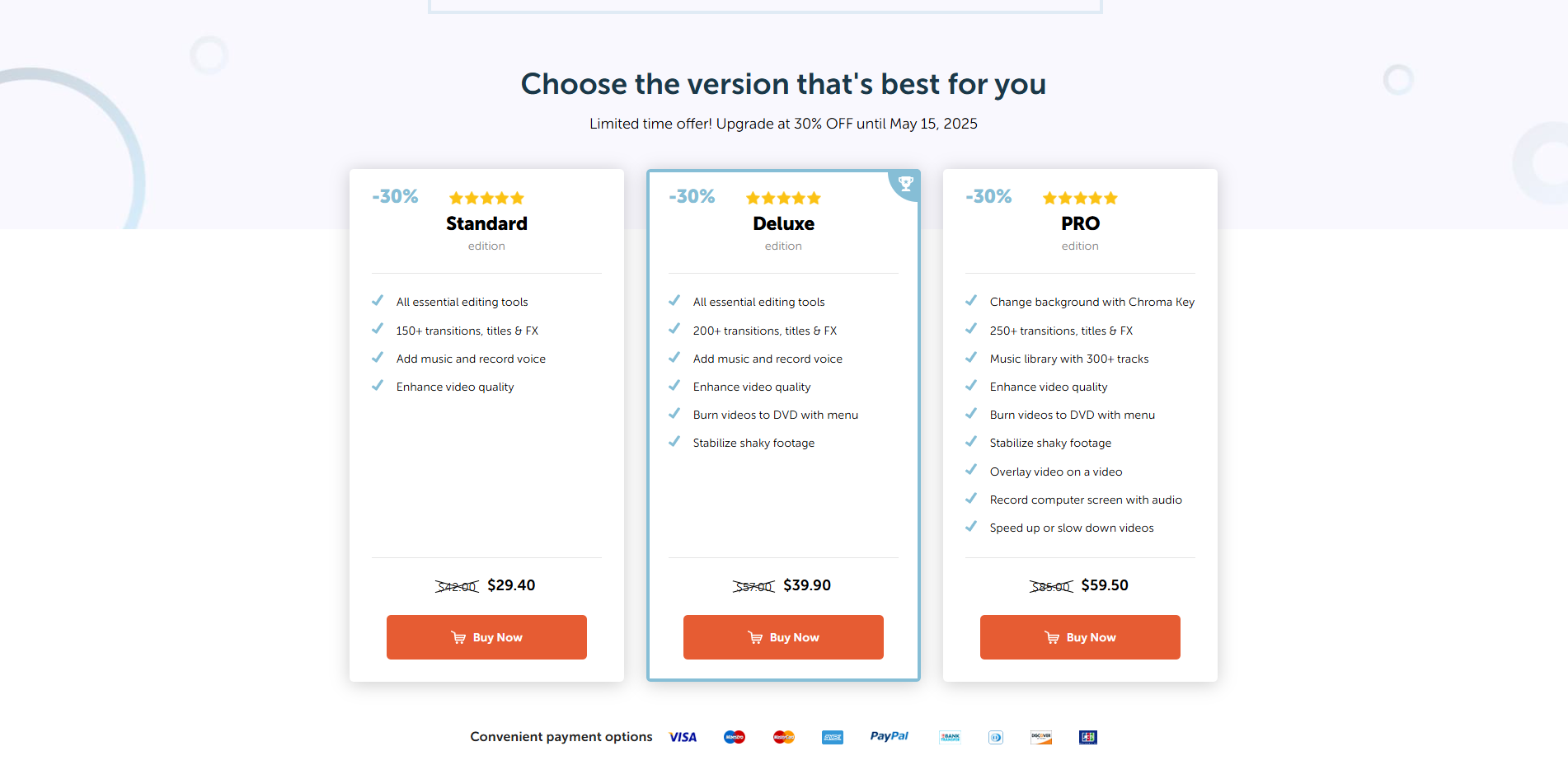
$29.40-$59.50 / Month
Deals Available

This product comes with a special deal, see details

Visit Now
✨ Ask AI about pricing
53% Subscribed Score
info Icon

The Subscribed Score is an independent rating that combines user reviews, features, and value-for-money from multiple trusted sources. It’s designed as a quick benchmark, not a guarantee of individual experience.

Analysis

Clipify is an intuitive and robust solution in the Video Editing category. Ideal for both novices and professionals, Clipify empowers users to create stunning videos effortlessly. With tools like chroma keying, speed adjustment, video trimming, and over 160 effects/filters, this software ensures easy editing while maintaining professional quality. Clipify supports over 50 video file formats, making it versatile for various multimedia projects. Whether you need to craft family montages or professional content, Clipify delivers dynamic functionality in a user-friendly interface. Explore exclusive deals. For similar tools, consider SimplifiedAdobe After Effects, and Dropbox.

Why Use Clipify?

Choosing Clipify for your video editing needs provides numerous advantages:

  • Ease of Use: Designed for beginners yet powerful enough for experts, Clipify simplifies the editing experience with its intuitive interface and pre-configured templates for events like weddings, birthdays, or holidays.
  • Comprehensive Features: Clipify includes an array of features like a chroma key tool, 200+ royalty-free music tracks, 150+ cinematic effects, transitions, and filters, helping users transform everyday videos into extraordinary content.
  • Versatile Outputs: Export videos in multiple formats for various platforms, including YouTube, or burn them onto DVDs for offline sharing.
  • Limitations-Free Editing: The software is entirely free of watermarks and time restrictions, enabling seamless content creation without hidden limitations.
  • Ongoing Support: Enjoy 12 months of free technical support and updates, ensuring your projects progress effortlessly.

Who is Clipify For?

Clipify caters to diverse users with various video editing needs:

  • Content Creators: Perfect for creators seeking to produce exceptional-quality videos for YouTube, social media, or personal projects.
  • Small Business Owners: Businesses can harness Clipify’s tools to produce promotional videos or product demonstrations to engage audiences effectively.
  • Event Planners: Easily create memorable highlight reels of events like weddings, parties, or corporate functions using Clipify’s ready-made templates.
  • Hobbyists: Amateurs and video enthusiasts can utilize Clipify to edit holiday memories, family moments, or creative projects without prior experience.

Clipify is an excellent choice for anyone in search of an accessible yet feature-packed video editing software. Whether you are editing videos for personal fun or professional purposes, Clipify ensures quality results with ease.

Pros
  • Easy to use for beginners
  • Affordable with no subscription required
  • Great customer support
  • Free music tracks included
Cons
  • Limited resolution options (no 4K/8K)
  • Occasional software bugs
  • Slow performance on certain tasks
  • Audio mixing tools need improvement
Subscribed Score Metrics
19/36 Metric achieved
MetricsScore
Customer Support4/6
Security0/6
Ease of Use5/6
Value of Money5/6
Integration2/6
Popularity3/6
Radar Chart Table View
Ease of Use
Measures how simple and intuitive the product is to use, including setup, navigation, and overall user experience
5/6 Metric Checks
Security
Compares the product`s features, quality, and pricing to determine its overall cost-effectiveness.
0/6 Metric Checks
Value of Money
Assesses the product`s ability to protect data, prevent breaches, and comply with industry standards.
5/6 Metric Checks
Customer Support
Reflects the responsiveness, helpfulness, and quality of assistance provided by the product`s support team.
4/6 Metric Checks
Integrations
Evaluates how well the product connects with other tools and platforms, enabling seamless workflows.
2/6 Metric Checks
Clipify Pricing Range
$29.40-$59.50 / Month

Clipify Showcase
info Icon

A curated gallery of real screenshots and use cases from the product, so you can see how it works before trying it.

Full Screen Icon
https://www.youtube.com/watch?v=Veike1R6vMI
Full Screen Icon

What else exists next to Clipify
info Icon

A list of platforms similar to Clipify, helping you evaluate which tool best matches your needs.

Need to cancel Clipify? Here is how
info Icon

Thinking about how to cancel Clipify this is how you do it!

To cancel a Clipify product, visit their support page for assistance. Contact their support team to initiate the cancellation process. Details on refunds and account management may be available upon request.

How to Cancel the Clipify

To cancel a Clipify product, visit their support page for assistance. Contact their support team to initiate the cancellation process. Details on refunds and account management may be available upon request.

Every else you need to know about Clipify
info Icon

A collection of FAQs, guides, alternatives, and comparisons to help you quickly understand if Clipify is right for you.

Pricing Range
info Icon

This only an estimated pricing range, visit Clipify pricing page to access all the information by clicking “Visit Now”.

$29.40-$59.50 / Month
Visit Now
Deals Available

This product comes with a special deal, see details

This product comes with a special deal, see details