Sign in to review
Join our community of software reviewers on Subscribed.fyi

Continue With Google
Continue With LinkedIn
Continue Review with Email
Continue with Email
Enter your email to continue.
Continue
Enter your password
Enter your password to finish setting up your account.
Continue
Activate your email
Enter activation code we sent to your email.
Submit
Reset your password
Enter activation code we sent to your email.
Submit
Set your new password
Enter a new password for your account.
Submit
Log in
Provide My Insights
Trigger logo
Trigger logo

Trigger Reviews, Pricing, Features & Alternatives (2026)

Trigger is a versatile time tracking and project management tool designed to streamline workflows, enhance collaboration, and improve productivity. Ideal for businesses of all sizes, it enables efficient project planning, time logging, insightful analysis, and seamless client invoicing. With robust integrations and user-friendly features, Trigger simplifies resource management and ensures greater transparency with clients.

Trigger logo
Trigger logo
Trigger logo

Trigger Overview

What is Trigger?

N/A
★ ★ ★ ★ ★
0
Reviews

Available for Claim - This listing is available to be claimed
Claim Profile

Unclaimed

Claim this profile to manage it.

Claim Profile

Why teams choose Trigger

Key Features

Fully Customizable
Fully Customizable
Tailor it to your brand and workflow.
Save Time
Save Time
Focus on impact, not repetitive tasks.
Fast & Efficient
Fast & Efficient
Optimized for speed and performance.

Who is Trigger for?

Trigger is a comprehensive solution in the Time Tracking category, designed to streamline time tracking, project management, and client invoicing for businesses. It offers an intuitive interface to help teams collaborate effectively, optimize project workflows, monitor budgets, and ensure billing accuracy. Trigger seamlessly integrates with popular tools like Xero, Freshbooks, Slack, Google, Zapier, and more. Explore exclusive deals. For alternatives, consider Avaza, Hubstaff.

Why Use Trigger?

Choosing Trigger comes with several benefits for managing projects and tracking time effectively:

  • Seamless Collaboration: Trigger promotes team transparency by allowing users to invite clients for greater collaboration while ensuring sensitive information remains private.
  • End-to-End Project Management: Carry projects effortlessly from planning to invoicing. Features like Kanban boards and time-tracking tools simplify managing timelines and resources.
  • Efficient Invoicing: Integrated with accounting platforms such as Xero, invoicing clients becomes quick and hassle-free, eliminating redundant processes.
  • Powerful Integrations: Trigger supports integrations with various tools, including Google Workspace, Dropbox, and Basecamp, for enhanced productivity across workflows.
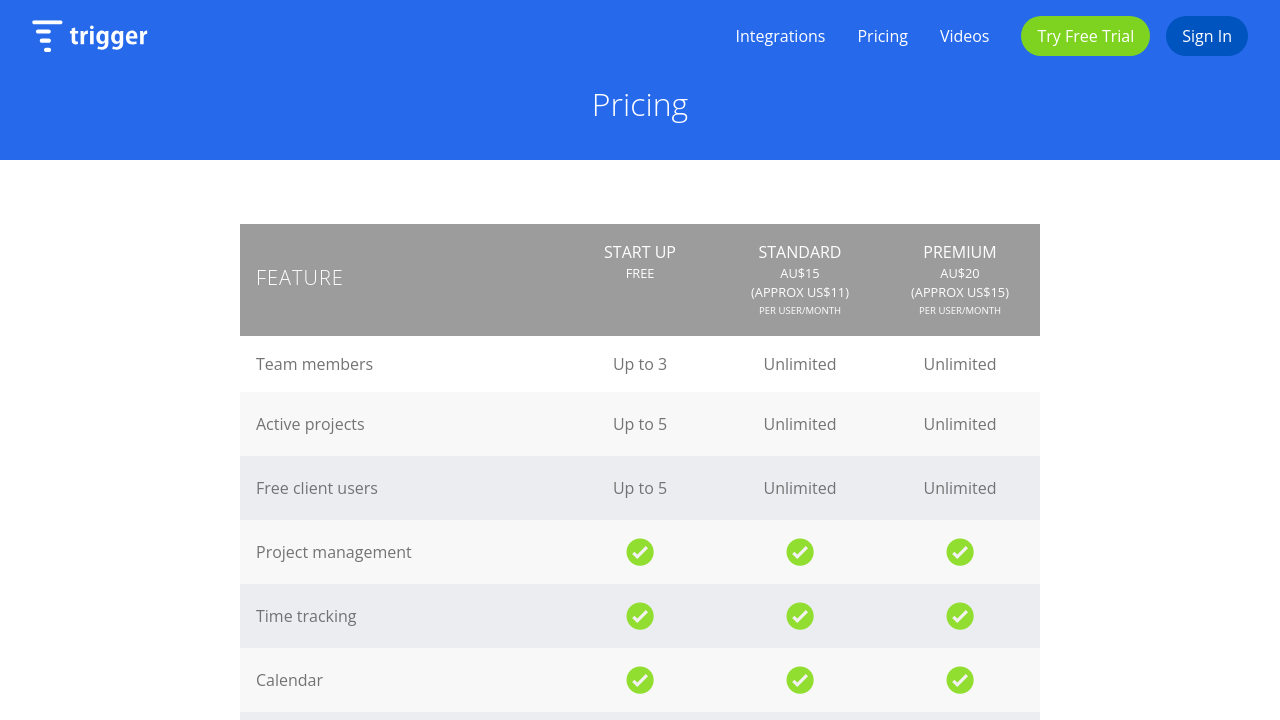
  • Cost-Effective Pricing: A simple pricing model at $8 per user per month ensures affordability without compromising functionality.

Who is Trigger For?

Trigger is the ideal tool for professionals and businesses looking to enhance time management and project efficiency:

  • Small Businesses and Agencies: Perfect for teams managing multiple projects and clients, Trigger simplifies collaboration and billing workflows.
  • Project Managers: Helps monitor project progress, track time accurately, and ensure deadlines are met without budget overruns.
  • Freelancers: Ideal for keeping track of small yet numerous tasks, managing client communications, and invoicing effectively.
  • Remote Teams: Aids in aligning team efforts, organizing tasks, and maintaining transparency across different time zones.

Trigger is essential for businesses wanting to streamline their time tracking, project management, and invoicing processes. With its blend of functionality, integrations, and ease of use, it’s a complete solution for optimizing productivity and delivering client satisfaction.

Trigger Summary

Trigger is a comprehensive solution in the Time Tracking category, designed to streamline time tracking, project management, and client invoicing for businesses. It offers an intuitive interface to help teams collaborate effectively, optimize project workflows, monitor budgets, and ensure billing accuracy. Trigger seamlessly integrates with popular tools like Xero, Freshbooks, Slack, Google, Zapier, and more. Explore exclusive deals. For alternatives, consider Avaza, Hubstaff.

Why Use Trigger?

Choosing Trigger comes with several benefits for managing projects and tracking time effectively:

  • Seamless Collaboration: Trigger promotes team transparency by allowing users to invite clients for greater collaboration while ensuring sensitive information remains private.
  • End-to-End Project Management: Carry projects effortlessly from planning to invoicing. Features like Kanban boards and time-tracking tools simplify managing timelines and resources.
  • Efficient Invoicing: Integrated with accounting platforms such as Xero, invoicing clients becomes quick and hassle-free, eliminating redundant processes.
  • Powerful Integrations: Trigger supports integrations with various tools, including Google Workspace, Dropbox, and Basecamp, for enhanced productivity across workflows.
  • Cost-Effective Pricing: A simple pricing model at $8 per user per month ensures affordability without compromising functionality.

Who is Trigger For?

Trigger is the ideal tool for professionals and businesses looking to enhance time management and project efficiency:

  • Small Businesses and Agencies: Perfect for teams managing multiple projects and clients, Trigger simplifies collaboration and billing workflows.
  • Project Managers: Helps monitor project progress, track time accurately, and ensure deadlines are met without budget overruns.
  • Freelancers: Ideal for keeping track of small yet numerous tasks, managing client communications, and invoicing effectively.
  • Remote Teams: Aids in aligning team efforts, organizing tasks, and maintaining transparency across different time zones.

Trigger is essential for businesses wanting to streamline their time tracking, project management, and invoicing processes. With its blend of functionality, integrations, and ease of use, it’s a complete solution for optimizing productivity and delivering client satisfaction.

Trigger reviews and insights

Learn what people say about Trigger

N/A ★ ★ ★ ★ ★
0 Reviews

No Reviews Yet!

Be the first to share your experience and help others in the community.

Trigger logo

Trigger User Reviews

0 User Reviews

Reviews from G2, Capterra, Trustpilot
info Icon

These ratings come directly from third-party platforms like G2, Capterra, and Trustpilot. They reflect real user feedback collected independently on those sites.

Trigger pricing

Pricing model

Trigger logo
Pricing Range
info Icon

This only an estimated pricing range, visit Trigger pricing page to access all the information by clicking “Visit Now”.

$11-$15 / Month
Deals Available

This product comes with a special deal, see details

Visit Now

Overview

Trigger is a comprehensive solution in the Time Tracking category, designed to streamline time tracking, project management, and client invoicing for businesses. It offers an intuitive interface to help teams collaborate effectively, optimize project workflows, monitor budgets, and ensure billing accuracy. Trigger seamlessly integrates with popular tools like Xero, Freshbooks, Slack, Google, Zapier, and more. Explore exclusive deals. For alternatives, consider Avaza, Hubstaff.

Why Use Trigger?

Choosing Trigger comes with several benefits for managing projects and tracking time effectively:

  • Seamless Collaboration: Trigger promotes team transparency by allowing users to invite clients for greater collaboration while ensuring sensitive information remains private.
  • End-to-End Project Management: Carry projects effortlessly from planning to invoicing. Features like Kanban boards and time-tracking tools simplify managing timelines and resources.
  • Efficient Invoicing: Integrated with accounting platforms such as Xero, invoicing clients becomes quick and hassle-free, eliminating redundant processes.
  • Powerful Integrations: Trigger supports integrations with various tools, including Google Workspace, Dropbox, and Basecamp, for enhanced productivity across workflows.
  • Cost-Effective Pricing: A simple pricing model at $8 per user per month ensures affordability without compromising functionality.

Who is Trigger For?

Trigger is the ideal tool for professionals and businesses looking to enhance time management and project efficiency:

  • Small Businesses and Agencies: Perfect for teams managing multiple projects and clients, Trigger simplifies collaboration and billing workflows.
  • Project Managers: Helps monitor project progress, track time accurately, and ensure deadlines are met without budget overruns.
  • Freelancers: Ideal for keeping track of small yet numerous tasks, managing client communications, and invoicing effectively.
  • Remote Teams: Aids in aligning team efforts, organizing tasks, and maintaining transparency across different time zones.

Trigger is essential for businesses wanting to streamline their time tracking, project management, and invoicing processes. With its blend of functionality, integrations, and ease of use, it’s a complete solution for optimizing productivity and delivering client satisfaction.

Where Trigger performs best

What users like
  • Ease of use and intuitive design.
  • Strong integrations with tools like Xero and Slack.
  • Improves team collaboration and workflow.
  • Affordable pricing and great customer support.

Where Trigger falls short

What users dislike
  • Limited reporting and export features.
  • Occasional server reliability issues.
  • Inadequate offline functionality.
  • Complex billing and invoicing setup.
Trigger Pricing Range
$11-$15 / Month

Trigger in action
info Icon

A curated gallery of real screenshots and use cases from the product, so you can see how it works before trying it.

Trigger screenshot 1 Full Screen Icon
Trigger screenshot 2 Full Screen Icon
Trigger screenshot 1
Trigger screenshot 2
Trigger screenshot 1
Trigger screenshot 2

Alternatives to Trigger
info Icon

A list of platforms similar to Trigger, helping you evaluate which tool best matches your needs.

How to cancel Trigger

Need to cancel Trigger? Here is how
info Icon

Thinking about how to cancel Trigger this is how you do it!

To cancel a Trigger product subscription:

  • Check if you used PayPal for payment.
  • If so, manage through PayPal’s preapproved payments.
  • If not, contact Trigger support directly.

How to Cancel the Trigger

To cancel a Trigger product subscription:

  • Check if you used PayPal for payment.
  • If so, manage through PayPal’s preapproved payments.
  • If not, contact Trigger support directly.

Manage your Trigger profile

Create profile

Want to list your product on Subscribed.fyi? Create a profile to reach more buyers.

Pricing Range
info Icon

This only an estimated pricing range, visit Trigger pricing page to access all the information by clicking “Visit Now”.

$11-$15 / Month
Visit Now
Deals Available

This product comes with a special deal, see details

This product comes with a special deal, see details