PartsBox Reviews 2026: Details, Pricing, & Features | Subscribed.fyi
Sign in to review
Join our community of software reviewers on Subscribed.fyi

Continue With Google
Continue With LinkedIn
Continue Review with Email
Continue with Email
Enter your email to continue.
Continue
Enter your password
Enter your password to finish setting up your account.
Continue
Activate your email
Enter activation code we sent to your email.
Submit
Reset your password
Enter activation code we sent to your email.
Submit
Set your new password
Enter a new password for your account.
Submit
✨ Ask AI Search
Categories
For Business
Log in
Provide My Insights

PartsBox

PartsBox is an inventory management tool designed for electronic parts and production. It tracks component storage, stock levels, and usage across projects while allowing document attachments like datasheets and CAD models. With features such as BOM imports, metapart management, and project tracking, PartsBox streamlines workflows, optimizes stock handling, and enhances production planning. Ideal for individuals or teams, it offers intuitive navigation and powerful functionality.

PartsBox

N/A
0
Reviews
69%
Subscribed Score

Available for Claim - This listing is available to be claimed
Claim For Free

Unclaimed

Curated and listed by Subscribed Team

Claim For Free
Eco-Friendly
Eco-Friendly
Designed with sustainability in mind.
Secure by Design
Secure by Design
Data protection and compliance built in.
Built for Flexibility
Adaptable for multiple use cases.

PartsBox is a comprehensive cloud-based solution for managing electronic parts and production inventory. Designed for engineers, small electronics manufacturing companies, and hobbyists alike, PartsBox simplifies the way you track your stock, organize your parts, and manage production projects. By offering an intuitive interface for cataloguing components, managing storage locations, and keeping real-time records, it makes inventory management seamless and efficient.

At its core, PartsBox is built to eliminate the pitfalls of traditional spreadsheets and cumbersome databases. The platform enables you to swiftly locate parts by leveraging its high-speed search functionality and by incorporating detailed part specifications. The ability to attach documents such as datasheets and 3D CAD models to each component further enhances the user experience, ensuring that every part’s technical information is always at your fingertips. For industries like Medical and Pharma, PartsBox also supports lot control, allowing complete two-way tracking of sensitive or regulated components.

PartsBox falls under the Inventory Management category, providing robust solutions that streamline the entire supply chain process. By integrating essential functions like real-time stock tracking, location management, and BOM (Bill of Materials) integration—such as direct imports from EDA software—PartsBox ultimately helps companies to avoid over-ordering and reduce waste, thereby saving valuable time and money.

Key Features and Benefits of PartsBox:

  • Comprehensive Inventory Tracking: Monitor current stock levels and manage detailed storage locations for every component.
  • Easy Part Identification: Utilize advanced search capabilities and tag-based organization to find parts quickly.
  • Document Attachment: Link datasheets, CAD models, and other technical documents directly to each part record for streamlined reference.
  • Lot Control for Regulated Industries: Keep track of batch origins and usage for a full audit trail in production.
  • Flexible Project Management: Manage parts used in different projects with ease, ensuring efficient BOM management and timely production runs.

In addition to its robust features, PartsBox is accessible via a secure web interface, which means you can manage your inventory anytime and anywhere. This flexibility is particularly beneficial for businesses with multiple locations or remote teams. Whether you are a startup looking to optimize production or an established manufacturer seeking a more agile inventory tracking system, PartsBox provides the necessary tools to enhance your operational efficiency.

Ready to transform your inventory management process? Discover exclusive offers on the PartsBox deals page and explore how this solution can work for you.

Alternatives to Consider:

PartsBox Summary

PartsBox is a comprehensive cloud-based solution for managing electronic parts and production inventory. Designed for engineers, small electronics manufacturing companies, and hobbyists alike, PartsBox simplifies the way you track your stock, organize your parts, and manage production projects. By offering an intuitive interface for cataloguing components, managing storage locations, and keeping real-time records, it makes inventory management seamless and efficient.

At its core, PartsBox is built to eliminate the pitfalls of traditional spreadsheets and cumbersome databases. The platform enables you to swiftly locate parts by leveraging its high-speed search functionality and by incorporating detailed part specifications. The ability to attach documents such as datasheets and 3D CAD models to each component further enhances the user experience, ensuring that every part’s technical information is always at your fingertips. For industries like Medical and Pharma, PartsBox also supports lot control, allowing complete two-way tracking of sensitive or regulated components.

PartsBox falls under the Inventory Management category, providing robust solutions that streamline the entire supply chain process. By integrating essential functions like real-time stock tracking, location management, and BOM (Bill of Materials) integration—such as direct imports from EDA software—PartsBox ultimately helps companies to avoid over-ordering and reduce waste, thereby saving valuable time and money.

Key Features and Benefits of PartsBox:

  • Comprehensive Inventory Tracking: Monitor current stock levels and manage detailed storage locations for every component.
  • Easy Part Identification: Utilize advanced search capabilities and tag-based organization to find parts quickly.
  • Document Attachment: Link datasheets, CAD models, and other technical documents directly to each part record for streamlined reference.
  • Lot Control for Regulated Industries: Keep track of batch origins and usage for a full audit trail in production.
  • Flexible Project Management: Manage parts used in different projects with ease, ensuring efficient BOM management and timely production runs.

In addition to its robust features, PartsBox is accessible via a secure web interface, which means you can manage your inventory anytime and anywhere. This flexibility is particularly beneficial for businesses with multiple locations or remote teams. Whether you are a startup looking to optimize production or an established manufacturer seeking a more agile inventory tracking system, PartsBox provides the necessary tools to enhance your operational efficiency.

Ready to transform your inventory management process? Discover exclusive offers on the PartsBox deals page and explore how this solution can work for you.

Alternatives to Consider:

PartsBox reviews

Learn what people say about PartsBox

N/A
0 Reviews
69%
Subscribed Score

Lear more here about the Subscribed score on how it is composed. Learn more Click here

Overall rating

5
4
3
2
1
CX 6/6

How good is the customer support based on subscribed’s assessment

CX Icon
Security 0/6

How secure is the product based on Subscribed’s assessment?

Security Icon
Ease of Use 6/6

How easy is the product to use, based on Subscribed’s assessment?

EOU Icon
Value 6/6

What is the value for money based on Subscribed’s assessment?

coin Icon
Integration 3/6

How many integrations does the product offer?

gear Icon
Popularity 4/6

How popular is the product?

star

No Reviews Yet!

Be the first to share your experience and help others in the community.

PartsBox User Reviews

0 User Reviews

Reviews from G2, Capterra, Trustpilot
info Icon

These ratings come directly from third-party platforms like G2, Capterra, and Trustpilot. They reflect real user feedback collected independently on those sites.

PartsBox

Pricing Range
info Icon

This only an estimated pricing range, visit PartsBox pricing page to access all the information by clicking “Visit Now”.

Not specified
Deals Available

This product comes with a special deal, see details

Visit Now
✨ Ask AI about pricing
69% Subscribed Score
info Icon

The Subscribed Score is an independent rating that combines user reviews, features, and value-for-money from multiple trusted sources. It’s designed as a quick benchmark, not a guarantee of individual experience.

Analysis

PartsBox is a comprehensive cloud-based solution for managing electronic parts and production inventory. Designed for engineers, small electronics manufacturing companies, and hobbyists alike, PartsBox simplifies the way you track your stock, organize your parts, and manage production projects. By offering an intuitive interface for cataloguing components, managing storage locations, and keeping real-time records, it makes inventory management seamless and efficient.

At its core, PartsBox is built to eliminate the pitfalls of traditional spreadsheets and cumbersome databases. The platform enables you to swiftly locate parts by leveraging its high-speed search functionality and by incorporating detailed part specifications. The ability to attach documents such as datasheets and 3D CAD models to each component further enhances the user experience, ensuring that every part’s technical information is always at your fingertips. For industries like Medical and Pharma, PartsBox also supports lot control, allowing complete two-way tracking of sensitive or regulated components.

PartsBox falls under the Inventory Management category, providing robust solutions that streamline the entire supply chain process. By integrating essential functions like real-time stock tracking, location management, and BOM (Bill of Materials) integration—such as direct imports from EDA software—PartsBox ultimately helps companies to avoid over-ordering and reduce waste, thereby saving valuable time and money.

Key Features and Benefits of PartsBox:

  • Comprehensive Inventory Tracking: Monitor current stock levels and manage detailed storage locations for every component.
  • Easy Part Identification: Utilize advanced search capabilities and tag-based organization to find parts quickly.
  • Document Attachment: Link datasheets, CAD models, and other technical documents directly to each part record for streamlined reference.
  • Lot Control for Regulated Industries: Keep track of batch origins and usage for a full audit trail in production.
  • Flexible Project Management: Manage parts used in different projects with ease, ensuring efficient BOM management and timely production runs.

In addition to its robust features, PartsBox is accessible via a secure web interface, which means you can manage your inventory anytime and anywhere. This flexibility is particularly beneficial for businesses with multiple locations or remote teams. Whether you are a startup looking to optimize production or an established manufacturer seeking a more agile inventory tracking system, PartsBox provides the necessary tools to enhance your operational efficiency.

Ready to transform your inventory management process? Discover exclusive offers on the PartsBox deals page and explore how this solution can work for you.

Alternatives to Consider:

Pros
  • Ease of use and intuitive interface
  • Fast part search and organization
  • Automated BOM import and pricing
  • Excellent customer support
Cons
  • Limited integration with EDA tools
  • No dedicated mobile app or API
  • Setup can be time-consuming
  • High pricing for advanced features
Subscribed Score Metrics
25/36 Metric achieved
MetricsScore
Customer Support6/6
Security0/6
Ease of Use6/6
Value of Money6/6
Integration3/6
Popularity4/6
Radar Chart Table View
Ease of Use
Measures how simple and intuitive the product is to use, including setup, navigation, and overall user experience
6/6 Metric Checks
Security
Compares the product`s features, quality, and pricing to determine its overall cost-effectiveness.
0/6 Metric Checks
Value of Money
Assesses the product`s ability to protect data, prevent breaches, and comply with industry standards.
6/6 Metric Checks
Customer Support
Reflects the responsiveness, helpfulness, and quality of assistance provided by the product`s support team.
6/6 Metric Checks
Integrations
Evaluates how well the product connects with other tools and platforms, enabling seamless workflows.
3/6 Metric Checks
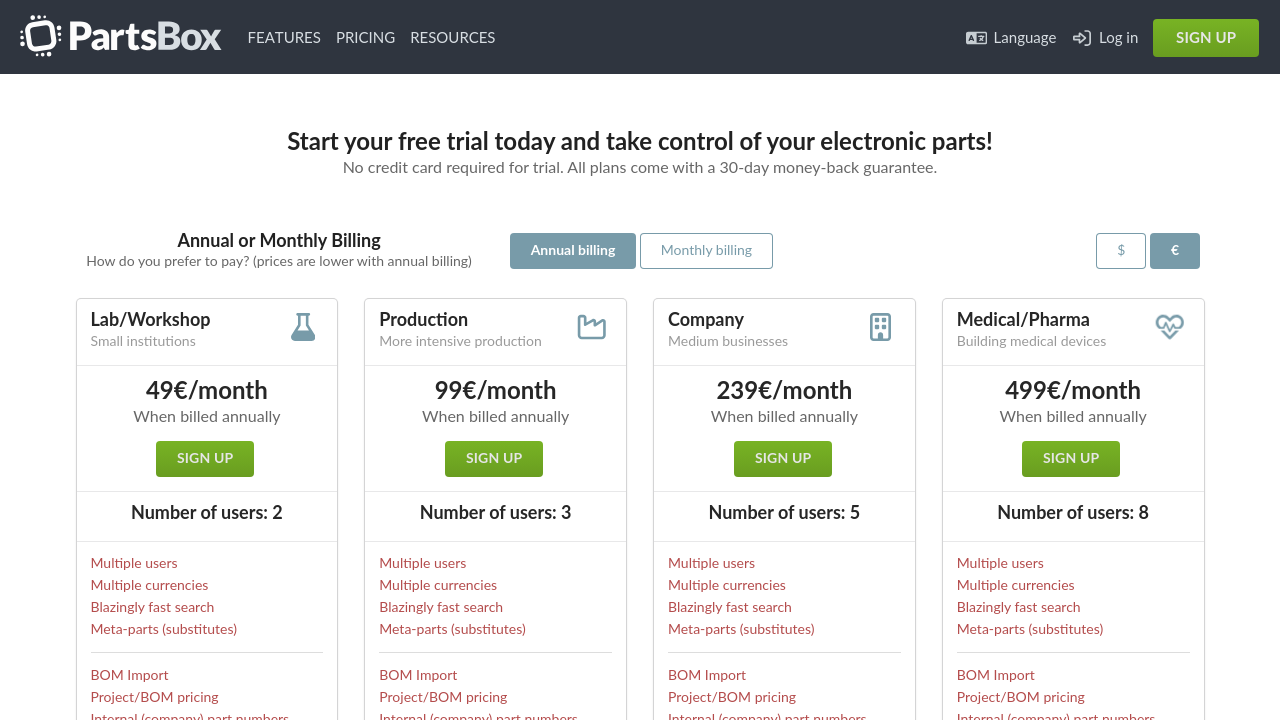
PartsBox Pricing Range
Not specified

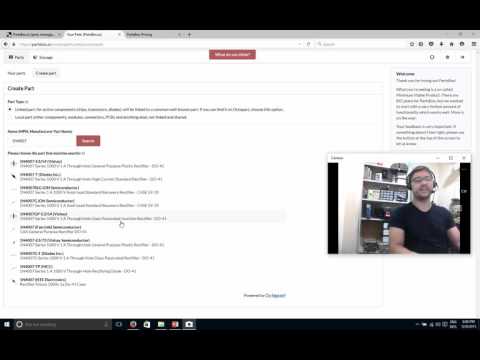
PartsBox Showcase
info Icon

A curated gallery of real screenshots and use cases from the product, so you can see how it works before trying it.

PartsBox Full Screen Icon
https://www.youtube.com/watch?v=0UbzkMxvQXw
Full Screen Icon
PartsBox
PartsBox

What else exists next to PartsBox
info Icon

A list of platforms similar to PartsBox, helping you evaluate which tool best matches your needs.

Need to cancel PartsBox? Here is how
info Icon

Thinking about how to cancel PartsBox this is how you do it!

To cancel a PartsBox product, contact customer support promptly. If the order hasn’t shipped, they may be able to cancel it. If shipped, follow return instructions provided by the support team.

How to Cancel the PartsBox

To cancel a PartsBox product, contact customer support promptly. If the order hasn’t shipped, they may be able to cancel it. If shipped, follow return instructions provided by the support team.

Every else you need to know about PartsBox
info Icon

A collection of FAQs, guides, alternatives, and comparisons to help you quickly understand if PartsBox is right for you.

Pricing Range
info Icon

This only an estimated pricing range, visit PartsBox pricing page to access all the information by clicking “Visit Now”.

Not specified
Visit Now
Deals Available

This product comes with a special deal, see details

This product comes with a special deal, see details