Pagescreen Reviews 2026: Details, Pricing, & Features | Subscribed.fyi
Sign in to review
Join our community of software reviewers on Subscribed.fyi

Continue With Google
Continue With LinkedIn
Continue Review with Email
Continue with Email
Enter your email to continue.
Continue
Enter your password
Enter your password to finish setting up your account.
Continue
Activate your email
Enter activation code we sent to your email.
Submit
Reset your password
Enter activation code we sent to your email.
Submit
Set your new password
Enter a new password for your account.
Submit
Categories
For Business
Log in
Provide My Insights
Pagescreen
Pagescreen

Pagescreen Reviews, Pricing, Features & Alternatives (2026)

4/5
(3)

Pagescreen automates website change detection by capturing screenshots at custom intervals. It compares visuals across devices, archives changes, and sends alerts for updates. Ideal for tracking competitors, monitoring trends, and ensuring site quality.

Pagescreen
Pagescreen
Pagescreen

Pagescreen Overview

What is Pagescreen?

4
3
Reviews
60%
Subscribed Score

Available for Claim - This listing is available to be claimed
Claim Profile For Free

Unclaimed

Manage profile with subsig, and unlock 23+ social and review monitoring. Get partnership options with

Claim Profile For Free

Why teams choose Pagescreen

Key Features

Collaborate Easily
Collaborate Easily
Built for teams and communication.
Secure by Design
Secure by Design
Data protection and compliance built in.
Real-Time Updates
Real-Time Updates
See changes instantly, no delays.

Who is Pagescreen for?

Pagescreen

Pagescreen is an automated visual monitoring tool that captures, compares, and archives website screenshots to detect changes over time. Users can monitor any URL for visual updates, competitor shifts, or quality assurance needs, with support for multiple devices and custom schedules.

Why Use Pagescreen?

  • Automated Captures: Schedule screenshots at set intervals, like specific times or days, for hands-free monitoring.
  • Change Detection: Instantly spot visual differences with pixel-perfect comparisons and percentage-based filtering.
  • Real-Time Alerts: Receive notifications when changes occur, enabling quick responses to trends or issues.

Who is Pagescreen For?

  • Marketers & Competitors Analysts: Track rival site updates and content evolutions for strategic insights.
  • Developers & QA Teams: Perform responsive design testing and landing page quality checks.
  • Business Teams: Collaborate on visual collections, export data, and manage user access securely.

Key Features and Benefits

  • Multi-Device Support: Generate screenshots for desktop, mobile, and various sizes automatically.
  • Organization Tools: Create collections, filter by date/size/change, and archive GDPR-compliant data.
  • Advanced Options: API access, custom dashboards, uptime/SSL monitoring, and team collaboration.
  • Scalable Pricing: Flexible plans with quotas for captures, overage fees, and unlimited monitoring.

This tool centralizes website intel without third-party trackers, supporting informed decisions at scale.

Pagescreen Summary

Pagescreen

Pagescreen is an automated visual monitoring tool that captures, compares, and archives website screenshots to detect changes over time. Users can monitor any URL for visual updates, competitor shifts, or quality assurance needs, with support for multiple devices and custom schedules.

Why Use Pagescreen?

  • Automated Captures: Schedule screenshots at set intervals, like specific times or days, for hands-free monitoring.
  • Change Detection: Instantly spot visual differences with pixel-perfect comparisons and percentage-based filtering.
  • Real-Time Alerts: Receive notifications when changes occur, enabling quick responses to trends or issues.

Who is Pagescreen For?

  • Marketers & Competitors Analysts: Track rival site updates and content evolutions for strategic insights.
  • Developers & QA Teams: Perform responsive design testing and landing page quality checks.
  • Business Teams: Collaborate on visual collections, export data, and manage user access securely.

Key Features and Benefits

  • Multi-Device Support: Generate screenshots for desktop, mobile, and various sizes automatically.
  • Organization Tools: Create collections, filter by date/size/change, and archive GDPR-compliant data.
  • Advanced Options: API access, custom dashboards, uptime/SSL monitoring, and team collaboration.
  • Scalable Pricing: Flexible plans with quotas for captures, overage fees, and unlimited monitoring.

This tool centralizes website intel without third-party trackers, supporting informed decisions at scale.

Pagescreen reviews and insights

Learn what people say about Pagescreen

4
3 Reviews
60%
Subscribed Score

Lear more here about the Subscribed score on how it is composed. Learn more Click here

Overall rating

5
4
3
2
1
CX 3/6

How good is the customer support based on subscribed’s assessment

CX Icon
Security 4/6

How secure is the product based on Subscribed’s assessment?

Security Icon
Ease of Use 5/6

How easy is the product to use, based on Subscribed’s assessment?

EOU Icon
Value 4/6

What is the value for money based on Subscribed’s assessment?

coin Icon
Integration 3/6

How many integrations does the product offer?

gear Icon
Popularity 3/6

How popular is the product?

star
Jovie Macalolo-oy User Test Enabled
Executive / Leadership
See My Portfolio
3 months ago
Share
What’s the biggest benefit you’ve noticed?
I don’t have to manually visit pages anymore to see my competitors changed their pricing or headlines. I just get an alert with before and after shot of exactly what was moved or updated.
What feature doesn’t work as expected?
he mobile view snapshots can be a little glitchy. Sometimes the page doesn't render correctly in the mobile preview so the screenshot ends up being useless until I change somethings in the settings
How could the product save you more time or money?
It would be great it if it could automatically group similar changes. Also if it could summarize those into one report, I wouldn't have to spend as much time filtering through my inbox.
Final thoughts, wrap up what you think
It’s the easiest way to "set and forget" your market research and instead of hiring more people to do it, this is very helpful.
Upvote (1)
Khim Cincoflores User Test Enabled
Customer Success
See My Portfolio
3 months ago
Share
What do you like best about this product?
What I like about this product is that it helps me track and monitor any mentions of my brand, my products, or even my company's name. It scans the internet for any mentions of any of my brands or products. It's very convenient and useful especially in customer's engagements.
Have you experienced any bugs or errors?
I haven't experienced any bugs or errors while I use this software. It's very convenient to use and works smoothly and oerfectly well.
What could make it even better?
Nothing really. You just have to really understand and learn the software better. This way, you can work and utilize the software to its full potential.
Final thoughts, wrap up what you think
Highly recommended. Does its job. Very reliable and convenient.
Upvote (1)
4 months ago
Share
How has it made your work/life easier?
I think the automated captures and visual comparison are life-savers. I don't have to waste time on manual checks.
Is there something that almost made you stop using it?
I've noticed overage fees stack up fast. It makes it tough for me to keep the monthly costs predictable.
What could make it even better?
Some smart scheduling tips would also be great. So, I don't waste captures on pages that haven't even changed.
Final thoughts, wrap up what you think
I think this is a great shout for marketers, Devs, and QA teams who need to automate their site monitoring. It’s been really helpful for me to keep an eye on competitor moves
Upvote (2)
Pagescreen

Pagescreen User Reviews

3 User Reviews

Reviews from G2, Capterra, Trustpilot
info Icon

These ratings come directly from third-party platforms like G2, Capterra, and Trustpilot. They reflect real user feedback collected independently on those sites.

Pagescreen pricing

Pricing model

Pagescreen
Pricing Range
info Icon

This only an estimated pricing range, visit Pagescreen pricing page to access all the information by clicking “Visit Now”.

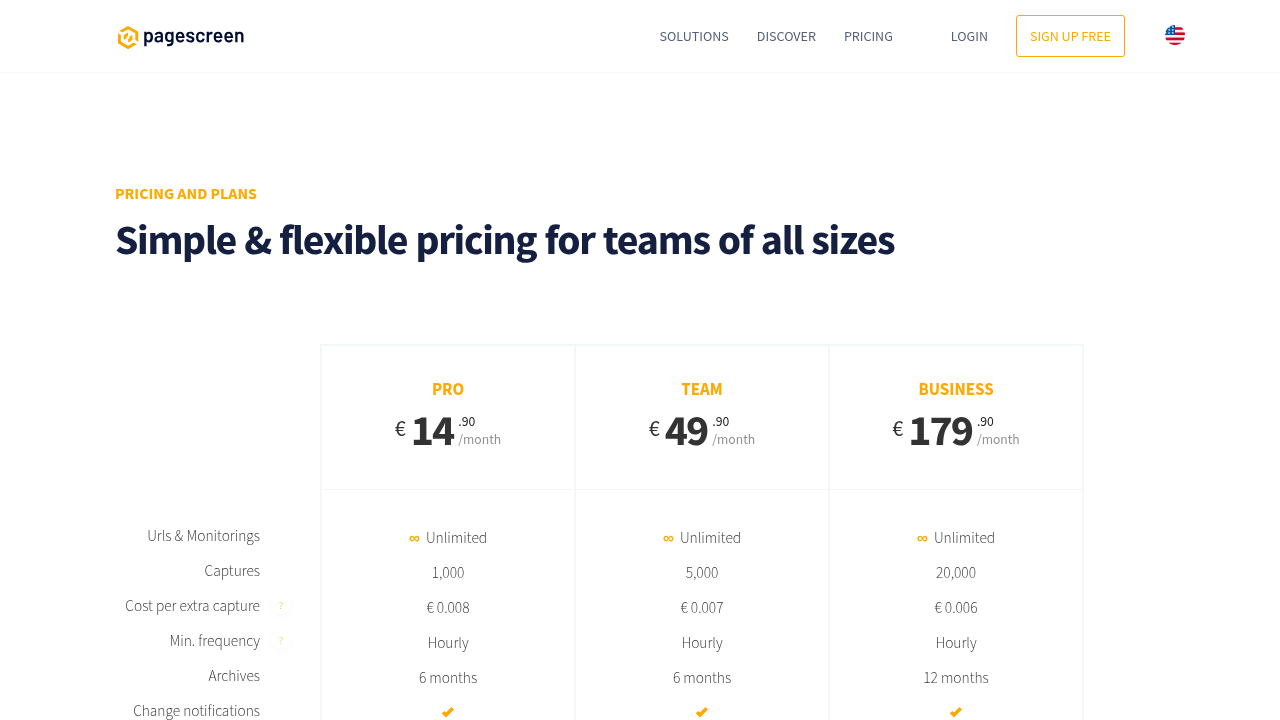
€14.90 - €179 / mo
Deals Available

This product comes with a special deal, see details

Visit Now
✨ Ask AI about pricing
60% Subscribed Score
info Icon

The Subscribed Score is an independent rating that combines user reviews, features, and value-for-money from multiple trusted sources. It’s designed as a quick benchmark, not a guarantee of individual experience.

Overview

Pagescreen

Pagescreen is an automated visual monitoring tool that captures, compares, and archives website screenshots to detect changes over time. Users can monitor any URL for visual updates, competitor shifts, or quality assurance needs, with support for multiple devices and custom schedules.

Why Use Pagescreen?

  • Automated Captures: Schedule screenshots at set intervals, like specific times or days, for hands-free monitoring.
  • Change Detection: Instantly spot visual differences with pixel-perfect comparisons and percentage-based filtering.
  • Real-Time Alerts: Receive notifications when changes occur, enabling quick responses to trends or issues.

Who is Pagescreen For?

  • Marketers & Competitors Analysts: Track rival site updates and content evolutions for strategic insights.
  • Developers & QA Teams: Perform responsive design testing and landing page quality checks.
  • Business Teams: Collaborate on visual collections, export data, and manage user access securely.

Key Features and Benefits

  • Multi-Device Support: Generate screenshots for desktop, mobile, and various sizes automatically.
  • Organization Tools: Create collections, filter by date/size/change, and archive GDPR-compliant data.
  • Advanced Options: API access, custom dashboards, uptime/SSL monitoring, and team collaboration.
  • Scalable Pricing: Flexible plans with quotas for captures, overage fees, and unlimited monitoring.

This tool centralizes website intel without third-party trackers, supporting informed decisions at scale.

Where Pagescreen performs best

What users like
  • Automated visual change detection
  • Custom capture schedules
  • Multi-device screenshots
  • Real-time alerts & archiving

Where Pagescreen falls short

What users dislike
  • Overage fees apply
  • Limited free tier details
  • Higher plans for scale
  • No uptime in base
Subscribed Score Metrics
22/36 Metric achieved
MetricsScore
Customer Support3/6
Security4/6
Ease of Use5/6
Value of Money4/6
Integration3/6
Popularity3/6
Radar Chart Table View
Ease of Use
Measures how simple and intuitive the product is to use, including setup, navigation, and overall user experience
5/6 Metric Checks
Security
Compares the product`s features, quality, and pricing to determine its overall cost-effectiveness.
4/6 Metric Checks
Value of Money
Assesses the product`s ability to protect data, prevent breaches, and comply with industry standards.
4/6 Metric Checks
Customer Support
Reflects the responsiveness, helpfulness, and quality of assistance provided by the product`s support team.
3/6 Metric Checks
Integrations
Evaluates how well the product connects with other tools and platforms, enabling seamless workflows.
3/6 Metric Checks
Pagescreen Pricing Range
€14.90 - €179 / mo

Pagescreen in action
info Icon

A curated gallery of real screenshots and use cases from the product, so you can see how it works before trying it.

Pagescreen Full Screen Icon
Pagescreen
Pagescreen
Pagescreen
Pagescreen

Alternatives to Pagescreen
info Icon

A list of platforms similar to Pagescreen, helping you evaluate which tool best matches your needs.

How to cancel Pagescreen

Need to cancel Pagescreen? Here is how
info Icon

Thinking about how to cancel Pagescreen this is how you do it!

Log into your Pagescreen account, navigate to Billing settings, select Cancel Subscription, and confirm. Access continues until the billing period ends, with email confirmation sent.

How to Cancel the Pagescreen

Log into your Pagescreen account, navigate to Billing settings, select Cancel Subscription, and confirm. Access continues until the billing period ends, with email confirmation sent.

FAQs about Pagescreen

Every else you need to know about Pagescreen
info Icon

A collection of FAQs, guides, alternatives, and comparisons to help you quickly understand if Pagescreen is right for you.

Manage your Pagescreen profile

Create profile

Want to list your product on Subscribed.fyi? Create a profile to reach more buyers.

Pricing Range
info Icon

This only an estimated pricing range, visit Pagescreen pricing page to access all the information by clicking “Visit Now”.

€14.90 - €179 / mo
Visit Now
Deals Available

This product comes with a special deal, see details

This product comes with a special deal, see details