Best Developer Productivity Tools to Streamline Your Workflow
- AI Image Generators Software AI Writing Assistant Popular Tools AI Tools WebOps Platforms Bug Tracking & Feedback Software Web Development & Design
Developer productivity tools are no longer just “nice to have.” In 2026, they are essential for managing complex developer workflow tools, improving collaboration, and shipping faster with fewer bottlenecks.
Today’s developers don’t just write code… they plan tasks, automate workflows, use AI assistance, and coordinate across teams. The right stack can save hours every week and dramatically improve output.
In this guide, we’ll explore the most effective developer productivity tools, including Linear, GitHub tools like GitHub Copilot, AI coding assistants like Cursor AI, and automation platforms like Zapier.
What are developer productivity tools?
Developer productivity tools are software solutions designed to help developers:
- Manage tasks and projects
- Automate repetitive workflows
- Improve coding speed with AI assistance
- Collaborate with teams efficiently
- Centralize documentation and planning
Instead of switching between multiple apps, modern developer teams use integrated tools to streamline the entire workflow.
Developer productivity tools comparison
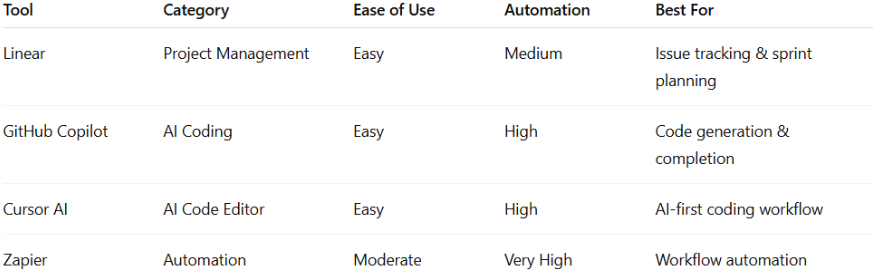
Here’s a quick comparison of the most popular tools used in modern developer stacks:Linear overview (fast developer project management)
Linear, a leader in the Worksuite category, transforms project management with its sleek, intuitive platform tailored for modern software development teams. Say goodbye to outdated tools and fragmented workflows; Linear streamlines issues, sprints, and product roadmaps effortlessly. Trusted by top-tier product teams, it’s perfect for both startups and established enterprises. Linear is built specifically for high-speed engineering teams.
Key features
- Issue tracking and bug management
- Sprint planning
- Fast, keyboard-driven UI
- Team collaboration tools
Pros
- Extremely fast and clean interface
- Built for developers
- Great for agile workflows
Cons
- Limited customization
- Not ideal for non-technical teams
Perfect for engineering teams managing sprints, bugs, and feature development.
Cursor AI overview (AI-first coding workflow)
Cursor AI is an AI code editor designed to enhance productivity for developers. With its advanced AI technology, Cursor provides the best coding experience for users. Cursor AI is one of the fastest-growing AI development tools.
Key features
- AI-assisted code generation
- Context-aware code editing
- Chat-based coding support
- Built on top of modern IDE workflows
Pros
- Speeds up coding significantly
- Great for debugging and refactoring
- Strong AI context understanding
Cons
- Requires internet for AI features
- Still evolving compared to traditional IDEs
Ideal for developers who want an AI-native coding experience and faster iteration cycles.
GitHub Copilot overview
GitHub Copilot is an AI-powered code completion tool developed by GitHub. Leveraging machine learning, Copilot suggests code snippets and completions based on the context of the code being written, helping developers write code faster and more efficiently. GitHub Copilot helps developers write code faster using AI suggestions.
Key features
- Autocomplete for entire functions
- Multi-language support
- IDE integration (VS Code, JetBrains)
Pros
- Speeds up repetitive coding
- Improves productivity
- Easy to integrate
Cons
- Sometimes generates incorrect code
- Requires manual review
Best for developers who want inline AI suggestions while coding.
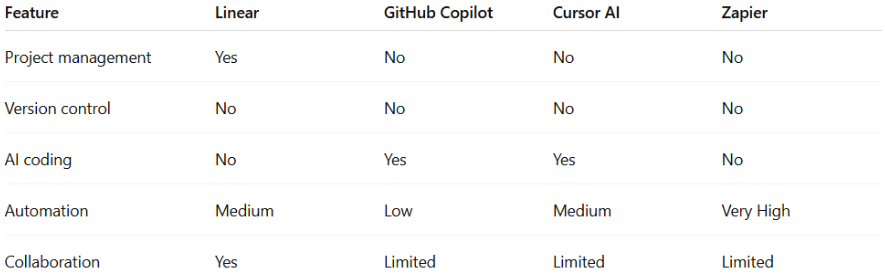
Feature comparison
How to choose the right developer workflow tools
Use Linear when:
- You need fast issue tracking
- You manage agile sprints
- You want a clean engineering workflow
Use Cursor AI when:
- You want an AI-first coding experience
- You want faster debugging and writing
- You prefer modern AI-enhanced IDEs
Use GitHub Copilot when:
- You want inline AI suggestions
- You write repetitive code
- You want faster function generation
Zapier overview (workflow automation for developers)
Zapier is a web-based platform in the Automation Tools category that allows users to effortlessly connect and automate workflows between their favorite applications, removing the hassle of manual task management. With its intuitive interface and extensive app integrations, Zapier boosts productivity by automating repetitive tasks and streamlining data flow. Zapier is a no-code automation tool that connects apps and automates repetitive workflows.
Key features
- Integration with thousands of applications
- Trigger-based automation workflows
- No-code setup
- Multi-step automation (Zaps)
Pros
- Saves time by automating repetitive tasks
- Works with a wide range of tools
- Easy to set up for most use cases
Cons
- Can become expensive at scale
- Limited flexibility for complex logic
Best use case
Best for developers and teams who want to automate repetitive processes, such as:
- Sending form data to a CRM
- Syncing data between tools
- Automating notifications and updates
Conclusion
The best developer productivity tools depend on your workflow, but modern developer teams often combine multiple tools:
- Linear for planning
- Cursor AI for AI-native coding
- GitHub Copilot for inline assistance
- Zapier for workflow automation
Together, these tools create a powerful system that reduces friction, improves speed, and enhances collaboration across teams.
If you are optimizing your developer stack, start by improving your weakest workflow area… whether that is planning, coding, or automation. Platforms like Subscribed.fyi make it easier to explore and compare tools so you can choose what fits your needs.