Sign in to review
Join our community of software reviewers on Subscribed.fyi

Continue With Google
Continue With LinkedIn
Continue Review with Email
Continue with Email
Enter your email to continue.
Continue
Enter your password
Enter your password to finish setting up your account.
Continue
Activate your email
Enter activation code we sent to your email.
Submit
Reset your password
Enter activation code we sent to your email.
Submit
Set your new password
Enter a new password for your account.
Submit
Log in
Provide My Insights
Element logo
Element logo

Element Reviews, Pricing, Features & Alternatives (2026)

Element is an open-source, encrypted messaging platform enabling private collaboration through secure chats, calls, file sharing, calendar integration, customizable features, end-to-end encryption, cross-platform accessibility, and community-driven development.

Element logo
Element logo
Element logo

Element Overview

What is Element?

N/A
★ ★ ★ ★ ★
0
Reviews

Available for Claim - This listing is available to be claimed
Claim Profile

Unclaimed

Claim this profile to manage it.

Claim Profile

Why teams choose Element

Key Features

Exclusive Perks
Exclusive Perks
Special offers and discounts available.
Expert Support
Expert Support
Help available when you need it.
Fast & Efficient
Fast & Efficient
Optimized for speed and performance.

Who is Element for?

What is Element?

Element is a secure and open-source messaging platform designed for collaboration and communication. It offers a powerful combination of encrypted chats, voice and video calls, file sharing, and integrations with popular tools, making it ideal for teams and individuals who prioritize privacy and efficiency.

Why Use Element?

  • Enhanced Privacy: Unlike many mainstream messaging apps, Element prioritizes user data privacy. It relies on end-to-end encryption by default, meaning only the sender and recipient can access message content. This ensures your conversations stay secure and private, even on shared devices.
  • Cross-Platform Accessibility: Element is available across various platforms, including desktops, tablets, and smartphones. This allows seamless communication regardless of your device or operating system, keeping you connected with your team or friends on the go.
  • Collaboration Features: Element provides several features tailored for teamwork. You can create groups and channels for specific projects, share files seamlessly, and conduct voice and video calls with up to nine participants. This fosters an environment for efficient communication and collaboration within teams.
  • Open-Source & Customizable: Unlike closed-source platforms, Element’s code is open-source, allowing developers to contribute and customize its features. This transparency adds to its security and empowers users with greater control over their experience.
  • Integrations: Element integrates with popular tools like Dropbox, Google Calendar, and Zapier, enabling a streamlined workflow by connecting your messaging platform with other essential applications.

Who is Element For?

  • Professionals & Teams: Businesses and teams working remotely or relying on confidential communication benefit greatly from Element’s secure and collaborative features.
  • Privacy-Conscious Individuals: Users who prioritize data privacy and control over their conversations find Element’s end-to-end encryption and open-source nature appealing.
  • Open-Source Enthusiasts: Developers and users who value transparency and customization appreciate Element’s open-source code and its potential for community-driven improvements.

Overall, Element caters to individuals and organizations seeking a secure, collaborative, and customizable messaging platform that prioritizes user privacy and open-source development.

Element Summary

What is Element?

Element is a secure and open-source messaging platform designed for collaboration and communication. It offers a powerful combination of encrypted chats, voice and video calls, file sharing, and integrations with popular tools, making it ideal for teams and individuals who prioritize privacy and efficiency.

Why Use Element?

  • Enhanced Privacy: Unlike many mainstream messaging apps, Element prioritizes user data privacy. It relies on end-to-end encryption by default, meaning only the sender and recipient can access message content. This ensures your conversations stay secure and private, even on shared devices.
  • Cross-Platform Accessibility: Element is available across various platforms, including desktops, tablets, and smartphones. This allows seamless communication regardless of your device or operating system, keeping you connected with your team or friends on the go.
  • Collaboration Features: Element provides several features tailored for teamwork. You can create groups and channels for specific projects, share files seamlessly, and conduct voice and video calls with up to nine participants. This fosters an environment for efficient communication and collaboration within teams.
  • Open-Source & Customizable: Unlike closed-source platforms, Element’s code is open-source, allowing developers to contribute and customize its features. This transparency adds to its security and empowers users with greater control over their experience.
  • Integrations: Element integrates with popular tools like Dropbox, Google Calendar, and Zapier, enabling a streamlined workflow by connecting your messaging platform with other essential applications.

Who is Element For?

  • Professionals & Teams: Businesses and teams working remotely or relying on confidential communication benefit greatly from Element’s secure and collaborative features.
  • Privacy-Conscious Individuals: Users who prioritize data privacy and control over their conversations find Element’s end-to-end encryption and open-source nature appealing.
  • Open-Source Enthusiasts: Developers and users who value transparency and customization appreciate Element’s open-source code and its potential for community-driven improvements.

Overall, Element caters to individuals and organizations seeking a secure, collaborative, and customizable messaging platform that prioritizes user privacy and open-source development.

Element reviews and insights

Learn what people say about Element

N/A ★ ★ ★ ★ ★
0 Reviews

No Reviews Yet!

Be the first to share your experience and help others in the community.

Element logo

Element User Reviews

0 User Reviews

Reviews from G2, Capterra, Trustpilot
info Icon

These ratings come directly from third-party platforms like G2, Capterra, and Trustpilot. They reflect real user feedback collected independently on those sites.

Element pricing

Pricing model

Element logo
Pricing Range
info Icon

This only an estimated pricing range, visit Element pricing page to access all the information by clicking “Visit Now”.

Not specified
Deals Available

This product comes with a special deal, see details

Visit Now

Overview

What is Element?

Element is a secure and open-source messaging platform designed for collaboration and communication. It offers a powerful combination of encrypted chats, voice and video calls, file sharing, and integrations with popular tools, making it ideal for teams and individuals who prioritize privacy and efficiency.

Why Use Element?

  • Enhanced Privacy: Unlike many mainstream messaging apps, Element prioritizes user data privacy. It relies on end-to-end encryption by default, meaning only the sender and recipient can access message content. This ensures your conversations stay secure and private, even on shared devices.
  • Cross-Platform Accessibility: Element is available across various platforms, including desktops, tablets, and smartphones. This allows seamless communication regardless of your device or operating system, keeping you connected with your team or friends on the go.
  • Collaboration Features: Element provides several features tailored for teamwork. You can create groups and channels for specific projects, share files seamlessly, and conduct voice and video calls with up to nine participants. This fosters an environment for efficient communication and collaboration within teams.
  • Open-Source & Customizable: Unlike closed-source platforms, Element’s code is open-source, allowing developers to contribute and customize its features. This transparency adds to its security and empowers users with greater control over their experience.
  • Integrations: Element integrates with popular tools like Dropbox, Google Calendar, and Zapier, enabling a streamlined workflow by connecting your messaging platform with other essential applications.

Who is Element For?

  • Professionals & Teams: Businesses and teams working remotely or relying on confidential communication benefit greatly from Element’s secure and collaborative features.
  • Privacy-Conscious Individuals: Users who prioritize data privacy and control over their conversations find Element’s end-to-end encryption and open-source nature appealing.
  • Open-Source Enthusiasts: Developers and users who value transparency and customization appreciate Element’s open-source code and its potential for community-driven improvements.

Overall, Element caters to individuals and organizations seeking a secure, collaborative, and customizable messaging platform that prioritizes user privacy and open-source development.

Where Element performs best

What users like
  • Easy to set up with seamless desktop and mobile integration.
  • Supports end-to-end encryption for secure communication.
  • Frequent updates with new features and enhancements.
  • Good for collaboration and tracking activities.

Where Element falls short

What users dislike
  • Threading functionality can be clunky at times.
  • High storage usage on mobile with shared files.
  • Initial setup and onboarding can be confusing.
  • Requires additional technical steps for full integration.
Element Pricing Range
Not specified

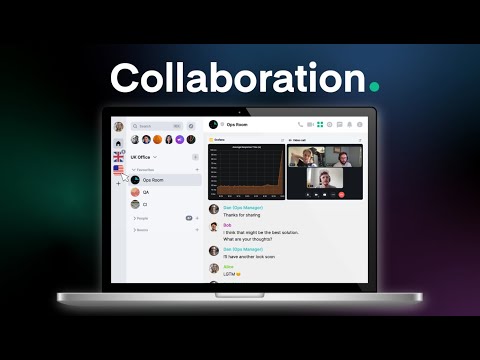
Element in action
info Icon

A curated gallery of real screenshots and use cases from the product, so you can see how it works before trying it.

Element screenshot 1 Full Screen Icon
Element screenshot 2 Full Screen Icon
Element screenshot 3 Full Screen Icon
https://www.youtube.com/watch?v=nM8OLQF0plQ?feature=oembed
Full Screen Icon
Element screenshot 1
Element screenshot 2
Element screenshot 3
Video thumbnail
Element screenshot 1
Element screenshot 2
Element screenshot 3

Alternatives to Element
info Icon

A list of platforms similar to Element, helping you evaluate which tool best matches your needs.

How to cancel Element

Need to cancel Element? Here is how
info Icon

Thinking about how to cancel Element this is how you do it!

empty stats

No Cancellation Found

Looks like we cannot found any Element cancellation

Manage your Element profile

Create profile

Want to list your product on Subscribed.fyi? Create a profile to reach more buyers.

Pricing Range
info Icon

This only an estimated pricing range, visit Element pricing page to access all the information by clicking “Visit Now”.

Not specified
Visit Now
Deals Available

This product comes with a special deal, see details

This product comes with a special deal, see details