Sign in to review
Join our community of software reviewers on Subscribed.fyi

Continue With Google
Continue With LinkedIn
Continue Review with Email
Continue with Email
Enter your email to continue.
Continue
Enter your password
Enter your password to finish setting up your account.
Continue
Activate your email
Enter activation code we sent to your email.
Submit
Reset your password
Enter activation code we sent to your email.
Submit
Set your new password
Enter a new password for your account.
Submit
Log in
Provide My Insights
Koha logo
Koha logo

Koha Reviews, Pricing, Features & Alternatives (2026)

Koha is a robust, open-source library management system designed for libraries of all sizes. It offers comprehensive features such as cataloging, circulation, acquisitions, and reporting, along with customization options. Known for its flexibility and cost-effectiveness, Koha supports efficient library operations while being scalable for diverse needs. Its active user community ensures continued improvement and support.

Koha logo
Koha logo
Koha logo

Koha Overview

What is Koha?

N/A
★ ★ ★ ★ ★
0
Reviews

Available for Claim - This listing is available to be claimed
Claim Profile

Unclaimed

Claim this profile to manage it.

Claim Profile

Why teams choose Koha

Key Features

Data-Driven Insights
Make better decisions with analytics.
Seamless Integrations
Connect easily with your favorite tools.
Trusted by Thousands
Proven by professionals worldwide.

Who is Koha for?

Product Overview

Koha is the pioneering free software library automation package that has evolved into a full-featured, enterprise-class Integrated Library System (ILS) adopted by libraries worldwide. Developed by a thriving global community, Koha delivers a robust solution for managing every aspect of library operations—from acquisitions and circulation to cataloging, serials management, authority control, flexible reporting, and even label printing. Its comprehensive functionality supports both basic and advanced library needs, making it an ideal choice for institutions ranging from small public libraries to large academic institutions.

Koha’s open-source nature provides libraries with the unique advantage of customization and adaptability. Libraries have the freedom to adjust workflows and modify the system to suit their particular needs without being locked into proprietary software constraints. With a community-driven approach, continuous improvement and innovation are integral, ensuring Koha remains at the forefront of library technology.

Positioned within the Library Management category, Koha offers an effective blend of powerful features and flexibility. The software’s modules are designed to simplify essential functions such as resource cataloging, efficient circulation management, and detailed reporting tools that enhance decision making. Additionally, its online public access catalog (OPAC) offers intuitive search capabilities, allowing both library staff and patrons to easily locate materials.

Koha stands out by combining the benefits of open-source software with the support of experienced professionals who specialize in its implementation and maintenance. Its customization options ensure libraries can tailor the system in accordance with local practices and standards. Moreover, pricing details based on bibliographic record count and circulation statistics make Koha an attractive, cost-effective solution for non-profit and budget-conscious institutions.

Key Advantages

  • Comprehensive functionality covering all aspects of library management.
  • Open-source flexibility that allows for extensive customization.
  • Community-driven development ensuring continuous enhancements and innovations.
  • Cost-effective pricing model tailored to the needs and size of the library.
  • User-friendly OPAC for both library staff and patrons.

Why Choose Koha?

  • It streamlines library operations with modules designed for every critical function.
  • The open-source framework grants full control over adaptations and innovations.
  • An active, experienced support network is available to guide implementation and troubleshooting.
  • Its scalability makes Koha a viable solution for libraries of varying sizes and types.

For more information, visit the Koha Homepage or check out exclusive deals available for this innovative ILS solution.

Alternatives

Koha Summary

Product Overview

Koha is the pioneering free software library automation package that has evolved into a full-featured, enterprise-class Integrated Library System (ILS) adopted by libraries worldwide. Developed by a thriving global community, Koha delivers a robust solution for managing every aspect of library operations—from acquisitions and circulation to cataloging, serials management, authority control, flexible reporting, and even label printing. Its comprehensive functionality supports both basic and advanced library needs, making it an ideal choice for institutions ranging from small public libraries to large academic institutions.

Koha’s open-source nature provides libraries with the unique advantage of customization and adaptability. Libraries have the freedom to adjust workflows and modify the system to suit their particular needs without being locked into proprietary software constraints. With a community-driven approach, continuous improvement and innovation are integral, ensuring Koha remains at the forefront of library technology.

Positioned within the Library Management category, Koha offers an effective blend of powerful features and flexibility. The software’s modules are designed to simplify essential functions such as resource cataloging, efficient circulation management, and detailed reporting tools that enhance decision making. Additionally, its online public access catalog (OPAC) offers intuitive search capabilities, allowing both library staff and patrons to easily locate materials.

Koha stands out by combining the benefits of open-source software with the support of experienced professionals who specialize in its implementation and maintenance. Its customization options ensure libraries can tailor the system in accordance with local practices and standards. Moreover, pricing details based on bibliographic record count and circulation statistics make Koha an attractive, cost-effective solution for non-profit and budget-conscious institutions.

Key Advantages

  • Comprehensive functionality covering all aspects of library management.
  • Open-source flexibility that allows for extensive customization.
  • Community-driven development ensuring continuous enhancements and innovations.
  • Cost-effective pricing model tailored to the needs and size of the library.
  • User-friendly OPAC for both library staff and patrons.

Why Choose Koha?

  • It streamlines library operations with modules designed for every critical function.
  • The open-source framework grants full control over adaptations and innovations.
  • An active, experienced support network is available to guide implementation and troubleshooting.
  • Its scalability makes Koha a viable solution for libraries of varying sizes and types.

For more information, visit the Koha Homepage or check out exclusive deals available for this innovative ILS solution.

Alternatives

Koha reviews and insights

Learn what people say about Koha

N/A ★ ★ ★ ★ ★
0 Reviews

No Reviews Yet!

Be the first to share your experience and help others in the community.

Koha logo

Koha User Reviews

0 User Reviews

Reviews from G2, Capterra, Trustpilot
info Icon

These ratings come directly from third-party platforms like G2, Capterra, and Trustpilot. They reflect real user feedback collected independently on those sites.

Koha pricing

Pricing model

Koha logo
Pricing Range
info Icon

This only an estimated pricing range, visit Koha pricing page to access all the information by clicking “Visit Now”.

Not specified
Deals Available

This product comes with a special deal, see details

Visit Now

Overview

Product Overview

Koha is the pioneering free software library automation package that has evolved into a full-featured, enterprise-class Integrated Library System (ILS) adopted by libraries worldwide. Developed by a thriving global community, Koha delivers a robust solution for managing every aspect of library operations—from acquisitions and circulation to cataloging, serials management, authority control, flexible reporting, and even label printing. Its comprehensive functionality supports both basic and advanced library needs, making it an ideal choice for institutions ranging from small public libraries to large academic institutions.

Koha’s open-source nature provides libraries with the unique advantage of customization and adaptability. Libraries have the freedom to adjust workflows and modify the system to suit their particular needs without being locked into proprietary software constraints. With a community-driven approach, continuous improvement and innovation are integral, ensuring Koha remains at the forefront of library technology.

Positioned within the Library Management category, Koha offers an effective blend of powerful features and flexibility. The software’s modules are designed to simplify essential functions such as resource cataloging, efficient circulation management, and detailed reporting tools that enhance decision making. Additionally, its online public access catalog (OPAC) offers intuitive search capabilities, allowing both library staff and patrons to easily locate materials.

Koha stands out by combining the benefits of open-source software with the support of experienced professionals who specialize in its implementation and maintenance. Its customization options ensure libraries can tailor the system in accordance with local practices and standards. Moreover, pricing details based on bibliographic record count and circulation statistics make Koha an attractive, cost-effective solution for non-profit and budget-conscious institutions.

Key Advantages

  • Comprehensive functionality covering all aspects of library management.
  • Open-source flexibility that allows for extensive customization.
  • Community-driven development ensuring continuous enhancements and innovations.
  • Cost-effective pricing model tailored to the needs and size of the library.
  • User-friendly OPAC for both library staff and patrons.

Why Choose Koha?

  • It streamlines library operations with modules designed for every critical function.
  • The open-source framework grants full control over adaptations and innovations.
  • An active, experienced support network is available to guide implementation and troubleshooting.
  • Its scalability makes Koha a viable solution for libraries of varying sizes and types.

For more information, visit the Koha Homepage or check out exclusive deals available for this innovative ILS solution.

Alternatives

Where Koha performs best

What users like
  • Flexible and customizable features
  • Cost-effective and open-source
  • Good customer service and support
  • Advanced and innovative capabilities

Where Koha falls short

What users dislike
  • Difficult to use backend interface
  • Glitches and inconsistent functionality
  • Limited options for batch editing
  • Complex setup and deployment process
Koha Pricing Range
Not specified

Koha in action
info Icon

A curated gallery of real screenshots and use cases from the product, so you can see how it works before trying it.

Koha screenshot 1 Full Screen Icon
Koha screenshot 2 Full Screen Icon
https://www.youtube.com/watch?v=apCtTfPJB0I
Full Screen Icon
https://www.youtube.com/watch?v=RK6crZLCG90
Full Screen Icon
Koha screenshot 1
Koha screenshot 2
Video thumbnail
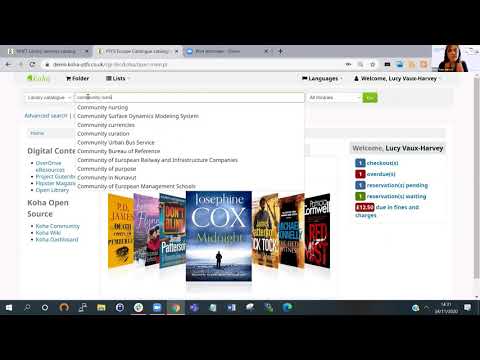
Video thumbnail
Koha screenshot 1
Koha screenshot 2

Alternatives to Koha
info Icon

A list of platforms similar to Koha, helping you evaluate which tool best matches your needs.

How to cancel Koha

Need to cancel Koha? Here is how
info Icon

Thinking about how to cancel Koha this is how you do it!

To cancel a hold in Koha:

  • Go to the hold record and select a cancellation reason from the "HOLD_CANCELLATION" category.
  • Confirm the cancellation; this records the reason and can send an email to the patron if the "HOLD_CANCELLATION" notice is set up.
  • For automatic cancellations, configure the cancel_expired_holds cronjob to apply a cancellation reason.

How to Cancel the Koha

To cancel a hold in Koha:

  • Go to the hold record and select a cancellation reason from the "HOLD_CANCELLATION" category.
  • Confirm the cancellation; this records the reason and can send an email to the patron if the "HOLD_CANCELLATION" notice is set up.
  • For automatic cancellations, configure the cancel_expired_holds cronjob to apply a cancellation reason.

Manage your Koha profile

Create profile

Want to list your product on Subscribed.fyi? Create a profile to reach more buyers.

Pricing Range
info Icon

This only an estimated pricing range, visit Koha pricing page to access all the information by clicking “Visit Now”.

Not specified
Visit Now
Deals Available

This product comes with a special deal, see details

This product comes with a special deal, see details