AttendanceBot Reviews 2026: Details, Pricing, & Features | Subscribed.fyi
Sign in to review
Join our community of software reviewers on Subscribed.fyi

Continue With Google
Continue With LinkedIn
Continue Review with Email
Continue with Email
Enter your email to continue.
Continue
Enter your password
Enter your password to finish setting up your account.
Continue
Activate your email
Enter activation code we sent to your email.
Submit
Reset your password
Enter activation code we sent to your email.
Submit
Set your new password
Enter a new password for your account.
Submit
Categories
For Business
Log in
Provide My Insights

AttendanceBot Reviews, Pricing, Features & Alternatives (2026)

4.7/5
(3)

AttendanceBot is an all-in-one solution for attendance, time tracking, and scheduling integrated seamlessly with Slack and Microsoft Teams. It simplifies leave management, hybrid work planning, and project tracking with customizable policies, automated reminders, and real-time reporting. Designed for efficient workflows, it empowers teams with user-friendly features like shift planning, status updates, and robust analytics. Streamline your operations with a tool trusted for its ease of use and adaptability.

AttendanceBot Overview

What is AttendanceBot?

4.7
3
Reviews
83%
Subscribed Score

Available for Claim - This listing is available to be claimed
Claim Profile For Free

Unclaimed

Manage profile with subsig, and unlock 23+ social and review monitoring. Get partnership options with

Claim Profile For Free

Why teams choose AttendanceBot

Key Features

Real-Time Updates
Real-Time Updates
See changes instantly, no delays.
Data-Driven Insights
Make better decisions with analytics.
Trusted by Thousands
Proven by professionals worldwide.

Who is AttendanceBot for?

AttendanceBot is an all-in-one solution designed to simplify time and attendance management within your organization. Integrated seamlessly into Slack, Microsoft 365, and Google Workspace, AttendanceBot offers a complete system for managing time off requests, time tracking, shift rostering, and employee scheduling—all while keeping your team in sync.

Positioned in the Time and Attendance Management category, AttendanceBot brings a host of capabilities to streamline daily operations. The platform empowers both employees and administrators, automating critical tasks and minimizing manual intervention. With powerful menus, quick command shortcuts, and robust notifications, it ensures that your team remains informed about attendance statuses, time off requests, and upcoming shifts at all times.

Key Features

  • Leave and Absence Management: Easily request time off, set up complex approval flows, and configure customized leave types including sick days, vacation, parental leaves, and more.
  • Time Tracking and Overtime Control: Record clock-ins and clock-outs for accurate timesheet entries. Use buttons for lunch breaks or overtime, ensuring compliance with your company policies.
  • Shift Scheduling and Rostering: Create, modify, and swap shifts with a sleek planning interface. Automated alerts and reminders keep teams updated on schedule changes in real time.
  • Hybrid Work and Office Capacity Planning: Manage remote work alongside regular office attendance. Set and monitor office capacities to maintain a balanced hybrid work environment.
  • Project and Client Billing: Track time by project or client, facilitating precise reporting and easier analysis of billable hours.

Why Use AttendanceBot?

AttendanceBot offers a streamlined platform that seamlessly integrates into your existing workflow. Its real-time updates reduce administrative overhead, making it easy for teams to stay on track even when working remotely. With administrative controls to tailor rules and accruals to your organization’s policies, AttendanceBot is both scalable and customizable to meet unique business needs. Additionally, features like automated reminders, live status updates, and an intuitive dashboard simplify oversight and ensure compliance.

Who Can Benefit?

AttendanceBot is ideal for small teams, mid-sized companies, and enterprises seeking an efficient way to manage attendance and time tracking. Whether you are a department manager overseeing schedules, a project lead tracking time allocations, or an HR professional managing leave policies, AttendanceBot offers a user-friendly yet powerful solution that adapts to your operational requirements.

Explore exclusive deals today and discover how AttendanceBot can transform your organization’s time management. Consider alternative solutions such as Paycom, Zapier, and Rippling if you’re exploring other options to streamline your processes.


AttendanceBot Summary

AttendanceBot is an all-in-one solution designed to simplify time and attendance management within your organization. Integrated seamlessly into Slack, Microsoft 365, and Google Workspace, AttendanceBot offers a complete system for managing time off requests, time tracking, shift rostering, and employee scheduling—all while keeping your team in sync.

Positioned in the Time and Attendance Management category, AttendanceBot brings a host of capabilities to streamline daily operations. The platform empowers both employees and administrators, automating critical tasks and minimizing manual intervention. With powerful menus, quick command shortcuts, and robust notifications, it ensures that your team remains informed about attendance statuses, time off requests, and upcoming shifts at all times.

Key Features

  • Leave and Absence Management: Easily request time off, set up complex approval flows, and configure customized leave types including sick days, vacation, parental leaves, and more.
  • Time Tracking and Overtime Control: Record clock-ins and clock-outs for accurate timesheet entries. Use buttons for lunch breaks or overtime, ensuring compliance with your company policies.
  • Shift Scheduling and Rostering: Create, modify, and swap shifts with a sleek planning interface. Automated alerts and reminders keep teams updated on schedule changes in real time.
  • Hybrid Work and Office Capacity Planning: Manage remote work alongside regular office attendance. Set and monitor office capacities to maintain a balanced hybrid work environment.
  • Project and Client Billing: Track time by project or client, facilitating precise reporting and easier analysis of billable hours.

Why Use AttendanceBot?

AttendanceBot offers a streamlined platform that seamlessly integrates into your existing workflow. Its real-time updates reduce administrative overhead, making it easy for teams to stay on track even when working remotely. With administrative controls to tailor rules and accruals to your organization’s policies, AttendanceBot is both scalable and customizable to meet unique business needs. Additionally, features like automated reminders, live status updates, and an intuitive dashboard simplify oversight and ensure compliance.

Who Can Benefit?

AttendanceBot is ideal for small teams, mid-sized companies, and enterprises seeking an efficient way to manage attendance and time tracking. Whether you are a department manager overseeing schedules, a project lead tracking time allocations, or an HR professional managing leave policies, AttendanceBot offers a user-friendly yet powerful solution that adapts to your operational requirements.

Explore exclusive deals today and discover how AttendanceBot can transform your organization’s time management. Consider alternative solutions such as Paycom, Zapier, and Rippling if you’re exploring other options to streamline your processes.

AttendanceBot reviews and insights

Learn what people say about AttendanceBot

4.7
3 Reviews
83%
Subscribed Score

Lear more here about the Subscribed score on how it is composed. Learn more Click here

Overall rating

5
4
3
2
1
CX 5/6

How good is the customer support based on subscribed’s assessment

CX Icon
Security 4/6

How secure is the product based on Subscribed’s assessment?

Security Icon
Ease of Use 5/6

How easy is the product to use, based on Subscribed’s assessment?

EOU Icon
Value 5/6

What is the value for money based on Subscribed’s assessment?

coin Icon
Integration 4/6

How many integrations does the product offer?

gear Icon
Popularity 6/6

How popular is the product?

star
Nesha Faith Arguelles Organic
Customer Success
2 months ago
Share
How has it made your work/life easier?
It’s killed the constant "Is Sarah in today?" messages because I can just glance at the dashboard or the status icons. Not having to cross-reference spreadsheets with emails for every vacation request has cleared a ton of mental space.
What do you dislike about this product?
The initial setup can feel like a bit of a maze since there are so many settings to tweak. Sometimes the bot gets a little chatty with notifications, which can be distracting when you're deep in a flow state.
What could make it even better?
The reporting Export feature could use a makeover to make the data look a bit cleaner right out of the gate. Sometimes I have to spend a few minutes formatting the CSVs before they're ready to show my boss.
Final thoughts, wrap up what you think
I’d definitely recommend it to anyone whose team is already stuck in Slack or Teams all day. It’s a total game-changer for small to mid-sized crews who need to ditch manual tracking.
Upvote (2)
crischan larita Incentivized
2 months ago
Share
What do you like best about this product?
It’s super handy because I can just clock in and out directly through Slack or Teams without opening another app. It tracks my hours automatically, so I don't have to stress about remembering my exact timing at the end of the week.
What slows you down when using it?
Sometimes the bot doesn't understand my message if I don't type the exact command, which is kind of annoying. Also, the notifications for reminders can get a bit spammy if you forget to turn them off during your break.
What could make it even better?
I’d love to see a simple map view that shows where I was when I clocked in for field work. A better summary report that shows my total hours for the month in a pretty chart would be great too.
Final thoughts, wrap up what you think
I highly recommend it since it's the easiest way to manage attendance for remote or flexible teams. It just works right where you're already chatting with your coworkers, so it's a no-brainer.
Upvote (1)
Jiandale Ambal User Test Enabled
Full Stack Developer | QA Specialist | Embedded Systems Developer
See My Portfolio
2 months ago
Share
What do you like best about this product?
I like how it integrates right into our daily Slack team messages. My entire staff appreciates checking their available vacation time directly within the chat application.
What’s been frustrating in your experience?
Setting up the complex approval flows took a lot of extra time. I also noticed some confusing schedule menus during my first major administrative setup phase.
What problem did this product solve for you?
This tracking application eliminated our annoying manual timesheet entry tasks completely. Our human resource managers can now monitor remote staff availability without sending constant emails.
Final thoughts, wrap up what you think
This attendance tool is a wonderful choice for any remote business team. Your office managers will appreciate having fewer repetitive scheduling tasks to handle every week.
Upvote (3)

AttendanceBot User Reviews

3 User Reviews

Reviews from G2, Capterra, Trustpilot
info Icon

These ratings come directly from third-party platforms like G2, Capterra, and Trustpilot. They reflect real user feedback collected independently on those sites.

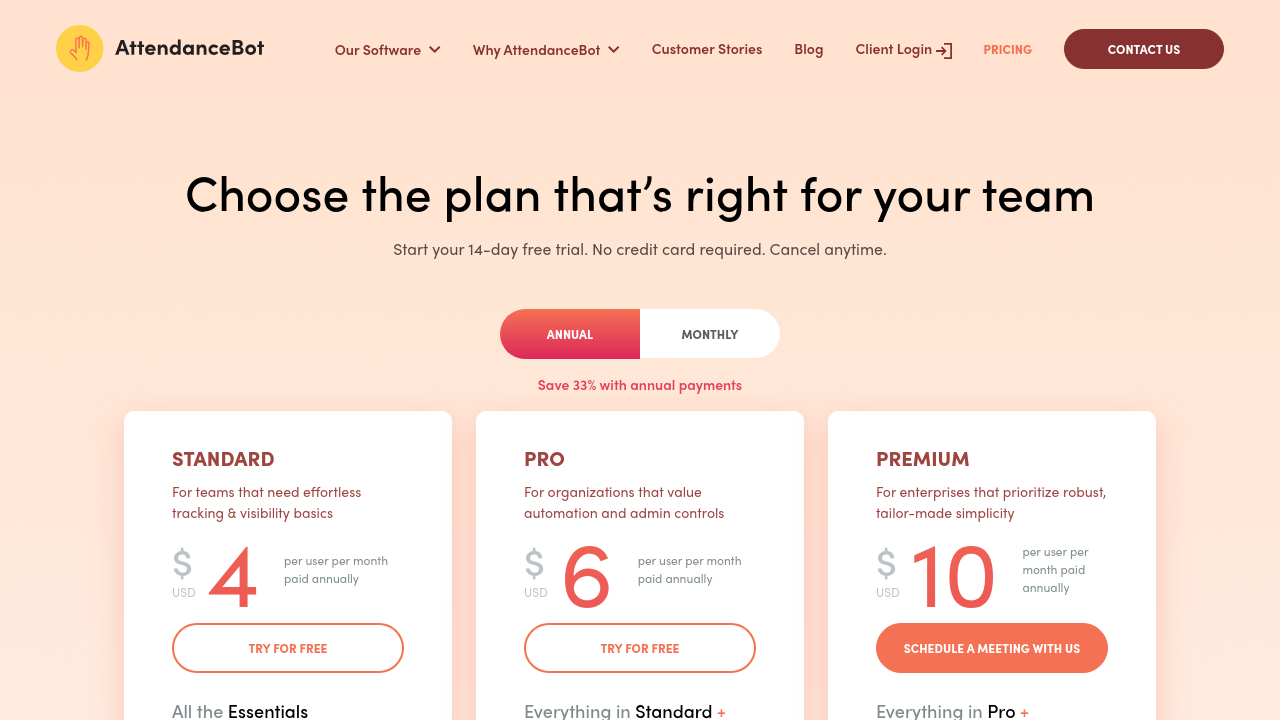
AttendanceBot pricing

Pricing model

Pricing Range
info Icon

This only an estimated pricing range, visit AttendanceBot pricing page to access all the information by clicking “Visit Now”.

$0-$15 / Month
Deals Available

This product comes with a special deal, see details

Visit Now
✨ Ask AI about pricing
83% Subscribed Score
info Icon

The Subscribed Score is an independent rating that combines user reviews, features, and value-for-money from multiple trusted sources. It’s designed as a quick benchmark, not a guarantee of individual experience.

Overview

AttendanceBot is an all-in-one solution designed to simplify time and attendance management within your organization. Integrated seamlessly into Slack, Microsoft 365, and Google Workspace, AttendanceBot offers a complete system for managing time off requests, time tracking, shift rostering, and employee scheduling—all while keeping your team in sync.

Positioned in the Time and Attendance Management category, AttendanceBot brings a host of capabilities to streamline daily operations. The platform empowers both employees and administrators, automating critical tasks and minimizing manual intervention. With powerful menus, quick command shortcuts, and robust notifications, it ensures that your team remains informed about attendance statuses, time off requests, and upcoming shifts at all times.

Key Features

  • Leave and Absence Management: Easily request time off, set up complex approval flows, and configure customized leave types including sick days, vacation, parental leaves, and more.
  • Time Tracking and Overtime Control: Record clock-ins and clock-outs for accurate timesheet entries. Use buttons for lunch breaks or overtime, ensuring compliance with your company policies.
  • Shift Scheduling and Rostering: Create, modify, and swap shifts with a sleek planning interface. Automated alerts and reminders keep teams updated on schedule changes in real time.
  • Hybrid Work and Office Capacity Planning: Manage remote work alongside regular office attendance. Set and monitor office capacities to maintain a balanced hybrid work environment.
  • Project and Client Billing: Track time by project or client, facilitating precise reporting and easier analysis of billable hours.

Why Use AttendanceBot?

AttendanceBot offers a streamlined platform that seamlessly integrates into your existing workflow. Its real-time updates reduce administrative overhead, making it easy for teams to stay on track even when working remotely. With administrative controls to tailor rules and accruals to your organization’s policies, AttendanceBot is both scalable and customizable to meet unique business needs. Additionally, features like automated reminders, live status updates, and an intuitive dashboard simplify oversight and ensure compliance.

Who Can Benefit?

AttendanceBot is ideal for small teams, mid-sized companies, and enterprises seeking an efficient way to manage attendance and time tracking. Whether you are a department manager overseeing schedules, a project lead tracking time allocations, or an HR professional managing leave policies, AttendanceBot offers a user-friendly yet powerful solution that adapts to your operational requirements.

Explore exclusive deals today and discover how AttendanceBot can transform your organization’s time management. Consider alternative solutions such as Paycom, Zapier, and Rippling if you’re exploring other options to streamline your processes.

Where AttendanceBot performs best

What users like
  • Seamless integration with Slack and Teams
  • Customizable features like leave types and approvals
  • Ease of use and fast adoption
  • Robust reporting and notifications

Where AttendanceBot falls short

What users dislike
  • Reports can be disorganized or limited
  • Editing timesheets is cumbersome for some users
  • Pricing may be high for smaller teams
  • Some features lack intuitive design
Subscribed Score Metrics
29/36 Metric achieved
MetricsScore
Customer Support5/6
Security4/6
Ease of Use5/6
Value of Money5/6
Integration4/6
Popularity6/6
Radar Chart Table View
Ease of Use
Measures how simple and intuitive the product is to use, including setup, navigation, and overall user experience
5/6 Metric Checks
Security
Compares the product`s features, quality, and pricing to determine its overall cost-effectiveness.
4/6 Metric Checks
Value of Money
Assesses the product`s ability to protect data, prevent breaches, and comply with industry standards.
5/6 Metric Checks
Customer Support
Reflects the responsiveness, helpfulness, and quality of assistance provided by the product`s support team.
5/6 Metric Checks
Integrations
Evaluates how well the product connects with other tools and platforms, enabling seamless workflows.
4/6 Metric Checks
AttendanceBot Pricing Range
$0-$15 / Month

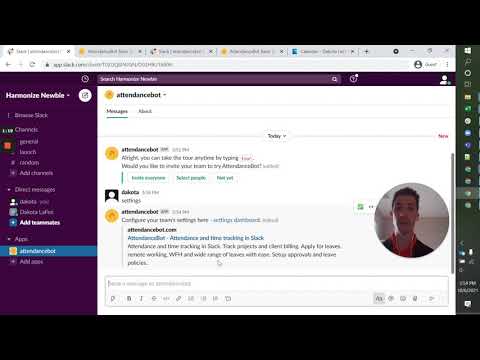
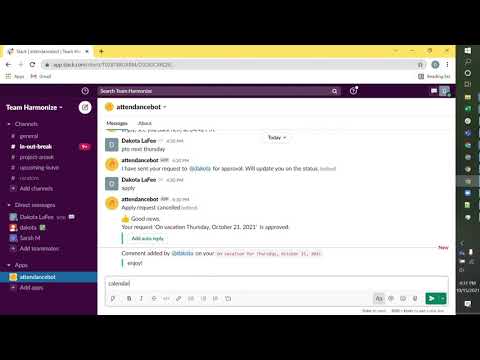
AttendanceBot in action
info Icon

A curated gallery of real screenshots and use cases from the product, so you can see how it works before trying it.

AttendanceBot Full Screen Icon
https://www.youtube.com/watch?v=OeNrT_yqE2Y
Full Screen Icon
https://www.youtube.com/watch?v=zjVHV9nM6M8
Full Screen Icon
AttendanceBot
AttendanceBot
Video thumbnail
Video thumbnail
AttendanceBot
AttendanceBot

Alternatives to AttendanceBot
info Icon

A list of platforms similar to AttendanceBot, helping you evaluate which tool best matches your needs.

How to cancel AttendanceBot

Need to cancel AttendanceBot? Here is how
info Icon

Thinking about how to cancel AttendanceBot this is how you do it!

To cancel AttendanceBot, contact support within 60 days for a refund. Monthly plans do not offer refunds. Reach out via chat or email for assistance.

How to Cancel the AttendanceBot

To cancel AttendanceBot, contact support within 60 days for a refund. Monthly plans do not offer refunds. Reach out via chat or email for assistance.

FAQs about AttendanceBot

Every else you need to know about AttendanceBot
info Icon

A collection of FAQs, guides, alternatives, and comparisons to help you quickly understand if AttendanceBot is right for you.

Manage your AttendanceBot profile

Create profile

Want to list your product on Subscribed.fyi? Create a profile to reach more buyers.

Pricing Range
info Icon

This only an estimated pricing range, visit AttendanceBot pricing page to access all the information by clicking “Visit Now”.

$0-$15 / Month
Visit Now
Deals Available

This product comes with a special deal, see details

This product comes with a special deal, see details