Best AI coding tools for developers
- AI Image Generators Software AI Writing Assistant Popular Tools AI Tools WebOps Platforms Bug Tracking & Feedback Software Web Development & Design
Picking the right AI coding assistant can make a huge difference in how quickly you write, debug, and actually ship your code.
The best ones nowadays go way beyond basic autocomplete. They give you an AI chat, generate whole chunks of code, help you debug tricky issues, and integrate deeply with your editor or IDE.
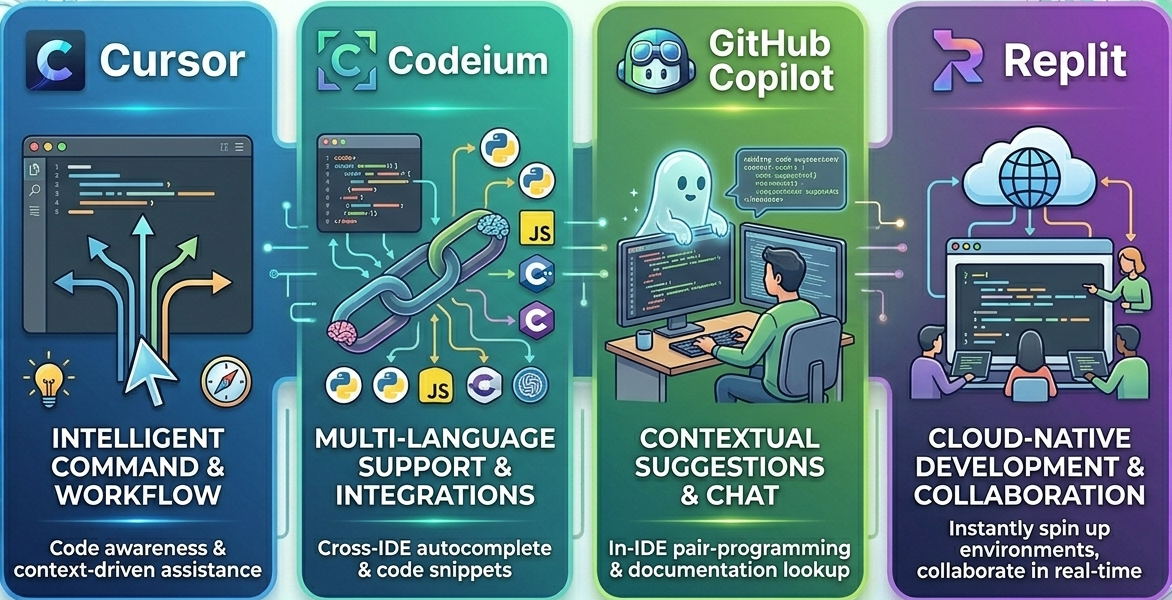
In this guide, you will discover and compare top AI coding tools like Cursor, Codeium, Copilot, and Replit. You can also explore detailed reviews and comparisons on Subscribed.fyi to find the best fit for your workflow.
What are AI coding tools
AI coding tools are developer-focused platforms that use large language models to assist with writing and improving code. These tools integrate directly into your editor or browser and help with:
- Code completion and suggestions
- Debugging and error explanations
- Refactoring and optimization
- Natural language to code generation
- Documentation and test generation
Instead of switching between docs, Stack Overflow, and your IDE, these tools bring everything into one workflow.
If you are evaluating tools, platforms like Subscribed.fyi help you compare features, pricing, and real user reviews in one place.
Cursor overview
Cursor is an AI-first code editor built on top of VS Code. It is designed specifically for developers who want a deeply integrated AI experience rather than a plugin.
Key features
- AI chat that understands your full codebase
- Inline editing and refactoring using prompts
- Context-aware suggestions across files
- Built-in debugging assistance
Why developers use it
Cursor is ideal for developers who want AI to act like a real pair programmer. Instead of just completing lines, it can modify entire files, explain logic, and help restructure code.
Use case
A startup building an MVP can use Cursor to quickly scaffold features, refactor messy code, and debug issues without leaving the editor.
Codeium overview
Codeium is a fast and free AI coding assistant that supports many editors and languages.
Key features
- Free unlimited code completion
- Support for dozens of IDEs
- Fast response time
- Basic AI chat and search
Why developers use it
Codeium has become really popular with developers who are looking for a lightweight, budget-friendly alternative to those expensive premium tools. It delivers solid autocomplete performance without subscription costs.
Use case
Freelancers and students often use Codeium to speed up coding tasks without adding extra expenses to their workflow.
GitHub Copilot overview
Copilot is one of the most widely adopted AI coding tools, developed by GitHub in collaboration with OpenAI.
Key features
- Advanced code completion
- AI chat inside IDEs
- Deep integration with GitHub workflows
- Support for multiple languages
Why developers use it
Copilot fits naturally into existing GitHub-based workflows. It is especially useful for teams already using GitHub for version control and collaboration.
Use case
A development team working on a large SaaS product can use Copilot to speed up repetitive coding tasks, generate boilerplate code, and maintain consistency across projects.
Replit overview
Replit is a browser-based development platform with built-in AI capabilities.
Key features
- AI-powered coding assistant (Ghostwriter)
- Cloud-based development environment
- Instant deployment and hosting
- Collaboration features
Why developers use it
Replit is ideal for developers who want an all-in-one platform. You can write code, collaborate, and deploy without setting up a local environment.
Use case
Educators and beginner developers use Replit to quickly build and share projects without worrying about setup or configuration.
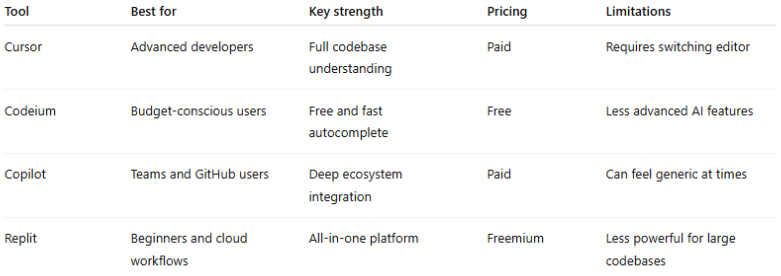
Comparison of AI coding tools
How to choose the right tool
The best AI coding tool depends on how you work.
If you want deep AI integration and full control over your codebase, Cursor is the strongest option.
If you need a free and reliable assistant, Codeium is a practical choice.
If your workflow is built around GitHub, Copilot offers the most seamless experience.
If you prefer a cloud-based environment with built-in deployment, Replit is a great fit.
Real-world workflow examples
Many developers combine these tools instead of relying on just one.
A common setup looks like this:
- Cursor for heavy coding and refactoring
- Copilot for quick suggestions inside GitHub projects
- Codeium as a backup or lightweight assistant
- Replit for rapid prototyping and sharing
This combination allows developers to optimize for speed, flexibility, and cost.
Conclusion
AI coding tools like Cursor, Codeium, Copilot, and Replit are transforming how developers build software. Whether you prioritize deep AI integration, affordability, ecosystem compatibility, or cloud-based workflows, there is a tool tailored to your needs.
Instead of guessing which one to choose, you can use Subscribed.fyi to explore reviews, compare features side by side, and discover the best tools for your workflow.