Top AI-Powered IDEs and Productivity Extensions for Developers
- AI Image Generators Software AI Writing Assistant Popular Tools AI Tools WebOps Platforms Bug Tracking & Feedback Software Web Development & Design
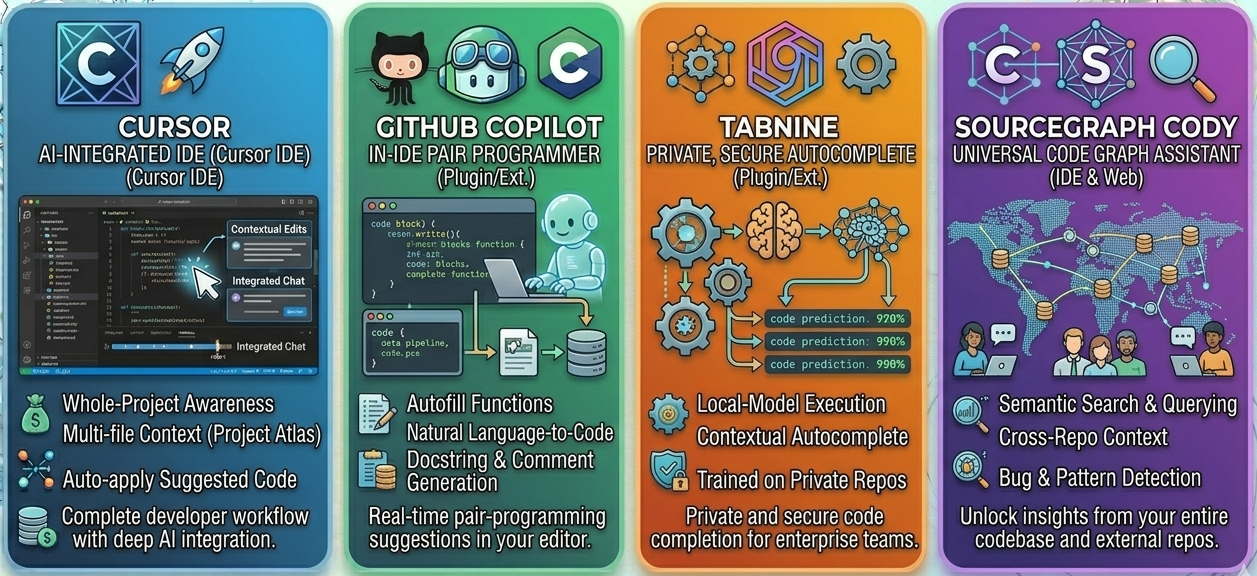
Modern development workflows are evolving fast, and AI is now deeply embedded in how teams write, review, and ship code. Tools like Cursor, GitHub Copilot, Tabnine, and Sourcegraph Cody are leading this shift by integrating large language models directly into development environments.
These tools go beyond autocomplete. They automate repetitive coding tasks, suggest architectural improvements, and even assist in terminal workflows. The key question is not whether to adopt AI in development, but which tool aligns best with your team’s needs. If you are evaluating which tools deliver the best return on investment, platforms like Subscribed.fyi provide curated insights and comparisons.
What makes AI-powered IDEs different
Traditional IDEs focus on syntax highlighting, debugging, and basic autocomplete. AI-powered IDEs extend this by understanding intent.
They can generate entire functions from comments, refactor large codebases with context awareness, and explain unfamiliar code instantly. This reduces onboarding time and allows developers to focus on higher-value work.
For example, instead of manually writing boilerplate API handlers, a developer can describe the functionality and let the tool generate a complete implementation. This is where tools like Cursor and GitHub Copilot stand out.
Cursor overview
Cursor is built as an AI-first code editor. Unlike plugins that sit on top of existing IDEs, this tool integrates AI into the core editing experience.
It allows developers to edit code using natural language instructions. You can highlight a block of code and ask for improvements, refactoring, or even a rewrite in a different style.
A real use case is refactoring legacy code. Instead of manually tracing dependencies, developers can prompt Cursor to simplify logic or convert patterns, saving hours of effort.
Cursor works best for teams that want a fully integrated AI workflow rather than adding extensions to existing tools.
GitHub Copilot overview
GitHub Copilot is one of the most widely adopted AI coding assistants. It integrates seamlessly into popular IDEs and provides real-time code suggestions as you type.
Its strength lies in speed and familiarity. Developers can continue using their preferred environment while gaining AI assistance.
A common use case is accelerating feature development. For example, when building a new endpoint, Copilot can suggest function structures, validation logic, and even test cases.
However, Copilot is more focused on inline suggestions rather than deep codebase understanding.
Tabnine overview
Tabnine emphasizes privacy and team customization. It allows organizations to train models on their own codebase, ensuring suggestions are aligned with internal standards.
This makes it a strong choice for enterprises handling sensitive data.
A practical use case is maintaining coding consistency across large teams. Tabnine can suggest patterns that match company guidelines, reducing review cycles.
It may not be as aggressive in generating large code blocks as other tools, but it excels in controlled environments.
Sourcegraph Cody overview
Sourcegraph Cody is designed for navigating and understanding large codebases. It combines AI with advanced code search capabilities.
Instead of just generating code, Cody helps developers explore repositories, trace dependencies, and understand how systems are connected.
A real-world example is onboarding new developers. Cody can answer questions about the codebase, such as where a function is used or how a service interacts with others.
This makes it particularly valuable for teams working with complex systems.
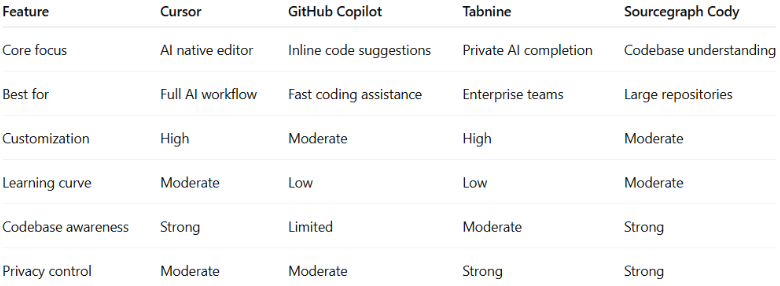
Comparison of AI-powered IDE tools

Choosing the right tool for your team
The right choice depends on how your team works.
If you want a fully AI-driven development experience, Cursor is a strong option. It changes how developers interact with code entirely.
If your team prefers minimal disruption, GitHub Copilot offers immediate productivity gains with almost no learning curve.
For organizations with strict data policies, Tabnine provides better control and customization.
If your challenge is navigating large and complex codebases, Sourcegraph Cody delivers the most value.
Conclusion
AI-powered IDEs are no longer optional tools. They are becoming a standard part of modern development workflows. Tools like Cursor, GitHub Copilot, Tabnine, and Sourcegraph Cody each offer distinct advantages depending on your priorities.
Check them out on Subscribed.fyi by comparing their features, real use cases, and integration capabilities, you can identify which solution delivers the best ROI for your engineering team.
Relevant links