Sign in to review
Join our community of software reviewers on Subscribed.fyi

Continue With Google
Continue With LinkedIn
Continue Review with Email
Continue with Email
Enter your email to continue.
Continue
Enter your password
Enter your password to finish setting up your account.
Continue
Activate your email
Enter activation code we sent to your email.
Submit
Reset your password
Enter activation code we sent to your email.
Submit
Set your new password
Enter a new password for your account.
Submit
Categories
For Business
Log in
Provide My Insights
Add Product
Suggested products People also compare with
Add to Comparison
Suggested products People also compare with

Compare AccountAbility and QuickBooks Online

We are comparing AccountAbility and QuickBooks Online to evaluate which one is the best product.

Suggested products People also compare with
Review Pricing Alternatives Experience

Review

72%
26/36 Metric achieved
83%
29/36 Metric achieved

Subscribed Metric

Customer Support 6/6
Security 0/6
Ease of Use 6/6
Value of Money 6/6
Integration 4/6
Popularity 4/6

Subscribed Metric

Customer Support 4/6
Security 4/6
Ease of Use 5/6
Value of Money 5/6
Integration 5/6
Popularity 6/6

Pros & Cons

Intuitive and easy to use interface
Comprehensive reporting and dashboards
Cloud-based with remote access
Excellent customer support
Occasionally slow learning curve
Complex add-on reporting tools
Navigation can be slightly awkward
No Android app available

Pros & Cons

User-friendly interface and ease of use
Strong automation features for repetitive tasks
Comprehensive reporting and customization options
Reliable cloud-based access and backup
Glitches and slow performance at times
Pricing is higher than some alternatives
Limited CRM capabilities without third-party apps
Occasional delays in feature updates or fixes

Conclusion

AccountAbility Product Overview:
AccountAbility is a cloud-based ERP designed for marketing, advertising, and communication agencies. Key features include integrated job management, accounting, time tracking, resource planning, and customizable reporting. It supports multi-currency and multi-office setups, integrates seamlessly with popular tools via APIs, and ensures agency-wide transparency.

Pros vs. Alternatives:
Compared to NetSuite, Sage Intacct, and QuickBooks Online, AccountAbility excels in agency-specific functionality and affordability. It’s easier to use and tailored for small-to-medium agencies. However, scalability for larger enterprises and advanced analytics may be less robust.

Ideal Users:
Perfect for marketing teams, agency CFOs, and project managers aiming to streamline processes, track profitability, and enhance financial accuracy.

Support & Pricing:
Outstanding customer support ensures smooth onboarding and ongoing assistance. Pricing is tailored; contact for details. A cost-effective choice for agencies seeking simplicity and value.

Conclusion

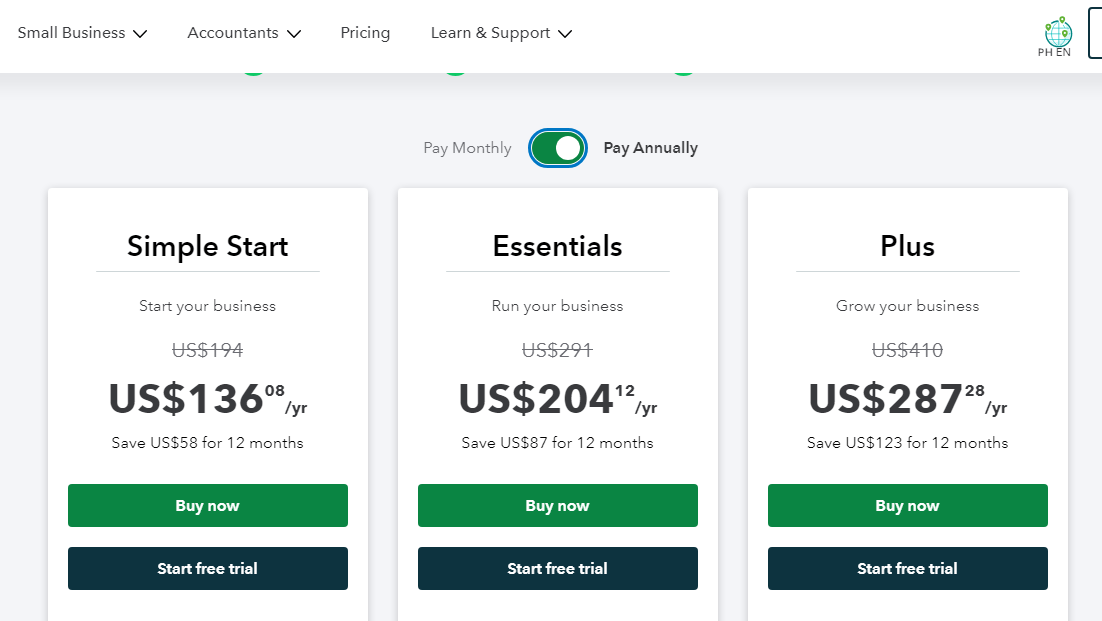
QuickBooks Online is a top-tier accounting software, ideal for small to mid-sized businesses, including freelancers, designers, developers, and marketers. Core features include customizable invoices, expense tracking, inventory management, and seamless app integrations. Plans start at $20/month (Simple Start) with advanced plans up to $150/month. Compared to Xero or FreshBooks, QuickBooks offers robust financial reporting and app compatibility but may feel complex for beginners. Customer support is efficient, though pricing can be higher for advanced features. Reliable for long-term use.

Pricing

AccountAbility Pricing

Pricing Range Not specified

QuickBooks Online Pricing

Pricing Range Not specified See QuickBooks Online Pricing

Alternatives

AccountAbility Alternatives

QuickBooks Online logo

QuickBooks Online

83%
NetSuite

NetSuite

78%
See All AccountAbility Alternatives

QuickBooks Online Alternatives

FreshBooks logo

FreshBooks

85%
Xero logo

Xero

80%
NetSuite

NetSuite

78%
See All QuickBooks Online Alternatives

Experience

AccountAbility Screenshots

AccountAbility screenshot 1

QuickBooks Online Screenshots

QuickBooks Online screenshot 1
QuickBooks Online screenshot 2