Sign in to review
Join our community of software reviewers on Subscribed.fyi

Continue With Google
Continue With LinkedIn
Continue Review with Email
Continue with Email
Enter your email to continue.
Continue
Enter your password
Enter your password to finish setting up your account.
Continue
Activate your email
Enter activation code we sent to your email.
Submit
Reset your password
Enter activation code we sent to your email.
Submit
Set your new password
Enter a new password for your account.
Submit
Categories
For Business
Log in
Provide My Insights
Add Product
Suggested products People also compare with
Add to Comparison
Suggested products People also compare with

Compare Beyond Compare and Studio 3T

We are comparing Beyond Compare and Studio 3T to evaluate which one is the best product.

Suggested products People also compare with
Review Pricing Alternatives Experience

Review

71%
25/36 Metric achieved
78%
27/36 Metric achieved

Subscribed Metric

Customer Support 5/6
Security 0/6
Ease of Use 6/6
Value of Money 5/6
Integration 4/6
Popularity 5/6

Subscribed Metric

Customer Support 5/6
Security 4/6
Ease of Use 5/6
Value of Money 4/6
Integration 3/6
Popularity 6/6

Pros & Cons

Easy-to-use interface with fast navigation.
Accurate comparison for files, folders, and subfolders.
Customizable with support for various file types.
Reliable synchronization and automation of tasks.
Session management can be confusing at times.
Lacks advanced features like JSON formatting.
Occasionally struggles with certain AI-based differences.
Limited free version availability compared to competitors.

Pros & Cons

User-friendly interface praised by many.
SQL to NoSQL conversion simplifies usage.
Efficient visual query builder for ease.
Enhances productivity with robust features.
High license cost frequently noted.
UI could be easier to navigate.
Crashes during large exports reported.
Memory and performance issues on occasion.

Conclusion

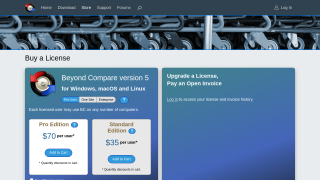
Beyond Compare is a file and folder comparison software designed for developers, IT professionals, and analysts to efficiently compare, merge, and sync data. It supports text, binary, image, and folder comparisons, offering features like 3-way merges, customizable rules, and integrations with tools like Visual Studio. Priced at $30 (Standard) or $60 (Pro) per user, it’s highly cost-effective compared to rivals like Araxis Merge, with the latter being pricier but more feature-rich for design-focused tasks. Beyond Compare excels in ease-of-use and speed, making it ideal for developers or QA teams, though advanced visualization features are limited for designers. With responsive customer support, it’s a reliable, budget-friendly tool for most comparison needs.

Conclusion

Studio 3T is a powerful MongoDB management tool tailored for developers and IT professionals. Key features include a Visual Query Builder, Aggregation Editor, SQL to MongoDB query translation, AI-powered query generation, and advanced automation. Renowned for its intuitive interface and robust features, Studio 3T simplifies complex tasks like schema exploration and migrations, boosting productivity.

It surpasses alternatives like Compass in flexibility and efficiency, particularly useful for teams transitioning from SQL to NoSQL. However, its cost ($249–$699/year) is higher than some competitors, and memory use can be heavy. Customer support is rated highly, ensuring effective issue resolution. While expensive, its rich functionality justifies the price for large-scale database projects.

Pricing

Beyond Compare Pricing

Pricing Range $15.75-42k/Month See Beyond Compare Pricing

Studio 3T Pricing

Pricing Range Not specified. See Studio 3T Pricing

Alternatives

Beyond Compare Alternatives

Studio 3T logo

Studio 3T

78%
See All Beyond Compare Alternatives

Studio 3T Alternatives

DBeaver logo

DBeaver

83%
See All Studio 3T Alternatives

Experience

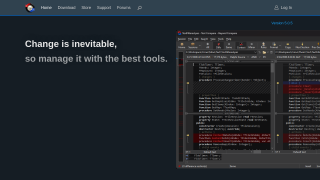
Beyond Compare Screenshots

Beyond Compare screenshot 1
Beyond Compare screenshot 2

Studio 3T Screenshots

Studio 3T screenshot 1
Studio 3T screenshot 2