Sign in to review
Join our community of software reviewers on Subscribed.fyi

Continue With Google
Continue With LinkedIn
Continue Review with Email
Continue with Email
Enter your email to continue.
Continue
Enter your password
Enter your password to finish setting up your account.
Continue
Activate your email
Enter activation code we sent to your email.
Submit
Reset your password
Enter activation code we sent to your email.
Submit
Set your new password
Enter a new password for your account.
Submit
Categories
For Business
Log in
Provide My Insights
Add Product
Suggested products People also compare with
Add to Comparison
Suggested products People also compare with

Compare Keynote and Visme

We are comparing Keynote and Visme to evaluate which one is the best product.

Suggested products People also compare with
Review Pricing Alternatives Experience

Review

80%
28/36 Metric achieved
68%
23/36 Metric achieved

Subscribed Metric

Customer Support 4/6
Security 4/6
Ease of Use 6/6
Value of Money 5/6
Integration 3/6
Popularity 6/6

Subscribed Metric

Customer Support 4/6
Security 0/6
Ease of Use 5/6
Value of Money 5/6
Integration 3/6
Popularity 6/6

Pros & Cons

Intuitive and user-friendly interface.
Beautiful templates and slide designs.
Easy integration with Apple ecosystem.
Flexible multimedia and animation features.
Limited to Apple devices, hindering collaboration.
Cloud version needs improvement.
Custom font issues between Mac and iPad.
Limited default templates for varied needs.

Pros & Cons

High-quality templates and visuals
Intuitive and easy to use
Great data visualization tools
Exceptional customer support
Occasional glitches and bugs
High pricing for multiple licenses
Slow performance for large projects
Limited free template options

Conclusion

Product Overview: Keynote

Key Features: Keynote excels with intuitive design, cinematic effects, and seamless integration across Apple devices. Features include custom templates, animations, presenter tools, and cloud-based collaboration, making it ideal for creating visually stunning presentations.

Performance: Known for exceptional visuals, Keynote is favored by designers, marketers, and educators seeking polished and engaging slides. However, collaboration features lag behind competitors.

Pricing: Free for Apple users, it offers top-tier value compared to alternatives like Microsoft PowerPoint (starting at $6) and Canva Pro ($15).

Comparison: Keynote vs Microsoft PowerPoint: Keynote offers superior aesthetics but lacks cross-platform compatibility. Compared to Canva, it’s less template-rich but more professional in design.

Pros: User-friendly, cost-effective, high-quality visuals.
Cons: Limited to Apple users, weaker collaboration tools.

Customer Support & Cost-effectiveness: Highly rated support and no additional cost mean great value for Apple users. However, multi-platform teams may prefer alternatives.

Conclusion

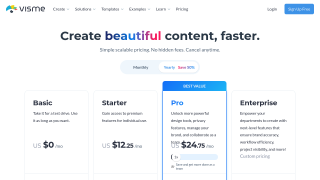
Visme is an all-in-one platform ideal for creating presentations, infographics, reports, and more, saving up to 79% design time without requiring prior design expertise. Key features include AI tools, templates, collaboration, analytics, and cloud-based access. Great for marketers, educators, and small businesses, it offers a free plan and paid options starting at $12.25/month. Compared to Canva or Prezi, Visme excels in data visualization but may encounter minor glitches. Customer support is highly rated, with solid cost-effectiveness for professionals seeking polished visuals.

Pricing

Keynote Pricing

Pricing Range $0.3k-0.9k/Month See Keynote Pricing

Visme Pricing

Pricing Range Not specified See Visme Pricing

Alternatives

Keynote Alternatives

Canva logo

Canva

90%
Adobe InDesign logo

Adobe InDesign

80%
Visme logo

Visme

68%
See All Keynote Alternatives

Visme Alternatives

Canva logo

Canva

90%
Adobe Illustrator logo

Adobe Illustrator

68%
Infogram logo

Infogram

58%
Contractor s Cloud logo

Contractor s Cloud

55%
See All Visme Alternatives

Experience

Keynote Screenshots

Keynote screenshot 1
Keynote screenshot 2

Visme Screenshots

Visme screenshot 1
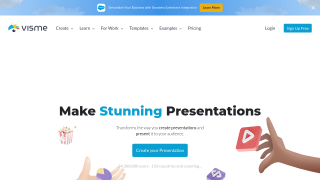
Visme screenshot 2