Sign in to review
Join our community of software reviewers on Subscribed.fyi

Continue With Google
Continue With LinkedIn
Continue Review with Email
Continue with Email
Enter your email to continue.
Continue
Enter your password
Enter your password to finish setting up your account.
Continue
Activate your email
Enter activation code we sent to your email.
Submit
Reset your password
Enter activation code we sent to your email.
Submit
Set your new password
Enter a new password for your account.
Submit
Categories
For Business
Log in
Provide My Insights
Add Product
Suggested products People also compare with
Add to Comparison
Suggested products People also compare with

Compare Peach Software and QuickBooks Online

We are comparing Peach Software and QuickBooks Online to evaluate which one is the best product.

Suggested products People also compare with
Review Pricing Alternatives Experience

Review

62%
22/36 Metric achieved
83%
29/36 Metric achieved

Subscribed Metric

Customer Support 5/6
Security 0/6
Ease of Use 5/6
Value of Money 5/6
Integration 3/6
Popularity 4/6

Subscribed Metric

Customer Support 4/6
Security 4/6
Ease of Use 5/6
Value of Money 5/6
Integration 5/6
Popularity 6/6

Pros & Cons

Ease of use and training for new users
Strong customer support and responsiveness
Flexible reporting and customization options
Good inventory and order management features
Complexity in generating or editing reports
Frequent software bugs or update issues
Integration with other systems needs improvement
Period lock and invoice editing difficulties

Pros & Cons

User-friendly interface and ease of use
Strong automation features for repetitive tasks
Comprehensive reporting and customization options
Reliable cloud-based access and backup
Glitches and slow performance at times
Pricing is higher than some alternatives
Limited CRM capabilities without third-party apps
Occasional delays in feature updates or fixes

Conclusion

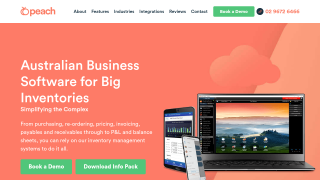
Peach Software is an ERP solution tailored for the automotive aftermarket, wholesalers, and importers, offering robust inventory control, kitting, barcode scanning, and forecasting tools. Its customization options include alternate suppliers/products and bulk data queries. Prices start at $180/month per user plus an initial setup fee (~$1,500), making it more affordable than many alternatives like QuickBooks or Xero.

Target user groups include small to mid-sized wholesale and automotive businesses. Pros include ease of use, local support with quick resolution times, and cost-effectiveness. However, reports customization and integration features may need improvement. Customer support is highly praised for being responsive, aided by frequent updates (every 10 days). While alternatives may provide broader functionalities, Peach excels in specialized inventory management for industry-specific users, offering value for money with streamlined B2B capabilities.

Conclusion

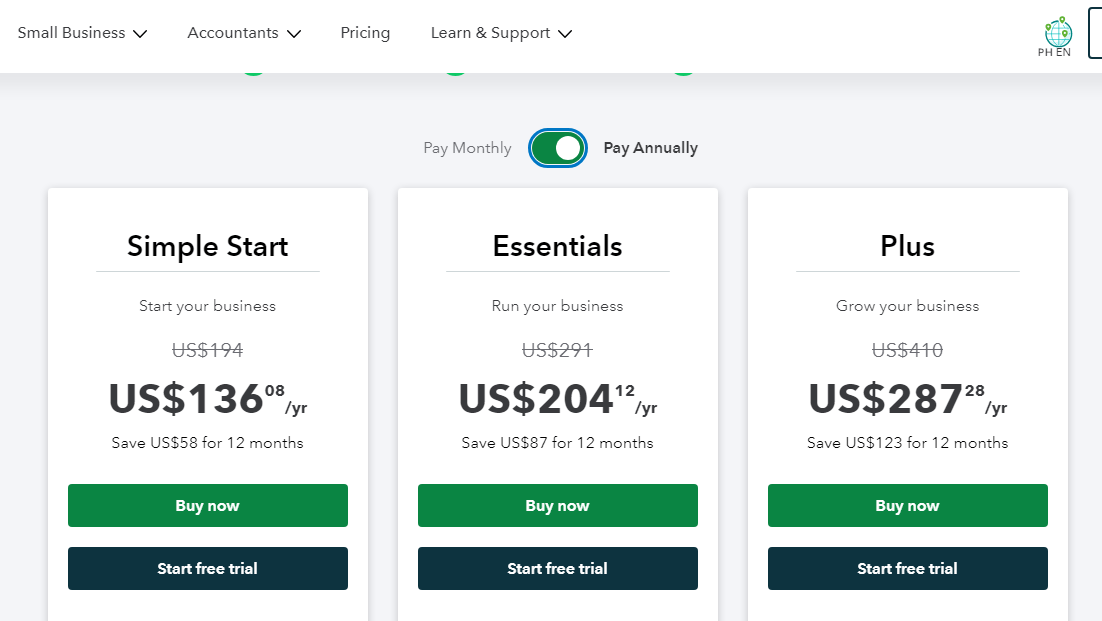
QuickBooks Online is a top-tier accounting software, ideal for small to mid-sized businesses, including freelancers, designers, developers, and marketers. Core features include customizable invoices, expense tracking, inventory management, and seamless app integrations. Plans start at $20/month (Simple Start) with advanced plans up to $150/month. Compared to Xero or FreshBooks, QuickBooks offers robust financial reporting and app compatibility but may feel complex for beginners. Customer support is efficient, though pricing can be higher for advanced features. Reliable for long-term use.

Pricing

Peach Software Pricing

Pricing Range Not specified

QuickBooks Online Pricing

Pricing Range Not specified See QuickBooks Online Pricing

Alternatives

Peach Software Alternatives

QuickBooks Online logo

QuickBooks Online

83%
Xero logo

Xero

80%
See All Peach Software Alternatives

QuickBooks Online Alternatives

FreshBooks logo

FreshBooks

85%
Xero logo

Xero

80%
NetSuite

NetSuite

78%
See All QuickBooks Online Alternatives

Experience

Peach Software Screenshots

Peach Software screenshot 1

QuickBooks Online Screenshots

QuickBooks Online screenshot 1
QuickBooks Online screenshot 2