Sign in to review
Join our community of software reviewers on Subscribed.fyi

Continue With Google
Continue With LinkedIn
Continue Review with Email
Continue with Email
Enter your email to continue.
Continue
Enter your password
Enter your password to finish setting up your account.
Continue
Activate your email
Enter activation code we sent to your email.
Submit
Reset your password
Enter activation code we sent to your email.
Submit
Set your new password
Enter a new password for your account.
Submit
Categories
For Business
Log in
Provide My Insights
Add Product
Suggested products People also compare with
Add to Comparison
Suggested products People also compare with

Compare Zoho Expense and QuickBooks Online

We are comparing Zoho Expense and QuickBooks Online to evaluate which one is the best product.

Suggested products People also compare with
Review Pricing Alternatives Experience

Review

80%
28/36 Metric achieved
83%
29/36 Metric achieved

Subscribed Metric

Customer Support 4/6
Security 4/6
Ease of Use 5/6
Value of Money 5/6
Integration 4/6
Popularity 6/6

Subscribed Metric

Customer Support 4/6
Security 4/6
Ease of Use 5/6
Value of Money 5/6
Integration 5/6
Popularity 6/6

Pros & Cons

Highly customizable and feature-rich tool.
Seamless receipt autoscan and OCR functionality.
Effective multi-device integration and user-friendly interface.
Good automation for expense tracking and reporting.
Some credit card integrations are complex.
Customer support may lack consistency.
Mobile app less robust than web version.
High cost compared to alternatives for basic features.

Pros & Cons

User-friendly interface and ease of use
Strong automation features for repetitive tasks
Comprehensive reporting and customization options
Reliable cloud-based access and backup
Glitches and slow performance at times
Pricing is higher than some alternatives
Limited CRM capabilities without third-party apps
Occasional delays in feature updates or fixes

Conclusion

Zoho Expense is a powerful and cost-effective travel and expense management software designed for businesses, freelancers, and startups. Its key features include receipt scanning, expense categorization, multi-level approvals, and integration with Zoho Books/CRM. It automates repetitive expense tasks, improving accuracy and operational efficiency.

Compared to alternatives like SAP Concur or Expensify, Zoho Expense is affordable and user-friendly, appealing to marketers and designers needing scalable and intuitive solutions. However, limited support for advanced integrations may hinder developers with complex needs. Customer support is responsive but occasionally criticized for delays. Plans start at $0 for freelancers; Premium costs $7/user/month. Overall, Zoho Expense balances features and affordability effectively.

Conclusion

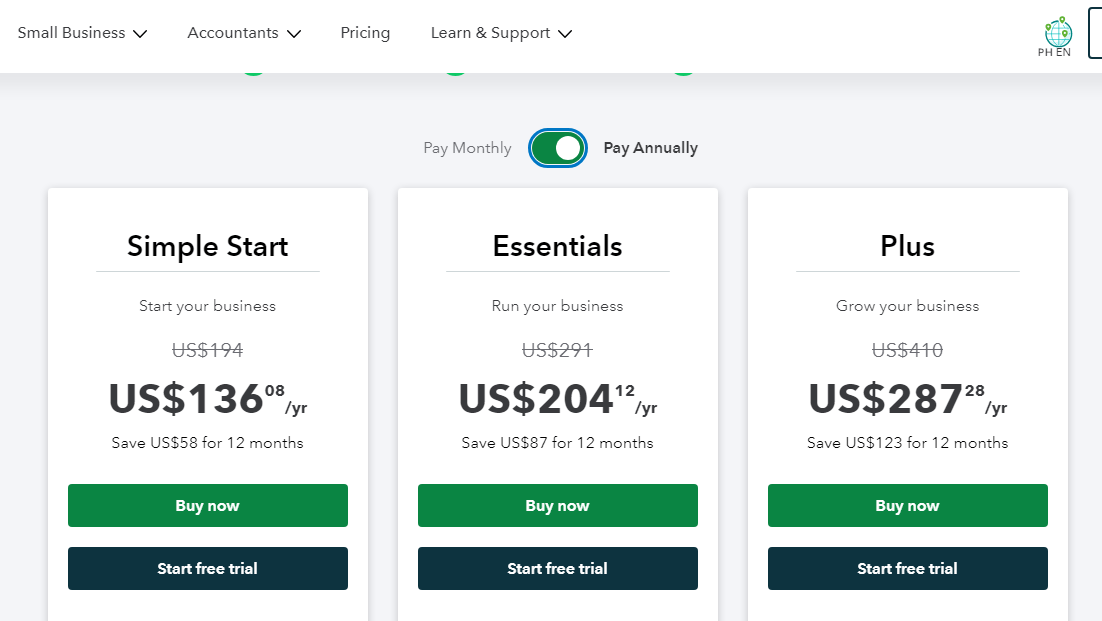
QuickBooks Online is a top-tier accounting software, ideal for small to mid-sized businesses, including freelancers, designers, developers, and marketers. Core features include customizable invoices, expense tracking, inventory management, and seamless app integrations. Plans start at $20/month (Simple Start) with advanced plans up to $150/month. Compared to Xero or FreshBooks, QuickBooks offers robust financial reporting and app compatibility but may feel complex for beginners. Customer support is efficient, though pricing can be higher for advanced features. Reliable for long-term use.

Pricing

Zoho Expense Pricing

Pricing Range $14-$65/Month See Zoho Expense Pricing

QuickBooks Online Pricing

Pricing Range Not specified See QuickBooks Online Pricing

Alternatives

Zoho Expense Alternatives

Rippling Logo

Rippling

93%
QuickBooks Online logo

QuickBooks Online

83%
Fyle logo

Fyle

83%
SAP Concur logo

SAP Concur

82%
See All Zoho Expense Alternatives

QuickBooks Online Alternatives

FreshBooks logo

FreshBooks

85%
Xero logo

Xero

80%
NetSuite

NetSuite

78%
See All QuickBooks Online Alternatives

Experience

Zoho Expense Screenshots

Zoho Expense screenshot 1
Zoho Expense screenshot 2

QuickBooks Online Screenshots

QuickBooks Online screenshot 1
QuickBooks Online screenshot 2