Project management tools like , Notion, Basecamp, Lark, Slack, Asana and Trello.
AI chatbot tools like ChatGPT, Grok, Perplexity, Claude, Gemini and Copilot.
Marketing analytics platforms like Google Analytics, Similarweb and Semrush.
CRM systems like HubSpot, Apollo.io Pipedrive, Zoho CRM, and Salesforce.
VPNs, SSO providers, and password managers like NordVPN, Okta, and LastPass.
Email marketing and campaign tools like MailerLite, Instantly, and Mailchimp.
Website builders, hosting tools like Hostinger, Webflow, Framer, and Shopify
HR and recruiting software like ATS platforms, BambooHR, Workday, and Lever.
Automate finances with confidence like Quickbooks, Stripe, Brex, and Mercury.
Design and editing tools like Figma, Canva, Adobe Creative Cloud, CapCut.
Workflow automation tools like Zapier, Make, Clay, and Reclaim.ai.
No-code and AI-native dev tools like Cursor, Windsurf, Lovable and Bubble.
Chat to find tools, compare options,
Discover the best-performing
Curated and listed by Subscribed Team
Loadium is a modern performance and load testing tool that enables organizations to simulate real-world usage scenarios using popular open source testing engines, including JMeter, Gatling, and Selenium. Built to address the challenges of ensuring optimal application performance, Loadium offers a robust platform designed to cut costs, reduce business risk, and improve customer satisfaction.
At its core, Loadium empowers users to upload JMX files and configure test parameters such as engine selection, thread count, iterations, geolocation, and network type. This flexibility allows testers to simulate varied traffic conditions and drill down into specific performance bottlenecks. The tool’s capability to compare previous test runs helps you monitor progress, identify trends, and maintain an optimal user experience over time.
Key Features and Benefits
The platform’s integration capabilities further enhance its appeal. Loadium easily connects with industry-standard tools such as Jenkins, New Relic, and Team City, embedding performance testing into your continuous integration and delivery pipelines. This seamless integration ensures that performance validation becomes an essential part of every development cycle.
Positioned in the Performance Testing Tools category, Loadium offers an accessible yet powerful solution to address the evolving needs of modern web applications. Whether you are a quality assurance professional, developer, or product manager, Loadium’s suite of features is designed to support your efforts in maintaining high-quality, responsive applications.
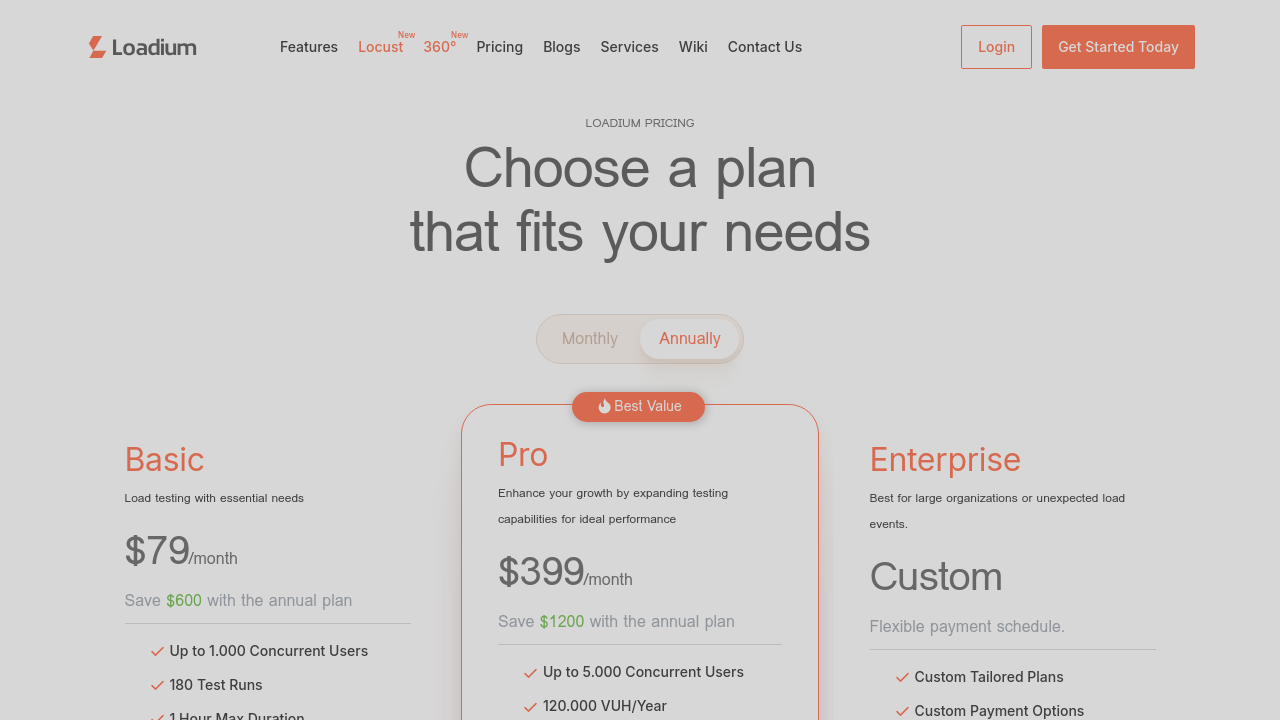
For businesses looking for an affordable and reliable performance testing solution, Loadium presents flexible pricing plans, including a Basic Plan that fits smaller teams while maintaining enterprise-level capabilities. Check out exclusive deals to find the plan that best suits your requirements.
Consider Alternatives
If you’re evaluating your performance testing options, you might also explore:
Each alternative offers unique features that could complement your testing strategy, but Loadium’s robust functionality and ease of integration make it a compelling choice for reliable performance and load testing across a range of applications.

Loadium is a modern performance and load testing tool that enables organizations to simulate real-world usage scenarios using popular open source testing engines, including JMeter, Gatling, and Selenium. Built to address the challenges of ensuring optimal application performance, Loadium offers a robust platform designed to cut costs, reduce business risk, and improve customer satisfaction.
At its core, Loadium empowers users to upload JMX files and configure test parameters such as engine selection, thread count, iterations, geolocation, and network type. This flexibility allows testers to simulate varied traffic conditions and drill down into specific performance bottlenecks. The tool’s capability to compare previous test runs helps you monitor progress, identify trends, and maintain an optimal user experience over time.
Key Features and Benefits
The platform’s integration capabilities further enhance its appeal. Loadium easily connects with industry-standard tools such as Jenkins, New Relic, and Team City, embedding performance testing into your continuous integration and delivery pipelines. This seamless integration ensures that performance validation becomes an essential part of every development cycle.
Positioned in the Performance Testing Tools category, Loadium offers an accessible yet powerful solution to address the evolving needs of modern web applications. Whether you are a quality assurance professional, developer, or product manager, Loadium’s suite of features is designed to support your efforts in maintaining high-quality, responsive applications.
For businesses looking for an affordable and reliable performance testing solution, Loadium presents flexible pricing plans, including a Basic Plan that fits smaller teams while maintaining enterprise-level capabilities. Check out exclusive deals to find the plan that best suits your requirements.
Consider Alternatives
If you’re evaluating your performance testing options, you might also explore:
Each alternative offers unique features that could complement your testing strategy, but Loadium’s robust functionality and ease of integration make it a compelling choice for reliable performance and load testing across a range of applications.

Learn what people say about Loadium
Be the first to share your experience and help others in the community.
Loadium is a modern performance and load testing tool that enables organizations to simulate real-world usage scenarios using popular open source testing engines, including JMeter, Gatling, and Selenium. Built to address the challenges of ensuring optimal application performance, Loadium offers a robust platform designed to cut costs, reduce business risk, and improve customer satisfaction.
At its core, Loadium empowers users to upload JMX files and configure test parameters such as engine selection, thread count, iterations, geolocation, and network type. This flexibility allows testers to simulate varied traffic conditions and drill down into specific performance bottlenecks. The tool’s capability to compare previous test runs helps you monitor progress, identify trends, and maintain an optimal user experience over time.
Key Features and Benefits
The platform’s integration capabilities further enhance its appeal. Loadium easily connects with industry-standard tools such as Jenkins, New Relic, and Team City, embedding performance testing into your continuous integration and delivery pipelines. This seamless integration ensures that performance validation becomes an essential part of every development cycle.
Positioned in the Performance Testing Tools category, Loadium offers an accessible yet powerful solution to address the evolving needs of modern web applications. Whether you are a quality assurance professional, developer, or product manager, Loadium’s suite of features is designed to support your efforts in maintaining high-quality, responsive applications.
For businesses looking for an affordable and reliable performance testing solution, Loadium presents flexible pricing plans, including a Basic Plan that fits smaller teams while maintaining enterprise-level capabilities. Check out exclusive deals to find the plan that best suits your requirements.
Consider Alternatives
If you’re evaluating your performance testing options, you might also explore:
Each alternative offers unique features that could complement your testing strategy, but Loadium’s robust functionality and ease of integration make it a compelling choice for reliable performance and load testing across a range of applications.
To cancel a Loadium subscription, log in to your account, go to the "Account" tab, and select "Subscription." Click the "Cancel Subscription" button. Your subscription will not renew after cancellation, and you can continue using it until the expiration date.