Scribe Reviews 2026: Details, Pricing, & Features | Subscribed.fyi
Sign in to review
Join our community of software reviewers on Subscribed.fyi

Continue With Google
Continue With LinkedIn
Continue Review with Email
Continue with Email
Enter your email to continue.
Continue
Enter your password
Enter your password to finish setting up your account.
Continue
Activate your email
Enter activation code we sent to your email.
Submit
Reset your password
Enter activation code we sent to your email.
Submit
Set your new password
Enter a new password for your account.
Submit
Categories
For Business
Log in
Provide My Insights

Scribe Reviews, Pricing, Features & Alternatives (2026)

4.4/5
(5)
Marco Organic
Marketing
2 months ago
Share
What was your first impression when you started using it?
It was very useful to create step by step guides. This would help my workflow and learning better.
What feels confusing or hard to use?
The initial setup felt confusing. It was also hard to consistently use the tool and integrate with everything I am using.
What problem did this product solve for you?
This solved a memory problem for me. I would forget a lot of things but this product helped me remember everything.
Final thoughts, wrap up what you think
Very helpful
Upvote (1)

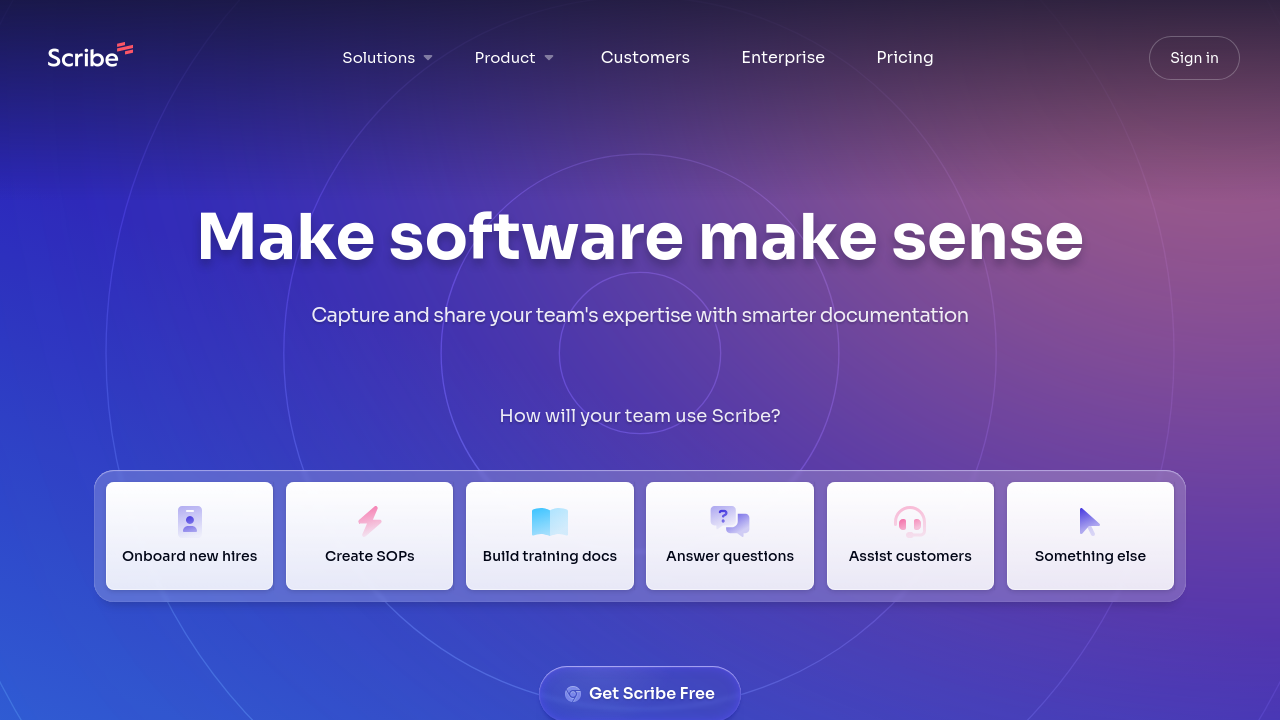
Scribe is an AI-powered tool that transforms any workflow into step-by-step guides with text, links, and annotated screenshots in seconds. Designed for effortless documentation, it simplifies creating SOPs, training manuals, and onboarding guides while enabling seamless sharing and embedding. With features like auto-redaction, multi-platform support, and customization options, Scribe streamlines processes for organizations of all sizes. Save time and enhance collaboration with Scribe’s intuitive and efficient platform.

Scribe Overview

What is Scribe?

4.4
5
Reviews
88%
Subscribed Score

Available for Claim - This listing is available to be claimed
Claim Profile For Free

Unclaimed

Manage profile with subsig, and unlock 23+ social and review monitoring. Get partnership options with

Claim Profile For Free

Why teams choose Scribe

Key Features

Built for Flexibility
Adaptable for multiple use cases.
Affordable Pricing
Affordable Pricing
Transparent plans to fit any budget.
Plug & Play Setup
Plug & Play Setup
Get started in minutes, not weeks.

Who is Scribe for?

Scribe is an AI-powered documentation tool that transforms the way teams capture and share their processes. By automatically converting your clicks and keystrokes into clear, step-by-step guides, Scribe streamlines the creation of standard operating procedures (SOPs), onboarding manuals, training materials, and more. Designed for effortless use, Scribe captures annotated screenshots, editable text, and relevant links, allowing you to quickly build guides that can be shared via links, embedded in your knowledge base, or integrated into your company wiki.

Perfect for organizations of all sizes—from innovative startups to established enterprises—Scribe significantly reduces the time spent on manual documentation. With its intuitive Chrome extension, users can record screen activity and have a comprehensive guide generated automatically, ensuring that even complex workflows are documented with precision. The flexibility to edit text and images after the capture empowers users to tailor each guide to their specific needs, making it an effective resource for training and process standardization.

Why Use Scribe?

  • Automated Documentation: Scribe instantly converts your workflow into a detailed guide, eliminating the traditional hassles of taking multiple screenshots and manually writing instructions.
  • Ease of Use: With an intuitive drag and drop editor and a rich text interface, even non-technical users can create and edit guides effortlessly.
  • Customizable Guides: Combine and tailor Scribes to produce branded guides, ensuring consistency with your company’s training materials and SOPs.
  • Seamless Sharing: Easily share guides with colleagues or embed them in your CMS, LMS, or help center to keep everyone aligned.

Scribe is designed to support any web, desktop, or mobile application, making it a versatile tool across various industries. Its SOC II Type II compliance guarantees that the documentation process is secure, while features such as multi-language support, single sign-on (SSO), and mobile access ensure that your guides are available anytime, anywhere. Whether you are onboarding new employees or streamlining operational workflows, Scribe’s efficient documentation capabilities help reduce repetitive tasks and boost team productivity.

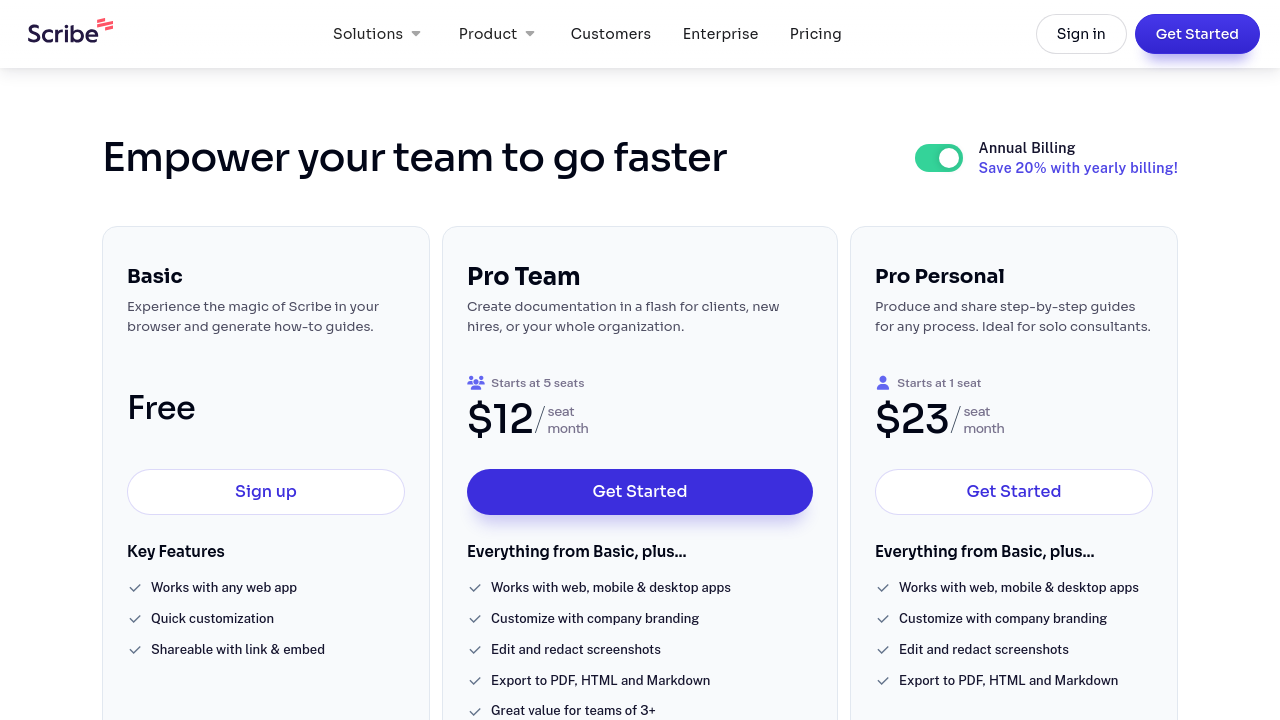
Scribe offers multiple pricing plans, including a free tier that lets you experience its powerful features without any upfront costs. For businesses with expanded needs, the Pro and Enterprise plans provide advanced options like custom branding, export formats, and enterprise-grade security with centralized user management. This scalable solution adapts to the demands of teams of all sizes.

For those looking to explore similar solutions, you may also consider these alternatives:

Scribe is a key player in the Documentation Software category, offering a revolutionary approach to process capture and sharing. Discover exclusive deals on Scribe by visiting the deal page and start transforming your documentation process today.


Scribe Summary

Scribe is an AI-powered documentation tool that transforms the way teams capture and share their processes. By automatically converting your clicks and keystrokes into clear, step-by-step guides, Scribe streamlines the creation of standard operating procedures (SOPs), onboarding manuals, training materials, and more. Designed for effortless use, Scribe captures annotated screenshots, editable text, and relevant links, allowing you to quickly build guides that can be shared via links, embedded in your knowledge base, or integrated into your company wiki.

Perfect for organizations of all sizes—from innovative startups to established enterprises—Scribe significantly reduces the time spent on manual documentation. With its intuitive Chrome extension, users can record screen activity and have a comprehensive guide generated automatically, ensuring that even complex workflows are documented with precision. The flexibility to edit text and images after the capture empowers users to tailor each guide to their specific needs, making it an effective resource for training and process standardization.

Why Use Scribe?

  • Automated Documentation: Scribe instantly converts your workflow into a detailed guide, eliminating the traditional hassles of taking multiple screenshots and manually writing instructions.
  • Ease of Use: With an intuitive drag and drop editor and a rich text interface, even non-technical users can create and edit guides effortlessly.
  • Customizable Guides: Combine and tailor Scribes to produce branded guides, ensuring consistency with your company’s training materials and SOPs.
  • Seamless Sharing: Easily share guides with colleagues or embed them in your CMS, LMS, or help center to keep everyone aligned.

Scribe is designed to support any web, desktop, or mobile application, making it a versatile tool across various industries. Its SOC II Type II compliance guarantees that the documentation process is secure, while features such as multi-language support, single sign-on (SSO), and mobile access ensure that your guides are available anytime, anywhere. Whether you are onboarding new employees or streamlining operational workflows, Scribe’s efficient documentation capabilities help reduce repetitive tasks and boost team productivity.

Scribe offers multiple pricing plans, including a free tier that lets you experience its powerful features without any upfront costs. For businesses with expanded needs, the Pro and Enterprise plans provide advanced options like custom branding, export formats, and enterprise-grade security with centralized user management. This scalable solution adapts to the demands of teams of all sizes.

For those looking to explore similar solutions, you may also consider these alternatives:

Scribe is a key player in the Documentation Software category, offering a revolutionary approach to process capture and sharing. Discover exclusive deals on Scribe by visiting the deal page and start transforming your documentation process today.

Scribe reviews and insights

Learn what people say about Scribe

4.4
5 Reviews
88%
Subscribed Score

Lear more here about the Subscribed score on how it is composed. Learn more Click here

Overall rating

5
4
3
2
1
CX 5/6

How good is the customer support based on subscribed’s assessment

CX Icon
Security 5/6

How secure is the product based on Subscribed’s assessment?

Security Icon
Ease of Use 6/6

How easy is the product to use, based on Subscribed’s assessment?

EOU Icon
Value 5/6

What is the value for money based on Subscribed’s assessment?

coin Icon
Integration 4/6

How many integrations does the product offer?

gear Icon
Popularity 6/6

How popular is the product?

star
2 months ago
Share
What’s the biggest benefit you’ve noticed?
Scribe saves a lot of time when making tutorials or training guides. It automatically captures steps and screenshots, which makes explaining much easier and faster.
What feature doesn’t work as expected?
Some guides need manual cleanup because the tool can capture unnecessary details. A few customization options also feel limited.
What new feature would you love to see added?
Scribe could improve editing tools and give users more control over screenshots and formatting.
Final thoughts, wrap up what you think
Scribe is really useful for teams, onboarding, and anyone who makes tutorials often.
Upvote
aze-elle389 User Test Enabled
lab assistant
2 months ago
Share
How has it made your work/life easier?
I stopped writing step by step documentation manually, just do the thing once and it captures the whole process with screenshots automatically
Have you experienced any bugs or errors?
The Chrome extension occasionally stops recording mid-flow without any warning
What problem did this product solve for you?
really helped with onboarding to help people understand without having to do it everything in person
Final thoughts, wrap up what you think
quite good but the extension reliability needs to improve before I'd trust it for anything more time sensitive
Upvote
2 months ago
Share
How does this compare to similar products you’ve tried?
Scribe feels more useful when it comes to turning workflows or videos into clear, structured steps compared to similar tools. It’s a bit more automated, so it saves time instead of manually writing everything.
What’s been frustrating in your experience?
Sometimes the tool doesn’t capture everything perfectly, so you still need to double-check or edit the output. It can also feel a bit limited if the process is more complex or not very standard.
What new feature would you love to see added?
I’d love better customization so I can control how detailed or simple the steps are. Also, better editing tools would help fix or adjust steps faster when something is off.
Final thoughts, wrap up what you think
Very useful
Upvote
Marco Organic
Marketing
2 months ago
Share
What was your first impression when you started using it?
It was very useful to create step by step guides. This would help my workflow and learning better.
What feels confusing or hard to use?
The initial setup felt confusing. It was also hard to consistently use the tool and integrate with everything I am using.
What problem did this product solve for you?
This solved a memory problem for me. I would forget a lot of things but this product helped me remember everything.
Final thoughts, wrap up what you think
Very helpful
Upvote (1)

Scribe User Reviews

5 User Reviews

Reviews from G2, Capterra, Trustpilot
info Icon

These ratings come directly from third-party platforms like G2, Capterra, and Trustpilot. They reflect real user feedback collected independently on those sites.

Scribe pricing

Pricing model

Pricing Range
info Icon

This only an estimated pricing range, visit Scribe pricing page to access all the information by clicking “Visit Now”.

$0-$29 / Month
Deals Available

This product comes with a special deal, see details

Visit Now
✨ Ask AI about pricing
88% Subscribed Score
info Icon

The Subscribed Score is an independent rating that combines user reviews, features, and value-for-money from multiple trusted sources. It’s designed as a quick benchmark, not a guarantee of individual experience.

Overview

Scribe is an AI-powered documentation tool that transforms the way teams capture and share their processes. By automatically converting your clicks and keystrokes into clear, step-by-step guides, Scribe streamlines the creation of standard operating procedures (SOPs), onboarding manuals, training materials, and more. Designed for effortless use, Scribe captures annotated screenshots, editable text, and relevant links, allowing you to quickly build guides that can be shared via links, embedded in your knowledge base, or integrated into your company wiki.

Perfect for organizations of all sizes—from innovative startups to established enterprises—Scribe significantly reduces the time spent on manual documentation. With its intuitive Chrome extension, users can record screen activity and have a comprehensive guide generated automatically, ensuring that even complex workflows are documented with precision. The flexibility to edit text and images after the capture empowers users to tailor each guide to their specific needs, making it an effective resource for training and process standardization.

Why Use Scribe?

  • Automated Documentation: Scribe instantly converts your workflow into a detailed guide, eliminating the traditional hassles of taking multiple screenshots and manually writing instructions.
  • Ease of Use: With an intuitive drag and drop editor and a rich text interface, even non-technical users can create and edit guides effortlessly.
  • Customizable Guides: Combine and tailor Scribes to produce branded guides, ensuring consistency with your company’s training materials and SOPs.
  • Seamless Sharing: Easily share guides with colleagues or embed them in your CMS, LMS, or help center to keep everyone aligned.

Scribe is designed to support any web, desktop, or mobile application, making it a versatile tool across various industries. Its SOC II Type II compliance guarantees that the documentation process is secure, while features such as multi-language support, single sign-on (SSO), and mobile access ensure that your guides are available anytime, anywhere. Whether you are onboarding new employees or streamlining operational workflows, Scribe’s efficient documentation capabilities help reduce repetitive tasks and boost team productivity.

Scribe offers multiple pricing plans, including a free tier that lets you experience its powerful features without any upfront costs. For businesses with expanded needs, the Pro and Enterprise plans provide advanced options like custom branding, export formats, and enterprise-grade security with centralized user management. This scalable solution adapts to the demands of teams of all sizes.

For those looking to explore similar solutions, you may also consider these alternatives:

Scribe is a key player in the Documentation Software category, offering a revolutionary approach to process capture and sharing. Discover exclusive deals on Scribe by visiting the deal page and start transforming your documentation process today.

Where Scribe performs best

What users like
  • Eases SOP creation effortlessly
  • Streamlines guide documentation
  • Quick to set up and intuitive
  • Saves significant time on tasks

Where Scribe falls short

What users dislike
  • Occasional duplicate steps
  • Base version limits editing features
  • Inaccuracy in auto documentation
  • Expensive for small businesses
Subscribed Score Metrics
31/36 Metric achieved
MetricsScore
Customer Support5/6
Security5/6
Ease of Use6/6
Value of Money5/6
Integration4/6
Popularity6/6
Radar Chart Table View
Ease of Use
Measures how simple and intuitive the product is to use, including setup, navigation, and overall user experience
6/6 Metric Checks
Security
Compares the product`s features, quality, and pricing to determine its overall cost-effectiveness.
5/6 Metric Checks
Value of Money
Assesses the product`s ability to protect data, prevent breaches, and comply with industry standards.
5/6 Metric Checks
Customer Support
Reflects the responsiveness, helpfulness, and quality of assistance provided by the product`s support team.
5/6 Metric Checks
Integrations
Evaluates how well the product connects with other tools and platforms, enabling seamless workflows.
4/6 Metric Checks
Scribe Pricing Range
$0-$29 / Month

Scribe in action
info Icon

A curated gallery of real screenshots and use cases from the product, so you can see how it works before trying it.

Scribe Full Screen Icon
https://www.youtube.com/watch?v=S7pw0c2gOf4
Full Screen Icon
https://www.youtube.com/watch?v=t1WkYkNcWMM
Full Screen Icon
Scribe
Scribe
Video thumbnail
Video thumbnail
Scribe
Scribe

Alternatives to Scribe
info Icon

A list of platforms similar to Scribe, helping you evaluate which tool best matches your needs.

How to cancel Scribe

Need to cancel Scribe? Here is how
info Icon

Thinking about how to cancel Scribe this is how you do it!

To cancel a Scribe product, log into your account and navigate to the subscription or order section. Look for options like "Cancel Subscription" or "End My Subscription." Follow the prompts to confirm cancellation. For physical products, contact customer service within 14 days of delivery to initiate a return.

How to Cancel the Scribe

To cancel a Scribe product, log into your account and navigate to the subscription or order section. Look for options like "Cancel Subscription" or "End My Subscription." Follow the prompts to confirm cancellation. For physical products, contact customer service within 14 days of delivery to initiate a return.

FAQs about Scribe

Every else you need to know about Scribe
info Icon

A collection of FAQs, guides, alternatives, and comparisons to help you quickly understand if Scribe is right for you.

Manage your Scribe profile

Create profile

Want to list your product on Subscribed.fyi? Create a profile to reach more buyers.

Pricing Range
info Icon

This only an estimated pricing range, visit Scribe pricing page to access all the information by clicking “Visit Now”.

$0-$29 / Month
Visit Now
Deals Available

This product comes with a special deal, see details

This product comes with a special deal, see details