Expend Reviews 2026: Details, Pricing, & Features | Subscribed.fyi
Sign in to review
Join our community of software reviewers on Subscribed.fyi

Continue With Google
Continue With LinkedIn
Continue Review with Email
Continue with Email
Enter your email to continue.
Continue
Enter your password
Enter your password to finish setting up your account.
Continue
Activate your email
Enter activation code we sent to your email.
Submit
Reset your password
Enter activation code we sent to your email.
Submit
Set your new password
Enter a new password for your account.
Submit
✨ Ask AI Search
Categories
For Business
Log in
Provide My Insights

Expend

Expend simplifies expense management with an all-in-one solution for controlling employee spending, tracking receipts, managing invoices, and reporting mileage. Equipped with budget-controlled cards, seamless account integrations, and real-time transaction data, it streamlines processes for finance teams and employees. Its intuitive platform offers features like automated receipt capture, policy compliance tools, and direct integrations with major accounting systems. Save time, reduce errors, and optimize business growth with Expend’s innovative approach to managing expenses.

Expend

N/A
0
Reviews
77%
Subscribed Score

Available for Claim - This listing is available to be claimed
Claim For Free

Unclaimed

Curated and listed by Subscribed Team

Claim For Free
Fully Customizable
Fully Customizable
Tailor it to your brand and workflow.
Exclusive Perks
Exclusive Perks
Special offers and discounts available.
Expert Support
Expert Support
Help available when you need it.

Expend is a powerful, all-in-one expense management solution designed to simplify and automate the way businesses handle spending. Developed to tackle common challenges such as incomplete receipts, multiple tool usage, and complex invoice management, Expend offers an efficient and intuitive platform that streamlines expense reporting and controls employee spending.

Key Features and Benefits

  • All-in-One Expense Management: Manage expenses, track digital receipts, and record transactions seamlessly in one platform.
  • Budget-Controlled Expense Cards: Empower teams with dedicated cards that are programmed with pre-set spending limits, ensuring better control over purchases and subscriptions.
  • Mileage Reporting: Track business mileage effortlessly using HMRC fuel rates, adding a layer of precision to reimbursement processes.
  • Card Connect Integration: Easily integrate Visa bank cards for real-time transaction data, which minimizes manual reviews and accelerates the creation of expense reports.
  • Invoice and Receipt Management: Automate data extraction using cutting-edge Optical Character Recognition (OCR), reducing manual entry and errors.
  • Seamless Accounting Integrations: Enjoy effortless syncing with popular accounting platforms such as Xero and QuickBooks, ensuring that financial data is consistent and up-to-date.

Expend’s mobile app enables employees to capture receipts, submit expense claims on the go, and conveniently track business mileage. This mobile-first approach eliminates the hassle of chasing missing receipts and mitigates the risk of delays in reimbursement. With automated reminders and an intuitive dashboard, finance teams can monitor expense compliance and gain valuable insights into company spending.

By automating core processes and integrating seamlessly with existing accounting software, Expend helps businesses redirect valuable time and resources toward strategic growth. The solution is designed to grow with your business, providing flexible options such as additional user support and customizable onboarding services, ensuring that it meets both small business needs and larger enterprise demands.

Why Choose Expend?

  • Simplified expense processes mean your team can focus on core business activities.
  • Real-time transaction data and automated reporting accelerate financial reconciliation.
  • Enhanced compliance features ensure that spending adheres to company policies.
  • Mobile access to expense management streamlines approvals and increases operational efficiency.

Expend is a leading solution in the Expense Management Software category. To experience the benefits firsthand, visit the Expend homepage or explore current offers on the deal page.

Explore Alternatives

Choose Expend to transform your expense management processes, boost operational efficiency, and support your business growth with a solution that integrates seamlessly into your financial workflow.


Expend Summary

Expend is a powerful, all-in-one expense management solution designed to simplify and automate the way businesses handle spending. Developed to tackle common challenges such as incomplete receipts, multiple tool usage, and complex invoice management, Expend offers an efficient and intuitive platform that streamlines expense reporting and controls employee spending.

Key Features and Benefits

  • All-in-One Expense Management: Manage expenses, track digital receipts, and record transactions seamlessly in one platform.
  • Budget-Controlled Expense Cards: Empower teams with dedicated cards that are programmed with pre-set spending limits, ensuring better control over purchases and subscriptions.
  • Mileage Reporting: Track business mileage effortlessly using HMRC fuel rates, adding a layer of precision to reimbursement processes.
  • Card Connect Integration: Easily integrate Visa bank cards for real-time transaction data, which minimizes manual reviews and accelerates the creation of expense reports.
  • Invoice and Receipt Management: Automate data extraction using cutting-edge Optical Character Recognition (OCR), reducing manual entry and errors.
  • Seamless Accounting Integrations: Enjoy effortless syncing with popular accounting platforms such as Xero and QuickBooks, ensuring that financial data is consistent and up-to-date.

Expend’s mobile app enables employees to capture receipts, submit expense claims on the go, and conveniently track business mileage. This mobile-first approach eliminates the hassle of chasing missing receipts and mitigates the risk of delays in reimbursement. With automated reminders and an intuitive dashboard, finance teams can monitor expense compliance and gain valuable insights into company spending.

By automating core processes and integrating seamlessly with existing accounting software, Expend helps businesses redirect valuable time and resources toward strategic growth. The solution is designed to grow with your business, providing flexible options such as additional user support and customizable onboarding services, ensuring that it meets both small business needs and larger enterprise demands.

Why Choose Expend?

  • Simplified expense processes mean your team can focus on core business activities.
  • Real-time transaction data and automated reporting accelerate financial reconciliation.
  • Enhanced compliance features ensure that spending adheres to company policies.
  • Mobile access to expense management streamlines approvals and increases operational efficiency.

Expend is a leading solution in the Expense Management Software category. To experience the benefits firsthand, visit the Expend homepage or explore current offers on the deal page.

Explore Alternatives

Choose Expend to transform your expense management processes, boost operational efficiency, and support your business growth with a solution that integrates seamlessly into your financial workflow.

Expend reviews

Learn what people say about Expend

N/A
0 Reviews
77%
Subscribed Score

Lear more here about the Subscribed score on how it is composed. Learn more Click here

Overall rating

5
4
3
2
1
CX 6/6

How good is the customer support based on subscribed’s assessment

CX Icon
Security 4/6

How secure is the product based on Subscribed’s assessment?

Security Icon
Ease of Use 5/6

How easy is the product to use, based on Subscribed’s assessment?

EOU Icon
Value 5/6

What is the value for money based on Subscribed’s assessment?

coin Icon
Integration 4/6

How many integrations does the product offer?

gear Icon
Popularity 4/6

How popular is the product?

star

No Reviews Yet!

Be the first to share your experience and help others in the community.

Expend User Reviews

0 User Reviews

Reviews from G2, Capterra, Trustpilot
info Icon

These ratings come directly from third-party platforms like G2, Capterra, and Trustpilot. They reflect real user feedback collected independently on those sites.

Expend

Pricing Range
info Icon

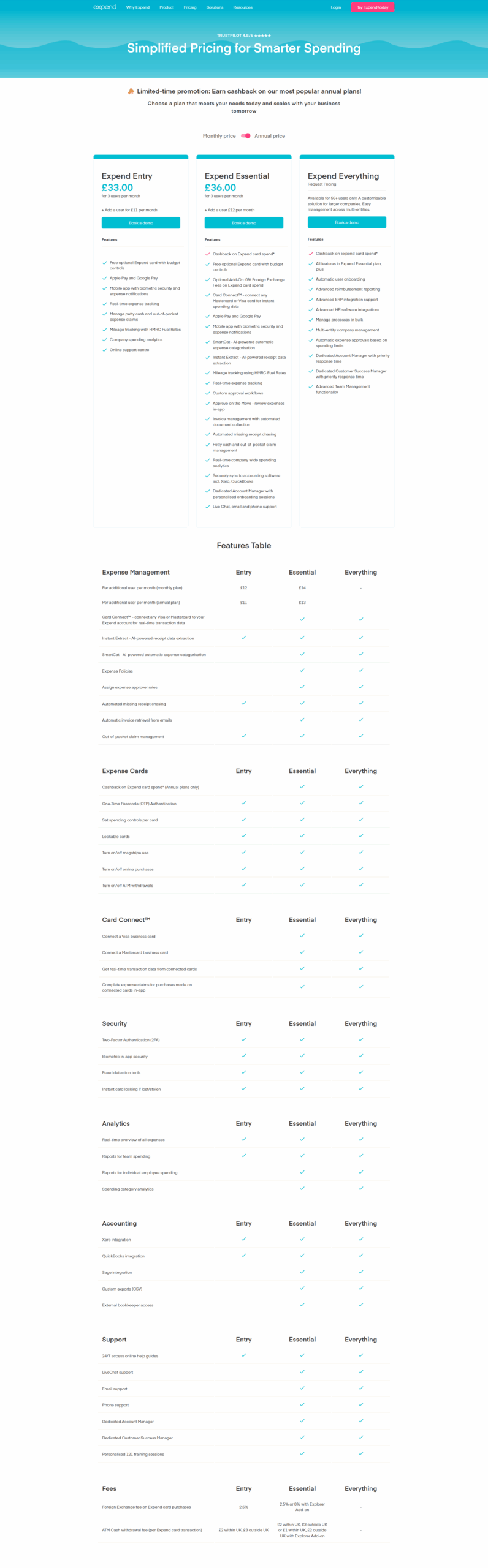
This only an estimated pricing range, visit Expend pricing page to access all the information by clicking “Visit Now”.

Not specified
Deals Available

This product comes with a special deal, see details

Visit Now
✨ Ask AI about pricing
77% Subscribed Score
info Icon

The Subscribed Score is an independent rating that combines user reviews, features, and value-for-money from multiple trusted sources. It’s designed as a quick benchmark, not a guarantee of individual experience.

Analysis

Expend is a powerful, all-in-one expense management solution designed to simplify and automate the way businesses handle spending. Developed to tackle common challenges such as incomplete receipts, multiple tool usage, and complex invoice management, Expend offers an efficient and intuitive platform that streamlines expense reporting and controls employee spending.

Key Features and Benefits

  • All-in-One Expense Management: Manage expenses, track digital receipts, and record transactions seamlessly in one platform.
  • Budget-Controlled Expense Cards: Empower teams with dedicated cards that are programmed with pre-set spending limits, ensuring better control over purchases and subscriptions.
  • Mileage Reporting: Track business mileage effortlessly using HMRC fuel rates, adding a layer of precision to reimbursement processes.
  • Card Connect Integration: Easily integrate Visa bank cards for real-time transaction data, which minimizes manual reviews and accelerates the creation of expense reports.
  • Invoice and Receipt Management: Automate data extraction using cutting-edge Optical Character Recognition (OCR), reducing manual entry and errors.
  • Seamless Accounting Integrations: Enjoy effortless syncing with popular accounting platforms such as Xero and QuickBooks, ensuring that financial data is consistent and up-to-date.

Expend’s mobile app enables employees to capture receipts, submit expense claims on the go, and conveniently track business mileage. This mobile-first approach eliminates the hassle of chasing missing receipts and mitigates the risk of delays in reimbursement. With automated reminders and an intuitive dashboard, finance teams can monitor expense compliance and gain valuable insights into company spending.

By automating core processes and integrating seamlessly with existing accounting software, Expend helps businesses redirect valuable time and resources toward strategic growth. The solution is designed to grow with your business, providing flexible options such as additional user support and customizable onboarding services, ensuring that it meets both small business needs and larger enterprise demands.

Why Choose Expend?

  • Simplified expense processes mean your team can focus on core business activities.
  • Real-time transaction data and automated reporting accelerate financial reconciliation.
  • Enhanced compliance features ensure that spending adheres to company policies.
  • Mobile access to expense management streamlines approvals and increases operational efficiency.

Expend is a leading solution in the Expense Management Software category. To experience the benefits firsthand, visit the Expend homepage or explore current offers on the deal page.

Explore Alternatives

Choose Expend to transform your expense management processes, boost operational efficiency, and support your business growth with a solution that integrates seamlessly into your financial workflow.

Pros
  • Quick and easy expense submission
  • Strong integration with accounting tools
  • Efficient Mastercard expense tracking
  • Responsive customer support
Cons
  • Mobile app can be difficult to use
  • Workflow initially confusing
  • Mistakes in reports hard to fix
  • Splitting different VAT receipts unclear
Subscribed Score Metrics
28/36 Metric achieved
MetricsScore
Customer Support6/6
Security4/6
Ease of Use5/6
Value of Money5/6
Integration4/6
Popularity4/6
Radar Chart Table View
Ease of Use
Measures how simple and intuitive the product is to use, including setup, navigation, and overall user experience
5/6 Metric Checks
Security
Compares the product`s features, quality, and pricing to determine its overall cost-effectiveness.
4/6 Metric Checks
Value of Money
Assesses the product`s ability to protect data, prevent breaches, and comply with industry standards.
5/6 Metric Checks
Customer Support
Reflects the responsiveness, helpfulness, and quality of assistance provided by the product`s support team.
6/6 Metric Checks
Integrations
Evaluates how well the product connects with other tools and platforms, enabling seamless workflows.
4/6 Metric Checks
Expend Pricing Range
Not specified

Expend Showcase
info Icon

A curated gallery of real screenshots and use cases from the product, so you can see how it works before trying it.

Full Screen Icon

What else exists next to Expend
info Icon

A list of platforms similar to Expend, helping you evaluate which tool best matches your needs.

Need to cancel Expend? Here is how
info Icon

Thinking about how to cancel Expend this is how you do it!

To cancel an Expend product, typically follow these steps:

  1. Access Account: Log into your Expend account.
  2. Find Subscription: Locate the subscription or product you wish to cancel.
  3. Cancel Option: Look for a cancel or pause button to initiate the process.
  4. Confirm Cancellation: Confirm your decision to cancel.

For specific details, visit Expend’s support page.

How to Cancel the Expend

To cancel an Expend product, typically follow these steps:

  1. Access Account: Log into your Expend account.
  2. Find Subscription: Locate the subscription or product you wish to cancel.
  3. Cancel Option: Look for a cancel or pause button to initiate the process.
  4. Confirm Cancellation: Confirm your decision to cancel.

For specific details, visit Expend’s support page.

Every else you need to know about Expend
info Icon

A collection of FAQs, guides, alternatives, and comparisons to help you quickly understand if Expend is right for you.

Pricing Range
info Icon

This only an estimated pricing range, visit Expend pricing page to access all the information by clicking “Visit Now”.

Not specified
Visit Now
Deals Available

This product comes with a special deal, see details

This product comes with a special deal, see details