Project management tools like , Notion, Basecamp, Lark, Slack, Asana and Trello.
AI chatbot tools like ChatGPT, Grok, Perplexity, Claude, Gemini and Copilot.
Marketing analytics platforms like Google Analytics, Similarweb and Semrush.
CRM systems like HubSpot, Apollo.io Pipedrive, Zoho CRM, and Salesforce.
VPNs, SSO providers, and password managers like NordVPN, Okta, and LastPass.
Email marketing and campaign tools like MailerLite, Instantly, and Mailchimp.
Website builders, hosting tools like Hostinger, Webflow, Framer, and Shopify
HR and recruiting software like ATS platforms, BambooHR, Workday, and Lever.
Automate finances with confidence like Quickbooks, Stripe, Brex, and Mercury.
Design and editing tools like Figma, Canva, Adobe Creative Cloud, CapCut.
Workflow automation tools like Zapier, Make, Clay, and Reclaim.ai.
No-code and AI-native dev tools like Cursor, Windsurf, Lovable and Bubble.
Chat to find tools, compare options,
Discover the best-performing
Curated and listed by Subscribed Team
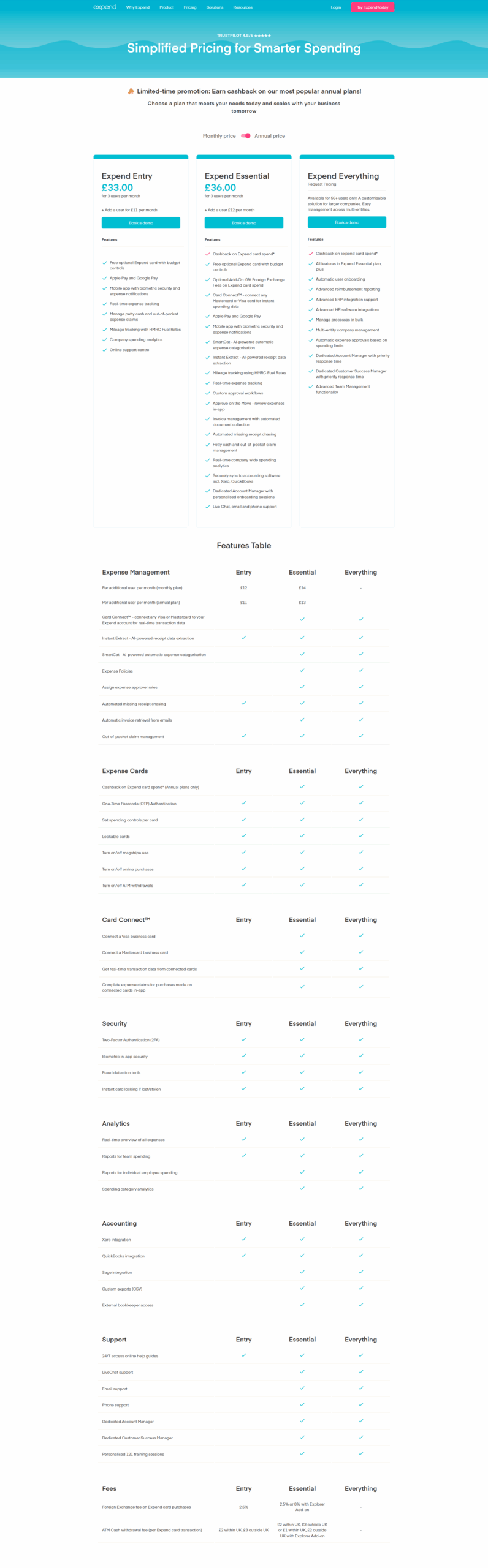
Expend is a powerful, all-in-one expense management solution designed to simplify and automate the way businesses handle spending. Developed to tackle common challenges such as incomplete receipts, multiple tool usage, and complex invoice management, Expend offers an efficient and intuitive platform that streamlines expense reporting and controls employee spending.
Key Features and Benefits
Expend’s mobile app enables employees to capture receipts, submit expense claims on the go, and conveniently track business mileage. This mobile-first approach eliminates the hassle of chasing missing receipts and mitigates the risk of delays in reimbursement. With automated reminders and an intuitive dashboard, finance teams can monitor expense compliance and gain valuable insights into company spending.
By automating core processes and integrating seamlessly with existing accounting software, Expend helps businesses redirect valuable time and resources toward strategic growth. The solution is designed to grow with your business, providing flexible options such as additional user support and customizable onboarding services, ensuring that it meets both small business needs and larger enterprise demands.
Why Choose Expend?
Expend is a leading solution in the Expense Management Software category. To experience the benefits firsthand, visit the Expend homepage or explore current offers on the deal page.
Explore Alternatives
Choose Expend to transform your expense management processes, boost operational efficiency, and support your business growth with a solution that integrates seamlessly into your financial workflow.

Expend is a powerful, all-in-one expense management solution designed to simplify and automate the way businesses handle spending. Developed to tackle common challenges such as incomplete receipts, multiple tool usage, and complex invoice management, Expend offers an efficient and intuitive platform that streamlines expense reporting and controls employee spending.
Key Features and Benefits
Expend’s mobile app enables employees to capture receipts, submit expense claims on the go, and conveniently track business mileage. This mobile-first approach eliminates the hassle of chasing missing receipts and mitigates the risk of delays in reimbursement. With automated reminders and an intuitive dashboard, finance teams can monitor expense compliance and gain valuable insights into company spending.
By automating core processes and integrating seamlessly with existing accounting software, Expend helps businesses redirect valuable time and resources toward strategic growth. The solution is designed to grow with your business, providing flexible options such as additional user support and customizable onboarding services, ensuring that it meets both small business needs and larger enterprise demands.
Why Choose Expend?
Expend is a leading solution in the Expense Management Software category. To experience the benefits firsthand, visit the Expend homepage or explore current offers on the deal page.
Explore Alternatives
Choose Expend to transform your expense management processes, boost operational efficiency, and support your business growth with a solution that integrates seamlessly into your financial workflow.

Learn what people say about Expend
Be the first to share your experience and help others in the community.
Expend is a powerful, all-in-one expense management solution designed to simplify and automate the way businesses handle spending. Developed to tackle common challenges such as incomplete receipts, multiple tool usage, and complex invoice management, Expend offers an efficient and intuitive platform that streamlines expense reporting and controls employee spending.
Key Features and Benefits
Expend’s mobile app enables employees to capture receipts, submit expense claims on the go, and conveniently track business mileage. This mobile-first approach eliminates the hassle of chasing missing receipts and mitigates the risk of delays in reimbursement. With automated reminders and an intuitive dashboard, finance teams can monitor expense compliance and gain valuable insights into company spending.
By automating core processes and integrating seamlessly with existing accounting software, Expend helps businesses redirect valuable time and resources toward strategic growth. The solution is designed to grow with your business, providing flexible options such as additional user support and customizable onboarding services, ensuring that it meets both small business needs and larger enterprise demands.
Why Choose Expend?
Expend is a leading solution in the Expense Management Software category. To experience the benefits firsthand, visit the Expend homepage or explore current offers on the deal page.
Explore Alternatives
Choose Expend to transform your expense management processes, boost operational efficiency, and support your business growth with a solution that integrates seamlessly into your financial workflow.

To cancel an Expend product, typically follow these steps:
For specific details, visit Expend’s support page.
To cancel an Expend product, typically follow these steps:
For specific details, visit Expend’s support page.