Here’s a concise guide on how to cancel your Redis subscription. Following these steps will ensure an effective and straightforward cancellation process. For more options on similar tools, check out the latest Subscribed Deals to see if other solutions might meet your needs.
How to Cancel Your Redis Subscription
Canceling your Redis subscription involves deleting associated databases and confirming your cancellation in the account settings.
How to Cancel Redis: Step-by-Step Guide
1. Delete All Databases:
- Begin by deleting each database associated with your subscription.
- Confirm that your database count is reduced to zero. This is a necessary step for proceeding with the subscription cancellation.
2. Navigate to Subscription Details:
- Go to your Redis account dashboard.
- Locate and select the subscription you intend to cancel from the list of subscriptions.
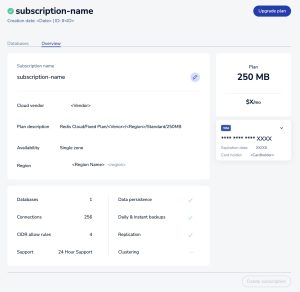
3. Open the Overview Tab:
- Within the selected subscription, find the Overview tab.
- This section will display key details about your subscription. (Photo Credit: Redis.io)
4. Initiate Subscription Deletion:
- Look for the option labeled Delete subscription or similar. Click to initiate the cancellation process.
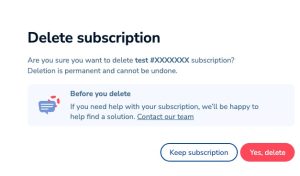
5. Confirm Cancellation:
- A prompt will ask for your confirmation to cancel the subscription. Click Yes, cancel or equivalent to proceed.
6. Final Confirmation:
- A second prompt will appear for final confirmation. Select Yes, delete to complete the subscription cancellation. (Photo Credit: Redis.io)

If you require more assistance, reach out to them through their page, Contact Us.
Important Considerations
- Database Deletion Requirement: Ensure all databases are deleted before attempting to cancel your subscription.
- Confirmation: Redis will ask for multiple confirmations during the cancellation process, providing you with opportunities to reconsider.
By following these steps, you can efficiently manage your Redis subscription cancellation. If you encounter any issues, Redis support is available for further assistance.
Looking for Alternatives?
If you’re exploring other tools in the Web Development & Design category, here are some top alternatives to consider:
- Figma: A powerful interface design tool for collaborative projects.
- Adobe Express: An easy-to-use content creation platform for web and graphic design.
- Vercel: A platform to deploy web applications seamlessly with serverless functions.
- Adobe Creative Cloud: A suite of tools for web development, graphic design, and multimedia creation.
- Adobe Photoshop: The go-to tool for professional photo editing and graphic design.
For even more tools, you should also check out other related categories like Open Source for versatile development resources and Marketing and Analytics to enhance your site’s performance and insights.