Windsurf Reviews 2026: Details, Pricing, & Features | Subscribed.fyi
Sign in to review
Join our community of software reviewers on Subscribed.fyi

Continue With Google
Continue With LinkedIn
Continue Review with Email
Continue with Email
Enter your email to continue.
Continue
Enter your password
Enter your password to finish setting up your account.
Continue
Activate your email
Enter activation code we sent to your email.
Submit
Reset your password
Enter activation code we sent to your email.
Submit
Set your new password
Enter a new password for your account.
Submit
Categories
For Business
Log in
Provide My Insights

Windsurf Reviews, Pricing, Features & Alternatives (2026)

4.5/5
(6)

Windsurf is an AI-powered code editor that accelerates software development through intelligent automation, context-aware suggestions, and multi-file editing capabilities. Designed to be your coding companion, it enhances productivity by streamlining complex workflows and turning your ideas into code faster than ever before.

Windsurf Overview

What is Windsurf?

4.5
6
Reviews
69%
Subscribed Score

Available for Claim - This listing is available to be claimed
Claim Profile For Free

Unclaimed

Manage profile with subsig, and unlock 23+ social and review monitoring. Get partnership options with

Claim Profile For Free

Why teams choose Windsurf

Key Features

Plug & Play Setup
Plug & Play Setup
Get started in minutes, not weeks.
Real-Time Updates
Real-Time Updates
See changes instantly, no delays.
No-Code Simplicity
No-Code Simplicity
Launch without writing a single line of code.

Who is Windsurf for?

Windsurf transforms the coding experience by acting as an intelligent partner that understands your entire codebase and automates repetitive tasks. This AI-powered code editor and integrated development environment (IDE) is built for developers who want to write better code faster, whether working alone or in teams. With its foundation in VS Code and advanced AI capabilities, Windsurf bridges the gap between traditional coding and the future of AI-assisted development.

Key Features of Windsurf

  • Cascade Multi-File Editing: Make complex edits across multiple files in a single flow, mimicking how engineers think and work with AI that understands file relationships and dependencies.
  • Customizable AI Behavior: Tailor the AI experience to your preferences with adjustable autocomplete settings, “Supercomplete” functionality, and clipboard context for more relevant suggestions.
  • Command Palette: Generate or edit code with simple English instructions via keyboard shortcuts, without consuming precious premium model credits.
  • Smart Code Lenses: Get one-click options to explain code, refactor functions/classes, or generate documentation instantly, streamlining review and maintenance.
  • Real-Time Previews: View and interact with local app deployments directly within the IDE, enabling faster testing, debugging, and UI refinement without context switching.
  • Windsurf Flows: Experience seamless collaboration between you and AI with synchronized workflows that keep both operating on the same state for truly contextual assistance.

Why Choose Windsurf?

Windsurf stands out with its powerful “Cascade” feature for agentic, multi-step workflows that goes beyond simple code completion. Unlike competitors that offer generic suggestions, Windsurf deeply understands your project context and assists with coherent edits across your entire codebase. Its enterprise focus ensures it handles large, complex projects while maintaining performance and security. With an intuitive interface built on familiar foundations, the learning curve is minimal while the productivity gains are substantial.

Who is Windsurf For?

  • Professional Developers: Individual coders seeking to accelerate their workflow and reduce time spent on repetitive tasks.
  • Development Teams: Groups managing large, complex projects requiring consistent multi-file edits and collaborative coding environments.
  • Enterprises: Organizations aiming to boost productivity and reduce onboarding time across engineering departments.
  • Tech Startups: Companies that need to move quickly from prototype to production with limited development resources.

 Explore deals, pricing, and alternatives in the tabs below.

Windsurf Summary

Windsurf transforms the coding experience by acting as an intelligent partner that understands your entire codebase and automates repetitive tasks. This AI-powered code editor and integrated development environment (IDE) is built for developers who want to write better code faster, whether working alone or in teams. With its foundation in VS Code and advanced AI capabilities, Windsurf bridges the gap between traditional coding and the future of AI-assisted development.

Key Features of Windsurf

  • Cascade Multi-File Editing: Make complex edits across multiple files in a single flow, mimicking how engineers think and work with AI that understands file relationships and dependencies.
  • Customizable AI Behavior: Tailor the AI experience to your preferences with adjustable autocomplete settings, “Supercomplete” functionality, and clipboard context for more relevant suggestions.
  • Command Palette: Generate or edit code with simple English instructions via keyboard shortcuts, without consuming precious premium model credits.
  • Smart Code Lenses: Get one-click options to explain code, refactor functions/classes, or generate documentation instantly, streamlining review and maintenance.
  • Real-Time Previews: View and interact with local app deployments directly within the IDE, enabling faster testing, debugging, and UI refinement without context switching.
  • Windsurf Flows: Experience seamless collaboration between you and AI with synchronized workflows that keep both operating on the same state for truly contextual assistance.

Why Choose Windsurf?

Windsurf stands out with its powerful “Cascade” feature for agentic, multi-step workflows that goes beyond simple code completion. Unlike competitors that offer generic suggestions, Windsurf deeply understands your project context and assists with coherent edits across your entire codebase. Its enterprise focus ensures it handles large, complex projects while maintaining performance and security. With an intuitive interface built on familiar foundations, the learning curve is minimal while the productivity gains are substantial.

Who is Windsurf For?

  • Professional Developers: Individual coders seeking to accelerate their workflow and reduce time spent on repetitive tasks.
  • Development Teams: Groups managing large, complex projects requiring consistent multi-file edits and collaborative coding environments.
  • Enterprises: Organizations aiming to boost productivity and reduce onboarding time across engineering departments.
  • Tech Startups: Companies that need to move quickly from prototype to production with limited development resources.

 Explore deals, pricing, and alternatives in the tabs below.

Windsurf reviews and insights

Learn what people say about Windsurf

4.5
6 Reviews
69%
Subscribed Score

Lear more here about the Subscribed score on how it is composed. Learn more Click here

Overall rating

5
4
3
2
1
CX 4/6

How good is the customer support based on subscribed’s assessment

CX Icon
Security 4/6

How secure is the product based on Subscribed’s assessment?

Security Icon
Ease of Use 5/6

How easy is the product to use, based on Subscribed’s assessment?

EOU Icon
Value 3/6

What is the value for money based on Subscribed’s assessment?

coin Icon
Integration 5/6

How many integrations does the product offer?

gear Icon
Popularity 4/6

How popular is the product?

star
Irfan Ali Invitation
Developer
3 months ago
Share
How does this compare to similar products you’ve tried?
this is a full IDE GitHub Copilot. It can edit multiple files at once, run terminal commands, and basically act like a pair-programmer for complex projects. I’ve tried other tools like Copilot or web-based editors, but Windsurf stands out for big projects
What feels confusing or hard to use?
If you are not already a good coder, it can feel harder to understand and get along. It requires a learning curve to find how to ask it the right questions or trust its suggestions. It is a heavy app and needs a powerful machine, some features feel buggy or not fully finished.
What’s still missing for your needs?
simple docs for starting or tutorials would help new users get started faster. some integration with Git would be cool. More customization of the AI like telling the style and background of or coding . If it could eventually simplify its UI for non developers team members to view code suggestions, that might help teams share ideas better.
Final thoughts, wrap up what you think
if you are a developer working on large or complex applications windsurf can seriously speed up your workflow. but for beginner coders or small scripts, it is probably overkill. I recommend it for serious projects where you need ai to manage lots of code; it feels like one of the best ai code editors available right now, even though it still maturing.
Upvote
M Raza Akhter Invitation
QA Engineer
3 months ago
Share
What feature do you use most often?
I mostly use Windsurf for coding help and speeding up regular development work. It is really useful when I want quick suggestions, help with logic, or support while working through code.
Have you experienced any bugs or errors?
I have seen it struggle sometimes with more complex context or longer code flows. Now and then the suggestions are not fully on point, so I still need to review and adjust things myself.
If you could change one thing, what would it be?
I would like it to handle larger context more smoothly and give more consistent suggestions across bigger tasks. That would make it feel even more reliable during longer coding sessions.
Final thoughts, wrap up what you think
I would recommend Windsurf because it has been genuinely useful in day to day coding work. It helps me move faster, gives me a good starting point when I am stuck, and reduces some of the back and forth that usually takes extra time.
Upvote
Andaç Güven Organic
Agency Founder
See My Portfolio
3 months ago
Share
What do you like best about this product?
This tool might initially make you wonder if 500 credits a month will be enough, but you can actually advance your project without paying any extra fees for a single project.
What feature doesn’t work as expected?
Everything was in its place; there used to be a cascade mode that I didn't quite understand, but now they've made it simpler, and I'm happy with it.
Is there a workflow that could be simpler?
I'd love to know the exact answer to that. All AI coding tools are trying to improve, and they're not bad at it. I'm looking forward to seeing the future.
Final thoughts, wrap up what you think
This tool does its job really well, and the credits don't run out quickly.
Upvote
SAIF ULLAH Invitation
3 months ago
Share
What do you like best about this product?
The benefit of Windsurf is how it predicts my next move and autocompletes whole blocks of code, which is very much faster than typing.
What feature doesn’t work as expected?
Sometimes when the project is very big, the AI takes a bit long to "think" before it gives a solution, which slows me down.
Is there a workflow that could be simpler?
If they add a way to use some basic AI features without internet, it would be very much helpful for working while traveling.
Final thoughts, wrap up what you think
I recommend this product to colleagues and friends. This is much more powerful than a normal code editor for any type of developer.
Upvote

Windsurf User Reviews

6 User Reviews

Reviews from G2, Capterra, Trustpilot
info Icon

These ratings come directly from third-party platforms like G2, Capterra, and Trustpilot. They reflect real user feedback collected independently on those sites.

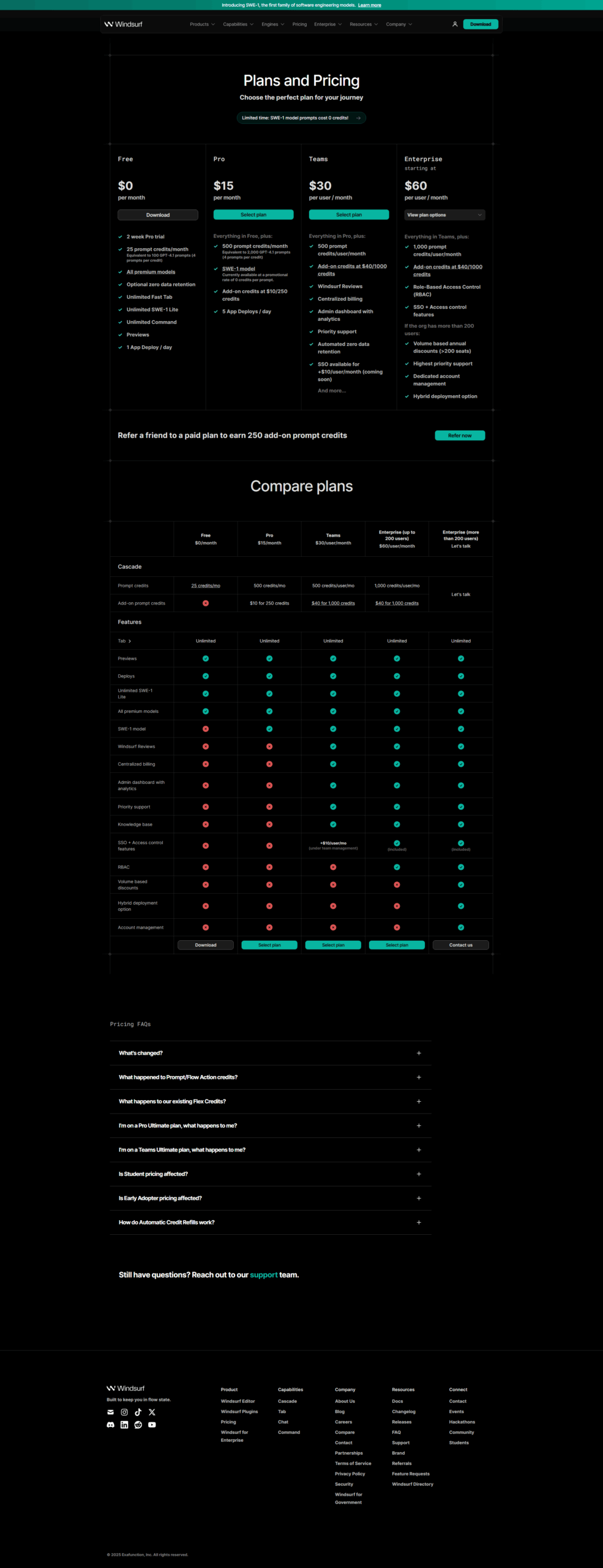
Windsurf pricing

Pricing model

Pricing Range
info Icon

This only an estimated pricing range, visit Windsurf pricing page to access all the information by clicking “Visit Now”.

$0-30 / Month
Deals Available

This product comes with a special deal, see details

Visit Now
✨ Ask AI about pricing
69% Subscribed Score
info Icon

The Subscribed Score is an independent rating that combines user reviews, features, and value-for-money from multiple trusted sources. It’s designed as a quick benchmark, not a guarantee of individual experience.

Overview

Windsurf transforms the coding experience by acting as an intelligent partner that understands your entire codebase and automates repetitive tasks. This AI-powered code editor and integrated development environment (IDE) is built for developers who want to write better code faster, whether working alone or in teams. With its foundation in VS Code and advanced AI capabilities, Windsurf bridges the gap between traditional coding and the future of AI-assisted development.

Key Features of Windsurf

  • Cascade Multi-File Editing: Make complex edits across multiple files in a single flow, mimicking how engineers think and work with AI that understands file relationships and dependencies.
  • Customizable AI Behavior: Tailor the AI experience to your preferences with adjustable autocomplete settings, “Supercomplete” functionality, and clipboard context for more relevant suggestions.
  • Command Palette: Generate or edit code with simple English instructions via keyboard shortcuts, without consuming precious premium model credits.
  • Smart Code Lenses: Get one-click options to explain code, refactor functions/classes, or generate documentation instantly, streamlining review and maintenance.
  • Real-Time Previews: View and interact with local app deployments directly within the IDE, enabling faster testing, debugging, and UI refinement without context switching.
  • Windsurf Flows: Experience seamless collaboration between you and AI with synchronized workflows that keep both operating on the same state for truly contextual assistance.

Why Choose Windsurf?

Windsurf stands out with its powerful “Cascade” feature for agentic, multi-step workflows that goes beyond simple code completion. Unlike competitors that offer generic suggestions, Windsurf deeply understands your project context and assists with coherent edits across your entire codebase. Its enterprise focus ensures it handles large, complex projects while maintaining performance and security. With an intuitive interface built on familiar foundations, the learning curve is minimal while the productivity gains are substantial.

Who is Windsurf For?

  • Professional Developers: Individual coders seeking to accelerate their workflow and reduce time spent on repetitive tasks.
  • Development Teams: Groups managing large, complex projects requiring consistent multi-file edits and collaborative coding environments.
  • Enterprises: Organizations aiming to boost productivity and reduce onboarding time across engineering departments.
  • Tech Startups: Companies that need to move quickly from prototype to production with limited development resources.

 Explore deals, pricing, and alternatives in the tabs below.

Where Windsurf performs best

What users like
  • Powerful multi-file editing with contextual understanding
  • Intuitive user interface with VS Code-like experience
  • Advanced AI assistance that learns your coding patterns
  • Real-time previews for faster development cycles
  • Customizable AI behavior to match personal preferences

Where Windsurf falls short

What users dislike
  • Monthly prompt limits may restrict heavy users
  • Recent price increase from $10 to $15/month
  • Occasional issues with context understanding in complex scenarios
  • Requires internet connection (no offline mode)
  • Performance can slow down with very large codebases
Subscribed Score Metrics
25/36 Metric achieved
MetricsScore
Customer Support4/6
Security4/6
Ease of Use5/6
Value of Money3/6
Integration5/6
Popularity4/6
Radar Chart Table View
Ease of Use
Measures how simple and intuitive the product is to use, including setup, navigation, and overall user experience
5/6 Metric Checks
Security
Compares the product`s features, quality, and pricing to determine its overall cost-effectiveness.
4/6 Metric Checks
Value of Money
Assesses the product`s ability to protect data, prevent breaches, and comply with industry standards.
3/6 Metric Checks
Customer Support
Reflects the responsiveness, helpfulness, and quality of assistance provided by the product`s support team.
4/6 Metric Checks
Integrations
Evaluates how well the product connects with other tools and platforms, enabling seamless workflows.
5/6 Metric Checks
Windsurf Pricing Range
$0-30 / Month

Windsurf in action
info Icon

A curated gallery of real screenshots and use cases from the product, so you can see how it works before trying it.

Windsurf screenshot Full Screen Icon
https://www.youtube.com/watch?v=x1VCmB__TDo
Full Screen Icon
https://www.youtube.com/watch?v=ENKR0_dE7Wc
Full Screen Icon
https://www.youtube.com/watch?v=tBRoC7w6No8
Full Screen Icon
https://www.youtube.com/watch?v=8TcWGk1DJVs
Full Screen Icon
Video thumbnail
Video thumbnail
Video thumbnail
Video thumbnail
Windsurf screenshot

Alternatives to Windsurf
info Icon

A list of platforms similar to Windsurf, helping you evaluate which tool best matches your needs.

How to cancel Windsurf

Need to cancel Windsurf? Here is how
info Icon

Thinking about how to cancel Windsurf this is how you do it!

To cancel your Windsurf subscription, navigate to the billing menu in your account settings and select the cancellation option. If you subscribed through a third-party platform, you’ll need to cancel through that service. Your access will continue until the end of your current billing period.

How to Cancel the Windsurf

To cancel your Windsurf subscription, navigate to the billing menu in your account settings and select the cancellation option. If you subscribed through a third-party platform, you’ll need to cancel through that service. Your access will continue until the end of your current billing period.

FAQs about Windsurf

Every else you need to know about Windsurf
info Icon

A collection of FAQs, guides, alternatives, and comparisons to help you quickly understand if Windsurf is right for you.

Manage your Windsurf profile

Create profile

Want to list your product on Subscribed.fyi? Create a profile to reach more buyers.

Pricing Range
info Icon

This only an estimated pricing range, visit Windsurf pricing page to access all the information by clicking “Visit Now”.

$0-30 / Month
Visit Now
Deals Available

This product comes with a special deal, see details

This product comes with a special deal, see details