Analytics Toolkit Reviews 2026: Details, Pricing, & Features | Subscribed.fyi
Sign in to review
Join our community of software reviewers on Subscribed.fyi

Continue With Google
Continue With LinkedIn
Continue Review with Email
Continue with Email
Enter your email to continue.
Continue
Enter your password
Enter your password to finish setting up your account.
Continue
Activate your email
Enter activation code we sent to your email.
Submit
Reset your password
Enter activation code we sent to your email.
Submit
Set your new password
Enter a new password for your account.
Submit
Categories
For Business
Log in
Provide My Insights
Analytics Toolkit
Analytics Toolkit

Analytics Toolkit Reviews, Pricing, Features & Alternatives (2026)

4.3/5
(3)

Analytics Toolkit provides statistical tools for planning and analyzing A/B tests with rigorous calculations. It offers an A/B test planner, significance calculator, and sample size estimator for digital experiments. Ideal for marketers and researchers optimizing websites and apps.

Analytics Toolkit
Analytics Toolkit
Analytics Toolkit

Analytics Toolkit Overview

What is Analytics Toolkit?

4.3
3
Reviews
68%
Subscribed Score

Available for Claim - This listing is available to be claimed
Claim Profile For Free

Unclaimed

Manage profile with subsig, and unlock 23+ social and review monitoring. Get partnership options with

Claim Profile For Free

Why teams choose Analytics Toolkit

Key Features

Plug & Play Setup
Plug & Play Setup
Get started in minutes, not weeks.
Collaborate Easily
Collaborate Easily
Built for teams and communication.
Fast & Efficient
Fast & Efficient
Optimized for speed and performance.

Who is Analytics Toolkit for?

Analytics Toolkit

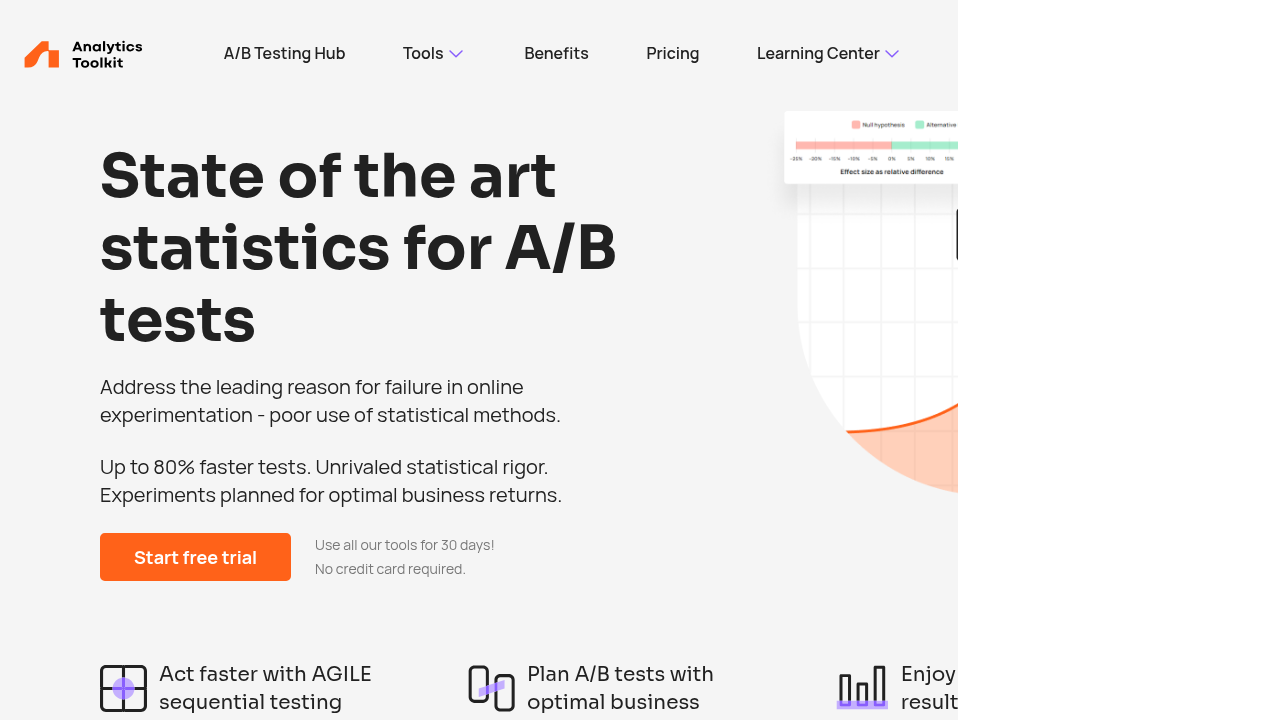
Analytics Toolkit is a specialized suite of statistical tools designed for A/B testing and online experimentation. It empowers digital marketers, CRO specialists, and UX researchers to plan, analyze, and optimize controlled experiments on websites, mobile apps, and digital platforms with unmatched statistical rigor.

Why Use Analytics Toolkit?

  • Statistical Precision: Delivers trusted results for A/B tests using revenue-based metrics to drive decisions and stakeholder buy-in.
  • AGILE Sequential Testing: Enables faster tests by continuously analyzing data, allowing early detection of winners without fixed sample sizes.
  • ROI Optimization: Balances business risk and reward by suggesting optimal test durations and significance levels based on key metrics.
  • Google Analytics Integration: Seamlessly pulls data from GA4 and Universal Analytics for automated, time-saving reports.

Who is Analytics Toolkit For?

  • Freelancers and Small Agencies: Affordable entry plan for individual testers.
  • Agencies and Consultants: Scalable tools for multiple clients and complex experiments.
  • Enterprises: Advanced features for high-stakes optimization programs.
  • Data Analysts and Marketers: Those needing control without manual calculations or dashboard switching.

Key Features and Benefits

  • A/B Test Planner & Calculator: Estimates sample sizes, calculates significance, and plans experiments accurately.
  • Event Tracking & Audience Segmentation: Monitors user actions, segments audiences for targeted insights.
  • Real-Time Analytics & Conversion Tracking: Provides immediate feedback and measures key actions like purchases.
  • Learning Center: Articles, videos, and glossaries on A/B testing statistics.
  • 30-Day Free Trial: No credit card required for full access.

This toolkit streamlines experimentation, reducing time from hypothesis to actionable insights while minimizing risks.

Analytics Toolkit Summary

Analytics Toolkit

Analytics Toolkit is a specialized suite of statistical tools designed for A/B testing and online experimentation. It empowers digital marketers, CRO specialists, and UX researchers to plan, analyze, and optimize controlled experiments on websites, mobile apps, and digital platforms with unmatched statistical rigor.

Why Use Analytics Toolkit?

  • Statistical Precision: Delivers trusted results for A/B tests using revenue-based metrics to drive decisions and stakeholder buy-in.
  • AGILE Sequential Testing: Enables faster tests by continuously analyzing data, allowing early detection of winners without fixed sample sizes.
  • ROI Optimization: Balances business risk and reward by suggesting optimal test durations and significance levels based on key metrics.
  • Google Analytics Integration: Seamlessly pulls data from GA4 and Universal Analytics for automated, time-saving reports.

Who is Analytics Toolkit For?

  • Freelancers and Small Agencies: Affordable entry plan for individual testers.
  • Agencies and Consultants: Scalable tools for multiple clients and complex experiments.
  • Enterprises: Advanced features for high-stakes optimization programs.
  • Data Analysts and Marketers: Those needing control without manual calculations or dashboard switching.

Key Features and Benefits

  • A/B Test Planner & Calculator: Estimates sample sizes, calculates significance, and plans experiments accurately.
  • Event Tracking & Audience Segmentation: Monitors user actions, segments audiences for targeted insights.
  • Real-Time Analytics & Conversion Tracking: Provides immediate feedback and measures key actions like purchases.
  • Learning Center: Articles, videos, and glossaries on A/B testing statistics.
  • 30-Day Free Trial: No credit card required for full access.

This toolkit streamlines experimentation, reducing time from hypothesis to actionable insights while minimizing risks.

Analytics Toolkit reviews and insights

Learn what people say about Analytics Toolkit

4.3
3 Reviews
68%
Subscribed Score

Lear more here about the Subscribed score on how it is composed. Learn more Click here

Overall rating

5
4
3
2
1
CX 4/6

How good is the customer support based on subscribed’s assessment

CX Icon
Security 4/6

How secure is the product based on Subscribed’s assessment?

Security Icon
Ease of Use 5/6

How easy is the product to use, based on Subscribed’s assessment?

EOU Icon
Value 5/6

What is the value for money based on Subscribed’s assessment?

coin Icon
Integration 4/6

How many integrations does the product offer?

gear Icon
Popularity 3/6

How popular is the product?

star
Kristine Lao Organic
Admin and Marketing
3 months ago
Share
What do you like best about this product?
Speeds up testing by continuously analyzing data and detecting winners early without fixed sample sizes.
What feature doesn’t work as expected?
All features are working. It monitors user actions, segments audiences for targeted insights.
How could the product save you more time or money?
Affordable entry plan for individual testers. Helps balance risk and reward by recommending optimal test durations and significance levels based on key metrics.
Final thoughts, wrap up what you think
It streamlines experimentation, helping turn hypotheses into actionable insights faster while reducing risk.
Upvote (3)
Perch Arnel II Montefalcon User Test Enabled
Freelance Software Developer
See My Portfolio
3 months ago
Share
What exceeded your expectations?
The AGILE sequential testing lets you confidently call winners way earlier without the usual stats headaches; saved me serious time and boosted test velocity like crazy. The ROI planner actually ties everything to real business returns instead of just p-values, which is a game-changer for selling results to non-tech stakeholders.
What slows you down when using it?
The initial learning curve on the AGILE sequential stuff and ROI planner if you're not already deep into stats; it takes a bit to fully trust and integrate without double-checking everything manually. API connections help once set up, but getting data flowing smoothly can eat a couple hours on complex sites.
What new feature would you love to see added?
Having integration with GA4 and CDPs for real-time data would be great. It means I not wasting hours on manual API setup for every new project, and plus a one-click export to client dashboards would make the workflow way smoother.
Final thoughts, wrap up what you think
The AGILE sequential testing and ROI planner have genuinely sped up my workflows and made results way more credible to non-tech stakeholders. Only holding back that last point because of the initial stats learning curve, but once you're in it's a no-brainer for anyone serious about proper experimentation.
Upvote (3)
3 months ago
Share
What do you like best about this product?
What stands out is the way it gathers several tools together. Switching from app to app isn’t something I have to do anymore.
What slows you down when using it?
Might seem crowded at first glance. Getting familiar means walking through each piece slowly.
What could make it even better?
Finding your way could be easier with clearer steps. That kind of support tends to soften the steep parts at the start.
Final thoughts, wrap up what you think
For folks looking for a single tool that does it all, this fits well. Once familiarity sets in, the benefits become clear.
Upvote
Analytics Toolkit

Analytics Toolkit User Reviews

3 User Reviews

Reviews from G2, Capterra, Trustpilot
info Icon

These ratings come directly from third-party platforms like G2, Capterra, and Trustpilot. They reflect real user feedback collected independently on those sites.

Analytics Toolkit pricing

Pricing model

Analytics Toolkit
Pricing Range
info Icon

This only an estimated pricing range, visit Analytics Toolkit pricing page to access all the information by clicking “Visit Now”.

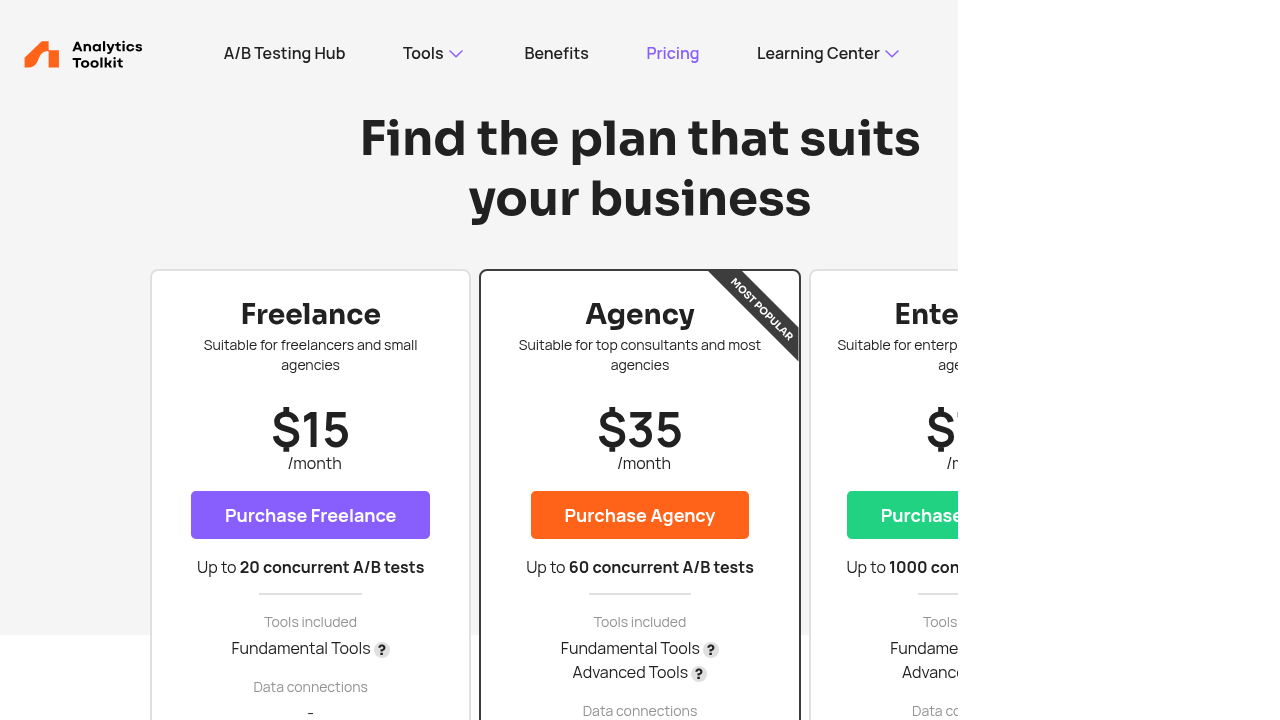
$15 - $70 / mo
Deals Available

This product comes with a special deal, see details

Visit Now
✨ Ask AI about pricing
68% Subscribed Score
info Icon

The Subscribed Score is an independent rating that combines user reviews, features, and value-for-money from multiple trusted sources. It’s designed as a quick benchmark, not a guarantee of individual experience.

Overview

Analytics Toolkit

Analytics Toolkit is a specialized suite of statistical tools designed for A/B testing and online experimentation. It empowers digital marketers, CRO specialists, and UX researchers to plan, analyze, and optimize controlled experiments on websites, mobile apps, and digital platforms with unmatched statistical rigor.

Why Use Analytics Toolkit?

  • Statistical Precision: Delivers trusted results for A/B tests using revenue-based metrics to drive decisions and stakeholder buy-in.
  • AGILE Sequential Testing: Enables faster tests by continuously analyzing data, allowing early detection of winners without fixed sample sizes.
  • ROI Optimization: Balances business risk and reward by suggesting optimal test durations and significance levels based on key metrics.
  • Google Analytics Integration: Seamlessly pulls data from GA4 and Universal Analytics for automated, time-saving reports.

Who is Analytics Toolkit For?

  • Freelancers and Small Agencies: Affordable entry plan for individual testers.
  • Agencies and Consultants: Scalable tools for multiple clients and complex experiments.
  • Enterprises: Advanced features for high-stakes optimization programs.
  • Data Analysts and Marketers: Those needing control without manual calculations or dashboard switching.

Key Features and Benefits

  • A/B Test Planner & Calculator: Estimates sample sizes, calculates significance, and plans experiments accurately.
  • Event Tracking & Audience Segmentation: Monitors user actions, segments audiences for targeted insights.
  • Real-Time Analytics & Conversion Tracking: Provides immediate feedback and measures key actions like purchases.
  • Learning Center: Articles, videos, and glossaries on A/B testing statistics.
  • 30-Day Free Trial: No credit card required for full access.

This toolkit streamlines experimentation, reducing time from hypothesis to actionable insights while minimizing risks.

Where Analytics Toolkit performs best

What users like
  • Statistically rigorous A/B tools
  • AGILE for faster testing
  • GA integration saves time
  • 30-day no-card trial
  • Affordable pricing

Where Analytics Toolkit falls short

What users dislike
  • Limited to A/B testing focus
  • No mobile/desktop app
  • Basic support options
  • Enterprise plan pricey
  • No free forever plan
Subscribed Score Metrics
25/36 Metric achieved
MetricsScore
Customer Support4/6
Security4/6
Ease of Use5/6
Value of Money5/6
Integration4/6
Popularity3/6
Radar Chart Table View
Ease of Use
Measures how simple and intuitive the product is to use, including setup, navigation, and overall user experience
5/6 Metric Checks
Security
Compares the product`s features, quality, and pricing to determine its overall cost-effectiveness.
4/6 Metric Checks
Value of Money
Assesses the product`s ability to protect data, prevent breaches, and comply with industry standards.
5/6 Metric Checks
Customer Support
Reflects the responsiveness, helpfulness, and quality of assistance provided by the product`s support team.
4/6 Metric Checks
Integrations
Evaluates how well the product connects with other tools and platforms, enabling seamless workflows.
4/6 Metric Checks
Analytics Toolkit Pricing Range
$15 - $70 / mo

Analytics Toolkit in action
info Icon

A curated gallery of real screenshots and use cases from the product, so you can see how it works before trying it.

Analytics Toolkit Full Screen Icon
Analytics Toolkit
Analytics Toolkit
Analytics Toolkit
Analytics Toolkit

Alternatives to Analytics Toolkit
info Icon

A list of platforms similar to Analytics Toolkit, helping you evaluate which tool best matches your needs.

How to cancel Analytics Toolkit

Need to cancel Analytics Toolkit? Here is how
info Icon

Thinking about how to cancel Analytics Toolkit this is how you do it!

Log into your Analytics Toolkit account, navigate to billing settings, and select cancel subscription. Confirm via prompts; access continues until period ends. Email support if needed.

How to Cancel the Analytics Toolkit

Log into your Analytics Toolkit account, navigate to billing settings, and select cancel subscription. Confirm via prompts; access continues until period ends. Email support if needed.

FAQs about Analytics Toolkit

Every else you need to know about Analytics Toolkit
info Icon

A collection of FAQs, guides, alternatives, and comparisons to help you quickly understand if Analytics Toolkit is right for you.

Manage your Analytics Toolkit profile

Create profile

Want to list your product on Subscribed.fyi? Create a profile to reach more buyers.

Pricing Range
info Icon

This only an estimated pricing range, visit Analytics Toolkit pricing page to access all the information by clicking “Visit Now”.

$15 - $70 / mo
Visit Now
Deals Available

This product comes with a special deal, see details

This product comes with a special deal, see details