AnalyticsCreator Reviews 2026: Details, Pricing, & Features | Subscribed.fyi
Sign in to review
Join our community of software reviewers on Subscribed.fyi

Continue With Google
Continue With LinkedIn
Continue Review with Email
Continue with Email
Enter your email to continue.
Continue
Enter your password
Enter your password to finish setting up your account.
Continue
Activate your email
Enter activation code we sent to your email.
Submit
Reset your password
Enter activation code we sent to your email.
Submit
Set your new password
Enter a new password for your account.
Submit
Categories
For Business
Log in
Provide My Insights

AnalyticsCreator Reviews, Pricing, Features & Alternatives (2026)

AnalyticsCreator is a no-code, fully automated data warehouse development platform that streamlines design, development, and deployment. It allows seamless integration with 250+ connectors, enabling businesses to achieve up to 10x faster results while reducing costs by 80%. With its powerful automation and ultrafast prototyping capabilities, teams can deliver data-driven insights in days, not weeks. Suitable for various environments, it simplifies data engineering and ensures scalability across projects.

AnalyticsCreator Overview

What is AnalyticsCreator?

N/A
0
Reviews
60%
Subscribed Score

Available for Claim - This listing is available to be claimed
Claim Profile For Free

Unclaimed

Manage profile with subsig, and unlock 23+ social and review monitoring. Get partnership options with

Claim Profile For Free

Why teams choose AnalyticsCreator

Key Features

Fast & Efficient
Fast & Efficient
Optimized for speed and performance.
Collaborate Easily
Collaborate Easily
Built for teams and communication.
Works Anywhere
Works Anywhere
Accessible from any device, anytime.

Who is AnalyticsCreator for?

AnalyticsCreator is a groundbreaking solution designed to revolutionize data management in the Data Engineering space. Built for data engineers and analytics teams, this platform automates the entire data warehouse lifecycle—from design and development to deployment and ongoing change management—removing the traditional challenges of manual coding and maintenance.

AnalyticsCreator streamlines data pipelines through a fully automated, no-code, and zero-maintenance approach. Users can connect to over 250 pre-built connectors, enabling seamless integration with virtually any data source or target. This ease of connectivity and automation empowers teams to achieve up to 10 times faster results, propelling business intelligence initiatives forward in days rather than weeks. In turn, companies experience significant time and cost savings while reducing project risks and ensuring compliance and transparency in data operations.

Key Features of AnalyticsCreator

  • No-Code Data Pipeline Automation: Eliminate tedious manual coding by leveraging a platform that automates design, deployment, and change processes across your entire BI stack.
  • 250+ Connectors: Enjoy seamless integration with various data sources, ensuring that your data pipelines work effortlessly across multiple environments, whether on-premise or in the cloud.
  • Ultrafast Prototyping: Quickly generate prototypes and showcase analytical results for rapid decision-making and strategic agility.
  • Error Alerts & Workflow Management: Stay informed with automated alerts and structured workflow management that guarantee continuous business operations and data quality.

Designed to simplify complex data engineering tasks, AnalyticsCreator not only generates code for data management but also supports comprehensive documentation management and a robust template system. This integrated functionality makes it an ideal tool for managing data warehouses across diverse infrastructures such as Azure SQL DB, Azure Data Warehouse, and on-premise MS SQL Server environments.

Why Use AnalyticsCreator?

  • Enhanced Productivity: Automate and optimize processes to free up valuable resources and reduce development cycles.
  • Improved Transparency: Detailed data lineage and error management provide clear insights into your data architecture.
  • Seamless Integration: Built-in support for a wide range of platforms means you can break down data silos and drive business intelligence across the organization.

Who is AnalyticsCreator For?

  • Data Engineers looking to automate the tedious processes of data warehouse design and deployment.
  • Analytics teams that require rapid prototyping and real-time data insights.
  • Organizations aiming to modernize their BI stack with a fully integrated, cost-effective solution.

Discover exclusive deals and learn more about how AnalyticsCreator can transform your data engineering workflows. For additional Data Engineering solutions, consider alternatives like WhereScape Red, Oracle Database, and Qlik Sense.


AnalyticsCreator Summary

AnalyticsCreator is a groundbreaking solution designed to revolutionize data management in the Data Engineering space. Built for data engineers and analytics teams, this platform automates the entire data warehouse lifecycle—from design and development to deployment and ongoing change management—removing the traditional challenges of manual coding and maintenance.

AnalyticsCreator streamlines data pipelines through a fully automated, no-code, and zero-maintenance approach. Users can connect to over 250 pre-built connectors, enabling seamless integration with virtually any data source or target. This ease of connectivity and automation empowers teams to achieve up to 10 times faster results, propelling business intelligence initiatives forward in days rather than weeks. In turn, companies experience significant time and cost savings while reducing project risks and ensuring compliance and transparency in data operations.

Key Features of AnalyticsCreator

  • No-Code Data Pipeline Automation: Eliminate tedious manual coding by leveraging a platform that automates design, deployment, and change processes across your entire BI stack.
  • 250+ Connectors: Enjoy seamless integration with various data sources, ensuring that your data pipelines work effortlessly across multiple environments, whether on-premise or in the cloud.
  • Ultrafast Prototyping: Quickly generate prototypes and showcase analytical results for rapid decision-making and strategic agility.
  • Error Alerts & Workflow Management: Stay informed with automated alerts and structured workflow management that guarantee continuous business operations and data quality.

Designed to simplify complex data engineering tasks, AnalyticsCreator not only generates code for data management but also supports comprehensive documentation management and a robust template system. This integrated functionality makes it an ideal tool for managing data warehouses across diverse infrastructures such as Azure SQL DB, Azure Data Warehouse, and on-premise MS SQL Server environments.

Why Use AnalyticsCreator?

  • Enhanced Productivity: Automate and optimize processes to free up valuable resources and reduce development cycles.
  • Improved Transparency: Detailed data lineage and error management provide clear insights into your data architecture.
  • Seamless Integration: Built-in support for a wide range of platforms means you can break down data silos and drive business intelligence across the organization.

Who is AnalyticsCreator For?

  • Data Engineers looking to automate the tedious processes of data warehouse design and deployment.
  • Analytics teams that require rapid prototyping and real-time data insights.
  • Organizations aiming to modernize their BI stack with a fully integrated, cost-effective solution.

Discover exclusive deals and learn more about how AnalyticsCreator can transform your data engineering workflows. For additional Data Engineering solutions, consider alternatives like WhereScape Red, Oracle Database, and Qlik Sense.

AnalyticsCreator reviews and insights

Learn what people say about AnalyticsCreator

N/A
0 Reviews
60%
Subscribed Score

Lear more here about the Subscribed score on how it is composed. Learn more Click here

Overall rating

5
4
3
2
1
CX 6/6

How good is the customer support based on subscribed’s assessment

CX Icon
Security 0/6

How secure is the product based on Subscribed’s assessment?

Security Icon
Ease of Use 5/6

How easy is the product to use, based on Subscribed’s assessment?

EOU Icon
Value 5/6

What is the value for money based on Subscribed’s assessment?

coin Icon
Integration 3/6

How many integrations does the product offer?

gear Icon
Popularity 3/6

How popular is the product?

star

No Reviews Yet!

Be the first to share your experience and help others in the community.

AnalyticsCreator User Reviews

0 User Reviews

Reviews from G2, Capterra, Trustpilot
info Icon

These ratings come directly from third-party platforms like G2, Capterra, and Trustpilot. They reflect real user feedback collected independently on those sites.

AnalyticsCreator pricing

Pricing model

Pricing Range
info Icon

This only an estimated pricing range, visit AnalyticsCreator pricing page to access all the information by clicking “Visit Now”.

Not specified
Deals Available

This product comes with a special deal, see details

Visit Now
✨ Ask AI about pricing
60% Subscribed Score
info Icon

The Subscribed Score is an independent rating that combines user reviews, features, and value-for-money from multiple trusted sources. It’s designed as a quick benchmark, not a guarantee of individual experience.

Overview

AnalyticsCreator is a groundbreaking solution designed to revolutionize data management in the Data Engineering space. Built for data engineers and analytics teams, this platform automates the entire data warehouse lifecycle—from design and development to deployment and ongoing change management—removing the traditional challenges of manual coding and maintenance.

AnalyticsCreator streamlines data pipelines through a fully automated, no-code, and zero-maintenance approach. Users can connect to over 250 pre-built connectors, enabling seamless integration with virtually any data source or target. This ease of connectivity and automation empowers teams to achieve up to 10 times faster results, propelling business intelligence initiatives forward in days rather than weeks. In turn, companies experience significant time and cost savings while reducing project risks and ensuring compliance and transparency in data operations.

Key Features of AnalyticsCreator

  • No-Code Data Pipeline Automation: Eliminate tedious manual coding by leveraging a platform that automates design, deployment, and change processes across your entire BI stack.
  • 250+ Connectors: Enjoy seamless integration with various data sources, ensuring that your data pipelines work effortlessly across multiple environments, whether on-premise or in the cloud.
  • Ultrafast Prototyping: Quickly generate prototypes and showcase analytical results for rapid decision-making and strategic agility.
  • Error Alerts & Workflow Management: Stay informed with automated alerts and structured workflow management that guarantee continuous business operations and data quality.

Designed to simplify complex data engineering tasks, AnalyticsCreator not only generates code for data management but also supports comprehensive documentation management and a robust template system. This integrated functionality makes it an ideal tool for managing data warehouses across diverse infrastructures such as Azure SQL DB, Azure Data Warehouse, and on-premise MS SQL Server environments.

Why Use AnalyticsCreator?

  • Enhanced Productivity: Automate and optimize processes to free up valuable resources and reduce development cycles.
  • Improved Transparency: Detailed data lineage and error management provide clear insights into your data architecture.
  • Seamless Integration: Built-in support for a wide range of platforms means you can break down data silos and drive business intelligence across the organization.

Who is AnalyticsCreator For?

  • Data Engineers looking to automate the tedious processes of data warehouse design and deployment.
  • Analytics teams that require rapid prototyping and real-time data insights.
  • Organizations aiming to modernize their BI stack with a fully integrated, cost-effective solution.

Discover exclusive deals and learn more about how AnalyticsCreator can transform your data engineering workflows. For additional Data Engineering solutions, consider alternatives like WhereScape Red, Oracle Database, and Qlik Sense.

Where AnalyticsCreator performs best

What users like
  • Fast implementation of data pipelines
  • Highly automated for efficiency
  • Great DWH project flexibility
  • Comprehensive support for SQL Server

Where AnalyticsCreator falls short

What users dislike
  • Limited to Microsoft stack
  • Steep learning curve for beginners
  • GUI appears outdated to some
  • Limited compatibility with certain cloud platforms
Subscribed Score Metrics
22/36 Metric achieved
MetricsScore
Customer Support6/6
Security0/6
Ease of Use5/6
Value of Money5/6
Integration3/6
Popularity3/6
Radar Chart Table View
Ease of Use
Measures how simple and intuitive the product is to use, including setup, navigation, and overall user experience
5/6 Metric Checks
Security
Compares the product`s features, quality, and pricing to determine its overall cost-effectiveness.
0/6 Metric Checks
Value of Money
Assesses the product`s ability to protect data, prevent breaches, and comply with industry standards.
5/6 Metric Checks
Customer Support
Reflects the responsiveness, helpfulness, and quality of assistance provided by the product`s support team.
6/6 Metric Checks
Integrations
Evaluates how well the product connects with other tools and platforms, enabling seamless workflows.
3/6 Metric Checks
AnalyticsCreator Pricing Range
Not specified

AnalyticsCreator in action
info Icon

A curated gallery of real screenshots and use cases from the product, so you can see how it works before trying it.

AnalyticsCreator Full Screen Icon
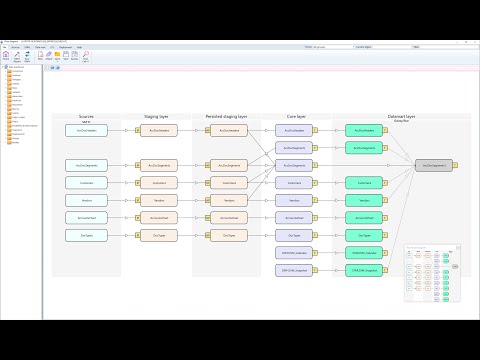
https://www.youtube.com/watch?v=x-KIzfA5QVc
Full Screen Icon
https://www.youtube.com/watch?v=FeUrE8xbbGY
Full Screen Icon
AnalyticsCreator
AnalyticsCreator
Video thumbnail
Video thumbnail
AnalyticsCreator
AnalyticsCreator

Alternatives to AnalyticsCreator
info Icon

A list of platforms similar to AnalyticsCreator, helping you evaluate which tool best matches your needs.

How to cancel AnalyticsCreator

Need to cancel AnalyticsCreator? Here is how
info Icon

Thinking about how to cancel AnalyticsCreator this is how you do it!

To cancel AnalyticsCreator, navigate to the billing section of your account dashboard. Click on the subscription management option and select the plan you wish to cancel. Follow the prompts to confirm cancellation, providing feedback if requested. Access will remain until the end of the billing cycle.

How to Cancel the AnalyticsCreator

To cancel AnalyticsCreator, navigate to the billing section of your account dashboard. Click on the subscription management option and select the plan you wish to cancel. Follow the prompts to confirm cancellation, providing feedback if requested. Access will remain until the end of the billing cycle.

FAQs about AnalyticsCreator

Every else you need to know about AnalyticsCreator
info Icon

A collection of FAQs, guides, alternatives, and comparisons to help you quickly understand if AnalyticsCreator is right for you.

Manage your AnalyticsCreator profile

Create profile

Want to list your product on Subscribed.fyi? Create a profile to reach more buyers.

Pricing Range
info Icon

This only an estimated pricing range, visit AnalyticsCreator pricing page to access all the information by clicking “Visit Now”.

Not specified
Visit Now
Deals Available

This product comes with a special deal, see details

This product comes with a special deal, see details