How to Cancel Arketa (2026)
How to cancel Arketa
Here’s a quick guide on how to cancel your Arketa subscription. Whether you’re moving to another booking software or simply cutting costs, this guide will walk you through the cancellation steps with ease. Arketa offers cutting-edge booking software solutions designed to enhance the client experience with a seamless and visually appealing checkout process, robust marketing automation tools, and exceptional customer support to streamline operations for businesses. If you’re looking for alternatives, feel free to explore other booking software tools that might better fit your business needs. If you’re looking for alternatives, explore other options in the WorkSuite category.
How to Cancel Your Arketa Subscription
Canceling your Arketa subscription is straightforward when you know the steps. Whether you’re switching to another platform or simply reducing your expenses, follow this guide for a smooth cancellation process.
How to Cancel Arketa: Step by step
Step 1: Log into Your Arketa Account
To begin, log in to your Arketa account on the Arketa website. Once logged in, navigate to your Account Settings by clicking on your profile icon at the top right of the screen.
Step 2: Access the Billing Settings
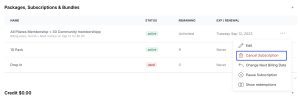
In your Account Settings, scroll down and find the Billing or Subscriptions tab. This is where you can view all of your current subscriptions and manage your billing information.
Step 3: Review Your Subscription Details
Before proceeding with the cancellation, review your subscription details to ensure you understand when your next billing date is and what features you will lose access to once canceled. This will help you make an informed decision.
Step 4: Start the Cancellation Process
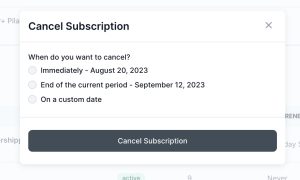
Next, click on the Cancel Subscription button under your subscription details. Arketa will ask if you’re sure you want to cancel. Click Yes, Cancel to initiate the cancellation process.
Step 5: Confirm the Cancellation
Follow any additional on-screen prompts to confirm your cancellation. Arketa may ask you to provide feedback on why you’re canceling, which can be helpful for improving their services.
Step 6: Verify Your Cancellation
After successfully canceling, you should receive a confirmation email from Arketa Support. Be sure to check your email to verify that the subscription has been canceled and that you will no longer be billed.
If you need more detailed information or have specific questions about your Arketa account, you can also refer to their Help Center or contact their support team directly.
Conclusion
Ending a subscription can be a hassle-free task when you follow the proper steps. Whether you’re opting for a different service, tightening your budget, or no longer need the product, the process can be managed smoothly with careful attention to the cancellation steps. Always ensure you’ve reviewed your subscription terms and confirmed the cancellation to avoid future charges. Should any complications arise, most services offer support options to help resolve issues quickly.
Explore Alternative Worksuite Options
If you’re exploring alternatives in the Worksuite category, consider these useful tools to enhance your productivity:
- Canva: A powerful tool for creating stunning graphics and presentations.
- Google Workspace: Comprehensive suite for collaboration and document management.
- Tactiq.io: A tool for transcribing and summarizing meetings.
- Notion: An all-in-one workspace for notes, tasks, and project management.
- Microsoft 365: A robust suite of office tools for business and personal use.
Don’t forget to browse the latest Subscribed Deals for similar solutions that may better fit your business needs. You should also check out other tools from related categories like Project Management for task tracking and planning, or Customer Relationship Management for managing client interactions and workflows.