CleverPDF Reviews 2026: Details, Pricing, & Features | Subscribed.fyi
Sign in to review
Join our community of software reviewers on Subscribed.fyi

Continue With Google
Continue With LinkedIn
Continue Review with Email
Continue with Email
Enter your email to continue.
Continue
Enter your password
Enter your password to finish setting up your account.
Continue
Activate your email
Enter activation code we sent to your email.
Submit
Reset your password
Enter activation code we sent to your email.
Submit
Set your new password
Enter a new password for your account.
Submit
✨ Ask AI Search
Categories
For Business
Log in
Provide My Insights

CleverPDF

4/5
(1)

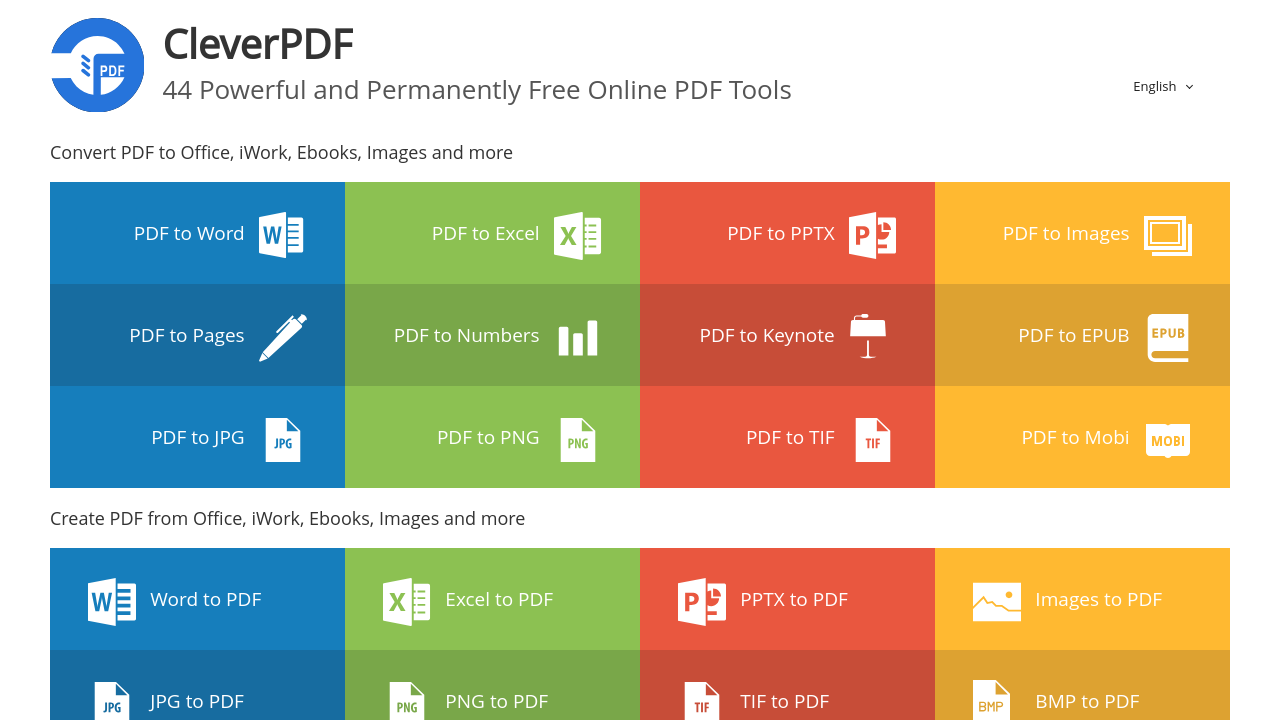
CleverPDF is a versatile tool offering over 30 PDF solutions, including conversion, compression, merging, splitting, and encryption. It provides both free online services and offline paid versions with perpetual licenses, ensuring flexibility for users. Designed for simplicity and efficiency, it supports 20+ languages and prioritizes file security by auto-deleting uploaded files after 30 minutes.

CleverPDF

4
1
Reviews
67%
Subscribed Score

Available for Claim - This listing is available to be claimed
Claim For Free

Unclaimed

Curated and listed by Subscribed Team

Claim For Free
Expert Support
Expert Support
Help available when you need it.
Works Anywhere
Works Anywhere
Accessible from any device, anytime.
Collaborate Easily
Collaborate Easily
Built for teams and communication.

CleverPDF is a comprehensive solution in the PDF Tools category, offering more than 30 tools to manage, edit, and convert PDF files. With CleverPDF, users can convert PDFs to Microsoft Office formats, images, eBooks, and iWork documents or create PDFs from these formats. The platform also provides an array of utilities including compression, splitting, merging, encryption, watermark addition, and page numbering tools. Both online and offline versions cater to diverse needs, making CleverPDF an essential resource for daily PDF tasks. Explore exclusive deals. Consider alternatives such as iLovePDF.

Why Use CleverPDF?

Choosing CleverPDF provides numerous advantages for managing PDFs:

  • Versatile Functionality: CleverPDF allows users to perform a wide range of operations, including format conversions, file merging, compression, and security enhancements like encryption.
  • Convenient Access: Its web-based tools are free to use without registration, while offline versions for Windows and Mac are available for a one-time license fee.
  • Ease of Use: Most tools operate with a simple three-step process, ensuring efficiency and user-friendliness.
  • Privacy Assurance: CleverPDF automatically deletes uploaded files from the server after 30 minutes, ensuring data privacy.
  • Global Accessibility: The tool is available in 20 languages, catering to a diverse global audience.

Who is CleverPDF For?

CleverPDF is ideal for a broad range of users:

  • Professionals: Businesspersons, educators, and marketers can rely on CleverPDF to handle document creation, conversion, and editing tasks efficiently.
  • Students: It simplifies academic work by converting, compressing, and managing PDF files for assignments and projects.
  • Freelancers and Personal Users: From organizing personal files to preparing client presentations, CleverPDF delivers robust tools for customization and management.

CleverPDF is a powerful solution for managing your PDF files with ease and security. Whether you’re a professional or a casual user, CleverPDF streamlines PDF management, ensuring efficiency and data privacy.

CleverPDF Summary

CleverPDF is a comprehensive solution in the PDF Tools category, offering more than 30 tools to manage, edit, and convert PDF files. With CleverPDF, users can convert PDFs to Microsoft Office formats, images, eBooks, and iWork documents or create PDFs from these formats. The platform also provides an array of utilities including compression, splitting, merging, encryption, watermark addition, and page numbering tools. Both online and offline versions cater to diverse needs, making CleverPDF an essential resource for daily PDF tasks. Explore exclusive deals. Consider alternatives such as iLovePDF.

Why Use CleverPDF?

Choosing CleverPDF provides numerous advantages for managing PDFs:

  • Versatile Functionality: CleverPDF allows users to perform a wide range of operations, including format conversions, file merging, compression, and security enhancements like encryption.
  • Convenient Access: Its web-based tools are free to use without registration, while offline versions for Windows and Mac are available for a one-time license fee.
  • Ease of Use: Most tools operate with a simple three-step process, ensuring efficiency and user-friendliness.
  • Privacy Assurance: CleverPDF automatically deletes uploaded files from the server after 30 minutes, ensuring data privacy.
  • Global Accessibility: The tool is available in 20 languages, catering to a diverse global audience.

Who is CleverPDF For?

CleverPDF is ideal for a broad range of users:

  • Professionals: Businesspersons, educators, and marketers can rely on CleverPDF to handle document creation, conversion, and editing tasks efficiently.
  • Students: It simplifies academic work by converting, compressing, and managing PDF files for assignments and projects.
  • Freelancers and Personal Users: From organizing personal files to preparing client presentations, CleverPDF delivers robust tools for customization and management.

CleverPDF is a powerful solution for managing your PDF files with ease and security. Whether you’re a professional or a casual user, CleverPDF streamlines PDF management, ensuring efficiency and data privacy.

CleverPDF reviews

Learn what people say about CleverPDF

4
1 Reviews
67%
Subscribed Score

Lear more here about the Subscribed score on how it is composed. Learn more Click here

Overall rating

5
4
3
2
1
CX 4/6

How good is the customer support based on subscribed’s assessment

CX Icon
Security 3/6

How secure is the product based on Subscribed’s assessment?

Security Icon
Ease of Use 5/6

How easy is the product to use, based on Subscribed’s assessment?

EOU Icon
Value 6/6

What is the value for money based on Subscribed’s assessment?

coin Icon
Integration 2/6

How many integrations does the product offer?

gear Icon
Popularity 4/6

How popular is the product?

star
M Raza Akhter Invitation
QA Engineer
2 weeks ago
Share
How has it made your work/life easier?
CleverPDF has made my work easier by handling common PDF tasks like conversion, compression, and basic editing in one place. It saves time, especially when I need to quickly convert files during testing or daily tasks.
Have you experienced any bugs or errors?
I noticed that the tool can slow down when working with larger files. In some cases, the formatting of the document slightly changed after conversion, which needed a quick check.
How could the product save you more time or money?
It would save more time if file conversions were faster and the output quality stayed exactly the same. Adding a few more advanced features in the basic version would also make it more useful and cost-effective.
Final thoughts, wrap up what you think
I would recommend CleverPDF because it’s simple to use and helpful for everyday PDF tasks. It makes routine file operations quicker and more convenient.
Upvote

CleverPDF User Reviews

1 User Reviews

M Raza Akhter Invitation
QA Engineer
2 weeks ago
Share
How has it made your work/life easier?
CleverPDF has made my work easier by handling common PDF tasks like conversion, compression, and basic editing in one place. It saves time, especially when I need to quickly convert files during testing or daily tasks.
Have you experienced any bugs or errors?
I noticed that the tool can slow down when working with larger files. In some cases, the formatting of the document slightly changed after conversion, which needed a quick check.
How could the product save you more time or money?
It would save more time if file conversions were faster and the output quality stayed exactly the same. Adding a few more advanced features in the basic version would also make it more useful and cost-effective.
Final thoughts, wrap up what you think
I would recommend CleverPDF because it’s simple to use and helpful for everyday PDF tasks. It makes routine file operations quicker and more convenient.
Upvote
Reviews from G2, Capterra, Trustpilot
info Icon

These ratings come directly from third-party platforms like G2, Capterra, and Trustpilot. They reflect real user feedback collected independently on those sites.

CleverPDF

Pricing Range
info Icon

This only an estimated pricing range, visit CleverPDF pricing page to access all the information by clicking “Visit Now”.

$14.99-$39.99 / Month
Deals Available

This product comes with a special deal, see details

Visit Now
✨ Ask AI about pricing
67% Subscribed Score
info Icon

The Subscribed Score is an independent rating that combines user reviews, features, and value-for-money from multiple trusted sources. It’s designed as a quick benchmark, not a guarantee of individual experience.

Analysis

CleverPDF is a comprehensive solution in the PDF Tools category, offering more than 30 tools to manage, edit, and convert PDF files. With CleverPDF, users can convert PDFs to Microsoft Office formats, images, eBooks, and iWork documents or create PDFs from these formats. The platform also provides an array of utilities including compression, splitting, merging, encryption, watermark addition, and page numbering tools. Both online and offline versions cater to diverse needs, making CleverPDF an essential resource for daily PDF tasks. Explore exclusive deals. Consider alternatives such as iLovePDF.

Why Use CleverPDF?

Choosing CleverPDF provides numerous advantages for managing PDFs:

  • Versatile Functionality: CleverPDF allows users to perform a wide range of operations, including format conversions, file merging, compression, and security enhancements like encryption.
  • Convenient Access: Its web-based tools are free to use without registration, while offline versions for Windows and Mac are available for a one-time license fee.
  • Ease of Use: Most tools operate with a simple three-step process, ensuring efficiency and user-friendliness.
  • Privacy Assurance: CleverPDF automatically deletes uploaded files from the server after 30 minutes, ensuring data privacy.
  • Global Accessibility: The tool is available in 20 languages, catering to a diverse global audience.

Who is CleverPDF For?

CleverPDF is ideal for a broad range of users:

  • Professionals: Businesspersons, educators, and marketers can rely on CleverPDF to handle document creation, conversion, and editing tasks efficiently.
  • Students: It simplifies academic work by converting, compressing, and managing PDF files for assignments and projects.
  • Freelancers and Personal Users: From organizing personal files to preparing client presentations, CleverPDF delivers robust tools for customization and management.

CleverPDF is a powerful solution for managing your PDF files with ease and security. Whether you’re a professional or a casual user, CleverPDF streamlines PDF management, ensuring efficiency and data privacy.

Pros
  • Free to use online with many tools.
  • User-friendly interface, easy navigation.
  • Quick file conversions.
  • Desktop version available with no file size limit.
Cons
  • OCR feature missing.
  • Occasionally messy document conversion.
  • File upload servers can be slow.
  • PDF to .mobi function has issues.
Subscribed Score Metrics
24/36 Metric achieved
MetricsScore
Customer Support4/6
Security3/6
Ease of Use5/6
Value of Money6/6
Integration2/6
Popularity4/6
Radar Chart Table View
Ease of Use
Measures how simple and intuitive the product is to use, including setup, navigation, and overall user experience
5/6 Metric Checks
Security
Compares the product`s features, quality, and pricing to determine its overall cost-effectiveness.
3/6 Metric Checks
Value of Money
Assesses the product`s ability to protect data, prevent breaches, and comply with industry standards.
6/6 Metric Checks
Customer Support
Reflects the responsiveness, helpfulness, and quality of assistance provided by the product`s support team.
4/6 Metric Checks
Integrations
Evaluates how well the product connects with other tools and platforms, enabling seamless workflows.
2/6 Metric Checks
CleverPDF Pricing Range
$14.99-$39.99 / Month

CleverPDF Showcase
info Icon

A curated gallery of real screenshots and use cases from the product, so you can see how it works before trying it.

CleverPDF Full Screen Icon
https://www.youtube.com/watch?v=QthvM6oaKCE
Full Screen Icon
https://www.youtube.com/watch?v=S4HLjcnA98g
Full Screen Icon
CleverPDF

What else exists next to CleverPDF
info Icon

A list of platforms similar to CleverPDF, helping you evaluate which tool best matches your needs.

Need to cancel CleverPDF? Here is how
info Icon

Thinking about how to cancel CleverPDF this is how you do it!

To cancel a CleverPDF product, there is no subscription to cancel since CleverPDF offers free online tools. For the paid offline version, contact support for assistance.

How to Cancel the CleverPDF

To cancel a CleverPDF product, there is no subscription to cancel since CleverPDF offers free online tools. For the paid offline version, contact support for assistance.

Every else you need to know about CleverPDF
info Icon

A collection of FAQs, guides, alternatives, and comparisons to help you quickly understand if CleverPDF is right for you.

Pricing Range
info Icon

This only an estimated pricing range, visit CleverPDF pricing page to access all the information by clicking “Visit Now”.

$14.99-$39.99 / Month
Visit Now
Deals Available

This product comes with a special deal, see details

This product comes with a special deal, see details