EventDraw Reviews 2026: Details, Pricing, & Features | Subscribed.fyi
Sign in to review
Join our community of software reviewers on Subscribed.fyi

Continue With Google
Continue With LinkedIn
Continue Review with Email
Continue with Email
Enter your email to continue.
Continue
Enter your password
Enter your password to finish setting up your account.
Continue
Activate your email
Enter activation code we sent to your email.
Submit
Reset your password
Enter activation code we sent to your email.
Submit
Set your new password
Enter a new password for your account.
Submit
✨ Ask AI Search
Categories
For Business
Log in
Provide My Insights

EventDraw

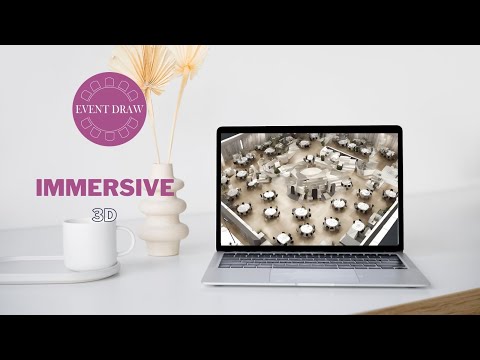
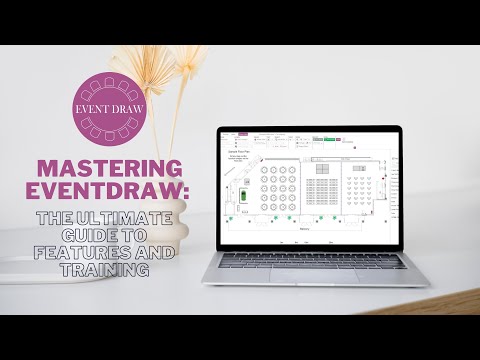
EventDraw is a user-friendly event diagramming software designed for venues and event planners to create detailed 2D and 3D floor plans effortlessly. Its drag-and-drop functionality and smart tools save time while enhancing venue setup efficiency. Clients can explore immersive 3D virtual tours of event spaces, enabling remote collaboration and decision-making. Ideal for events of all types, EventDraw streamlines planning while delivering an exceptional client experience.

EventDraw

N/A
0
Reviews
68%
Subscribed Score

Available for Claim - This listing is available to be claimed
Claim For Free

Unclaimed

Curated and listed by Subscribed Team

Claim For Free
Built for Flexibility
Adaptable for multiple use cases.
Fully Customizable
Fully Customizable
Tailor it to your brand and workflow.
Works Anywhere
Works Anywhere
Accessible from any device, anytime.

EventDraw is a premier tool in the Event Management category, designed to simplify and enhance event planning for venues and coordinators. This leading diagramming software enables users to create stunning 2D and 3D floor plans in minutes using intuitive drag-and-drop functionality. Supporting a wide variety of events such as dinners, conferences, and cocktail parties, EventDraw helps professionals optimize setups and improve client experiences with immersive technology. Explore exclusive deals. For more options, consider ClickUp, and Wrike.

Why Use EventDraw?

Choosing EventDraw for your event management needs offers several distinct advantages:

  • Efficient Floor Plan Design: Create custom layouts with ease using over 5,000 preloaded furniture shapes, unlimited guest lists, and advanced design tools for indoor and outdoor events.
  • Immersive 3D Tours: Enhance client collaboration with 4K virtual walkthroughs of your event space, eliminating the need for onsite visits and delivering flexibility for global audiences.
  • Improved Productivity: Save time and streamline processes with features like table numbering, inventory reports, and reusable templates, increasing operational efficiency.
  • Scalable and Cost-Effective Solutions: With no restrictions on user access, events per year, or lock-in contracts, EventDraw offers versatile pricing tailored to various venues, including hotels, universities, theatres, or convention centers.

Who is EventDraw For?

EventDraw caters to a wide range of event professionals and venues:

  • Event Planners: Ideal for planners seeking an intuitive digital tool to easily map out complex setups for client presentations.
  • Venue Managers: Providing seamless planning capabilities to maximize space utilization and enhance client satisfaction.
  • Event Coordinators: Enables faster collaboration with clients and teams, ensuring accurate execution and operational reliability.
  • Businesses and Institutions: Tailored solutions for schools, universities, government entities, and cultural venues to host organized and visually stunning events.

EventDraw is an indispensable tool for any business prioritizing efficient event planning, visual presentation, and customer satisfaction. With its advanced features and competitive offerings, EventDraw sets the benchmark for modern event management solutions.


EventDraw Summary

EventDraw is a premier tool in the Event Management category, designed to simplify and enhance event planning for venues and coordinators. This leading diagramming software enables users to create stunning 2D and 3D floor plans in minutes using intuitive drag-and-drop functionality. Supporting a wide variety of events such as dinners, conferences, and cocktail parties, EventDraw helps professionals optimize setups and improve client experiences with immersive technology. Explore exclusive deals. For more options, consider ClickUp, and Wrike.

Why Use EventDraw?

Choosing EventDraw for your event management needs offers several distinct advantages:

  • Efficient Floor Plan Design: Create custom layouts with ease using over 5,000 preloaded furniture shapes, unlimited guest lists, and advanced design tools for indoor and outdoor events.
  • Immersive 3D Tours: Enhance client collaboration with 4K virtual walkthroughs of your event space, eliminating the need for onsite visits and delivering flexibility for global audiences.
  • Improved Productivity: Save time and streamline processes with features like table numbering, inventory reports, and reusable templates, increasing operational efficiency.
  • Scalable and Cost-Effective Solutions: With no restrictions on user access, events per year, or lock-in contracts, EventDraw offers versatile pricing tailored to various venues, including hotels, universities, theatres, or convention centers.

Who is EventDraw For?

EventDraw caters to a wide range of event professionals and venues:

  • Event Planners: Ideal for planners seeking an intuitive digital tool to easily map out complex setups for client presentations.
  • Venue Managers: Providing seamless planning capabilities to maximize space utilization and enhance client satisfaction.
  • Event Coordinators: Enables faster collaboration with clients and teams, ensuring accurate execution and operational reliability.
  • Businesses and Institutions: Tailored solutions for schools, universities, government entities, and cultural venues to host organized and visually stunning events.

EventDraw is an indispensable tool for any business prioritizing efficient event planning, visual presentation, and customer satisfaction. With its advanced features and competitive offerings, EventDraw sets the benchmark for modern event management solutions.

EventDraw reviews

Learn what people say about EventDraw

N/A
0 Reviews
68%
Subscribed Score

Lear more here about the Subscribed score on how it is composed. Learn more Click here

Overall rating

5
4
3
2
1
CX 5/6

How good is the customer support based on subscribed’s assessment

CX Icon
Security 4/6

How secure is the product based on Subscribed’s assessment?

Security Icon
Ease of Use 5/6

How easy is the product to use, based on Subscribed’s assessment?

EOU Icon
Value 5/6

What is the value for money based on Subscribed’s assessment?

coin Icon
Integration 3/6

How many integrations does the product offer?

gear Icon
Popularity 3/6

How popular is the product?

star

No Reviews Yet!

Be the first to share your experience and help others in the community.

EventDraw User Reviews

0 User Reviews

Reviews from G2, Capterra, Trustpilot
info Icon

These ratings come directly from third-party platforms like G2, Capterra, and Trustpilot. They reflect real user feedback collected independently on those sites.

EventDraw

Pricing Range
info Icon

This only an estimated pricing range, visit EventDraw pricing page to access all the information by clicking “Visit Now”.

$49 / Month
Visit Now
✨ Ask AI about pricing
68% Subscribed Score
info Icon

The Subscribed Score is an independent rating that combines user reviews, features, and value-for-money from multiple trusted sources. It’s designed as a quick benchmark, not a guarantee of individual experience.

Analysis

EventDraw is a premier tool in the Event Management category, designed to simplify and enhance event planning for venues and coordinators. This leading diagramming software enables users to create stunning 2D and 3D floor plans in minutes using intuitive drag-and-drop functionality. Supporting a wide variety of events such as dinners, conferences, and cocktail parties, EventDraw helps professionals optimize setups and improve client experiences with immersive technology. Explore exclusive deals. For more options, consider ClickUp, and Wrike.

Why Use EventDraw?

Choosing EventDraw for your event management needs offers several distinct advantages:

  • Efficient Floor Plan Design: Create custom layouts with ease using over 5,000 preloaded furniture shapes, unlimited guest lists, and advanced design tools for indoor and outdoor events.
  • Immersive 3D Tours: Enhance client collaboration with 4K virtual walkthroughs of your event space, eliminating the need for onsite visits and delivering flexibility for global audiences.
  • Improved Productivity: Save time and streamline processes with features like table numbering, inventory reports, and reusable templates, increasing operational efficiency.
  • Scalable and Cost-Effective Solutions: With no restrictions on user access, events per year, or lock-in contracts, EventDraw offers versatile pricing tailored to various venues, including hotels, universities, theatres, or convention centers.

Who is EventDraw For?

EventDraw caters to a wide range of event professionals and venues:

  • Event Planners: Ideal for planners seeking an intuitive digital tool to easily map out complex setups for client presentations.
  • Venue Managers: Providing seamless planning capabilities to maximize space utilization and enhance client satisfaction.
  • Event Coordinators: Enables faster collaboration with clients and teams, ensuring accurate execution and operational reliability.
  • Businesses and Institutions: Tailored solutions for schools, universities, government entities, and cultural venues to host organized and visually stunning events.

EventDraw is an indispensable tool for any business prioritizing efficient event planning, visual presentation, and customer satisfaction. With its advanced features and competitive offerings, EventDraw sets the benchmark for modern event management solutions.

Pros
  • Easy to use with minimal training
  • Customizable for venue needs
  • Helpful for client collaboration
  • Affordable pricing
Cons
  • Graphics need improvement
  • Limited features on web version
  • Occasional system crashes
  • Initial setup time-consuming
Subscribed Score Metrics
25/36 Metric achieved
MetricsScore
Customer Support5/6
Security4/6
Ease of Use5/6
Value of Money5/6
Integration3/6
Popularity3/6
Radar Chart Table View
Ease of Use
Measures how simple and intuitive the product is to use, including setup, navigation, and overall user experience
5/6 Metric Checks
Security
Compares the product`s features, quality, and pricing to determine its overall cost-effectiveness.
4/6 Metric Checks
Value of Money
Assesses the product`s ability to protect data, prevent breaches, and comply with industry standards.
5/6 Metric Checks
Customer Support
Reflects the responsiveness, helpfulness, and quality of assistance provided by the product`s support team.
5/6 Metric Checks
Integrations
Evaluates how well the product connects with other tools and platforms, enabling seamless workflows.
3/6 Metric Checks
EventDraw Pricing Range
$49 / Month

EventDraw Showcase
info Icon

A curated gallery of real screenshots and use cases from the product, so you can see how it works before trying it.

EventDraw Full Screen Icon
https://www.youtube.com/watch?v=atUBcsO9nhY
Full Screen Icon
https://www.youtube.com/watch?v=q2vOy45yPlU
Full Screen Icon
EventDraw
EventDraw

What else exists next to EventDraw
info Icon

A list of platforms similar to EventDraw, helping you evaluate which tool best matches your needs.

Need to cancel EventDraw? Here is how
info Icon

Thinking about how to cancel EventDraw this is how you do it!

To cancel an event in the context provided, here is a quick outline:

  • Navigate to the Events Dashboard.
  • Select the event to cancel.
  • Use the Actions drop-down menu and choose "Cancel."
  • Follow the cancellation options, such as canceling remaining occurrences and notifying registrants.
  • Confirm the cancellation in the pop-up window.

This process is generally outlined in event management systems, though specific steps may vary depending on the platform.

How to Cancel the EventDraw

To cancel an event in the context provided, here is a quick outline:

  • Navigate to the Events Dashboard.
  • Select the event to cancel.
  • Use the Actions drop-down menu and choose "Cancel."
  • Follow the cancellation options, such as canceling remaining occurrences and notifying registrants.
  • Confirm the cancellation in the pop-up window.

This process is generally outlined in event management systems, though specific steps may vary depending on the platform.

Every else you need to know about EventDraw
info Icon

A collection of FAQs, guides, alternatives, and comparisons to help you quickly understand if EventDraw is right for you.

Pricing Range
info Icon

This only an estimated pricing range, visit EventDraw pricing page to access all the information by clicking “Visit Now”.

$49 / Month
Visit Now