Sign in to review
Join our community of software reviewers on Subscribed.fyi

Continue With Google
Continue With LinkedIn
Continue Review with Email
Continue with Email
Enter your email to continue.
Continue
Enter your password
Enter your password to finish setting up your account.
Continue
Activate your email
Enter activation code we sent to your email.
Submit
Reset your password
Enter activation code we sent to your email.
Submit
Set your new password
Enter a new password for your account.
Submit
Log in
Provide My Insights
Express Scribe logo
Express Scribe logo

Express Scribe Reviews, Pricing, Features & Alternatives (2026)

Express Scribe is a professional audio transcription software designed for PC and Mac, ideal for typists and transcriptionists. It supports variable speed playback, speech-to-text integration, and various audio formats like WAV and MP3. With features such as foot pedal compatibility and automatic audio loading, it streamlines transcription workflows. Its lightweight design and user-friendly interface make it efficient for high-speed and accurate transcriptions.

Express Scribe logo
Express Scribe logo
Express Scribe logo

Express Scribe Overview

What is Express Scribe?

N/A
★ ★ ★ ★ ★
0
Reviews

Available for Claim - This listing is available to be claimed
Claim Profile

Unclaimed

Claim this profile to manage it.

Claim Profile

Why teams choose Express Scribe

Key Features

Fast & Efficient
Fast & Efficient
Optimized for speed and performance.
Smart Automation
Smart Automation
Save time with AI-powered workflows.
Secure by Design
Secure by Design
Data protection and compliance built in.

Who is Express Scribe for?

Express Scribe Overview

Express Scribe is a professional transcription tool designed to streamline audio and video transcription workflows. Developed for both PC and Mac environments, this robust software enables transcriptionists to efficiently convert recordings into text while keeping productivity high. With support for various audio formats such as WAV, MP3, and WMA, Express Scribe offers seamless playback and control functionalities that make transcription tasks faster and more accurate.

Express Scribe is especially designed for transcribers who demand precision and efficiency in their work. Given its integration with foot pedal controls and customizable hotkeys, users can control audio playback without interrupting their typing flow. The program’s ability to automatically load audio recordings from diverse sources — including CDs, email, LAN, FTP, and even portable recorder devices — ensures that your files are always ready when you need them.

Key Features of Express Scribe

  • Variable Speed Playback: Adjust audio speed without affecting the pitch to match your transcription pace.
  • Foot Pedal Support: Keep your hands free on the keyboard while a foot pedal controls playback, rewinding, and forwarding.
  • Multi-Source File Loading: Seamlessly load files from local drives, network sources, and external devices.
  • Hotkey Functionality: Customizable shortcut commands allow you to manage audio control swiftly while working in tandem with other applications.
  • Integration Capabilities: Easily dock portable recorders and integrate with Express Delegate for smoother file transfers.

Express Scribe falls under the Transcription Software category and delivers a user-friendly experience that supports multiple languages including English, German, French, Italian, Japanese, and Spanish. Its streamlined interface and minimal screen footprint — highlighted by a “Mini” version — make it an ideal choice for individuals looking to improve their transcription efficiency.

Why Choose Express Scribe?

  • Efficiency for Professionals: Enhance productivity with features such as auto backstep, time stamp insertion, and customizable controls.
  • Versatile Compatibility: Work with a variety of audio formats and external devices regardless of your recording source.
  • User-Centric Design: Enjoy a simple installation process and an intuitive interface that reduces the learning curve.

For those who want to explore attractive deals and pricing, visit the Express Scribe Deal Page. Additionally, if you are considering alternative transcription solutions, you might consider The FTW Transcriber and Deepgram.

Express Scribe is an essential tool for transcription professionals, offering enhanced control, flexibility, and reliability. Its comprehensive feature set empowers users in legal, medical, educational, and administrative fields to achieve accurate transcriptions faster, thereby allowing them to focus more on the content and less on the mechanics of audio control.

Express Scribe Summary

Express Scribe Overview

Express Scribe is a professional transcription tool designed to streamline audio and video transcription workflows. Developed for both PC and Mac environments, this robust software enables transcriptionists to efficiently convert recordings into text while keeping productivity high. With support for various audio formats such as WAV, MP3, and WMA, Express Scribe offers seamless playback and control functionalities that make transcription tasks faster and more accurate.

Express Scribe is especially designed for transcribers who demand precision and efficiency in their work. Given its integration with foot pedal controls and customizable hotkeys, users can control audio playback without interrupting their typing flow. The program’s ability to automatically load audio recordings from diverse sources — including CDs, email, LAN, FTP, and even portable recorder devices — ensures that your files are always ready when you need them.

Key Features of Express Scribe

  • Variable Speed Playback: Adjust audio speed without affecting the pitch to match your transcription pace.
  • Foot Pedal Support: Keep your hands free on the keyboard while a foot pedal controls playback, rewinding, and forwarding.
  • Multi-Source File Loading: Seamlessly load files from local drives, network sources, and external devices.
  • Hotkey Functionality: Customizable shortcut commands allow you to manage audio control swiftly while working in tandem with other applications.
  • Integration Capabilities: Easily dock portable recorders and integrate with Express Delegate for smoother file transfers.

Express Scribe falls under the Transcription Software category and delivers a user-friendly experience that supports multiple languages including English, German, French, Italian, Japanese, and Spanish. Its streamlined interface and minimal screen footprint — highlighted by a “Mini” version — make it an ideal choice for individuals looking to improve their transcription efficiency.

Why Choose Express Scribe?

  • Efficiency for Professionals: Enhance productivity with features such as auto backstep, time stamp insertion, and customizable controls.
  • Versatile Compatibility: Work with a variety of audio formats and external devices regardless of your recording source.
  • User-Centric Design: Enjoy a simple installation process and an intuitive interface that reduces the learning curve.

For those who want to explore attractive deals and pricing, visit the Express Scribe Deal Page. Additionally, if you are considering alternative transcription solutions, you might consider The FTW Transcriber and Deepgram.

Express Scribe is an essential tool for transcription professionals, offering enhanced control, flexibility, and reliability. Its comprehensive feature set empowers users in legal, medical, educational, and administrative fields to achieve accurate transcriptions faster, thereby allowing them to focus more on the content and less on the mechanics of audio control.

Express Scribe reviews and insights

Learn what people say about Express Scribe

N/A ★ ★ ★ ★ ★
0 Reviews

No Reviews Yet!

Be the first to share your experience and help others in the community.

Express Scribe logo

Express Scribe User Reviews

0 User Reviews

Reviews from G2, Capterra, Trustpilot
info Icon

These ratings come directly from third-party platforms like G2, Capterra, and Trustpilot. They reflect real user feedback collected independently on those sites.

Express Scribe pricing

Pricing model

Express Scribe logo
Pricing Range
info Icon

This only an estimated pricing range, visit Express Scribe pricing page to access all the information by clicking “Visit Now”.

$10.75-$11.58 / Month
Deals Available

This product comes with a special deal, see details

Visit Now

Overview

Express Scribe Overview

Express Scribe is a professional transcription tool designed to streamline audio and video transcription workflows. Developed for both PC and Mac environments, this robust software enables transcriptionists to efficiently convert recordings into text while keeping productivity high. With support for various audio formats such as WAV, MP3, and WMA, Express Scribe offers seamless playback and control functionalities that make transcription tasks faster and more accurate.

Express Scribe is especially designed for transcribers who demand precision and efficiency in their work. Given its integration with foot pedal controls and customizable hotkeys, users can control audio playback without interrupting their typing flow. The program’s ability to automatically load audio recordings from diverse sources — including CDs, email, LAN, FTP, and even portable recorder devices — ensures that your files are always ready when you need them.

Key Features of Express Scribe

  • Variable Speed Playback: Adjust audio speed without affecting the pitch to match your transcription pace.
  • Foot Pedal Support: Keep your hands free on the keyboard while a foot pedal controls playback, rewinding, and forwarding.
  • Multi-Source File Loading: Seamlessly load files from local drives, network sources, and external devices.
  • Hotkey Functionality: Customizable shortcut commands allow you to manage audio control swiftly while working in tandem with other applications.
  • Integration Capabilities: Easily dock portable recorders and integrate with Express Delegate for smoother file transfers.

Express Scribe falls under the Transcription Software category and delivers a user-friendly experience that supports multiple languages including English, German, French, Italian, Japanese, and Spanish. Its streamlined interface and minimal screen footprint — highlighted by a “Mini” version — make it an ideal choice for individuals looking to improve their transcription efficiency.

Why Choose Express Scribe?

  • Efficiency for Professionals: Enhance productivity with features such as auto backstep, time stamp insertion, and customizable controls.
  • Versatile Compatibility: Work with a variety of audio formats and external devices regardless of your recording source.
  • User-Centric Design: Enjoy a simple installation process and an intuitive interface that reduces the learning curve.

For those who want to explore attractive deals and pricing, visit the Express Scribe Deal Page. Additionally, if you are considering alternative transcription solutions, you might consider The FTW Transcriber and Deepgram.

Express Scribe is an essential tool for transcription professionals, offering enhanced control, flexibility, and reliability. Its comprehensive feature set empowers users in legal, medical, educational, and administrative fields to achieve accurate transcriptions faster, thereby allowing them to focus more on the content and less on the mechanics of audio control.

Where Express Scribe performs best

What users like
  • User-friendly interface with customizable shortcuts.
  • Foot pedal integration improves transcription efficiency.
  • Supports a wide variety of file formats.
  • One-time purchase with no recurring subscription.

Where Express Scribe falls short

What users dislike
  • Lacks integrated auto-correct or advanced editing tools.
  • Some users faced sound quality and compatibility issues.
  • License tied to a single user and device.
  • High cost for additional features or reinstallation.
Express Scribe Pricing Range
$10.75-$11.58 / Month

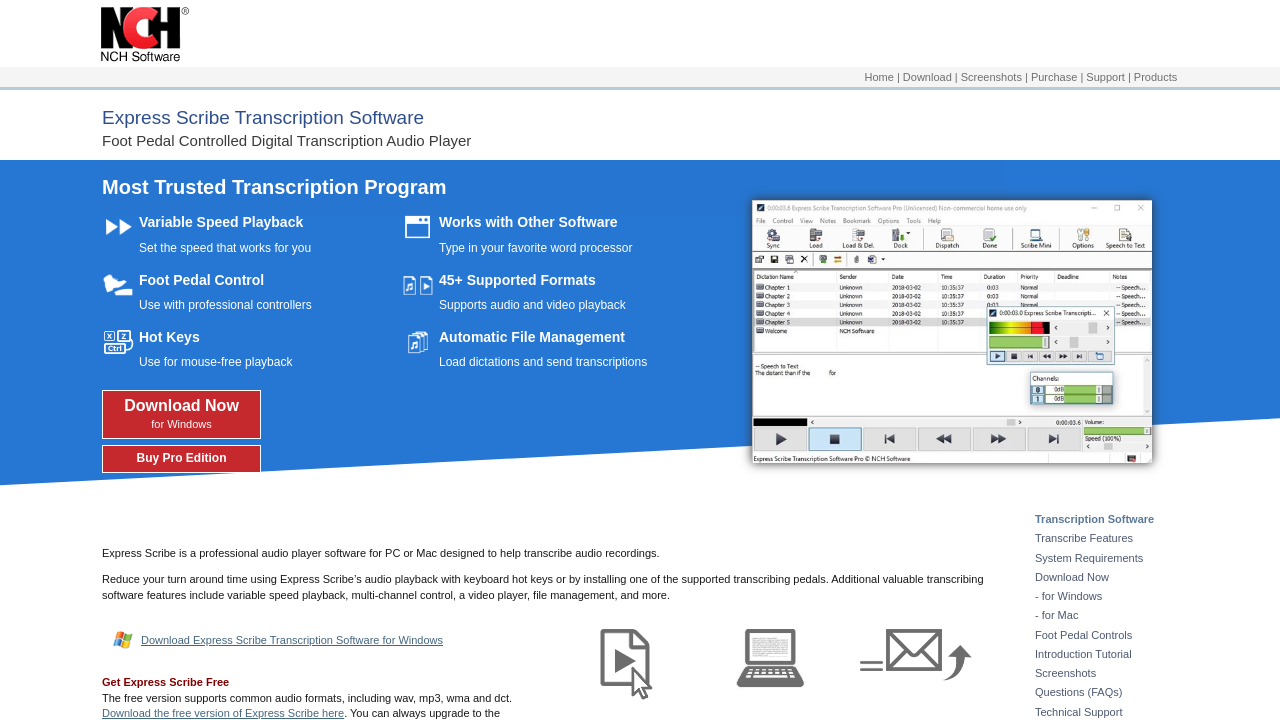
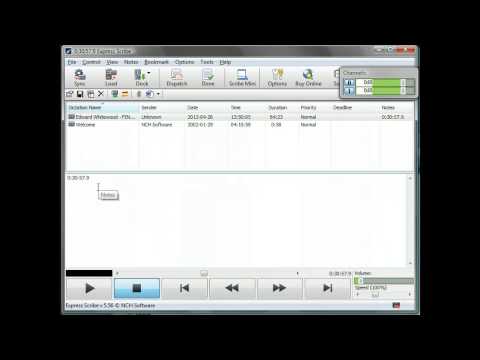
Express Scribe in action
info Icon

A curated gallery of real screenshots and use cases from the product, so you can see how it works before trying it.

Express Scribe screenshot 1 Full Screen Icon
https://www.youtube.com/watch?v=VL9YwIbvXyo
Full Screen Icon
https://www.youtube.com/watch?v=PG334gg65oU
Full Screen Icon
Express Scribe screenshot 1
Video thumbnail
Video thumbnail
Express Scribe screenshot 1

Alternatives to Express Scribe
info Icon

A list of platforms similar to Express Scribe, helping you evaluate which tool best matches your needs.

How to cancel Express Scribe

Need to cancel Express Scribe? Here is how
info Icon

Thinking about how to cancel Express Scribe this is how you do it!

To cancel an Express Scribe product, follow these steps:

  1. Access Subscription Management: Visit NCH Software’s subscription management page.
  2. Identify Your Subscription: Locate the specific subscription you wish to cancel.
  3. Cancel Subscription: Follow the prompts to cancel your subscription.
  4. Contact Support: If needed, reach out to NCH Software’s customer support for assistance.

How to Cancel the Express Scribe

To cancel an Express Scribe product, follow these steps:

  1. Access Subscription Management: Visit NCH Software’s subscription management page.
  2. Identify Your Subscription: Locate the specific subscription you wish to cancel.
  3. Cancel Subscription: Follow the prompts to cancel your subscription.
  4. Contact Support: If needed, reach out to NCH Software’s customer support for assistance.

Manage your Express Scribe profile

Create profile

Want to list your product on Subscribed.fyi? Create a profile to reach more buyers.

Pricing Range
info Icon

This only an estimated pricing range, visit Express Scribe pricing page to access all the information by clicking “Visit Now”.

$10.75-$11.58 / Month
Visit Now
Deals Available

This product comes with a special deal, see details

This product comes with a special deal, see details