Handdy Reviews 2026: Details, Pricing, & Features | Subscribed.fyi
Sign in to review
Join our community of software reviewers on Subscribed.fyi

Continue With Google
Continue With LinkedIn
Continue Review with Email
Continue with Email
Enter your email to continue.
Continue
Enter your password
Enter your password to finish setting up your account.
Continue
Activate your email
Enter activation code we sent to your email.
Submit
Reset your password
Enter activation code we sent to your email.
Submit
Set your new password
Enter a new password for your account.
Submit
Categories
For Business
Log in
Provide My Insights
Handdy
Handdy

Handdy Reviews, Pricing, Features & Alternatives (2026)

4/5
(3)

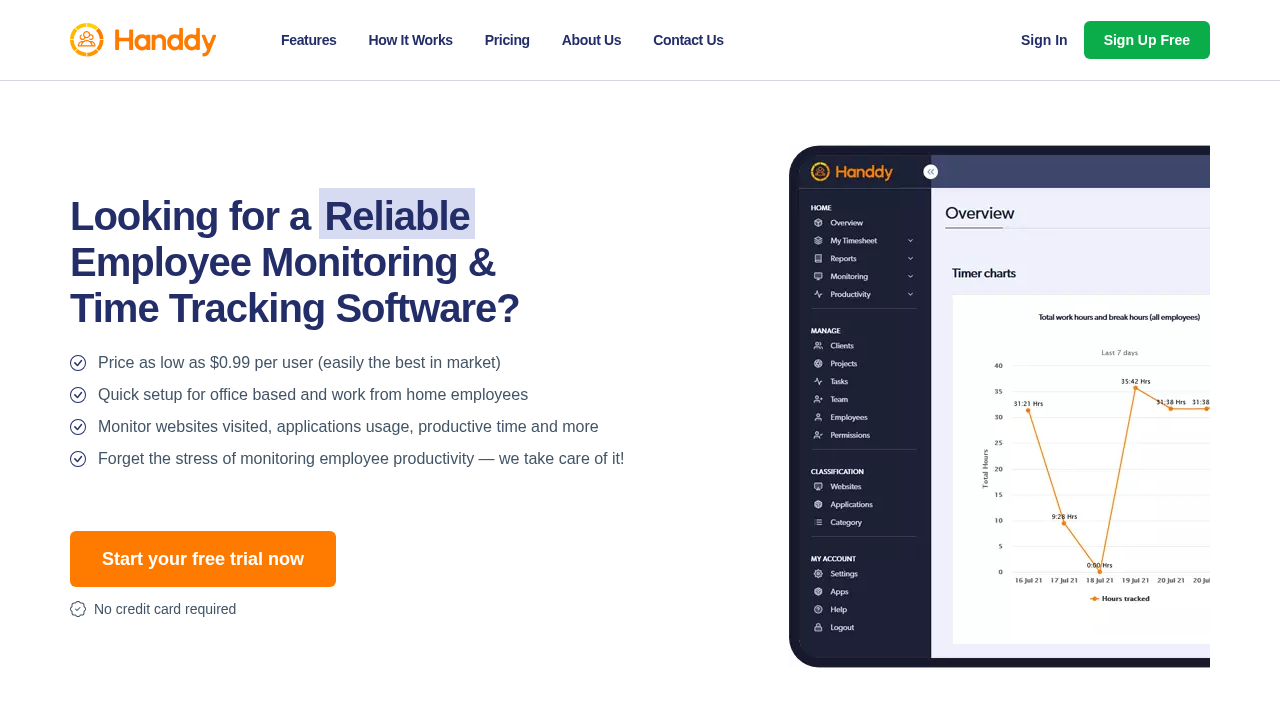
Handdy is an easy-to-use employee monitoring and productivity software designed for tracking remote and in-house staff performance. It offers real-time insights into employee activity with affordable pricing starting at $0.99 per user monthly. Non-intrusive and suitable for businesses of all sizes, it helps optimize workforce productivity effectively.

Handdy
Handdy
Handdy

Handdy Overview

What is Handdy?

4
3
Reviews
68%
Subscribed Score

Available for Claim - This listing is available to be claimed
Claim Profile For Free

Unclaimed

Manage profile with subsig, and unlock 23+ social and review monitoring. Get partnership options with

Claim Profile For Free

Why teams choose Handdy

Key Features

Real-Time Updates
Real-Time Updates
See changes instantly, no delays.
Data-Driven Insights
Make better decisions with analytics.
Secure by Design
Secure by Design
Data protection and compliance built in.

Who is Handdy for?

Handdy

Handdy provides straightforward employee monitoring and productivity tracking for remote, work-from-home, and in-house teams. With affordable per-user pricing and a free version available, it delivers essential tools to analyze staff performance without complexity.

Why Use Handdy?

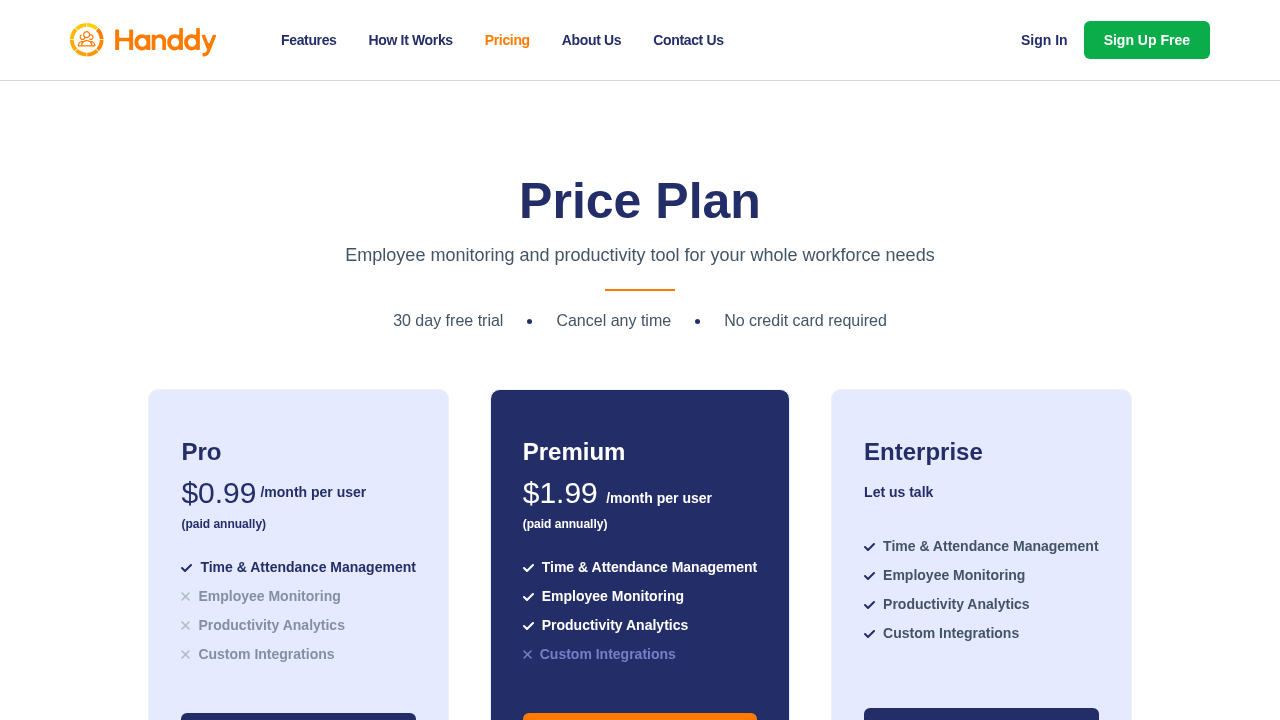
  • Affordable Pricing: Starts at $0.99/month per user for Pro plan, scaling to $1.99 for Premium, with annual billing options.
  • Non-Intrusive Monitoring: Tracks activity in real-time without disrupting workflows, ideal for productivity insights.
  • Quick Setup: Get started in 15 minutes, suitable for companies of all types and sizes.

Who is Handdy For?

  • Small businesses and startups needing cost-effective employee oversight.
  • Medium enterprises managing remote and hybrid teams.
  • Agencies, freelancers, and enterprises seeking simple productivity tools.

Key Features and Benefits

  • Employee Monitoring: Real-time tracking of remote staff, work-from-home employees, and in-house teams.
  • Productivity Analysis: Measure and analyze workforce performance with detailed reports.
  • Time Scheduling: Plan shifts and monitor time usage effectively.
  • Remote Access: Includes remote desktop control for better management.
  • Free Version: Install and test core features before upgrading to premium.

Handdy stands out for its low cost and ease of use, making advanced monitoring accessible. Compatible with Windows and Macintosh, it supports diverse business needs from freelancers to enterprises. Training resources like documentation and videos aid quick adoption.

Handdy Summary

Handdy

Handdy provides straightforward employee monitoring and productivity tracking for remote, work-from-home, and in-house teams. With affordable per-user pricing and a free version available, it delivers essential tools to analyze staff performance without complexity.

Why Use Handdy?

  • Affordable Pricing: Starts at $0.99/month per user for Pro plan, scaling to $1.99 for Premium, with annual billing options.
  • Non-Intrusive Monitoring: Tracks activity in real-time without disrupting workflows, ideal for productivity insights.
  • Quick Setup: Get started in 15 minutes, suitable for companies of all types and sizes.

Who is Handdy For?

  • Small businesses and startups needing cost-effective employee oversight.
  • Medium enterprises managing remote and hybrid teams.
  • Agencies, freelancers, and enterprises seeking simple productivity tools.

Key Features and Benefits

  • Employee Monitoring: Real-time tracking of remote staff, work-from-home employees, and in-house teams.
  • Productivity Analysis: Measure and analyze workforce performance with detailed reports.
  • Time Scheduling: Plan shifts and monitor time usage effectively.
  • Remote Access: Includes remote desktop control for better management.
  • Free Version: Install and test core features before upgrading to premium.

Handdy stands out for its low cost and ease of use, making advanced monitoring accessible. Compatible with Windows and Macintosh, it supports diverse business needs from freelancers to enterprises. Training resources like documentation and videos aid quick adoption.

Handdy reviews and insights

Learn what people say about Handdy

4
3 Reviews
68%
Subscribed Score

Lear more here about the Subscribed score on how it is composed. Learn more Click here

Overall rating

5
4
3
2
1
CX 4/6

How good is the customer support based on subscribed’s assessment

CX Icon
Security 4/6

How secure is the product based on Subscribed’s assessment?

Security Icon
Ease of Use 5/6

How easy is the product to use, based on Subscribed’s assessment?

EOU Icon
Value 6/6

What is the value for money based on Subscribed’s assessment?

coin Icon
Integration 3/6

How many integrations does the product offer?

gear Icon
Popularity 3/6

How popular is the product?

star
Jovie Macalolo-oy User Test Enabled
Executive / Leadership
See My Portfolio
3 months ago
Share
How does this compare to similar products you’ve tried?
It feels much more straightforward than other time trackers because it focuses purely on employee monitoring and simple productivity reports. I like that it doesn't have a bunch of extra features I'll never use, making it feel lighter and easier to navigate than the bigger platforms.
What slows you down when using it?
The initial setup took a bit longer than I expected because I had to manually configure the tracking settings for each person. I also find that switching between the different reporting tabs can sometimes be a little laggy when I have a lot of data to load at once.
What’s still missing for your needs?
I would really like to see more built in integrations with my current project management tools so my data could sync across apps automatically. It would also be great if there was a more modern mobile app so I could check on my team progress while im away from my desk.
Final thoughts, wrap up what you think
i would recommend it because it is an affordable and very effective way to keep a remote team accountable and productive throughout the day.
Upvote (3)
Khim Cincoflores User Test Enabled
Customer Success
See My Portfolio
3 months ago
Share
How has it made your work/life easier?
This software is a lifesaver! It has helped me track my teams spent time on work, monitor my team's activity, and tracks my team's projects and assigned tasks. Very convenient to use especially when creating invoices for salaries.
What feature doesn’t work as expected?
None so far. It works smoothly. It does its job as a tracker and monitoring. Very efficient to use and is very handy since you can monitor and track even when you're away from work.
What’s still missing for your needs?
Everything is perfect for my needs. I like how it has good integrations with our tools for easy task tracking and monitoring. Really efficient and convenient to use.
Final thoughts, wrap up what you think
Highly recommended. It does its job. Very efficient and convenient to use.
Upvote (1)
Perch Arnel II Montefalcon Organic
Freelance Software Developer
See My Portfolio
3 months ago
Share
How does this compare to similar products you’ve tried?
I tried twelve apps to watch workers on remote jobs; Handy is partially good. It works well offline and is easy to use, while other apps like Time Doctor or Hubstaff are bad and break when the internet is slow.
What feature doesn’t work as expected?
Handdy's mobile app is kind of a mess; it doesn't sync well like they say it will. The desktop version is okay, but the mobile app has big gaps, and the reports are very simple and you can't change much.
Is there a workflow that could be simpler?
Handdy is cool because it's easy to use at home and works offline, but I used Toggl Track and it's way better for me. It doesn't take creepy screenshots of your screen all the time.
Final thoughts, wrap up what you think
This tool is great because it is cheap and works offline; it is easy to set up for teams without much money. But the reports are very basic, which is a bummer.
Upvote (2)
Handdy

Handdy User Reviews

3 User Reviews

Reviews from G2, Capterra, Trustpilot
info Icon

These ratings come directly from third-party platforms like G2, Capterra, and Trustpilot. They reflect real user feedback collected independently on those sites.

Handdy pricing

Pricing model

Handdy
Pricing Range
info Icon

This only an estimated pricing range, visit Handdy pricing page to access all the information by clicking “Visit Now”.

$0.99-$1.99 / mo per user
Deals Available

This product comes with a special deal, see details

Visit Now
✨ Ask AI about pricing
68% Subscribed Score
info Icon

The Subscribed Score is an independent rating that combines user reviews, features, and value-for-money from multiple trusted sources. It’s designed as a quick benchmark, not a guarantee of individual experience.

Overview

Handdy

Handdy provides straightforward employee monitoring and productivity tracking for remote, work-from-home, and in-house teams. With affordable per-user pricing and a free version available, it delivers essential tools to analyze staff performance without complexity.

Why Use Handdy?

  • Affordable Pricing: Starts at $0.99/month per user for Pro plan, scaling to $1.99 for Premium, with annual billing options.
  • Non-Intrusive Monitoring: Tracks activity in real-time without disrupting workflows, ideal for productivity insights.
  • Quick Setup: Get started in 15 minutes, suitable for companies of all types and sizes.

Who is Handdy For?

  • Small businesses and startups needing cost-effective employee oversight.
  • Medium enterprises managing remote and hybrid teams.
  • Agencies, freelancers, and enterprises seeking simple productivity tools.

Key Features and Benefits

  • Employee Monitoring: Real-time tracking of remote staff, work-from-home employees, and in-house teams.
  • Productivity Analysis: Measure and analyze workforce performance with detailed reports.
  • Time Scheduling: Plan shifts and monitor time usage effectively.
  • Remote Access: Includes remote desktop control for better management.
  • Free Version: Install and test core features before upgrading to premium.

Handdy stands out for its low cost and ease of use, making advanced monitoring accessible. Compatible with Windows and Macintosh, it supports diverse business needs from freelancers to enterprises. Training resources like documentation and videos aid quick adoption.

Where Handdy performs best

What users like
  • Affordable from $0.99/user/mo
  • Easy 15-min setup
  • Free version available
  • Real-time tracking
  • Windows/Mac support

Where Handdy falls short

What users dislike
  • Limited integrations
  • Basic reporting in free
  • Per-user pricing scales
  • Desktop-focused
  • No mobile app
Subscribed Score Metrics
25/36 Metric achieved
MetricsScore
Customer Support4/6
Security4/6
Ease of Use5/6
Value of Money6/6
Integration3/6
Popularity3/6
Radar Chart Table View
Ease of Use
Measures how simple and intuitive the product is to use, including setup, navigation, and overall user experience
5/6 Metric Checks
Security
Compares the product`s features, quality, and pricing to determine its overall cost-effectiveness.
4/6 Metric Checks
Value of Money
Assesses the product`s ability to protect data, prevent breaches, and comply with industry standards.
6/6 Metric Checks
Customer Support
Reflects the responsiveness, helpfulness, and quality of assistance provided by the product`s support team.
4/6 Metric Checks
Integrations
Evaluates how well the product connects with other tools and platforms, enabling seamless workflows.
3/6 Metric Checks
Handdy Pricing Range
$0.99-$1.99 / mo per user

Handdy in action
info Icon

A curated gallery of real screenshots and use cases from the product, so you can see how it works before trying it.

Handdy Full Screen Icon
Handdy
Handdy
Handdy
Handdy

Alternatives to Handdy
info Icon

A list of platforms similar to Handdy, helping you evaluate which tool best matches your needs.

How to cancel Handdy

Need to cancel Handdy? Here is how
info Icon

Thinking about how to cancel Handdy this is how you do it!

Log into your Handdy account, navigate to billing or subscription settings, and select cancel or downgrade to free. Confirm via email; process is straightforward with no contracts. Data remains accessible on free plan.

How to Cancel the Handdy

Log into your Handdy account, navigate to billing or subscription settings, and select cancel or downgrade to free. Confirm via email; process is straightforward with no contracts. Data remains accessible on free plan.

FAQs about Handdy

Every else you need to know about Handdy
info Icon

A collection of FAQs, guides, alternatives, and comparisons to help you quickly understand if Handdy is right for you.

Manage your Handdy profile

Create profile

Want to list your product on Subscribed.fyi? Create a profile to reach more buyers.

Pricing Range
info Icon

This only an estimated pricing range, visit Handdy pricing page to access all the information by clicking “Visit Now”.

$0.99-$1.99 / mo per user
Visit Now
Deals Available

This product comes with a special deal, see details

This product comes with a special deal, see details