Monday.com Reviews 2026: Details, Pricing, & Features | Subscribed.fyi
Sign in to review
Join our community of software reviewers on Subscribed.fyi

Continue With Google
Continue With LinkedIn
Continue Review with Email
Continue with Email
Enter your email to continue.
Continue
Enter your password
Enter your password to finish setting up your account.
Continue
Activate your email
Enter activation code we sent to your email.
Submit
Reset your password
Enter activation code we sent to your email.
Submit
Set your new password
Enter a new password for your account.
Submit
✨ Ask AI Search
Categories
For Business
Log in
Provide My Insight

Monday.com

4.5/5
(4)

Monday.com is a versatile work operating system designed for teams to manage projects and processes collaboratively. With customizable workflows, visual workspaces, and automation, it caters to project managers, remote teams, marketing, creative, and product development teams, enhancing productivity and collaboration.

Monday.com

Operations
AI Choice Award
2025

All Awards

Operations
AI Choice Award
2025
Work Hub
Most Loved Award
2026
4.5
4
Reviews
90%
Subscribed Score

Available for Claim - This listing is available to be claimed
Claim For Free

Unclaimed

Curated and listed by Subscribed Team

Claim For Free
Seamless Integrations
Connect easily with your favorite tools.
Works Anywhere
Works Anywhere
Accessible from any device, anytime.
Secure by Design
Secure by Design
Data protection and compliance built in.

Streamline Your Workflow with monday.com – The All-in-One Project Management Platform

monday.com, a top tool in the Project Management category, empowers teams to manage projects, tasks, and processes seamlessly in a visual, collaborative space. With its intuitive interface, customizable workflows, and extensive integrations, monday.com enhances team communication, boosts transparency, and drives productivity. Ready to transform how your team works? Explore exclusive deals. For more project management tools, check out Trello, Airtable and Smartsheet.

Why Use monday.com?

In the realm of work management and collaboration, monday.com excels by:

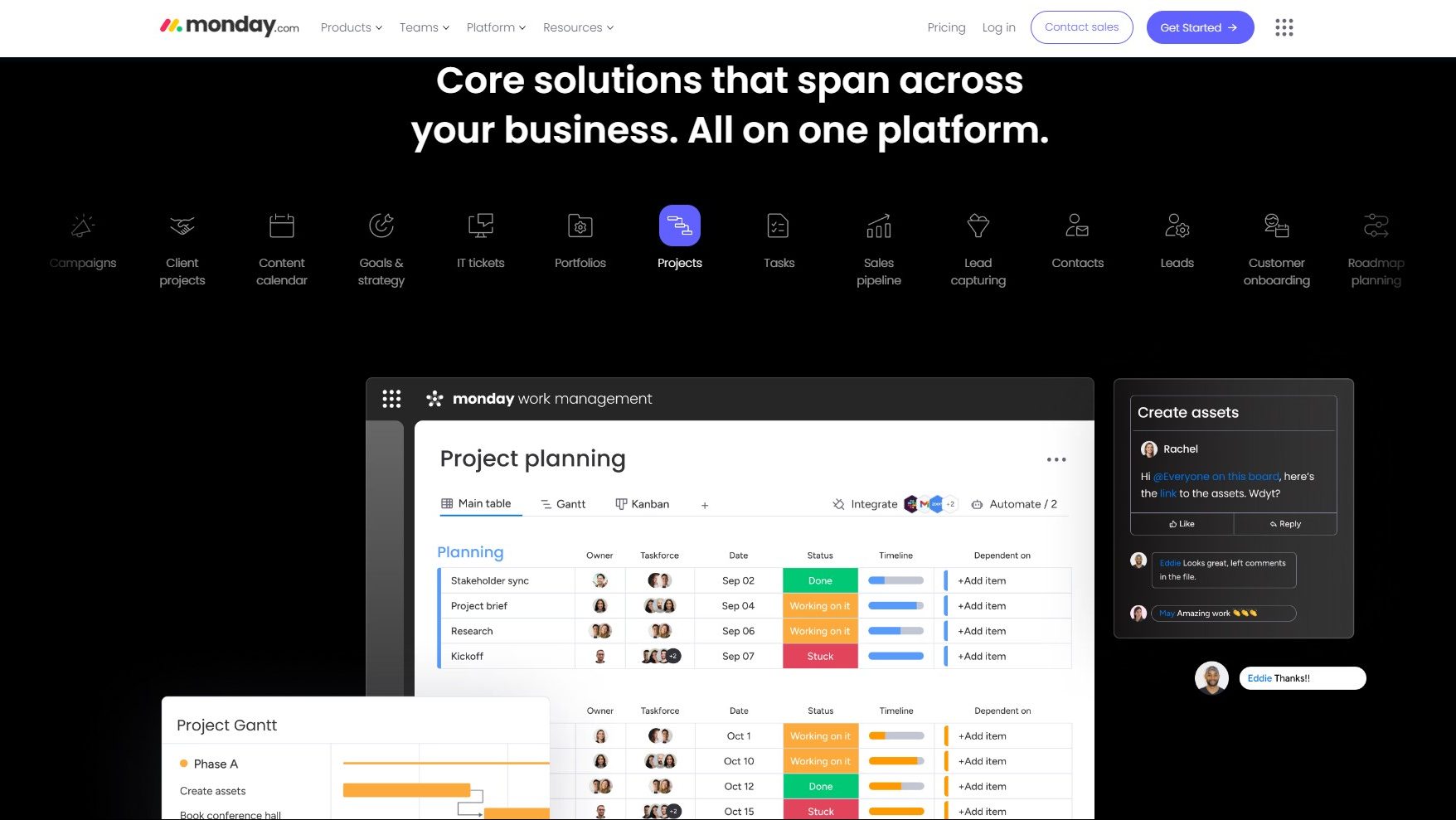
  • Visual Workspaces: monday.com offers customizable boards and workspaces where teams can visually organize tasks, projects, and processes using various views like Kanban boards, timelines, and calendars.
  • Customizable Workflows: Users can design and tailor workflows to match their specific processes, ensuring flexibility and alignment with the unique needs of different teams and projects.
  • Collaboration and Communication: monday.com provides features for real-time collaboration, file sharing, and communication, creating a centralized hub for team members to work together seamlessly.
  • Automation: The platform supports automation features that allow teams to eliminate repetitive tasks, streamline processes, and maintain consistency in their work.

Who is monday.com For?

Monday.com caters to a diverse range of users, including:

  • Project Managers: Project managers use monday.com to plan and track projects, allocate resources, and ensure that team members are aligned with project goals and timelines.
  • Remote Teams: Remote teams leverage monday.com as a collaborative platform to stay connected, manage tasks, and maintain visibility into ongoing projects, regardless of geographical locations.
  • Marketing and Creative Teams: Marketing and creative teams benefit from monday.com’s visual workflows, which facilitate project management, content creation, and campaign planning.
  • Product Development Teams: Product development teams use monday.com to manage their product development lifecycle, from ideation and planning to execution and release.

Monday.com serves as a comprehensive work operating system, empowering teams to manage their work in a visual and collaborative environment. Whether you’re a project manager, part of a remote team, in marketing or product development, monday.com provides the tools needed to enhance productivity and streamline work processes.


Monday.com Summary

Streamline Your Workflow with monday.com – The All-in-One Project Management Platform

monday.com, a top tool in the Project Management category, empowers teams to manage projects, tasks, and processes seamlessly in a visual, collaborative space. With its intuitive interface, customizable workflows, and extensive integrations, monday.com enhances team communication, boosts transparency, and drives productivity. Ready to transform how your team works? Explore exclusive deals. For more project management tools, check out Trello, Airtable and Smartsheet.

Why Use monday.com?

In the realm of work management and collaboration, monday.com excels by:

  • Visual Workspaces: monday.com offers customizable boards and workspaces where teams can visually organize tasks, projects, and processes using various views like Kanban boards, timelines, and calendars.
  • Customizable Workflows: Users can design and tailor workflows to match their specific processes, ensuring flexibility and alignment with the unique needs of different teams and projects.
  • Collaboration and Communication: monday.com provides features for real-time collaboration, file sharing, and communication, creating a centralized hub for team members to work together seamlessly.
  • Automation: The platform supports automation features that allow teams to eliminate repetitive tasks, streamline processes, and maintain consistency in their work.

Who is monday.com For?

Monday.com caters to a diverse range of users, including:

  • Project Managers: Project managers use monday.com to plan and track projects, allocate resources, and ensure that team members are aligned with project goals and timelines.
  • Remote Teams: Remote teams leverage monday.com as a collaborative platform to stay connected, manage tasks, and maintain visibility into ongoing projects, regardless of geographical locations.
  • Marketing and Creative Teams: Marketing and creative teams benefit from monday.com’s visual workflows, which facilitate project management, content creation, and campaign planning.
  • Product Development Teams: Product development teams use monday.com to manage their product development lifecycle, from ideation and planning to execution and release.

Monday.com serves as a comprehensive work operating system, empowering teams to manage their work in a visual and collaborative environment. Whether you’re a project manager, part of a remote team, in marketing or product development, monday.com provides the tools needed to enhance productivity and streamline work processes.

Monday.com reviews

Learn what people say about Monday.com

4.5
4 Reviews
90%
Subscribed Score

Lear more here about the Subscribed score on how it is composed. Learn more Click here

Overall rating

5
4
3
2
1
CX 5/6

How good is the customer support based on subscribed’s assessment

CX Icon
Security 5/6

How secure is the product based on Subscribed’s assessment?

Security Icon
Ease of Use 6/6

How easy is the product to use, based on Subscribed’s assessment?

EOU Icon
Value 5/6

What is the value for money based on Subscribed’s assessment?

coin Icon
Integration 5/6

How many integrations does the product offer?

gear Icon
Popularity 6/6

How popular is the product?

star
Kit Irvin Mationg User Test Enabled
Virtual Assistant | AI Operations | Admin & Workflow Coordination
See My Portfolio
2 days ago
Share
What was your first impression when you started using it?
When I used Monday.com, I noticed that it is flexible, it is a drag-and-drop, user-friendly platform, it is customizable, and it adapts to many use cases in industries. I can put it side by side with Microsoft project and that makes my work more easier.
What feels confusing or hard to use?
Though, it is not the most budget-friendly tool for everyone. The user-based pricing can be a bit of a problem for me that has a small team or company.
What’s still missing for your needs?
Without an internet connection, I can't access its features. I personally think that an Offline capabilities will provide a big impact for Monday.com.
Final thoughts, wrap up what you think
I chose 8, because even with its Cons, Monday.com still is one of the best project tracker you can use. Also, it will help you streamline project management thoroughly.
Upvote
M Raza Akhter Invitation
QA Engineer
3 days ago
Share
How does this compare to similar products you’ve tried?
Monday.com is characterized by the visual tracking of projects, the ability to build workflows and the possibility of easy collaboration within the team. In comparison to similar tools, it is more personalized and easier to use in the management of various types of work.
What’s been frustrating in your experience?
The price is also capable of rising rapidly with the increase in the number of team members, as well as the number of features used. Certain highly complex automations and integrations would seem difficult to set up initially as well.
What’s still missing for your needs?
Monday.com may be enhanced with more sophisticated reporting and more dependency management of complicated projects. My next needs include getting more sophisticated analytics without having to make extensive use of external integrations.
Final thoughts, wrap up what you think
I would score it high due to Monday.com being flexible, visual, and easy to use by the teams. I will recommend it to colleagues and friends seeking to have project tracking that is not too complex.
Upvote
Elizabeth Hermance Invitation
Wordpress developer
See My Portfolio
5 days ago
Share
What was your first impression when you started using it?
Monday.com helps a lot when there are many moving parts. I like being able to see status, owners, and deadlines in one place, though at times it feels a little too busy.
What do you dislike about this product?
I have not had major problems, but I have had moments where the platform felt slow or took too many clicks. The system is strong overall, but it could feel lighter and smoother.c
What problem did this product solve for you?
The main thing I would change is the amount of visual clutter. There is a lot of power there, but a cleaner and simpler interface would make it easier to use every day.
Final thoughts, wrap up what you think
I would recommend it because it is useful and can handle serious project tracking. I stopped at an 8 because for simple work it can feel heavier than necessary.
Upvote
Melville Organic
1 month ago
Share
What was your first impression when you started using it?
Polished and visual right away. Setting up boards for sprint tracking and analytics tasks was quick.
What feels confusing or hard to use?
The number of views and automations can get confusing fast.
If you could change one thing, what would it be?
I would simplify cross board dependencies and reporting. Rolling up progress from multiple teams into one clean view is harder than it should be.
Final thoughts, wrap up what you think
7/10. Works well for coordination and visibility across teams.
Upvote

Monday.com User Reviews

4 User Reviews

Kit Irvin Mationg User Test Enabled
Virtual Assistant | AI Operations | Admin & Workflow Coordination
See My Portfolio
2 days ago
Share
What was your first impression when you started using it?
When I used Monday.com, I noticed that it is flexible, it is a drag-and-drop, user-friendly platform, it is customizable, and it adapts to many use cases in industries. I can put it side by side with Microsoft project and that makes my work more easier.
What feels confusing or hard to use?
Though, it is not the most budget-friendly tool for everyone. The user-based pricing can be a bit of a problem for me that has a small team or company.
What’s still missing for your needs?
Without an internet connection, I can't access its features. I personally think that an Offline capabilities will provide a big impact for Monday.com.
Final thoughts, wrap up what you think
I chose 8, because even with its Cons, Monday.com still is one of the best project tracker you can use. Also, it will help you streamline project management thoroughly.
Upvote
M Raza Akhter Invitation
QA Engineer
3 days ago
Share
How does this compare to similar products you’ve tried?
Monday.com is characterized by the visual tracking of projects, the ability to build workflows and the possibility of easy collaboration within the team. In comparison to similar tools, it is more personalized and easier to use in the management of various types of work.
What’s been frustrating in your experience?
The price is also capable of rising rapidly with the increase in the number of team members, as well as the number of features used. Certain highly complex automations and integrations would seem difficult to set up initially as well.
What’s still missing for your needs?
Monday.com may be enhanced with more sophisticated reporting and more dependency management of complicated projects. My next needs include getting more sophisticated analytics without having to make extensive use of external integrations.
Final thoughts, wrap up what you think
I would score it high due to Monday.com being flexible, visual, and easy to use by the teams. I will recommend it to colleagues and friends seeking to have project tracking that is not too complex.
Upvote
Elizabeth Hermance Invitation
Wordpress developer
See My Portfolio
5 days ago
Share
What was your first impression when you started using it?
Monday.com helps a lot when there are many moving parts. I like being able to see status, owners, and deadlines in one place, though at times it feels a little too busy.
What do you dislike about this product?
I have not had major problems, but I have had moments where the platform felt slow or took too many clicks. The system is strong overall, but it could feel lighter and smoother.c
What problem did this product solve for you?
The main thing I would change is the amount of visual clutter. There is a lot of power there, but a cleaner and simpler interface would make it easier to use every day.
Final thoughts, wrap up what you think
I would recommend it because it is useful and can handle serious project tracking. I stopped at an 8 because for simple work it can feel heavier than necessary.
Upvote
Melville Organic
1 month ago
Share
What was your first impression when you started using it?
Polished and visual right away. Setting up boards for sprint tracking and analytics tasks was quick.
What feels confusing or hard to use?
The number of views and automations can get confusing fast.
If you could change one thing, what would it be?
I would simplify cross board dependencies and reporting. Rolling up progress from multiple teams into one clean view is harder than it should be.
Final thoughts, wrap up what you think
7/10. Works well for coordination and visibility across teams.
Upvote
Reviews from G2, Capterra, Trustpilot
info Icon

These ratings come directly from third-party platforms like G2, Capterra, and Trustpilot. They reflect real user feedback collected independently on those sites.

Monday.com

Pricing Range
info Icon

This only an estimated pricing range, visit Monday.com pricing page to access all the information by clicking “Visit Now”.

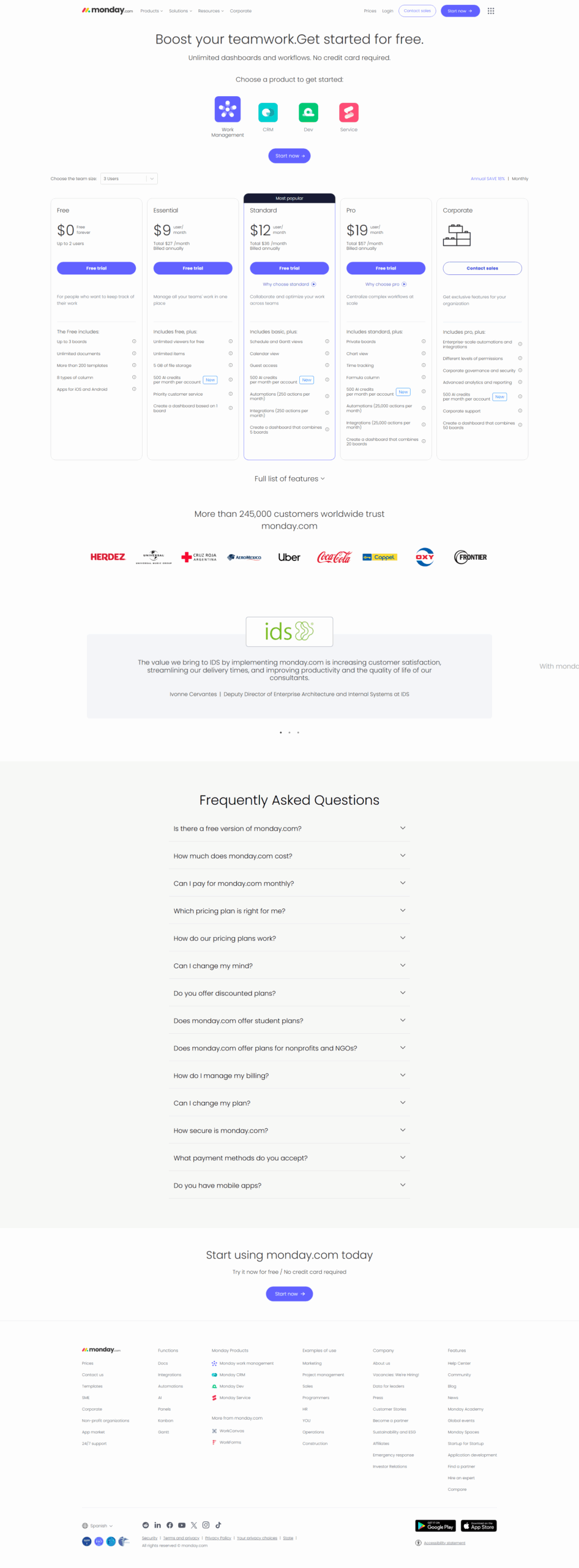
$0-$19 / Month
Deals Available

This product comes with a special deal, see details

Visit Now
✨ Ask AI about pricing
90% Subscribed Score
info Icon

The Subscribed Score is an independent rating that combines user reviews, features, and value-for-money from multiple trusted sources. It’s designed as a quick benchmark, not a guarantee of individual experience.

Analysis

Streamline Your Workflow with monday.com – The All-in-One Project Management Platform

monday.com, a top tool in the Project Management category, empowers teams to manage projects, tasks, and processes seamlessly in a visual, collaborative space. With its intuitive interface, customizable workflows, and extensive integrations, monday.com enhances team communication, boosts transparency, and drives productivity. Ready to transform how your team works? Explore exclusive deals. For more project management tools, check out Trello, Airtable and Smartsheet.

Why Use monday.com?

In the realm of work management and collaboration, monday.com excels by:

  • Visual Workspaces: monday.com offers customizable boards and workspaces where teams can visually organize tasks, projects, and processes using various views like Kanban boards, timelines, and calendars.
  • Customizable Workflows: Users can design and tailor workflows to match their specific processes, ensuring flexibility and alignment with the unique needs of different teams and projects.
  • Collaboration and Communication: monday.com provides features for real-time collaboration, file sharing, and communication, creating a centralized hub for team members to work together seamlessly.
  • Automation: The platform supports automation features that allow teams to eliminate repetitive tasks, streamline processes, and maintain consistency in their work.

Who is monday.com For?

Monday.com caters to a diverse range of users, including:

  • Project Managers: Project managers use monday.com to plan and track projects, allocate resources, and ensure that team members are aligned with project goals and timelines.
  • Remote Teams: Remote teams leverage monday.com as a collaborative platform to stay connected, manage tasks, and maintain visibility into ongoing projects, regardless of geographical locations.
  • Marketing and Creative Teams: Marketing and creative teams benefit from monday.com’s visual workflows, which facilitate project management, content creation, and campaign planning.
  • Product Development Teams: Product development teams use monday.com to manage their product development lifecycle, from ideation and planning to execution and release.

Monday.com serves as a comprehensive work operating system, empowering teams to manage their work in a visual and collaborative environment. Whether you’re a project manager, part of a remote team, in marketing or product development, monday.com provides the tools needed to enhance productivity and streamline work processes.

Pros
  • Highly intuitive and user-friendly interface.
  • Streamlines task and project management effectively.
  • Offers powerful automation and customization tools.
  • Supports collaboration with communication integrations.
Cons
  • Can feel overwhelming for new users.
  • Pricing structure criticized for small teams.
  • Limited customization of visual elements.
  • Some features feel basic or less developed.
Subscribed Score Metrics
32/36 Metric achieved
MetricsScore
Customer Support5/6
Security5/6
Ease of Use6/6
Value of Money5/6
Integration5/6
Popularity6/6
Radar Chart Table View
Ease of Use
Measures how simple and intuitive the product is to use, including setup, navigation, and overall user experience
6/6 Metric Checks
Security
Compares the product`s features, quality, and pricing to determine its overall cost-effectiveness.
5/6 Metric Checks
Value of Money
Assesses the product`s ability to protect data, prevent breaches, and comply with industry standards.
5/6 Metric Checks
Customer Support
Reflects the responsiveness, helpfulness, and quality of assistance provided by the product`s support team.
5/6 Metric Checks
Integrations
Evaluates how well the product connects with other tools and platforms, enabling seamless workflows.
5/6 Metric Checks
Monday.com Pricing Range
$0-$19 / Month

Monday.com Showcase
info Icon

A curated gallery of real screenshots and use cases from the product, so you can see how it works before trying it.

Full Screen Icon
Full Screen Icon
Full Screen Icon
https://www.youtube.com/watch?v=_HO86JjtB2c?feature=oembed
Full Screen Icon

What else exists next to Monday.com
info Icon

A list of platforms similar to Monday.com, helping you evaluate which tool best matches your needs.

Need to cancel Monday.com? Here is how
info Icon

Thinking about how to cancel Monday.com this is how you do it!

Steps to Cancel Monday.com Subscription.

Canceling your Monday.com subscription is a simple process. For detailed instructions, please refer to the official Monday.com support page: Monday.com Subscription Cancellation Guide.

How to Cancel the Monday.com

Steps to Cancel Monday.com Subscription.

Canceling your Monday.com subscription is a simple process. For detailed instructions, please refer to the official Monday.com support page: Monday.com Subscription Cancellation Guide.

Every else you need to know about Monday.com
info Icon

A collection of FAQs, guides, alternatives, and comparisons to help you quickly understand if Monday.com is right for you.

Pricing Range
info Icon

This only an estimated pricing range, visit Monday.com pricing page to access all the information by clicking “Visit Now”.

$0-$19 / Month
Visit Now
Deals Available

This product comes with a special deal, see details

This product comes with a special deal, see details