Movavi Video Converter Reviews 2026: Details, Pricing, & Features | Subscribed.fyi
Sign in to review
Join our community of software reviewers on Subscribed.fyi

Continue With Google
Continue With LinkedIn
Continue Review with Email
Continue with Email
Enter your email to continue.
Continue
Enter your password
Enter your password to finish setting up your account.
Continue
Activate your email
Enter activation code we sent to your email.
Submit
Reset your password
Enter activation code we sent to your email.
Submit
Set your new password
Enter a new password for your account.
Submit
Categories
For Business
Log in
Provide My Insights

Movavi Video Converter Reviews, Pricing, Features & Alternatives (2026)

5/5
(1)

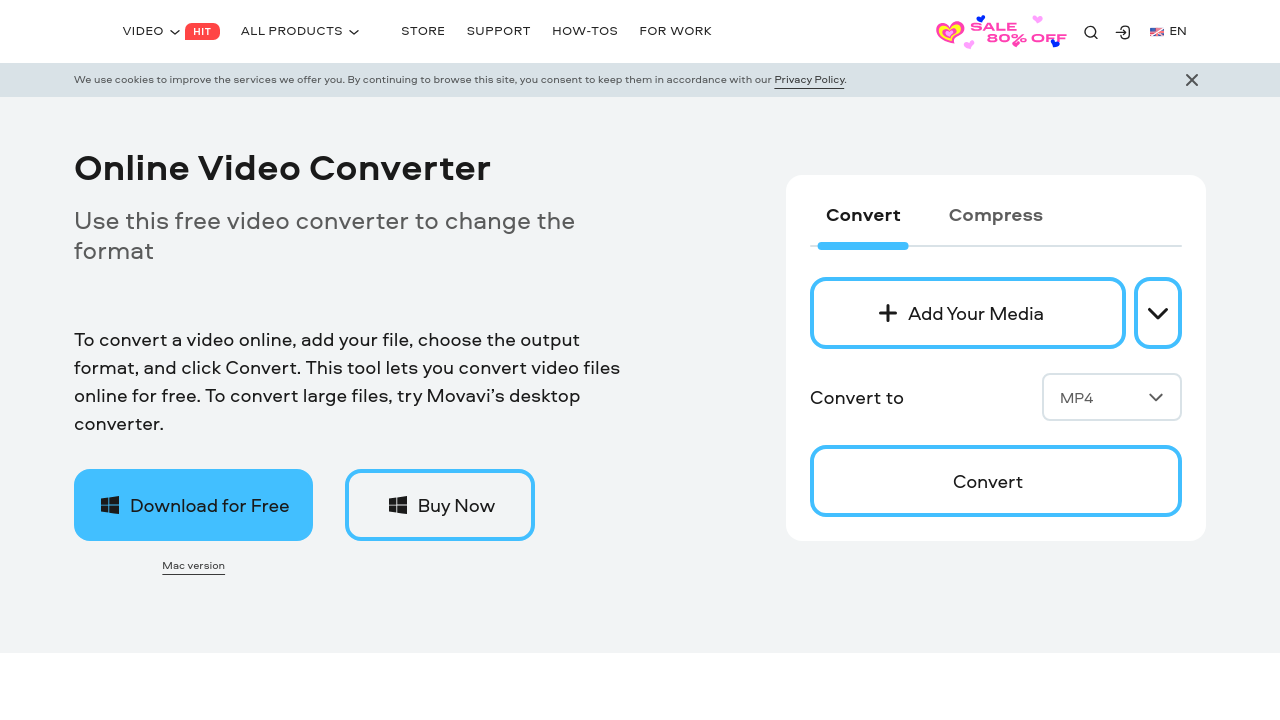
Movavi Video Converter is a user-friendly tool for fast and reliable media conversion. It supports over 180 file formats and 200+ device presets, allowing seamless file preparation for any device. With features like audio extraction, basic editing, and high-speed processing, it offers an all-in-one solution while maintaining high quality. Ideal for beginners and professionals alike, it ensures efficiency in every task.

Movavi Video Converter Overview

What is Movavi Video Converter?

5
1
Reviews
65%
Subscribed Score

Available for Claim - This listing is available to be claimed
Claim Profile For Free

Unclaimed

Manage profile with subsig, and unlock 23+ social and review monitoring. Get partnership options with

Claim Profile For Free

Why teams choose Movavi Video Converter

Key Features

Built for Flexibility
Adaptable for multiple use cases.
Exclusive Perks
Exclusive Perks
Special offers and discounts available.
Secure by Design
Secure by Design
Data protection and compliance built in.

Who is Movavi Video Converter for?

Movavi Video Converter is a powerful, all-in-one solution specifically designed for media production professionals and enthusiasts who need to convert, compress, and edit video files with ease. Positioned in the Media Production category, this versatile tool supports over 180 media file formats including AVI, MP4, FLV, MKV, MOV, WMV, and 3GP. Its extensive format compatibility makes it an indispensable resource for converting DVD and HD videos, extracting soundtracks, and even creating GIFs from video clips.

Movavi Video Converter combines high-speed processing with a user-friendly interface. Whether you need a straightforward conversion for a personal project or require advanced file adjustments for professional editing, this software adapts to your every need. With more than 200 presets available for mobile devices, preparing videos for playback across a range of smartphones, tablets, and media players is both fast and stress free.

Key Features of Movavi Video Converter

  • Wide Format Support: Convert between numerous video, audio, and image formats without compromising on quality.
  • Mobile Device Presets: Enjoy ready-made presets for over 200 mobile devices, ensuring optimal playback and compatibility.
  • High-Speed Processing: Benefit from rapid conversion times that help you meet deadlines without delay.
  • Editing Tools: Beyond conversion, easily edit and adjust your videos, extract individual audio tracks, and add subtitles.
  • Batch Conversion: Improve productivity by converting multiple files simultaneously.

This intuitive solution is ideal for video editors, content creators, and professionals in media production who need a straightforward yet advanced tool to manage their multimedia files. Its ease-of-use makes it perfect for beginners, while its comprehensive features satisfy the demands of seasoned professionals.

Movavi Video Converter not only simplifies video processing but also enhances workflow efficiency with its seamless integration into everyday editing tasks. The software’s automatic device recognition and preset selection ensure that you can convert your media files confidently and quickly with minimal technical knowledge. Moreover, the tool’s capability to compress files without a noticeable loss in quality proves invaluable in managing storage and distribution requirements.

For those looking to make the most of this robust software, exclusive deals are available. Discover these special offers at Movavi Video Converter Deals.

Alternatives to Consider

Movavi Video Converter is an excellent choice for anyone looking to streamline the conversion and editing process in a single software package. It empowers users to keep pace with the demanding pace of modern media production while ensuring professional quality results every time.


Movavi Video Converter Summary

Movavi Video Converter is a powerful, all-in-one solution specifically designed for media production professionals and enthusiasts who need to convert, compress, and edit video files with ease. Positioned in the Media Production category, this versatile tool supports over 180 media file formats including AVI, MP4, FLV, MKV, MOV, WMV, and 3GP. Its extensive format compatibility makes it an indispensable resource for converting DVD and HD videos, extracting soundtracks, and even creating GIFs from video clips.

Movavi Video Converter combines high-speed processing with a user-friendly interface. Whether you need a straightforward conversion for a personal project or require advanced file adjustments for professional editing, this software adapts to your every need. With more than 200 presets available for mobile devices, preparing videos for playback across a range of smartphones, tablets, and media players is both fast and stress free.

Key Features of Movavi Video Converter

  • Wide Format Support: Convert between numerous video, audio, and image formats without compromising on quality.
  • Mobile Device Presets: Enjoy ready-made presets for over 200 mobile devices, ensuring optimal playback and compatibility.
  • High-Speed Processing: Benefit from rapid conversion times that help you meet deadlines without delay.
  • Editing Tools: Beyond conversion, easily edit and adjust your videos, extract individual audio tracks, and add subtitles.
  • Batch Conversion: Improve productivity by converting multiple files simultaneously.

This intuitive solution is ideal for video editors, content creators, and professionals in media production who need a straightforward yet advanced tool to manage their multimedia files. Its ease-of-use makes it perfect for beginners, while its comprehensive features satisfy the demands of seasoned professionals.

Movavi Video Converter not only simplifies video processing but also enhances workflow efficiency with its seamless integration into everyday editing tasks. The software’s automatic device recognition and preset selection ensure that you can convert your media files confidently and quickly with minimal technical knowledge. Moreover, the tool’s capability to compress files without a noticeable loss in quality proves invaluable in managing storage and distribution requirements.

For those looking to make the most of this robust software, exclusive deals are available. Discover these special offers at Movavi Video Converter Deals.

Alternatives to Consider

Movavi Video Converter is an excellent choice for anyone looking to streamline the conversion and editing process in a single software package. It empowers users to keep pace with the demanding pace of modern media production while ensuring professional quality results every time.

Movavi Video Converter reviews and insights

Learn what people say about Movavi Video Converter

5
1 Reviews
65%
Subscribed Score

Lear more here about the Subscribed score on how it is composed. Learn more Click here

Overall rating

5
4
3
2
1
CX 5/6

How good is the customer support based on subscribed’s assessment

CX Icon
Security 0/6

How secure is the product based on Subscribed’s assessment?

Security Icon
Ease of Use 6/6

How easy is the product to use, based on Subscribed’s assessment?

EOU Icon
Value 5/6

What is the value for money based on Subscribed’s assessment?

coin Icon
Integration 0/6

How many integrations does the product offer?

gear Icon
Popularity 6/6

How popular is the product?

star
LAIRIN LACBAOAN Organic
Salesforce Administrator/Devops Support
2 months ago
Share
How has it made your work/life easier?
It definitely made my work easier. These should have created way back during my college days. I struggled so much converting and editing videos before. Now it is very easy using Movavi. People are really genius now that they were able to design solution like this.
Is there something that almost made you stop using it?
None. I will keep using Movavi as long as I want. This product is worth every penny.
If you could change one thing, what would it be?
Wider integration with other platforms so we can directly save the videos to those platforms like CRM.
Final thoughts, wrap up what you think
Must have tool for every student and professionals. Very simple and easy to use. You won't regret subscribing to this.
Upvote

Movavi Video Converter User Reviews

1 User Reviews

Reviews from G2, Capterra, Trustpilot
info Icon

These ratings come directly from third-party platforms like G2, Capterra, and Trustpilot. They reflect real user feedback collected independently on those sites.

Movavi Video Converter pricing

Pricing model

Pricing Range
info Icon

This only an estimated pricing range, visit Movavi Video Converter pricing page to access all the information by clicking “Visit Now”.

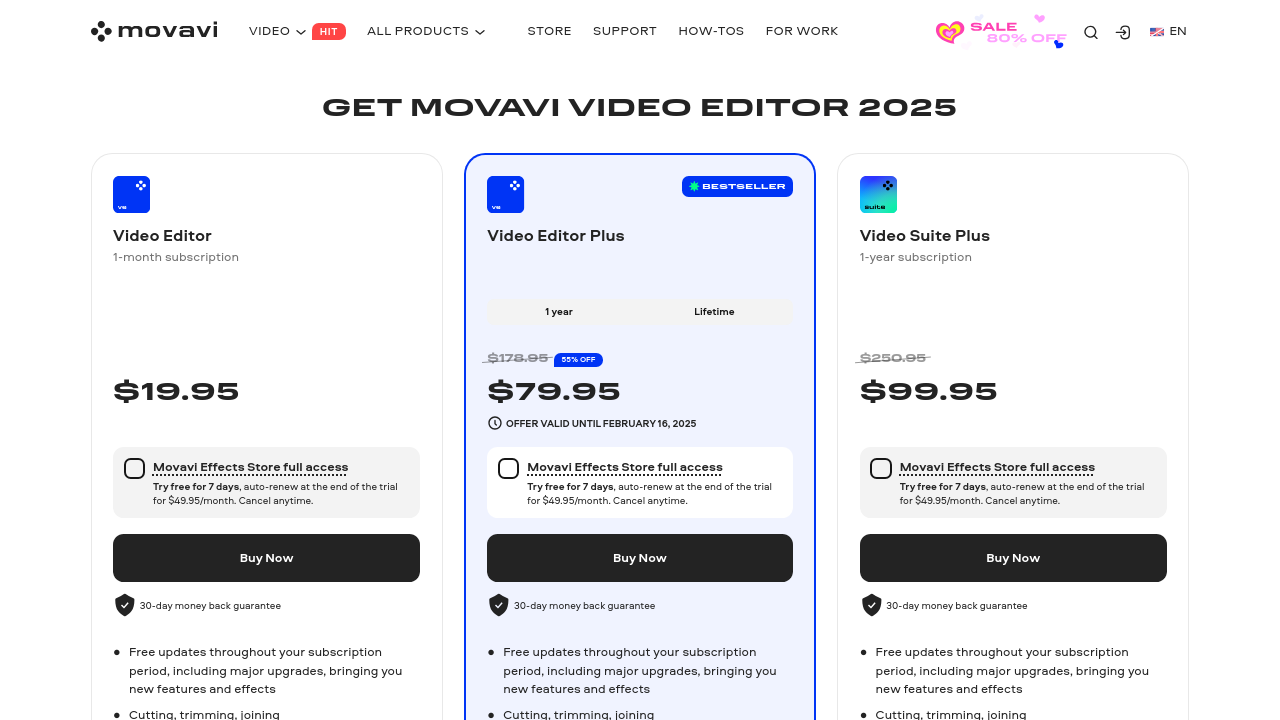
$19.95-$99.95 / Month
Deals Available

This product comes with a special deal, see details

Visit Now
✨ Ask AI about pricing
65% Subscribed Score
info Icon

The Subscribed Score is an independent rating that combines user reviews, features, and value-for-money from multiple trusted sources. It’s designed as a quick benchmark, not a guarantee of individual experience.

Overview

Movavi Video Converter is a powerful, all-in-one solution specifically designed for media production professionals and enthusiasts who need to convert, compress, and edit video files with ease. Positioned in the Media Production category, this versatile tool supports over 180 media file formats including AVI, MP4, FLV, MKV, MOV, WMV, and 3GP. Its extensive format compatibility makes it an indispensable resource for converting DVD and HD videos, extracting soundtracks, and even creating GIFs from video clips.

Movavi Video Converter combines high-speed processing with a user-friendly interface. Whether you need a straightforward conversion for a personal project or require advanced file adjustments for professional editing, this software adapts to your every need. With more than 200 presets available for mobile devices, preparing videos for playback across a range of smartphones, tablets, and media players is both fast and stress free.

Key Features of Movavi Video Converter

  • Wide Format Support: Convert between numerous video, audio, and image formats without compromising on quality.
  • Mobile Device Presets: Enjoy ready-made presets for over 200 mobile devices, ensuring optimal playback and compatibility.
  • High-Speed Processing: Benefit from rapid conversion times that help you meet deadlines without delay.
  • Editing Tools: Beyond conversion, easily edit and adjust your videos, extract individual audio tracks, and add subtitles.
  • Batch Conversion: Improve productivity by converting multiple files simultaneously.

This intuitive solution is ideal for video editors, content creators, and professionals in media production who need a straightforward yet advanced tool to manage their multimedia files. Its ease-of-use makes it perfect for beginners, while its comprehensive features satisfy the demands of seasoned professionals.

Movavi Video Converter not only simplifies video processing but also enhances workflow efficiency with its seamless integration into everyday editing tasks. The software’s automatic device recognition and preset selection ensure that you can convert your media files confidently and quickly with minimal technical knowledge. Moreover, the tool’s capability to compress files without a noticeable loss in quality proves invaluable in managing storage and distribution requirements.

For those looking to make the most of this robust software, exclusive deals are available. Discover these special offers at Movavi Video Converter Deals.

Alternatives to Consider

Movavi Video Converter is an excellent choice for anyone looking to streamline the conversion and editing process in a single software package. It empowers users to keep pace with the demanding pace of modern media production while ensuring professional quality results every time.

Where Movavi Video Converter performs best

What users like
  • Fast conversion speeds
  • User-friendly interface
  • Wide range of supported formats
  • Reliable and efficient performance

Where Movavi Video Converter falls short

What users dislike
  • Limited free trial features
  • Price can be high for some users
  • Occasional software delays
  • Basic editing capabilities
Subscribed Score Metrics
22/36 Metric achieved
MetricsScore
Customer Support5/6
Security0/6
Ease of Use6/6
Value of Money5/6
Integration0/6
Popularity6/6
Radar Chart Table View
Ease of Use
Measures how simple and intuitive the product is to use, including setup, navigation, and overall user experience
6/6 Metric Checks
Security
Compares the product`s features, quality, and pricing to determine its overall cost-effectiveness.
0/6 Metric Checks
Value of Money
Assesses the product`s ability to protect data, prevent breaches, and comply with industry standards.
5/6 Metric Checks
Customer Support
Reflects the responsiveness, helpfulness, and quality of assistance provided by the product`s support team.
5/6 Metric Checks
Integrations
Evaluates how well the product connects with other tools and platforms, enabling seamless workflows.
0/6 Metric Checks
Movavi Video Converter Pricing Range
$19.95-$99.95 / Month

Movavi Video Converter in action
info Icon

A curated gallery of real screenshots and use cases from the product, so you can see how it works before trying it.

Movavi Video Converter Full Screen Icon
https://www.youtube.com/watch?v=Usq4s9jnQV8
Full Screen Icon
https://www.youtube.com/watch?v=6Nj_KVHKvcY
Full Screen Icon
Movavi Video Converter
Video thumbnail
Video thumbnail
Movavi Video Converter

Alternatives to Movavi Video Converter
info Icon

A list of platforms similar to Movavi Video Converter, helping you evaluate which tool best matches your needs.

How to cancel Movavi Video Converter

Need to cancel Movavi Video Converter? Here is how
info Icon

Thinking about how to cancel Movavi Video Converter this is how you do it!

To cancel Movavi Video Converter, log into your 2Checkout account, find the product, and click "Stop automatic renewal." Confirm cancellation and provide a reason if prompted. Contact support if needed.

How to Cancel the Movavi Video Converter

To cancel Movavi Video Converter, log into your 2Checkout account, find the product, and click "Stop automatic renewal." Confirm cancellation and provide a reason if prompted. Contact support if needed.

FAQs about Movavi Video Converter

Every else you need to know about Movavi Video Converter
info Icon

A collection of FAQs, guides, alternatives, and comparisons to help you quickly understand if Movavi Video Converter is right for you.

Manage your Movavi Video Converter profile

Create profile

Want to list your product on Subscribed.fyi? Create a profile to reach more buyers.

Pricing Range
info Icon

This only an estimated pricing range, visit Movavi Video Converter pricing page to access all the information by clicking “Visit Now”.

$19.95-$99.95 / Month
Visit Now
Deals Available

This product comes with a special deal, see details

This product comes with a special deal, see details