Sign in to review
Join our community of software reviewers on Subscribed.fyi

Continue With Google
Continue With LinkedIn
Continue Review with Email
Continue with Email
Enter your email to continue.
Continue
Enter your password
Enter your password to finish setting up your account.
Continue
Activate your email
Enter activation code we sent to your email.
Submit
Reset your password
Enter activation code we sent to your email.
Submit
Set your new password
Enter a new password for your account.
Submit
Log in
Provide My Insights
Qbserve logo
Qbserve logo

Qbserve Reviews, Pricing, Features & Alternatives (2026)

Qbserve is an automatic time-tracking app designed to boost productivity and simplify project management. It tracks work on websites, apps, documents, and chats, providing real-time feedback, reports, and customizable timesheets. With no subscriptions and local data storage, it offers a seamless, private solution for freelancers and professionals.

Qbserve logo
Qbserve logo
Qbserve logo

Qbserve Overview

What is Qbserve?

N/A
★ ★ ★ ★ ★
0
Reviews

Available for Claim - This listing is available to be claimed
Claim Profile

Unclaimed

Claim this profile to manage it.

Claim Profile

Why teams choose Qbserve

Key Features

Save Time
Save Time
Focus on impact, not repetitive tasks.
Seamless Integrations
Connect easily with your favorite tools.
Real-Time Updates
Real-Time Updates
See changes instantly, no delays.

Who is Qbserve for?

Qbserve is an innovative time tracking solution designed for professionals and freelancers who need effortless monitoring of work hours and project activities. Positioned in the Time Tracking category, Qbserve offers an all-in-one tool that not only tracks your work but also provides detailed insights into your productivity patterns.

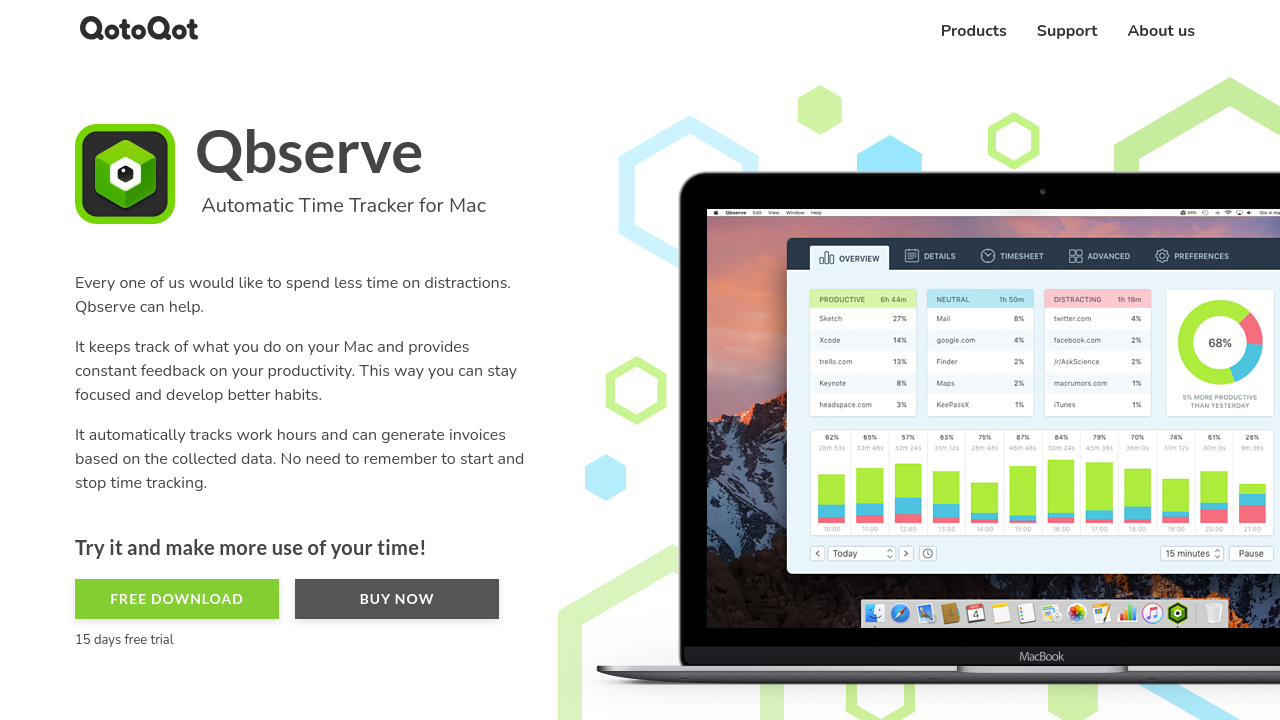
With Qbserve, you benefit from a versatile set of features built to enhance your workflow without intrusive subscriptions. The software runs in the background, automatically tracking the time you spend on various applications, websites, and documents. By categorizing your activities into productive, neutral, or distracting, it ensures you have a clear picture of your daily routines without constant manual inputs.

Key Features of Qbserve:

  • Automatic Productivity Tracking: Seamlessly monitor your activities across different applications and websites to understand when you’re most productive.
  • Project Tracking: Automatically track work related to specific projects by monitoring opened documents and web pages.
  • Invoice Generation: Generate invoices based on tracked time, making it easier for freelancers to bill clients accurately.
  • Real-Time Feedback and Notifications: Receive instant performance updates and helpful alerts that keep you motivated and productive.
  • Detailed Reporting: Access various reports and timesheets that offer comprehensive insights into your work patterns, helping you optimize your workflow.
  • Scheduled Data Export: Export your data on a schedule that suits your needs, ensuring you always have an up-to-date record of your activity.
  • Integrated Chat Tracking: Monitor activities within Slack teams and Skype chats, further broadening the scope of your productivity tracking.

Qbserve stands out by storing all your tracked information locally, providing a strong focus on privacy and data security. With a one-time payment model and special student discounts available, it offers a hassle-free experience without recurring fees. This approach significantly reduces administrative overhead, allowing you to focus on your work rather than on managing subscriptions.

For a closer look at Qbserve and to access exclusive deals, visit the deal page. This solution is perfect for independent professionals, freelancers, and teams who want an unobtrusive yet powerful tool to maximize their productivity.

Why Choose Qbserve?

  • It provides automatic and accurate time and productivity tracking for a seamless user experience.
  • Its robust reporting features offer actionable insights to boost professional efficiency.
  • The local data storage model emphasizes both privacy and simplicity.

Alternatives

Discover how Qbserve can transform the way you work by providing clear, automatic tracking that keeps you in control of your time and projects. Whether you’re a freelancer or part of a dynamic team, Qbserve is an indispensable resource to ensure every minute counts.

Qbserve Summary

Qbserve is an innovative time tracking solution designed for professionals and freelancers who need effortless monitoring of work hours and project activities. Positioned in the Time Tracking category, Qbserve offers an all-in-one tool that not only tracks your work but also provides detailed insights into your productivity patterns.

With Qbserve, you benefit from a versatile set of features built to enhance your workflow without intrusive subscriptions. The software runs in the background, automatically tracking the time you spend on various applications, websites, and documents. By categorizing your activities into productive, neutral, or distracting, it ensures you have a clear picture of your daily routines without constant manual inputs.

Key Features of Qbserve:

  • Automatic Productivity Tracking: Seamlessly monitor your activities across different applications and websites to understand when you’re most productive.
  • Project Tracking: Automatically track work related to specific projects by monitoring opened documents and web pages.
  • Invoice Generation: Generate invoices based on tracked time, making it easier for freelancers to bill clients accurately.
  • Real-Time Feedback and Notifications: Receive instant performance updates and helpful alerts that keep you motivated and productive.
  • Detailed Reporting: Access various reports and timesheets that offer comprehensive insights into your work patterns, helping you optimize your workflow.
  • Scheduled Data Export: Export your data on a schedule that suits your needs, ensuring you always have an up-to-date record of your activity.
  • Integrated Chat Tracking: Monitor activities within Slack teams and Skype chats, further broadening the scope of your productivity tracking.

Qbserve stands out by storing all your tracked information locally, providing a strong focus on privacy and data security. With a one-time payment model and special student discounts available, it offers a hassle-free experience without recurring fees. This approach significantly reduces administrative overhead, allowing you to focus on your work rather than on managing subscriptions.

For a closer look at Qbserve and to access exclusive deals, visit the deal page. This solution is perfect for independent professionals, freelancers, and teams who want an unobtrusive yet powerful tool to maximize their productivity.

Why Choose Qbserve?

  • It provides automatic and accurate time and productivity tracking for a seamless user experience.
  • Its robust reporting features offer actionable insights to boost professional efficiency.
  • The local data storage model emphasizes both privacy and simplicity.

Alternatives

Discover how Qbserve can transform the way you work by providing clear, automatic tracking that keeps you in control of your time and projects. Whether you’re a freelancer or part of a dynamic team, Qbserve is an indispensable resource to ensure every minute counts.

Qbserve reviews and insights

Learn what people say about Qbserve

N/A ★ ★ ★ ★ ★
0 Reviews

No Reviews Yet!

Be the first to share your experience and help others in the community.

Qbserve logo

Qbserve User Reviews

0 User Reviews

Reviews from G2, Capterra, Trustpilot
info Icon

These ratings come directly from third-party platforms like G2, Capterra, and Trustpilot. They reflect real user feedback collected independently on those sites.

Qbserve pricing

Pricing model

Qbserve logo
Pricing Range
info Icon

This only an estimated pricing range, visit Qbserve pricing page to access all the information by clicking “Visit Now”.

Not specified
Deals Available

This product comes with a special deal, see details

Visit Now

Overview

Qbserve is an innovative time tracking solution designed for professionals and freelancers who need effortless monitoring of work hours and project activities. Positioned in the Time Tracking category, Qbserve offers an all-in-one tool that not only tracks your work but also provides detailed insights into your productivity patterns.

With Qbserve, you benefit from a versatile set of features built to enhance your workflow without intrusive subscriptions. The software runs in the background, automatically tracking the time you spend on various applications, websites, and documents. By categorizing your activities into productive, neutral, or distracting, it ensures you have a clear picture of your daily routines without constant manual inputs.

Key Features of Qbserve:

  • Automatic Productivity Tracking: Seamlessly monitor your activities across different applications and websites to understand when you’re most productive.
  • Project Tracking: Automatically track work related to specific projects by monitoring opened documents and web pages.
  • Invoice Generation: Generate invoices based on tracked time, making it easier for freelancers to bill clients accurately.
  • Real-Time Feedback and Notifications: Receive instant performance updates and helpful alerts that keep you motivated and productive.
  • Detailed Reporting: Access various reports and timesheets that offer comprehensive insights into your work patterns, helping you optimize your workflow.
  • Scheduled Data Export: Export your data on a schedule that suits your needs, ensuring you always have an up-to-date record of your activity.
  • Integrated Chat Tracking: Monitor activities within Slack teams and Skype chats, further broadening the scope of your productivity tracking.

Qbserve stands out by storing all your tracked information locally, providing a strong focus on privacy and data security. With a one-time payment model and special student discounts available, it offers a hassle-free experience without recurring fees. This approach significantly reduces administrative overhead, allowing you to focus on your work rather than on managing subscriptions.

For a closer look at Qbserve and to access exclusive deals, visit the deal page. This solution is perfect for independent professionals, freelancers, and teams who want an unobtrusive yet powerful tool to maximize their productivity.

Why Choose Qbserve?

  • It provides automatic and accurate time and productivity tracking for a seamless user experience.
  • Its robust reporting features offer actionable insights to boost professional efficiency.
  • The local data storage model emphasizes both privacy and simplicity.

Alternatives

Discover how Qbserve can transform the way you work by providing clear, automatic tracking that keeps you in control of your time and projects. Whether you’re a freelancer or part of a dynamic team, Qbserve is an indispensable resource to ensure every minute counts.

Where Qbserve performs best

What users like
  • Highly customizable and intuitive interface
  • No subscription fees; one-time payment
  • Accurate activity tracking for productivity
  • Responsive customer support

Where Qbserve falls short

What users dislike
  • Lack of mobile and multi-platform support
  • Initial setup can feel slightly overwhelming
  • Limited idle time logging options
  • Name is hard to pronounce and remember
Qbserve Pricing Range
Not specified

Qbserve in action
info Icon

A curated gallery of real screenshots and use cases from the product, so you can see how it works before trying it.

Qbserve screenshot 1 Full Screen Icon
Qbserve screenshot 1

Alternatives to Qbserve
info Icon

A list of platforms similar to Qbserve, helping you evaluate which tool best matches your needs.

How to cancel Qbserve

Need to cancel Qbserve? Here is how
info Icon

Thinking about how to cancel Qbserve this is how you do it!

To cancel Qbserve, move the app to the Trash. For full cancellation, delete tracked history by moving "UserDatabase.sqlite" to the Trash. Contact support for any license-related issues.

How to Cancel the Qbserve

To cancel Qbserve, move the app to the Trash. For full cancellation, delete tracked history by moving "UserDatabase.sqlite" to the Trash. Contact support for any license-related issues.

Manage your Qbserve profile

Create profile

Want to list your product on Subscribed.fyi? Create a profile to reach more buyers.

Pricing Range
info Icon

This only an estimated pricing range, visit Qbserve pricing page to access all the information by clicking “Visit Now”.

Not specified
Visit Now
Deals Available

This product comes with a special deal, see details

This product comes with a special deal, see details