Here’s a quick guide on how to cancel your Talysto subscription. Whether you’re switching to another service or simply reducing expenses, this guide will walk you through the necessary steps with ease. Talysto offers various data-driven insights and solutions, but if you’re considering alternatives, feel free to explore other Marketing and Analytics platforms that might better fit your needs.
How to Cancel a Talysto Subscription
Canceling your Talysto subscription is straightforward when you know the steps. Whether you’re switching to another platform or simply reducing your expenses, follow this guide for a seamless cancellation process.
How to Cancel Talysto: Step-by-step
Step 1: Access the Talysto Contact Page
To begin, visit the Talysto Contact Page to initiate your cancellation. This page offers a contact form for all inquiries, including subscription cancellations.
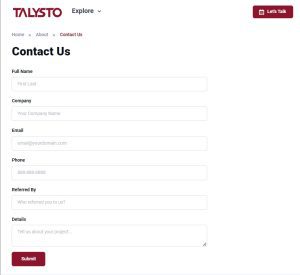
In the contact form, use a clear subject line such as “Cancellation of Talysto Subscription – [Your Account Name]” to ensure that your request is understood immediately.
In the message body, clearly state your request to cancel your subscription. Be sure to include your account email address and any relevant details that may help Talysto locate your account.
After filling in all necessary details, submit the form. Ensure you double-check the email address and account information before submitting to avoid delays in processing your request.
Step 5: Await Confirmation
Talysto should send a confirmation email acknowledging the cancellation request within 2-3 business days. If you do not receive a confirmation, consider following up via the contact form again.
Additional Considerations
Billing Cycle:
Your cancellation will likely take effect at the end of the current billing cycle, allowing you access to Talysto services until that date. For more specific details, consult Talysto’s Terms of Service.
Prorated Refunds:
Review Talysto’s refund policy to determine whether you are eligible for a prorated refund for unused portions of your subscription. If unclear, ask about this when you contact support.
Conclusion
Canceling your Talysto subscription is a straightforward process when you use their contact form. Ensure you provide all the required details to make the process as smooth as possible. If you encounter any issues or have further questions, don’t hesitate to contact: [email protected] or further support.
Explore Alternative Marketing and Analytics Tools
If you’re looking to explore more tools in the Marketing and Analytics category, here are some top alternatives to consider:
- Tikr: A powerful financial analytics platform offering deep insights for investors.
- Simply Wall St: A comprehensive stock analysis tool with visual data representations.
- SEMrush: A leading SEO and marketing platform used by professionals worldwide.
- ZoomInfo: A data-driven platform offering deep insights into business contacts and companies.
- Ahrefs: A highly regarded SEO tool for backlink analysis, keyword research, and more.
You should also check out other tools from related categories like Customer Relationship Management for streamlining client interactions or Automation Tools to help automate your marketing efforts. Additionally, you can explore Subscribed deals for potential savings on other services.