TimeLog Reviews 2026: Details, Pricing, & Features | Subscribed.fyi
Sign in to review
Join our community of software reviewers on Subscribed.fyi

Continue With Google
Continue With LinkedIn
Continue Review with Email
Continue with Email
Enter your email to continue.
Continue
Enter your password
Enter your password to finish setting up your account.
Continue
Activate your email
Enter activation code we sent to your email.
Submit
Reset your password
Enter activation code we sent to your email.
Submit
Set your new password
Enter a new password for your account.
Submit
Categories
For Business
Log in
Provide My Insights
TimeLog
TimeLog

TimeLog Reviews, Pricing, Features & Alternatives (2026)

4.3/5
(3)

TimeLog is a comprehensive project management and time tracking software that unifies time, expenses, projects, and finances in one platform. It enables real-time tracking of resources, budgets, and profitability with built-in AI insights. Ideal for teams seeking to optimize project delivery and financial oversight without spreadsheets.

TimeLog
TimeLog
TimeLog

TimeLog Overview

What is TimeLog?

4.3
3
Reviews
65%
Subscribed Score

Available for Claim - This listing is available to be claimed
Claim Profile For Free

Unclaimed

Manage profile with subsig, and unlock 23+ social and review monitoring. Get partnership options with

Claim Profile For Free

Why teams choose TimeLog

Key Features

Expert Support
Expert Support
Help available when you need it.
Seamless Integrations
Connect easily with your favorite tools.
Scales with You
Scales with You
Grows with your business needs.

Who is TimeLog for?

TimeLog

TimeLog is a cloud-based professional services automation (PSA) platform designed to streamline time tracking, project management, resource allocation, and financial oversight for businesses of varying sizes. By integrating time, expenses, projects, and profitability metrics into a single dashboard, it empowers teams to monitor real-time performance, detect issues early, and make data-driven decisions. With built-in AI that highlights potential risks and opportunities, TimeLog connects seamlessly with payroll and finance systems to ensure accurate, up-to-date reporting.

Why Use TimeLog?

  • Real-time Visibility: Track time, expenses, budgets, and resources instantly to spot profitability issues before they escalate.
  • AI-Powered Insights: Automated alerts on early signals for faster, confident decision-making.
  • End-to-End Automation: From planning and scheduling to invoicing and reporting, reducing manual admin.
  • Scalable for Growth: Supports simple tracking for small teams up to enterprise-wide profitability optimization.

Who is TimeLog For?

  • Professional services firms, agencies, consultancies, and IT teams managing billable hours and projects.
  • Businesses transitioning from spreadsheets to professional tools.
  • Growing organizations needing resource planning, Gantt charts, and client portals.

Key Features and Benefits

  • Time & Expense Tracking: Log billable/non-billable hours, approvals, and expenses with mobile access.
  • Project Management: Gantt charts, task assignment, milestones, Kanban boards, and budgeting.
  • Resource & Capacity Planning: Allocate teams, forecast workloads, and balance utilization.
  • Invoicing & Reporting: Generate invoices from timesheets, track margins, custom dashboards.
  • Integrations: API connects to Outlook, Dynamics NAV, payroll, and finance tools.
  • Security & Compliance: User permissions, approvals, and customizable workflows.

TimeLog Summary

TimeLog

TimeLog is a cloud-based professional services automation (PSA) platform designed to streamline time tracking, project management, resource allocation, and financial oversight for businesses of varying sizes. By integrating time, expenses, projects, and profitability metrics into a single dashboard, it empowers teams to monitor real-time performance, detect issues early, and make data-driven decisions. With built-in AI that highlights potential risks and opportunities, TimeLog connects seamlessly with payroll and finance systems to ensure accurate, up-to-date reporting.

Why Use TimeLog?

  • Real-time Visibility: Track time, expenses, budgets, and resources instantly to spot profitability issues before they escalate.
  • AI-Powered Insights: Automated alerts on early signals for faster, confident decision-making.
  • End-to-End Automation: From planning and scheduling to invoicing and reporting, reducing manual admin.
  • Scalable for Growth: Supports simple tracking for small teams up to enterprise-wide profitability optimization.

Who is TimeLog For?

  • Professional services firms, agencies, consultancies, and IT teams managing billable hours and projects.
  • Businesses transitioning from spreadsheets to professional tools.
  • Growing organizations needing resource planning, Gantt charts, and client portals.

Key Features and Benefits

  • Time & Expense Tracking: Log billable/non-billable hours, approvals, and expenses with mobile access.
  • Project Management: Gantt charts, task assignment, milestones, Kanban boards, and budgeting.
  • Resource & Capacity Planning: Allocate teams, forecast workloads, and balance utilization.
  • Invoicing & Reporting: Generate invoices from timesheets, track margins, custom dashboards.
  • Integrations: API connects to Outlook, Dynamics NAV, payroll, and finance tools.
  • Security & Compliance: User permissions, approvals, and customizable workflows.

TimeLog reviews and insights

Learn what people say about TimeLog

4.3
3 Reviews
65%
Subscribed Score

Lear more here about the Subscribed score on how it is composed. Learn more Click here

Overall rating

5
4
3
2
1
CX 4/6

How good is the customer support based on subscribed’s assessment

CX Icon
Security 4/6

How secure is the product based on Subscribed’s assessment?

Security Icon
Ease of Use 4/6

How easy is the product to use, based on Subscribed’s assessment?

EOU Icon
Value 5/6

What is the value for money based on Subscribed’s assessment?

coin Icon
Integration 4/6

How many integrations does the product offer?

gear Icon
Popularity 3/6

How popular is the product?

star
Jackie Liezel Jane Broniola Organic
Social Media Manager | Graphic Designer | Content Creator | Coding Instructor | Digital Marketing Specialist
See My Portfolio
3 months ago
Share
What feature do you use most often?
The time tracking timer is hands down what i live in every single day because it just runs in the background while i work and i never have to think about logging hours manually. its the kind of feature that does its job without getting in your way.
What slows you down when using it?
Sometimes switching between multiple projects in one session feels like a couple more clicks than it needs to be but honestly you get into a rhythm with it pretty quickly. once i set up my most used projects as favorites it stopped feeling like an issue.
How could the product save you more time or money?
if TimeLog added smarter auto suggestions for project categorization based on past behavior it would cut down the few seconds of decision making i do every time i start a new timer. small thing but across a whole team that adds up to real time saved
Final thoughts, wrap up what you think
already got two people on my team using it after they saw how clean my project reports looked during our last client review. when the output looks that good the tool basically recommends itself.
Upvote (2)
Kristine Lao Organic
Admin and Marketing
3 months ago
Share
How has it made your work/life easier?
everything I need i can find in a single dashboard. It easily connects to the system to ensure accurate and up to date reporting.
What feels confusing or hard to use?
for new users, its kinda confusing since everything is in a single dashboard but upon checking and studying you can easily grasp the app.
If you could change one thing, what would it be?
nothing but I hope it can also connect even without internet connection. since it has built in AI it cant work without one.
Final thoughts, wrap up what you think
the integration, allocation and accessibility of the app. the customize workflows are recommendable.
Upvote (4)
4 months ago
Share
What’s the biggest benefit you’ve noticed?
Its awesome that this eliminates my time copying numbers from one tool to another and linking time tracking to my projects and invoicing. Thanks to TimeLog I can see my projects whether profitable or not and make a decision easier.
Is there something that almost made you stop using it?
I want to make small changes over multiple projects simultaneously but it feels rigid and slow. It will feel a lot more fluid if its drag and drop.
What problem did this product solve for you?
Currently customers need to go outside of platform to be able to see progress of the project and invoices to approve, it would be nice to have that functionality within the platform. Adding more native CRM integrations would also make my whole experience feel complete.
Final thoughts, wrap up what you think
You can use this if you want to remove chaotic speadsheets and detached tools. This platform helps you make work a bit easier and faster.
Upvote (1)
TimeLog

TimeLog User Reviews

3 User Reviews

Reviews from G2, Capterra, Trustpilot
info Icon

These ratings come directly from third-party platforms like G2, Capterra, and Trustpilot. They reflect real user feedback collected independently on those sites.

TimeLog pricing

Pricing model

TimeLog
Pricing Range
info Icon

This only an estimated pricing range, visit TimeLog pricing page to access all the information by clicking “Visit Now”.

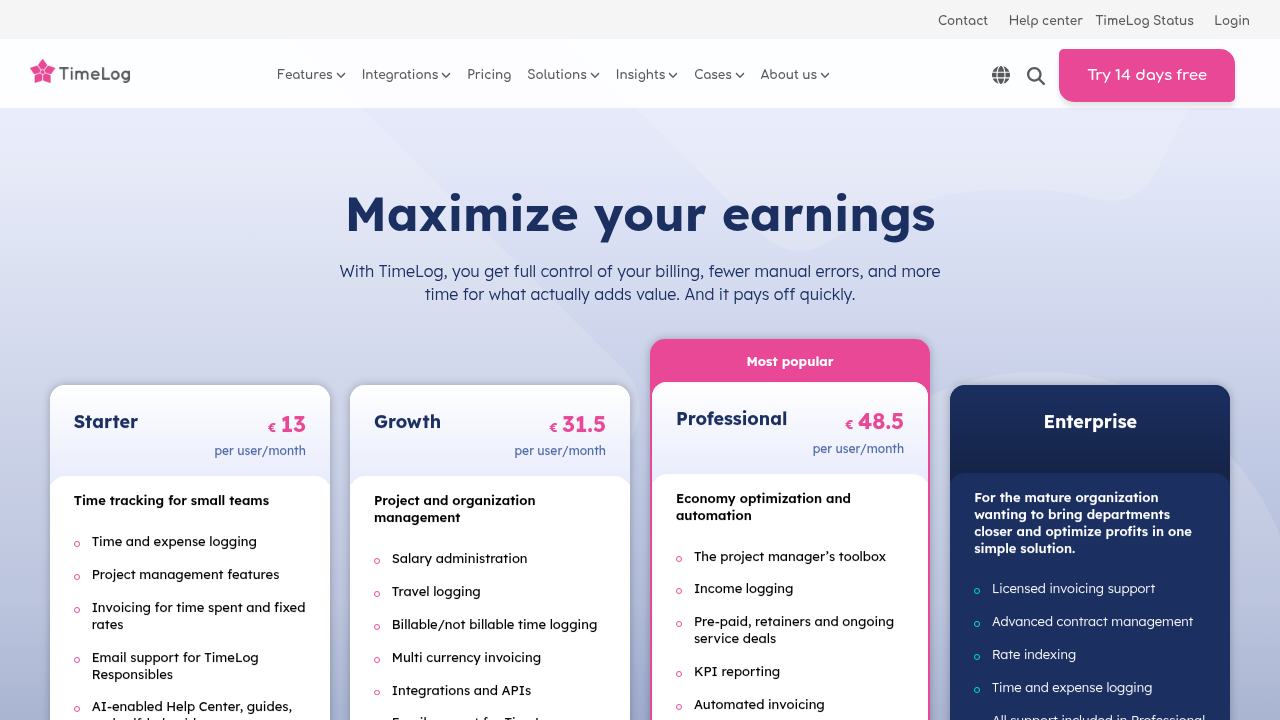
Free - €48.50 / user
Deals Available

This product comes with a special deal, see details

Visit Now
✨ Ask AI about pricing
65% Subscribed Score
info Icon

The Subscribed Score is an independent rating that combines user reviews, features, and value-for-money from multiple trusted sources. It’s designed as a quick benchmark, not a guarantee of individual experience.

Overview

TimeLog

TimeLog is a cloud-based professional services automation (PSA) platform designed to streamline time tracking, project management, resource allocation, and financial oversight for businesses of varying sizes. By integrating time, expenses, projects, and profitability metrics into a single dashboard, it empowers teams to monitor real-time performance, detect issues early, and make data-driven decisions. With built-in AI that highlights potential risks and opportunities, TimeLog connects seamlessly with payroll and finance systems to ensure accurate, up-to-date reporting.

Why Use TimeLog?

  • Real-time Visibility: Track time, expenses, budgets, and resources instantly to spot profitability issues before they escalate.
  • AI-Powered Insights: Automated alerts on early signals for faster, confident decision-making.
  • End-to-End Automation: From planning and scheduling to invoicing and reporting, reducing manual admin.
  • Scalable for Growth: Supports simple tracking for small teams up to enterprise-wide profitability optimization.

Who is TimeLog For?

  • Professional services firms, agencies, consultancies, and IT teams managing billable hours and projects.
  • Businesses transitioning from spreadsheets to professional tools.
  • Growing organizations needing resource planning, Gantt charts, and client portals.

Key Features and Benefits

  • Time & Expense Tracking: Log billable/non-billable hours, approvals, and expenses with mobile access.
  • Project Management: Gantt charts, task assignment, milestones, Kanban boards, and budgeting.
  • Resource & Capacity Planning: Allocate teams, forecast workloads, and balance utilization.
  • Invoicing & Reporting: Generate invoices from timesheets, track margins, custom dashboards.
  • Integrations: API connects to Outlook, Dynamics NAV, payroll, and finance tools.
  • Security & Compliance: User permissions, approvals, and customizable workflows.

Where TimeLog performs best

What users like
  • Real-time profitability insights
  • AI-powered early warnings
  • Comprehensive project tools
  • Free plan available
  • Strong integrations

Where TimeLog falls short

What users dislike
  • Enterprise pricing opaque
  • Manual timesheet entry
  • Learning curve for advanced features
  • Limited free invoicing
  • Some admin still required
Subscribed Score Metrics
24/36 Metric achieved
MetricsScore
Customer Support4/6
Security4/6
Ease of Use4/6
Value of Money5/6
Integration4/6
Popularity3/6
Radar Chart Table View
Ease of Use
Measures how simple and intuitive the product is to use, including setup, navigation, and overall user experience
4/6 Metric Checks
Security
Compares the product`s features, quality, and pricing to determine its overall cost-effectiveness.
4/6 Metric Checks
Value of Money
Assesses the product`s ability to protect data, prevent breaches, and comply with industry standards.
5/6 Metric Checks
Customer Support
Reflects the responsiveness, helpfulness, and quality of assistance provided by the product`s support team.
4/6 Metric Checks
Integrations
Evaluates how well the product connects with other tools and platforms, enabling seamless workflows.
4/6 Metric Checks
TimeLog Pricing Range
Free - €48.50 / user/mo

TimeLog in action
info Icon

A curated gallery of real screenshots and use cases from the product, so you can see how it works before trying it.

TimeLog Full Screen Icon
TimeLog
TimeLog

Alternatives to TimeLog
info Icon

A list of platforms similar to TimeLog, helping you evaluate which tool best matches your needs.

How to cancel TimeLog

Need to cancel TimeLog? Here is how
info Icon

Thinking about how to cancel TimeLog this is how you do it!

Log into your TimeLog account, navigate to Billing/Subscription settings, and select cancel or downgrade. Confirmation email sent; access remains until billing period ends. Export data within 30 days if needed.

How to Cancel the TimeLog

Log into your TimeLog account, navigate to Billing/Subscription settings, and select cancel or downgrade. Confirmation email sent; access remains until billing period ends. Export data within 30 days if needed.

FAQs about TimeLog

Every else you need to know about TimeLog
info Icon

A collection of FAQs, guides, alternatives, and comparisons to help you quickly understand if TimeLog is right for you.

Manage your TimeLog profile

Create profile

Want to list your product on Subscribed.fyi? Create a profile to reach more buyers.

Pricing Range
info Icon

This only an estimated pricing range, visit TimeLog pricing page to access all the information by clicking “Visit Now”.

Free - €48.50 / user
Visit Now
Deals Available

This product comes with a special deal, see details

This product comes with a special deal, see details