Google Workspace Reviews 2026: Details, Pricing, & Features | Subscribed.fyi
Sign in to review
Join our community of software reviewers on Subscribed.fyi

Continue With Google
Continue With LinkedIn
Continue Review with Email
Continue with Email
Enter your email to continue.
Continue
Enter your password
Enter your password to finish setting up your account.
Continue
Activate your email
Enter activation code we sent to your email.
Submit
Reset your password
Enter activation code we sent to your email.
Submit
Set your new password
Enter a new password for your account.
Submit
✨ Ask AI Search
Categories
For Business
Log in
Provide My Insights

Google Workspace

5/5
(5)

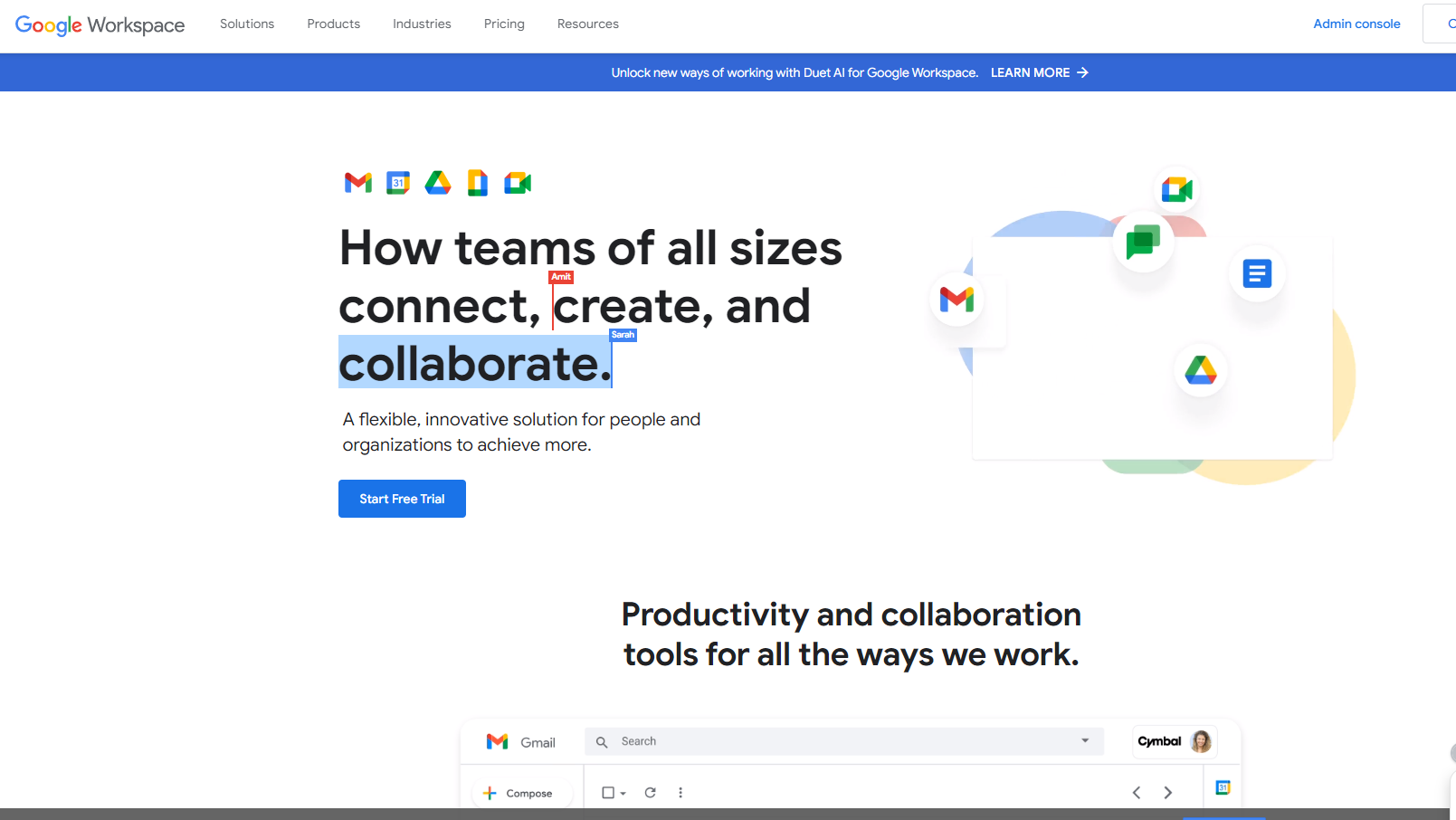
Google Workspace is a cloud-based suite of productivity and collaboration tools by Google. With applications like Gmail, Google Drive, and Google Meet, it enables efficient communication and collaboration for businesses, remote teams, educational institutions, and individual professionals.

Google Workspace

Work Hub
Most Loved Award
2026

All Awards

Work Hub
Most Loved Award
2026
5
5
Reviews
90%
Subscribed Score

Available for Claim - This listing is available to be claimed
Claim For Free

Unclaimed

Curated and listed by Subscribed Team

Claim For Free
Smart Automation
Smart Automation
Save time with AI-powered workflows.
Works Anywhere
Works Anywhere
Accessible from any device, anytime.
Secure by Design
Secure by Design
Data protection and compliance built in.

Boost Team Collaboration with Google Workspace – The Complete Productivity Suite

Google Workspace, a top solution in the Worksuite category, offers a powerful suite of cloud-based tools like Gmail, Google Drive, Docs, Sheets, and more. Designed to enhance communication and productivity, Google Workspace provides a unified platform for seamless real-time collaboration across teams. Ready to streamline your workflow? Don’t miss exclusive deals. For more productivity tools, explore Microsoft 365, Canva, and Notion.

Why Use Google Workspace?

In the realm of cloud-based productivity suites, Google Workspace excels by:

  • Collaborative Tools: Google Workspace offers a suite of collaborative tools that allow teams to work together in real time on documents, spreadsheets, presentations, and more. This fosters efficient teamwork and reduces the need for email exchanges.
  • Cloud Storage and Sharing: With Google Drive, users can store, access, and share files in the cloud. The integration of Google Drive with other applications in the suite ensures easy collaboration and access to documents from any device.
  • Professional Email: Gmail for Business, part of Google Workspace, provides professional email hosting with a custom domain. It includes advanced features such as spam filtering, search capabilities, and integration with other Google applications.
  • Video Conferencing: Google Meet, integrated into Google Workspace, offers secure and high-quality video conferencing. It allows teams to conduct virtual meetings, webinars, and collaborative sessions with ease.

Who is Google Workspace For?

Google Workspace caters to a diverse range of users and organizations:

  • Businesses and Enterprises: Google Workspace is ideal for businesses of all sizes, providing a suite of tools to enhance collaboration, communication, and productivity within the organization.
  • Remote Teams: With a focus on cloud-based collaboration, Google Workspace is well-suited for remote teams, enabling seamless communication and collaboration regardless of geographical locations.
  • Educational Institutions: Google Workspace for Education offers a tailored set of tools for educators and students, facilitating online learning, collaboration, and document sharing.
  • Individual Professionals: Freelancers and individual professionals benefit from the suite’s versatile applications, allowing them to manage emails, documents, and collaborative projects in a unified platform.

Google Workspace is a comprehensive and collaborative suite of applications that simplifies communication and enhances productivity for businesses, remote teams, educational institutions, and individual professionals. Whether you need professional email hosting, collaborative document editing, or video conferencing, Google Workspace provides the tools needed to streamline work processes and foster effective collaboration.


Google Workspace Summary

Boost Team Collaboration with Google Workspace – The Complete Productivity Suite

Google Workspace, a top solution in the Worksuite category, offers a powerful suite of cloud-based tools like Gmail, Google Drive, Docs, Sheets, and more. Designed to enhance communication and productivity, Google Workspace provides a unified platform for seamless real-time collaboration across teams. Ready to streamline your workflow? Don’t miss exclusive deals. For more productivity tools, explore Microsoft 365, Canva, and Notion.

Why Use Google Workspace?

In the realm of cloud-based productivity suites, Google Workspace excels by:

  • Collaborative Tools: Google Workspace offers a suite of collaborative tools that allow teams to work together in real time on documents, spreadsheets, presentations, and more. This fosters efficient teamwork and reduces the need for email exchanges.
  • Cloud Storage and Sharing: With Google Drive, users can store, access, and share files in the cloud. The integration of Google Drive with other applications in the suite ensures easy collaboration and access to documents from any device.
  • Professional Email: Gmail for Business, part of Google Workspace, provides professional email hosting with a custom domain. It includes advanced features such as spam filtering, search capabilities, and integration with other Google applications.
  • Video Conferencing: Google Meet, integrated into Google Workspace, offers secure and high-quality video conferencing. It allows teams to conduct virtual meetings, webinars, and collaborative sessions with ease.

Who is Google Workspace For?

Google Workspace caters to a diverse range of users and organizations:

  • Businesses and Enterprises: Google Workspace is ideal for businesses of all sizes, providing a suite of tools to enhance collaboration, communication, and productivity within the organization.
  • Remote Teams: With a focus on cloud-based collaboration, Google Workspace is well-suited for remote teams, enabling seamless communication and collaboration regardless of geographical locations.
  • Educational Institutions: Google Workspace for Education offers a tailored set of tools for educators and students, facilitating online learning, collaboration, and document sharing.
  • Individual Professionals: Freelancers and individual professionals benefit from the suite’s versatile applications, allowing them to manage emails, documents, and collaborative projects in a unified platform.

Google Workspace is a comprehensive and collaborative suite of applications that simplifies communication and enhances productivity for businesses, remote teams, educational institutions, and individual professionals. Whether you need professional email hosting, collaborative document editing, or video conferencing, Google Workspace provides the tools needed to streamline work processes and foster effective collaboration.

Google Workspace reviews

Learn what people say about Google Workspace

5
5 Reviews
90%
Subscribed Score

Lear more here about the Subscribed score on how it is composed. Learn more Click here

Overall rating

5
4
3
2
1
CX 4/6

How good is the customer support based on subscribed’s assessment

CX Icon
Security 5/6

How secure is the product based on Subscribed’s assessment?

Security Icon
Ease of Use 6/6

How easy is the product to use, based on Subscribed’s assessment?

EOU Icon
Value 5/6

What is the value for money based on Subscribed’s assessment?

coin Icon
Integration 6/6

How many integrations does the product offer?

gear Icon
Popularity 6/6

How popular is the product?

star
Hamza Rauf Organic
Full Stack Developer
See My Portfolio
4 days ago
Share
What do you like best about this product?
Google Workspace has been my primary office suite since it was just G Suite, and now the experience has shifted significantly. It now feels like a massive, interconnected brain that knows where my files are better than I do.
Is there something that almost made you stop using it?
While I've been a Google Workspace user for years, one specific reason has, at times, made me consider moving my entire team back to Microsoft 365. That is, all Gemini's advanced features are behind a "Paid Add-on."
If you could change one thing, what would it be?
The transition between being online and offline still feels fragile, and losing real-time sync the moment Wi-Fi drops remains the suite’s biggest thorn in the throat.
Final thoughts, wrap up what you think
9/10. Gemini provides the best value for money. Gemini is significantly cheaper than Claude 4 or GPT-5 for high-volume work. Plus, the paid tier usually bundles 2TB of Google One storage, making it the most practical all-in-one subscription.
Upvote
Irfan Ali Invitation
Developer
5 days ago
Share
What exceeded your expectations?
The best tools and software they provide, after using this i barely use my windows office, it has realtime collaboration feature for mulitplse user editing and working on same dcouments or shhet, works from any browser in differnt environments, it saves content automatically so no data loss in accidental close.
Is there something that almost made you stop using it?
Its works best with a good internet, without it its not available for use, we can;t access it in browser or in mobile, google sheet and documents has some limitations as compare to windows excel and ms word, all data is stored in cloud so privacy concern ma exists for sensitive data.
What problem did this product solve for you?
online collaboraitve documents management and sharing docs easily with any with required permissions, enhance sheet and docs with more advanced formulas and features which are missing in these and available in native microsoft apps, integrate ai for suggestions and autocompletion in docs, excel, and slides, ai generation is also important and good feature that can be added
Final thoughts, wrap up what you think
If need better docs management use it, it has online sharing, online colloboraion features and much more, it is ideal for teams collaborating remotely on same files and data across from differnet devices, saves all data on you google account make it easy for accessible
Upvote
M Raza Akhter Organic
QA Engineer
7 days ago
Share
How has it made your work/life easier?
Google Workspace is unique because it supports smooth integration of the Gmail, Docs, Sheets, Drive, and Meet, thus making daily working tasks more linked and effective. It has simplified work because it has provided an opportunity of working together in real time, sharing files fast without requiring much configuration, and accessibility anywhere.
What’s been frustrating in your experience?
Certain advanced functions are inadequate to desktop based tools. The off line usage and consistency of format can also be annoying at times.
What could make it even better?
More AI automation of email, docs, and meetings would enhance Google Workspace. This would be enhanced by even more powerful advanced formatting and offline.
Final thoughts, wrap up what you think
I would give it a rating of very highly as collaboration is easily achieved using the Google workspace. I would suggest it to other colleagues and friends willing to have reliable cloud based tools in their day to day work.
Upvote
saiprasanna sabinikari Invitation
Senior Test Engineer
1 week ago
Share
How has it made your work/life easier?
Google workspace makes everyday life easy for office work related tasks, google meet, docs and drives. Google's Gmail is vastly used by many millions of people with it's simple and friendly usage.
What feels confusing or hard to use?
When the storage is full without buying the space it's hard to clear the clutter.
What problem did this product solve for you?
The security it provides especially the 2- factor authentication and also the storage capacity it offers for minimum photos or videos.
Final thoughts, wrap up what you think
This is comparatively easy to use and understandable.
Upvote

Google Workspace User Reviews

5 User Reviews

Hamza Rauf Organic
Full Stack Developer
See My Portfolio
4 days ago
Share
What do you like best about this product?
Google Workspace has been my primary office suite since it was just G Suite, and now the experience has shifted significantly. It now feels like a massive, interconnected brain that knows where my files are better than I do.
Is there something that almost made you stop using it?
While I've been a Google Workspace user for years, one specific reason has, at times, made me consider moving my entire team back to Microsoft 365. That is, all Gemini's advanced features are behind a "Paid Add-on."
If you could change one thing, what would it be?
The transition between being online and offline still feels fragile, and losing real-time sync the moment Wi-Fi drops remains the suite’s biggest thorn in the throat.
Final thoughts, wrap up what you think
9/10. Gemini provides the best value for money. Gemini is significantly cheaper than Claude 4 or GPT-5 for high-volume work. Plus, the paid tier usually bundles 2TB of Google One storage, making it the most practical all-in-one subscription.
Upvote
Irfan Ali Invitation
Developer
5 days ago
Share
What exceeded your expectations?
The best tools and software they provide, after using this i barely use my windows office, it has realtime collaboration feature for mulitplse user editing and working on same dcouments or shhet, works from any browser in differnt environments, it saves content automatically so no data loss in accidental close.
Is there something that almost made you stop using it?
Its works best with a good internet, without it its not available for use, we can;t access it in browser or in mobile, google sheet and documents has some limitations as compare to windows excel and ms word, all data is stored in cloud so privacy concern ma exists for sensitive data.
What problem did this product solve for you?
online collaboraitve documents management and sharing docs easily with any with required permissions, enhance sheet and docs with more advanced formulas and features which are missing in these and available in native microsoft apps, integrate ai for suggestions and autocompletion in docs, excel, and slides, ai generation is also important and good feature that can be added
Final thoughts, wrap up what you think
If need better docs management use it, it has online sharing, online colloboraion features and much more, it is ideal for teams collaborating remotely on same files and data across from differnet devices, saves all data on you google account make it easy for accessible
Upvote
M Raza Akhter Organic
QA Engineer
7 days ago
Share
How has it made your work/life easier?
Google Workspace is unique because it supports smooth integration of the Gmail, Docs, Sheets, Drive, and Meet, thus making daily working tasks more linked and effective. It has simplified work because it has provided an opportunity of working together in real time, sharing files fast without requiring much configuration, and accessibility anywhere.
What’s been frustrating in your experience?
Certain advanced functions are inadequate to desktop based tools. The off line usage and consistency of format can also be annoying at times.
What could make it even better?
More AI automation of email, docs, and meetings would enhance Google Workspace. This would be enhanced by even more powerful advanced formatting and offline.
Final thoughts, wrap up what you think
I would give it a rating of very highly as collaboration is easily achieved using the Google workspace. I would suggest it to other colleagues and friends willing to have reliable cloud based tools in their day to day work.
Upvote
saiprasanna sabinikari Invitation
Senior Test Engineer
1 week ago
Share
How has it made your work/life easier?
Google workspace makes everyday life easy for office work related tasks, google meet, docs and drives. Google's Gmail is vastly used by many millions of people with it's simple and friendly usage.
What feels confusing or hard to use?
When the storage is full without buying the space it's hard to clear the clutter.
What problem did this product solve for you?
The security it provides especially the 2- factor authentication and also the storage capacity it offers for minimum photos or videos.
Final thoughts, wrap up what you think
This is comparatively easy to use and understandable.
Upvote
Kris Castillo Invitation
Quality Assurance Engineer
See My Portfolio
1 month ago
Share
How does this compare to similar products you’ve tried?
Ive used Microsoft 365, Google Workspace is easier to move around in. Gmail, Docs, Drive etc, and better than MIcrosoft for sure
Is there something that almost made you stop using it?
Sync issues with Drive sometimeds were frustrating. Storage limits can also feel restrictive in the medium/long run. Not deal breakers, but noticeable
How could the product save you more time or money?
Better storage management. Maybe clearer way to contact offline support during travel or connectivity issues
Final thoughts, wrap up what you think
reliable and easy to use for daily work. My go to if had too choose between other workspaces.
Upvote
Reviews from G2, Capterra, Trustpilot
info Icon

These ratings come directly from third-party platforms like G2, Capterra, and Trustpilot. They reflect real user feedback collected independently on those sites.

Google Workspace

Pricing Range
info Icon

This only an estimated pricing range, visit Google Workspace pricing page to access all the information by clicking “Visit Now”.

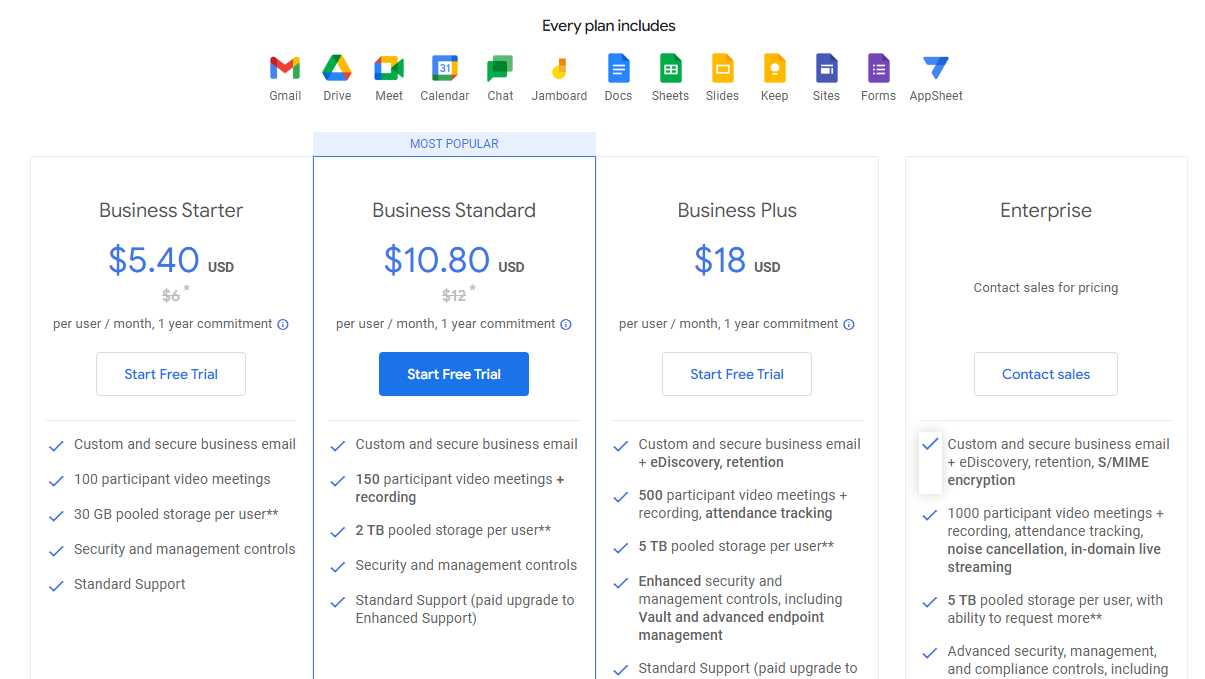
$7.20-$21.60 / Month
Deals Available

This product comes with a special deal, see details

Visit Now
✨ Ask AI about pricing
90% Subscribed Score
info Icon

The Subscribed Score is an independent rating that combines user reviews, features, and value-for-money from multiple trusted sources. It’s designed as a quick benchmark, not a guarantee of individual experience.

Analysis

Boost Team Collaboration with Google Workspace – The Complete Productivity Suite

Google Workspace, a top solution in the Worksuite category, offers a powerful suite of cloud-based tools like Gmail, Google Drive, Docs, Sheets, and more. Designed to enhance communication and productivity, Google Workspace provides a unified platform for seamless real-time collaboration across teams. Ready to streamline your workflow? Don’t miss exclusive deals. For more productivity tools, explore Microsoft 365, Canva, and Notion.

Why Use Google Workspace?

In the realm of cloud-based productivity suites, Google Workspace excels by:

  • Collaborative Tools: Google Workspace offers a suite of collaborative tools that allow teams to work together in real time on documents, spreadsheets, presentations, and more. This fosters efficient teamwork and reduces the need for email exchanges.
  • Cloud Storage and Sharing: With Google Drive, users can store, access, and share files in the cloud. The integration of Google Drive with other applications in the suite ensures easy collaboration and access to documents from any device.
  • Professional Email: Gmail for Business, part of Google Workspace, provides professional email hosting with a custom domain. It includes advanced features such as spam filtering, search capabilities, and integration with other Google applications.
  • Video Conferencing: Google Meet, integrated into Google Workspace, offers secure and high-quality video conferencing. It allows teams to conduct virtual meetings, webinars, and collaborative sessions with ease.

Who is Google Workspace For?

Google Workspace caters to a diverse range of users and organizations:

  • Businesses and Enterprises: Google Workspace is ideal for businesses of all sizes, providing a suite of tools to enhance collaboration, communication, and productivity within the organization.
  • Remote Teams: With a focus on cloud-based collaboration, Google Workspace is well-suited for remote teams, enabling seamless communication and collaboration regardless of geographical locations.
  • Educational Institutions: Google Workspace for Education offers a tailored set of tools for educators and students, facilitating online learning, collaboration, and document sharing.
  • Individual Professionals: Freelancers and individual professionals benefit from the suite’s versatile applications, allowing them to manage emails, documents, and collaborative projects in a unified platform.

Google Workspace is a comprehensive and collaborative suite of applications that simplifies communication and enhances productivity for businesses, remote teams, educational institutions, and individual professionals. Whether you need professional email hosting, collaborative document editing, or video conferencing, Google Workspace provides the tools needed to streamline work processes and foster effective collaboration.

Pros
  • Seamless integration of tools
  • Real-time collaboration features
  • User-friendly and intuitive design
  • Cloud-based access for flexibility
Cons
  • Limited offline functionality
  • Higher pricing for small businesses
  • Lacks advanced features in some apps
  • Search functionality can be overwhelming
Subscribed Score Metrics
32/36 Metric achieved
MetricsScore
Customer Support4/6
Security5/6
Ease of Use6/6
Value of Money5/6
Integration6/6
Popularity6/6
Radar Chart Table View
Ease of Use
Measures how simple and intuitive the product is to use, including setup, navigation, and overall user experience
6/6 Metric Checks
Security
Compares the product`s features, quality, and pricing to determine its overall cost-effectiveness.
5/6 Metric Checks
Value of Money
Assesses the product`s ability to protect data, prevent breaches, and comply with industry standards.
5/6 Metric Checks
Customer Support
Reflects the responsiveness, helpfulness, and quality of assistance provided by the product`s support team.
4/6 Metric Checks
Integrations
Evaluates how well the product connects with other tools and platforms, enabling seamless workflows.
6/6 Metric Checks
Google Workspace Pricing Range
$7.20-$21.60 / Month

Google Workspace Showcase
info Icon

A curated gallery of real screenshots and use cases from the product, so you can see how it works before trying it.

Full Screen Icon
Full Screen Icon
Full Screen Icon
Full Screen Icon
Full Screen Icon
Full Screen Icon
Full Screen Icon
Full Screen Icon
Full Screen Icon
Full Screen Icon
https://www.youtube.com/watch?v=6DaJVZBXETE?start=4&feature=oembed
Full Screen Icon

What else exists next to Google Workspace
info Icon

A list of platforms similar to Google Workspace, helping you evaluate which tool best matches your needs.

Need to cancel Google Workspace? Here is how
info Icon

Thinking about how to cancel Google Workspace this is how you do it!

Steps to Cancel Google Workspace Subscription.
Canceling your Google Workspace subscription is a straightforward process. For detailed instructions, please refer to the official Google Workspace support page: Google Workspace Subscription Cancellation Guide.

How to Cancel the Google Workspace

Steps to Cancel Google Workspace Subscription.
Canceling your Google Workspace subscription is a straightforward process. For detailed instructions, please refer to the official Google Workspace support page: Google Workspace Subscription Cancellation Guide.

Every else you need to know about Google Workspace
info Icon

A collection of FAQs, guides, alternatives, and comparisons to help you quickly understand if Google Workspace is right for you.

Pricing Range
info Icon

This only an estimated pricing range, visit Google Workspace pricing page to access all the information by clicking “Visit Now”.

$7.20-$21.60 / Month
Visit Now
Deals Available

This product comes with a special deal, see details

This product comes with a special deal, see details