Sweep AI Reviews 2026: Details, Pricing, & Features | Subscribed.fyi
Sign in to review
Join our community of software reviewers on Subscribed.fyi

Continue With Google
Continue With LinkedIn
Continue Review with Email
Continue with Email
Enter your email to continue.
Continue
Enter your password
Enter your password to finish setting up your account.
Continue
Activate your email
Enter activation code we sent to your email.
Submit
Reset your password
Enter activation code we sent to your email.
Submit
Set your new password
Enter a new password for your account.
Submit
Categories
For Business
Log in
Provide My Insights

Sweep AI Reviews, Pricing, Features & Alternatives (2026)

5/5
(1)

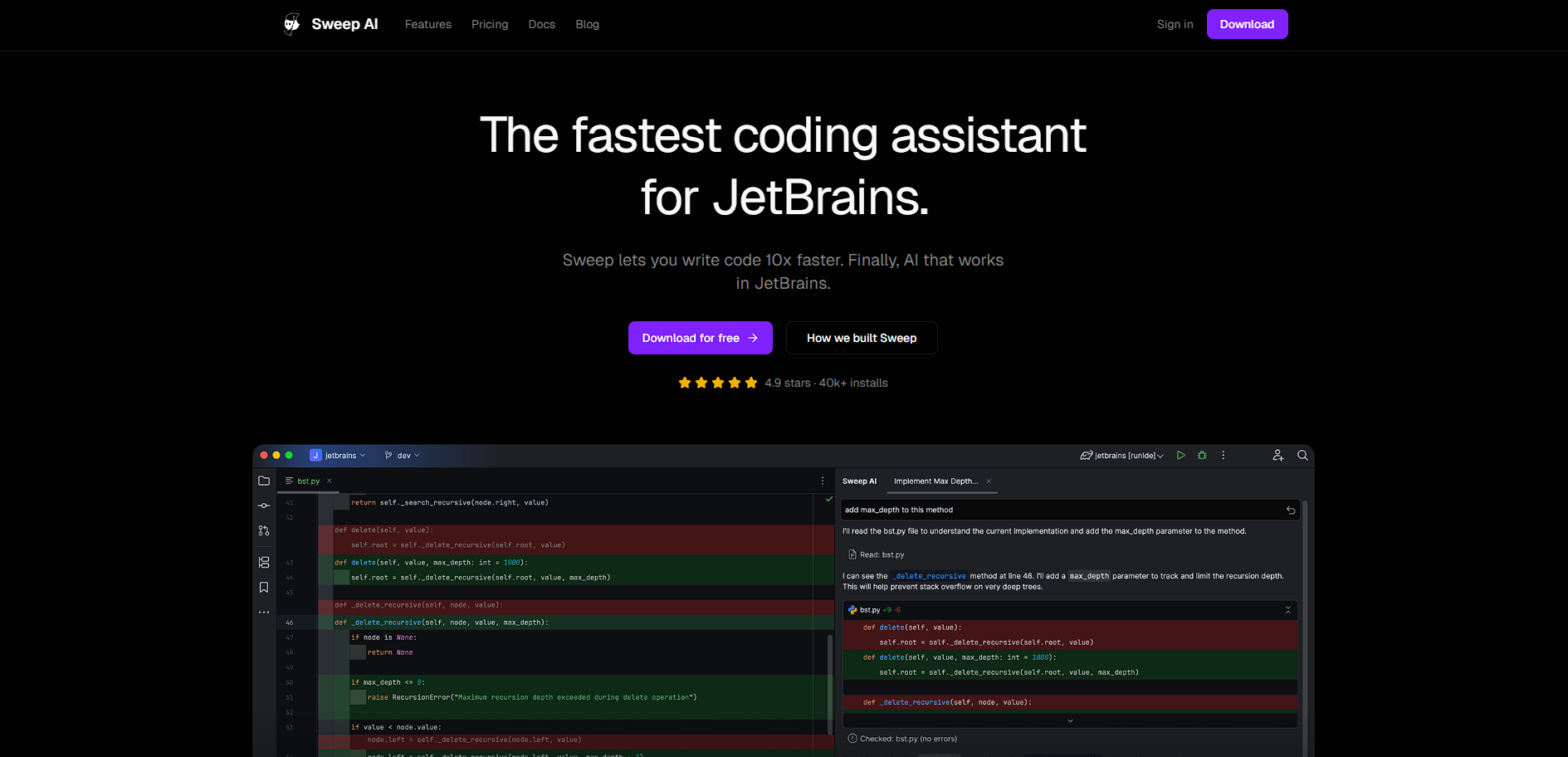
Sweep is an AI coding assistant built for JetBrains IDEs that accelerates development through fast autocomplete, code editing, and agent-based automation directly inside the coding environment.

Sweep AI Overview

What is Sweep AI?

5
1
Reviews
67%
Subscribed Score

Available for Claim - This listing is available to be claimed
Claim Profile For Free

Unclaimed

Manage profile with subsig, and unlock 23+ social and review monitoring. Get partnership options with

Claim Profile For Free

Why teams choose Sweep AI

Key Features

Data-Driven Insights
Make better decisions with analytics.
Scales with You
Scales with You
Grows with your business needs.
Eco-Friendly
Eco-Friendly
Designed with sustainability in mind.

Who is Sweep AI for?

Sweep is an AI-powered coding assistant designed specifically for JetBrains IDEs such as IntelliJ, PyCharm, and WebStorm. It focuses on improving developer productivity by delivering fast, context-aware code suggestions and enabling direct interaction with AI inside the development environment.

Unlike generic AI coding tools, Sweep is tightly integrated with JetBrains’ ecosystem and leverages the IDE’s internal code indexing to better understand entire projects. This allows it to provide more accurate autocomplete suggestions and edits that align with the developer’s existing codebase.

In practice, Sweep acts as both a coding assistant and a lightweight AI agent. Developers can use it to generate code, refactor files, fix bugs, and automate repetitive tasks. Its design prioritizes speed and workflow continuity, keeping developers inside their IDE instead of switching between tools.

Key Features and Benefits

  • Next-edit autocomplete: Predicts and inserts code changes instantly with minimal latency
  • Codebase awareness: Uses indexing to understand full project context
  • AI agent capabilities: Automates tasks like refactoring and code review
  • Inline editing: Modify code directly using natural language commands
  • JetBrains-native integration: Works seamlessly across IntelliJ, PyCharm, and more
  • High-speed inference: Delivers sub-second suggestions for real-time coding
  • Privacy-first design: Ensures code is not retained externally

Who Can Benefit from Sweep

  • JetBrains developers: Enhance productivity without switching IDEs
  • Backend engineers: Work efficiently across large, complex codebases
  • Startups: Accelerate development with minimal tooling overhead
  • Engineering teams: Automate repetitive coding and maintenance tasks
  • Individual developers: Improve speed and reduce manual coding effort

Looking for alternative solutions?
If you are exploring similar AI coding assistants, tools like GitHub Copilot, Cursor, Continue.dev, and Tabnine offer broader IDE support or more advanced agent workflows depending on your needs.

Sweep AI Summary

Sweep is an AI-powered coding assistant designed specifically for JetBrains IDEs such as IntelliJ, PyCharm, and WebStorm. It focuses on improving developer productivity by delivering fast, context-aware code suggestions and enabling direct interaction with AI inside the development environment.

Unlike generic AI coding tools, Sweep is tightly integrated with JetBrains’ ecosystem and leverages the IDE’s internal code indexing to better understand entire projects. This allows it to provide more accurate autocomplete suggestions and edits that align with the developer’s existing codebase.

In practice, Sweep acts as both a coding assistant and a lightweight AI agent. Developers can use it to generate code, refactor files, fix bugs, and automate repetitive tasks. Its design prioritizes speed and workflow continuity, keeping developers inside their IDE instead of switching between tools.

Key Features and Benefits

  • Next-edit autocomplete: Predicts and inserts code changes instantly with minimal latency
  • Codebase awareness: Uses indexing to understand full project context
  • AI agent capabilities: Automates tasks like refactoring and code review
  • Inline editing: Modify code directly using natural language commands
  • JetBrains-native integration: Works seamlessly across IntelliJ, PyCharm, and more
  • High-speed inference: Delivers sub-second suggestions for real-time coding
  • Privacy-first design: Ensures code is not retained externally

Who Can Benefit from Sweep

  • JetBrains developers: Enhance productivity without switching IDEs
  • Backend engineers: Work efficiently across large, complex codebases
  • Startups: Accelerate development with minimal tooling overhead
  • Engineering teams: Automate repetitive coding and maintenance tasks
  • Individual developers: Improve speed and reduce manual coding effort

Looking for alternative solutions?
If you are exploring similar AI coding assistants, tools like GitHub Copilot, Cursor, Continue.dev, and Tabnine offer broader IDE support or more advanced agent workflows depending on your needs.

Sweep AI reviews and insights

Learn what people say about Sweep AI

5
1 Reviews
67%
Subscribed Score

Lear more here about the Subscribed score on how it is composed. Learn more Click here

Overall rating

5
4
3
2
1
CX 3/6

How good is the customer support based on subscribed’s assessment

CX Icon
Security 5/6

How secure is the product based on Subscribed’s assessment?

Security Icon
Ease of Use 4/6

How easy is the product to use, based on Subscribed’s assessment?

EOU Icon
Value 5/6

What is the value for money based on Subscribed’s assessment?

coin Icon
Integration 3/6

How many integrations does the product offer?

gear Icon
Popularity 4/6

How popular is the product?

star
Denniel Gerald Taloyo Organic
Full-Stack Developer
See My Portfolio
3 weeks ago
Share
What exceeded your expectations?
When using Sweep, debugging has been much easier as it is able to locate the problems and provide possible solutions to it. As usual, coding has been accelerated, but Sweep AI is more context-driven, being able to understand what else needs to be changed or adjusted, when prompted.
Is there something that almost made you stop using it?
Nothing has made me stop using it so far. It has been promising as an AI coding agent for handling repository-level tasks.
What could make it even better?
Depending on the developer, getting the prompting exactly right to get the agent to properly debug or write code can be a challenge, so they should improve on helping to be beginner-friendly. Latency can also be a problem as it performs a bit slower compared to other coding agents.
Final thoughts, wrap up what you think
Overall, Sweep is a great AI coding agent to use for those using a Jetbrains IDE as it is context-driven. It will save developers tons of time for both coding and debugging.
Upvote

Sweep AI User Reviews

1 User Reviews

Reviews from G2, Capterra, Trustpilot
info Icon

These ratings come directly from third-party platforms like G2, Capterra, and Trustpilot. They reflect real user feedback collected independently on those sites.

Sweep AI pricing

Pricing model

Pricing Range
info Icon

This only an estimated pricing range, visit Sweep AI pricing page to access all the information by clicking “Visit Now”.

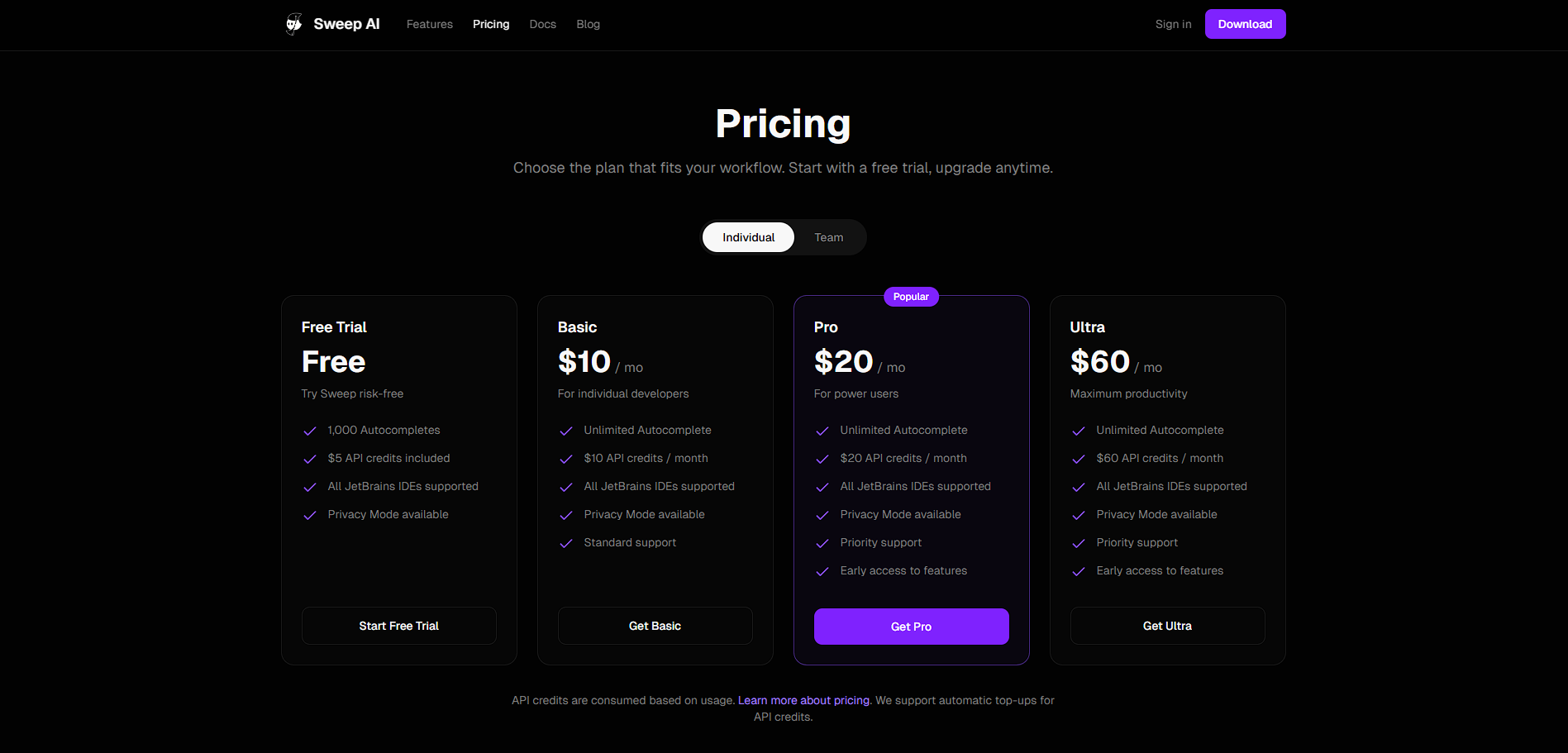
Custom (No Public plans)
Visit Now
✨ Ask AI about pricing
67% Subscribed Score
info Icon

The Subscribed Score is an independent rating that combines user reviews, features, and value-for-money from multiple trusted sources. It’s designed as a quick benchmark, not a guarantee of individual experience.

Overview

Sweep is an AI-powered coding assistant designed specifically for JetBrains IDEs such as IntelliJ, PyCharm, and WebStorm. It focuses on improving developer productivity by delivering fast, context-aware code suggestions and enabling direct interaction with AI inside the development environment.

Unlike generic AI coding tools, Sweep is tightly integrated with JetBrains’ ecosystem and leverages the IDE’s internal code indexing to better understand entire projects. This allows it to provide more accurate autocomplete suggestions and edits that align with the developer’s existing codebase.

In practice, Sweep acts as both a coding assistant and a lightweight AI agent. Developers can use it to generate code, refactor files, fix bugs, and automate repetitive tasks. Its design prioritizes speed and workflow continuity, keeping developers inside their IDE instead of switching between tools.

Key Features and Benefits

  • Next-edit autocomplete: Predicts and inserts code changes instantly with minimal latency
  • Codebase awareness: Uses indexing to understand full project context
  • AI agent capabilities: Automates tasks like refactoring and code review
  • Inline editing: Modify code directly using natural language commands
  • JetBrains-native integration: Works seamlessly across IntelliJ, PyCharm, and more
  • High-speed inference: Delivers sub-second suggestions for real-time coding
  • Privacy-first design: Ensures code is not retained externally

Who Can Benefit from Sweep

  • JetBrains developers: Enhance productivity without switching IDEs
  • Backend engineers: Work efficiently across large, complex codebases
  • Startups: Accelerate development with minimal tooling overhead
  • Engineering teams: Automate repetitive coding and maintenance tasks
  • Individual developers: Improve speed and reduce manual coding effort

Looking for alternative solutions?
If you are exploring similar AI coding assistants, tools like GitHub Copilot, Cursor, Continue.dev, and Tabnine offer broader IDE support or more advanced agent workflows depending on your needs.

Where Sweep AI performs best

What users like
  • Purpose-built for JetBrains IDEs with deep native integration
  • Extremely fast autocomplete with near-instant suggestions
  • Understands entire codebases using indexing for context-aware edits
  • Includes AI agent features for code editing, review, and automation
  • Privacy-focused with no code retention by third parties

Where Sweep AI falls short

What users dislike
  • Primarily optimized for JetBrains users, limiting appeal for other IDE users
  • Still evolving compared to more mature competitors like Copilot
  • Limited ecosystem integrations beyond IDE usage
  • Advanced agent workflows may not match full autonomous coding tools
Subscribed Score Metrics
24/36 Metric achieved
MetricsScore
Customer Support3/6
Security5/6
Ease of Use4/6
Value of Money5/6
Integration3/6
Popularity4/6
Radar Chart Table View
Ease of Use
Measures how simple and intuitive the product is to use, including setup, navigation, and overall user experience
4/6 Metric Checks
Security
Compares the product`s features, quality, and pricing to determine its overall cost-effectiveness.
5/6 Metric Checks
Value of Money
Assesses the product`s ability to protect data, prevent breaches, and comply with industry standards.
5/6 Metric Checks
Customer Support
Reflects the responsiveness, helpfulness, and quality of assistance provided by the product`s support team.
3/6 Metric Checks
Integrations
Evaluates how well the product connects with other tools and platforms, enabling seamless workflows.
3/6 Metric Checks
Sweep AI Pricing Range
Custom (No Public plans)

Sweep AI in action
info Icon

A curated gallery of real screenshots and use cases from the product, so you can see how it works before trying it.

Sweep AI Full Screen Icon
https://www.youtube.com/watch?v=0ryi52dcz3s
Full Screen Icon
Sweep AI
Sweep AI
Video thumbnail
Sweep AI
Sweep AI

Alternatives to Sweep AI
info Icon

A list of platforms similar to Sweep AI, helping you evaluate which tool best matches your needs.

How to cancel Sweep AI

Need to cancel Sweep AI? Here is how
info Icon

Thinking about how to cancel Sweep AI this is how you do it!

  1. Open your JetBrains IDE
  2. Navigate to plugins or account settings
  3. Locate the Sweep plugin subscription
  4. Cancel or uninstall the plugin
  5. Confirm cancellation and stop usage

How to Cancel the Sweep AI

  1. Open your JetBrains IDE
  2. Navigate to plugins or account settings
  3. Locate the Sweep plugin subscription
  4. Cancel or uninstall the plugin
  5. Confirm cancellation and stop usage

FAQs about Sweep AI

Every else you need to know about Sweep AI
info Icon

A collection of FAQs, guides, alternatives, and comparisons to help you quickly understand if Sweep AI is right for you.

Manage your Sweep AI profile

Create profile

Want to list your product on Subscribed.fyi? Create a profile to reach more buyers.

Pricing Range
info Icon

This only an estimated pricing range, visit Sweep AI pricing page to access all the information by clicking “Visit Now”.

Custom (No Public plans)
Visit Now