AppSheet Reviews 2026: Details, Pricing, & Features | Subscribed.fyi
Sign in to review
Join our community of software reviewers on Subscribed.fyi

Continue With Google
Continue With LinkedIn
Continue Review with Email
Continue with Email
Enter your email to continue.
Continue
Enter your password
Enter your password to finish setting up your account.
Continue
Activate your email
Enter activation code we sent to your email.
Submit
Reset your password
Enter activation code we sent to your email.
Submit
Set your new password
Enter a new password for your account.
Submit
Categories
For Business
Log in
Provide My Insights

AppSheet Reviews, Pricing, Features & Alternatives (2026)

4.3/5
(4)

AppSheet is a no-code platform empowering users to build and deploy custom apps without programming expertise. It integrates seamlessly with data sources like Google Sheets, Excel, and SQL, enabling businesses to streamline operations. The platform offers intuitive UI/UX tools, automation, and cross-platform compatibility, making app development faster and more accessible for teams of all sizes.

AppSheet Overview

What is AppSheet?

4.3
4
Reviews
80%
Subscribed Score

Available for Claim - This listing is available to be claimed
Claim Profile For Free

Unclaimed

Manage profile with subsig, and unlock 23+ social and review monitoring. Get partnership options with

Claim Profile For Free

Why teams choose AppSheet

Key Features

Fully Customizable
Fully Customizable
Tailor it to your brand and workflow.
Scales with You
Scales with You
Grows with your business needs.
Collaborate Easily
Collaborate Easily
Built for teams and communication.

Who is AppSheet for?

AppSheet is a widely recognized solution in the No-Code Platforms category. It enables businesses to build powerful mobile and web applications directly from existing data sources like Google Sheets, Excel, or SQL databases without requiring coding expertise. The platform simplifies app creation, allowing organizations to digitize processes and increase productivity through features such as intuitive UI/UX customization, workflow automation, and real-time data synchronization. Explore exclusive deals. For alternatives, consider JIRA, QuickBase, and Appy Pie.

Why Use AppSheet?

Choosing AppSheet offers several competitive benefits for businesses:

  • No-Code Simplicity: AppSheet empowers users without technical backgrounds to create applications by connecting data sources and using drag-and-drop functionalities.
  • Fast Deployment: Applications can be built and deployed across multiple platforms in real-time, making the development process efficient and agile.
  • Robust Automation: Streamline business workflows with features like email notifications, real-time updates, and workflow triggers, increasing operational efficiency.
  • Versatile Integration: Supports integrations with major tools like Google Sheets, Excel, Salesforce, and SQL, enabling seamless data management and accessibility.
  • Secure and Scalable: Features include data encryption, access control, user authentication, and scalability for businesses of various sizes.

Who is AppSheet For?

AppSheet is ideal for a diverse audience across industries:

  • Small and Medium Businesses: Entrepreneurs and teams looking to digitize workflows without investing in extensive development resources.
  • Enterprise Teams: Corporations seeking scalable, collaborative solutions for department-level or multi-team app deployment.
  • Education and Nonprofits: Organizations that require cost-effective and user-friendly tools to streamline their operations. (Discounts are available for eligible entities.)
  • Project Managers and Administrators: Professionals aiming to manage tasks, automate workflows, or create efficient reporting systems.

AppSheet redefines app development with its intuitive platform, making it an ideal solution for digitizing processes and enhancing productivity while avoiding the complexity of traditional development. Whether you’re building apps for small projects or enterprise-scale deployments, AppSheet offers a versatile and powerful solution to meet your needs.


AppSheet Summary

AppSheet is a widely recognized solution in the No-Code Platforms category. It enables businesses to build powerful mobile and web applications directly from existing data sources like Google Sheets, Excel, or SQL databases without requiring coding expertise. The platform simplifies app creation, allowing organizations to digitize processes and increase productivity through features such as intuitive UI/UX customization, workflow automation, and real-time data synchronization. Explore exclusive deals. For alternatives, consider JIRA, QuickBase, and Appy Pie.

Why Use AppSheet?

Choosing AppSheet offers several competitive benefits for businesses:

  • No-Code Simplicity: AppSheet empowers users without technical backgrounds to create applications by connecting data sources and using drag-and-drop functionalities.
  • Fast Deployment: Applications can be built and deployed across multiple platforms in real-time, making the development process efficient and agile.
  • Robust Automation: Streamline business workflows with features like email notifications, real-time updates, and workflow triggers, increasing operational efficiency.
  • Versatile Integration: Supports integrations with major tools like Google Sheets, Excel, Salesforce, and SQL, enabling seamless data management and accessibility.
  • Secure and Scalable: Features include data encryption, access control, user authentication, and scalability for businesses of various sizes.

Who is AppSheet For?

AppSheet is ideal for a diverse audience across industries:

  • Small and Medium Businesses: Entrepreneurs and teams looking to digitize workflows without investing in extensive development resources.
  • Enterprise Teams: Corporations seeking scalable, collaborative solutions for department-level or multi-team app deployment.
  • Education and Nonprofits: Organizations that require cost-effective and user-friendly tools to streamline their operations. (Discounts are available for eligible entities.)
  • Project Managers and Administrators: Professionals aiming to manage tasks, automate workflows, or create efficient reporting systems.

AppSheet redefines app development with its intuitive platform, making it an ideal solution for digitizing processes and enhancing productivity while avoiding the complexity of traditional development. Whether you’re building apps for small projects or enterprise-scale deployments, AppSheet offers a versatile and powerful solution to meet your needs.

AppSheet reviews and insights

Learn what people say about AppSheet

4.3
4 Reviews
80%
Subscribed Score

Lear more here about the Subscribed score on how it is composed. Learn more Click here

Overall rating

5
4
3
2
1
CX 4/6

How good is the customer support based on subscribed’s assessment

CX Icon
Security 4/6

How secure is the product based on Subscribed’s assessment?

Security Icon
Ease of Use 5/6

How easy is the product to use, based on Subscribed’s assessment?

EOU Icon
Value 4/6

What is the value for money based on Subscribed’s assessment?

coin Icon
Integration 5/6

How many integrations does the product offer?

gear Icon
Popularity 6/6

How popular is the product?

star
Hans Benson Dy Tuan Organic
Cyber and Information Security Associate
See My Portfolio
4 months ago
Share
What exceeded your expectations?
What exceeded my expectation is that how easy to create and develop application that is based on day to day business operations. We currently used this to simplify our workflows and automate our work.
What slows you down when using it?
Since app sheet a no-code to low code based platform, the scalability is limited specially for the developers who wants to employ some products that are compatible with app sheet.
If you could change one thing, what would it be?
Scale to a bigger reach, maybe if possible to integrate products that are not only google services.
Final thoughts, wrap up what you think
Easy to build applications, and can be used by someone who does not have a background of programming.
Upvote (2)
Elizabeth Hermance Invitation
Wordpress developer
See My Portfolio
4 months ago
Share
What feature do you use most often?
AppSheet is nice for quickly building simple apps without much coding.
What feels confusing or hard to use?
The UI and logic can get messy and hard to manage.
What new feature would you love to see added?
I would make it more flexible for advanced use cases.
Final thoughts, wrap up what you think
It is good for quick internal tools or simple apps. But I wouldn’t use it for anything serious or scalable.
Upvote
Bersufekad Mihret User Test Enabled
Software Engineer
4 months ago
Share
What do you like best about this product?
Quick app creation from data sources, strong Google Sheets integration is the main draw. Offline support is a welcome bonus.
What feature doesn’t work as expected?
My main gripe is ui customization is limited. Complex logic can be difficult to implement without code could use some work too.
What new feature would you love to see added?
Improve design flexibility and add more advanced workflow automation.
Final thoughts, wrap up what you think
Great for non-developers wanting to quickly build business apps from existing spreadsheet data.
Upvote (1)
M Raza Akhter Invitation
QA Engineer
4 months ago
Share
What feature do you use most often?
AppSheet is user-friendly and assists in app development which requires less code. I most frequently use the feature of creating simple workflows and forms within a short amount of time.
What feels confusing or hard to use?
There are sections of AppSheet that may become baffling as the application logic becomes more complex. The workflow and expressions setup might be less complicated and understandable.
What problem did this product solve for you?
AppSheet addressed the issue of creating simple business applications without serious coding. It might be even improved with simpler advanced configuration and more specific instructions on how to work with complex processes.
Final thoughts, wrap up what you think
I would suggest AppSheet to other colleagues and friends since it simplifies the creation of apps without the need to write a lot of code. Simple business processes are very easy to work with using it, but sophisticated configuration may be more difficult to master.
Upvote

AppSheet User Reviews

4 User Reviews

Reviews from G2, Capterra, Trustpilot
info Icon

These ratings come directly from third-party platforms like G2, Capterra, and Trustpilot. They reflect real user feedback collected independently on those sites.

AppSheet pricing

Pricing model

Pricing Range
info Icon

This only an estimated pricing range, visit AppSheet pricing page to access all the information by clicking “Visit Now”.

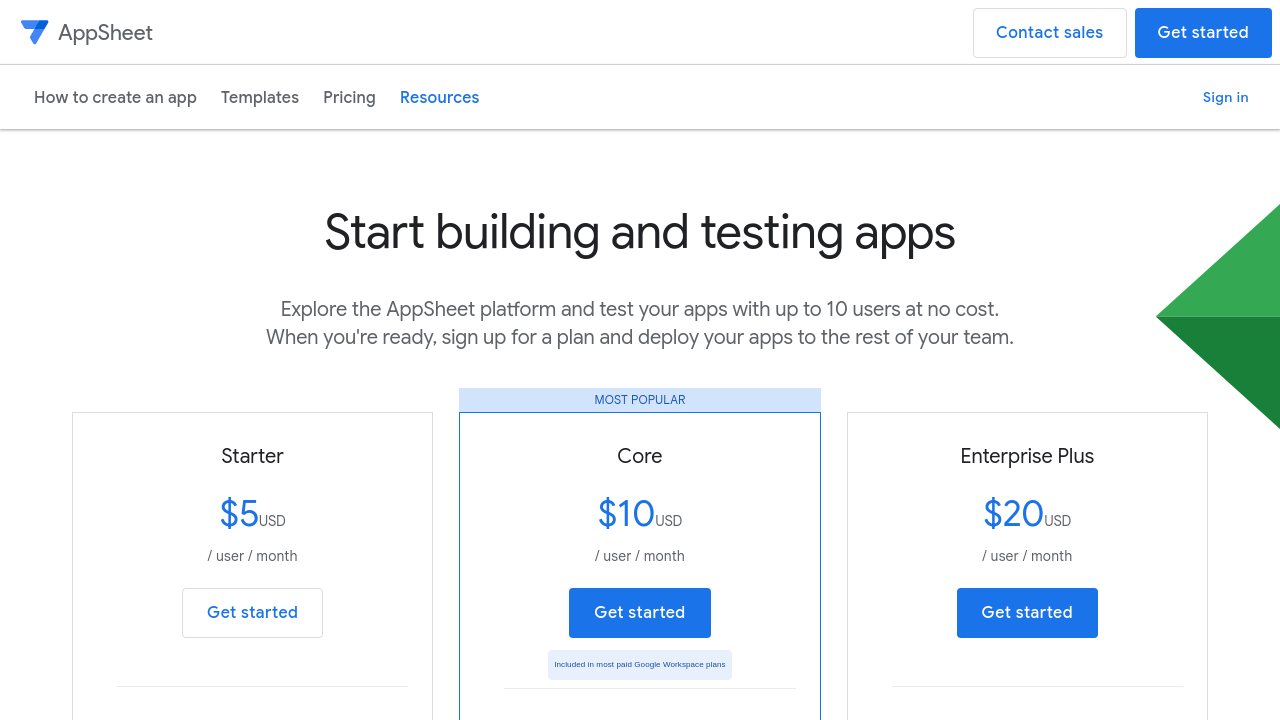
$5-$10 / Month
Deals Available

This product comes with a special deal, see details

Visit Now
✨ Ask AI about pricing
80% Subscribed Score
info Icon

The Subscribed Score is an independent rating that combines user reviews, features, and value-for-money from multiple trusted sources. It’s designed as a quick benchmark, not a guarantee of individual experience.

Overview

AppSheet is a widely recognized solution in the No-Code Platforms category. It enables businesses to build powerful mobile and web applications directly from existing data sources like Google Sheets, Excel, or SQL databases without requiring coding expertise. The platform simplifies app creation, allowing organizations to digitize processes and increase productivity through features such as intuitive UI/UX customization, workflow automation, and real-time data synchronization. Explore exclusive deals. For alternatives, consider JIRA, QuickBase, and Appy Pie.

Why Use AppSheet?

Choosing AppSheet offers several competitive benefits for businesses:

  • No-Code Simplicity: AppSheet empowers users without technical backgrounds to create applications by connecting data sources and using drag-and-drop functionalities.
  • Fast Deployment: Applications can be built and deployed across multiple platforms in real-time, making the development process efficient and agile.
  • Robust Automation: Streamline business workflows with features like email notifications, real-time updates, and workflow triggers, increasing operational efficiency.
  • Versatile Integration: Supports integrations with major tools like Google Sheets, Excel, Salesforce, and SQL, enabling seamless data management and accessibility.
  • Secure and Scalable: Features include data encryption, access control, user authentication, and scalability for businesses of various sizes.

Who is AppSheet For?

AppSheet is ideal for a diverse audience across industries:

  • Small and Medium Businesses: Entrepreneurs and teams looking to digitize workflows without investing in extensive development resources.
  • Enterprise Teams: Corporations seeking scalable, collaborative solutions for department-level or multi-team app deployment.
  • Education and Nonprofits: Organizations that require cost-effective and user-friendly tools to streamline their operations. (Discounts are available for eligible entities.)
  • Project Managers and Administrators: Professionals aiming to manage tasks, automate workflows, or create efficient reporting systems.

AppSheet redefines app development with its intuitive platform, making it an ideal solution for digitizing processes and enhancing productivity while avoiding the complexity of traditional development. Whether you’re building apps for small projects or enterprise-scale deployments, AppSheet offers a versatile and powerful solution to meet your needs.

Where AppSheet performs best

What users like
  • Easy integration with Google Sheets and other databases.
  • Quick app creation with no coding required.
  • Customizable application templates for various use cases.
  • Great for small business and individual projects.

Where AppSheet falls short

What users dislike
  • High pricing for multi-user or complex apps.
  • Limited customization options for advanced needs.
  • Reports and PDF generation can be difficult.
  • Performance issues on less powerful devices.
Subscribed Score Metrics
28/36 Metric achieved
MetricsScore
Customer Support4/6
Security4/6
Ease of Use5/6
Value of Money4/6
Integration5/6
Popularity6/6
Radar Chart Table View
Ease of Use
Measures how simple and intuitive the product is to use, including setup, navigation, and overall user experience
5/6 Metric Checks
Security
Compares the product`s features, quality, and pricing to determine its overall cost-effectiveness.
4/6 Metric Checks
Value of Money
Assesses the product`s ability to protect data, prevent breaches, and comply with industry standards.
4/6 Metric Checks
Customer Support
Reflects the responsiveness, helpfulness, and quality of assistance provided by the product`s support team.
4/6 Metric Checks
Integrations
Evaluates how well the product connects with other tools and platforms, enabling seamless workflows.
5/6 Metric Checks
AppSheet Pricing Range
$5-$10 / Month

AppSheet in action
info Icon

A curated gallery of real screenshots and use cases from the product, so you can see how it works before trying it.

AppSheet Full Screen Icon
https://www.youtube.com/watch?v=CxbwSK5BU6s
Full Screen Icon
https://www.youtube.com/watch?v=CLc7y4je9Ro
Full Screen Icon
AppSheet
AppSheet
Video thumbnail
Video thumbnail
AppSheet
AppSheet

Alternatives to AppSheet
info Icon

A list of platforms similar to AppSheet, helping you evaluate which tool best matches your needs.
How to cancel AppSheet

Need to cancel AppSheet? Here is how
info Icon

Thinking about how to cancel AppSheet this is how you do it!

To cancel an AppSheet product, sign in as a super administrator in the Google Admin console. Navigate to Billing > Subscriptions, select the AppSheet subscription, and click Cancel Subscription. Review details and confirm cancellation.

How to Cancel the AppSheet

To cancel an AppSheet product, sign in as a super administrator in the Google Admin console. Navigate to Billing > Subscriptions, select the AppSheet subscription, and click Cancel Subscription. Review details and confirm cancellation.

FAQs about AppSheet

Every else you need to know about AppSheet
info Icon

A collection of FAQs, guides, alternatives, and comparisons to help you quickly understand if AppSheet is right for you.

Manage your AppSheet profile

Create profile

Want to list your product on Subscribed.fyi? Create a profile to reach more buyers.

Pricing Range
info Icon

This only an estimated pricing range, visit AppSheet pricing page to access all the information by clicking “Visit Now”.

$5-$10 / Month
Visit Now
Deals Available

This product comes with a special deal, see details

This product comes with a special deal, see details