Sign in to review
Join our community of software reviewers on Subscribed.fyi

Continue With Google
Continue With LinkedIn
Continue Review with Email
Continue with Email
Enter your email to continue.
Continue
Enter your password
Enter your password to finish setting up your account.
Continue
Activate your email
Enter activation code we sent to your email.
Submit
Reset your password
Enter activation code we sent to your email.
Submit
Set your new password
Enter a new password for your account.
Submit
Log in
Provide My Insights
Collavate logo
Collavate logo

Collavate Reviews, Pricing, Features & Alternatives (2026)

Collavate is a cloud-based document collaboration and workflow management tool seamlessly integrated with Google Workspace. It simplifies document creation, approval processes, and team collaboration while ensuring compliance with standards like ISO and GDPR. With features like automated workflows, version control, and real-time communication, Collavate improves productivity and streamlines documentation across teams.

Collavate logo
Collavate logo
Collavate logo

Collavate Overview

What is Collavate?

N/A
★ ★ ★ ★ ★
0
Reviews

Available for Claim - This listing is available to be claimed
Claim Profile

Unclaimed

Claim this profile to manage it.

Claim Profile

Why teams choose Collavate

Key Features

Save Time
Save Time
Focus on impact, not repetitive tasks.
Smart Automation
Smart Automation
Save time with AI-powered workflows.
Collaborate Easily
Collaborate Easily
Built for teams and communication.

Who is Collavate for?

Collavate is a premier solution in the Document Management category, offering a robust platform for workflow automation and team collaboration integrated seamlessly with Google Drive and Google Workspace. Designed for businesses of all sizes, Collavate simplifies the document management lifecycle with tools that enhance collaboration, compliance, and communication, making it an essential tool for modern organizations. Explore exclusive Collavate deals. For alternative document management tools, consider Google Workspace, Hive, and PandaDoc.

Why Use Collavate?

Collavate’s powerful features offer a streamlined approach to document and workflow management. Here’s why it stands out:

  • Seamless Google Integration: Effortlessly integrates with Google Drive, Docs, and Sheets, enabling users to manage documents and workflows within familiar Google tools while leveraging the platform’s enhanced functionality.
  • Workflow Automation: Automate the creation, review, approval, and archiving of documents with advanced tools like sequential and parallel workflows, due date reminders, and customizable templates.
  • Compliance and Security: With support for ISO 9001, GDPR, HIPAA, and other certifications, Collavate ensures secure management of sensitive data and documents, meeting the stringent compliance requirements of various industries.
  • Collaborative Features: Collavate enables real-time collaboration for brainstorming, editing, and approval processes. Team members can chat, share media, and track updates within a unified interface.
  • Document Control: Enhance organization with features such as version control, audit trails, and document ownership transfer for effective governance of corporate documentation.
  • Ease of Use: Its intuitive interface allows users to quickly set up workflows, submit approvals, and track updates through email or messages, streamlining productivity across teams.

Who is Collavate For?

Collavate is ideal for professionals and teams across various industries:

  • Project Managers: Simplify workflow coordination, document approvals, and cross-departmental communication.
  • Compliance Officers: Ensure compliance workflows are in-line with regulations like GDPR and ISO standards.
  • Educators and Administrators: Collaborate on academic initiatives and manage institutional workflows seamlessly.
  • Small and Medium Businesses: Automate time-consuming processes like file sharing, approval tracking, and data management without requiring complex systems or additional resources.

Collavate brings a comprehensive approach to document lifecycle management and teamwork, offering a practical, scalable, and secure solution for businesses striving to enhance communication, collaboration, and efficiency. Whether you’re managing corporate workflows or daily project tasks, Collavate is your partner in achieving streamlined processes and improved productivity.

Collavate Summary

Collavate is a premier solution in the Document Management category, offering a robust platform for workflow automation and team collaboration integrated seamlessly with Google Drive and Google Workspace. Designed for businesses of all sizes, Collavate simplifies the document management lifecycle with tools that enhance collaboration, compliance, and communication, making it an essential tool for modern organizations. Explore exclusive Collavate deals. For alternative document management tools, consider Google Workspace, Hive, and PandaDoc.

Why Use Collavate?

Collavate’s powerful features offer a streamlined approach to document and workflow management. Here’s why it stands out:

  • Seamless Google Integration: Effortlessly integrates with Google Drive, Docs, and Sheets, enabling users to manage documents and workflows within familiar Google tools while leveraging the platform’s enhanced functionality.
  • Workflow Automation: Automate the creation, review, approval, and archiving of documents with advanced tools like sequential and parallel workflows, due date reminders, and customizable templates.
  • Compliance and Security: With support for ISO 9001, GDPR, HIPAA, and other certifications, Collavate ensures secure management of sensitive data and documents, meeting the stringent compliance requirements of various industries.
  • Collaborative Features: Collavate enables real-time collaboration for brainstorming, editing, and approval processes. Team members can chat, share media, and track updates within a unified interface.
  • Document Control: Enhance organization with features such as version control, audit trails, and document ownership transfer for effective governance of corporate documentation.
  • Ease of Use: Its intuitive interface allows users to quickly set up workflows, submit approvals, and track updates through email or messages, streamlining productivity across teams.

Who is Collavate For?

Collavate is ideal for professionals and teams across various industries:

  • Project Managers: Simplify workflow coordination, document approvals, and cross-departmental communication.
  • Compliance Officers: Ensure compliance workflows are in-line with regulations like GDPR and ISO standards.
  • Educators and Administrators: Collaborate on academic initiatives and manage institutional workflows seamlessly.
  • Small and Medium Businesses: Automate time-consuming processes like file sharing, approval tracking, and data management without requiring complex systems or additional resources.

Collavate brings a comprehensive approach to document lifecycle management and teamwork, offering a practical, scalable, and secure solution for businesses striving to enhance communication, collaboration, and efficiency. Whether you’re managing corporate workflows or daily project tasks, Collavate is your partner in achieving streamlined processes and improved productivity.

Collavate reviews and insights

Learn what people say about Collavate

N/A ★ ★ ★ ★ ★
0 Reviews

No Reviews Yet!

Be the first to share your experience and help others in the community.

Collavate logo

Collavate User Reviews

0 User Reviews

Reviews from G2, Capterra, Trustpilot
info Icon

These ratings come directly from third-party platforms like G2, Capterra, and Trustpilot. They reflect real user feedback collected independently on those sites.

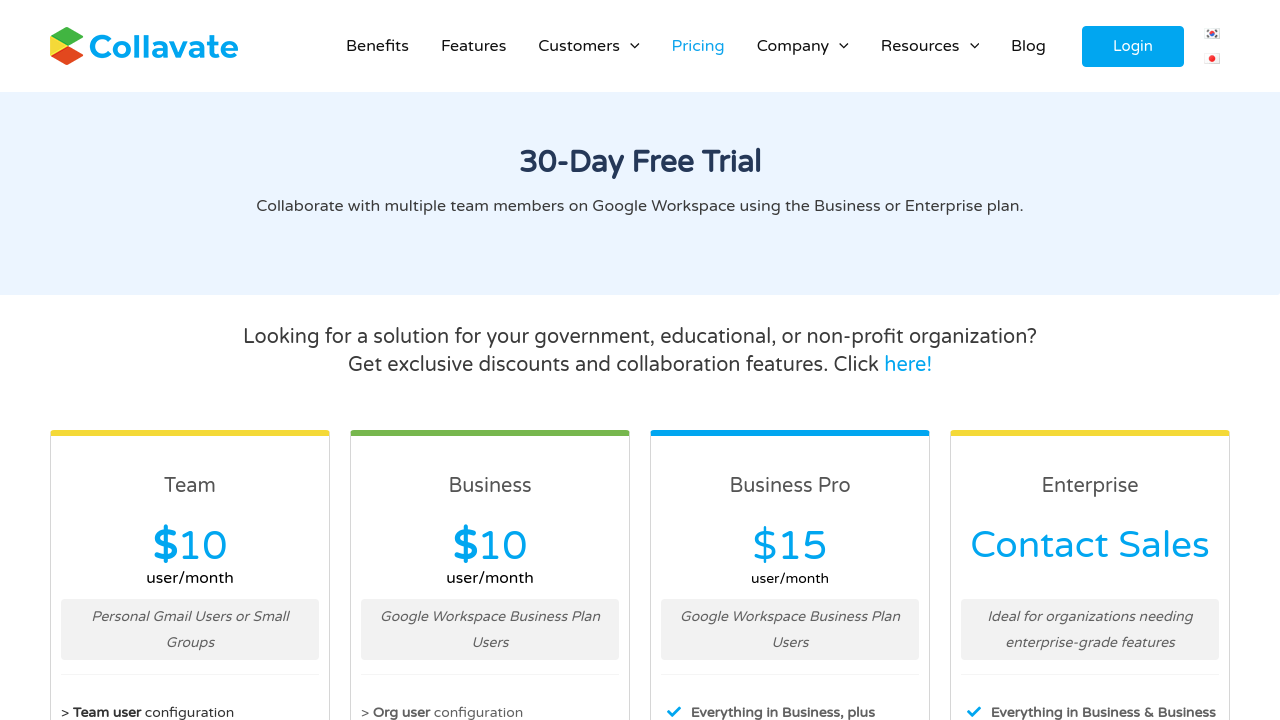
Collavate pricing

Pricing model

Collavate logo
Pricing Range
info Icon

This only an estimated pricing range, visit Collavate pricing page to access all the information by clicking “Visit Now”.

Not specified
Deals Available

This product comes with a special deal, see details

Visit Now

Overview

Collavate is a premier solution in the Document Management category, offering a robust platform for workflow automation and team collaboration integrated seamlessly with Google Drive and Google Workspace. Designed for businesses of all sizes, Collavate simplifies the document management lifecycle with tools that enhance collaboration, compliance, and communication, making it an essential tool for modern organizations. Explore exclusive Collavate deals. For alternative document management tools, consider Google Workspace, Hive, and PandaDoc.

Why Use Collavate?

Collavate’s powerful features offer a streamlined approach to document and workflow management. Here’s why it stands out:

  • Seamless Google Integration: Effortlessly integrates with Google Drive, Docs, and Sheets, enabling users to manage documents and workflows within familiar Google tools while leveraging the platform’s enhanced functionality.
  • Workflow Automation: Automate the creation, review, approval, and archiving of documents with advanced tools like sequential and parallel workflows, due date reminders, and customizable templates.
  • Compliance and Security: With support for ISO 9001, GDPR, HIPAA, and other certifications, Collavate ensures secure management of sensitive data and documents, meeting the stringent compliance requirements of various industries.
  • Collaborative Features: Collavate enables real-time collaboration for brainstorming, editing, and approval processes. Team members can chat, share media, and track updates within a unified interface.
  • Document Control: Enhance organization with features such as version control, audit trails, and document ownership transfer for effective governance of corporate documentation.
  • Ease of Use: Its intuitive interface allows users to quickly set up workflows, submit approvals, and track updates through email or messages, streamlining productivity across teams.

Who is Collavate For?

Collavate is ideal for professionals and teams across various industries:

  • Project Managers: Simplify workflow coordination, document approvals, and cross-departmental communication.
  • Compliance Officers: Ensure compliance workflows are in-line with regulations like GDPR and ISO standards.
  • Educators and Administrators: Collaborate on academic initiatives and manage institutional workflows seamlessly.
  • Small and Medium Businesses: Automate time-consuming processes like file sharing, approval tracking, and data management without requiring complex systems or additional resources.

Collavate brings a comprehensive approach to document lifecycle management and teamwork, offering a practical, scalable, and secure solution for businesses striving to enhance communication, collaboration, and efficiency. Whether you’re managing corporate workflows or daily project tasks, Collavate is your partner in achieving streamlined processes and improved productivity.

Where Collavate performs best

What users like
  • Easy integration with Google Workspace
  • Efficient document approval workflows
  • User-friendly interface
  • Improves team collaboration

Where Collavate falls short

What users dislike
  • Occasional language display issues
  • Limited private storage support
  • Signature functionality is basic
  • Minor lag attaching files
Collavate Pricing Range
Not specified

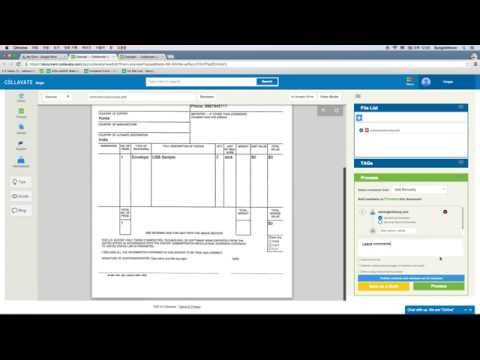
Collavate in action
info Icon

A curated gallery of real screenshots and use cases from the product, so you can see how it works before trying it.

Collavate screenshot 1 Full Screen Icon
Collavate screenshot 2 Full Screen Icon
https://www.youtube.com/watch?v=VKbJ0k_0a8Q
Full Screen Icon
https://www.youtube.com/watch?v=video_id_not_found
Full Screen Icon
Collavate screenshot 1
Collavate screenshot 2
Video thumbnail
Video thumbnail
Collavate screenshot 1
Collavate screenshot 2

Alternatives to Collavate
info Icon

A list of platforms similar to Collavate, helping you evaluate which tool best matches your needs.

How to cancel Collavate

Need to cancel Collavate? Here is how
info Icon

Thinking about how to cancel Collavate this is how you do it!

To cancel a Collavate subscription:

  • Sign in to your Collavate account.
  • Navigate to settings and find the "Cancel subscription" option.
  • Confirm cancellation to stop future charges.

How to Cancel the Collavate

To cancel a Collavate subscription:

  • Sign in to your Collavate account.
  • Navigate to settings and find the "Cancel subscription" option.
  • Confirm cancellation to stop future charges.

Manage your Collavate profile

Create profile

Want to list your product on Subscribed.fyi? Create a profile to reach more buyers.

Pricing Range
info Icon

This only an estimated pricing range, visit Collavate pricing page to access all the information by clicking “Visit Now”.

Not specified
Visit Now
Deals Available

This product comes with a special deal, see details

This product comes with a special deal, see details