Google Sites Reviews 2026: Details, Pricing, & Features | Subscribed.fyi
Sign in to review
Join our community of software reviewers on Subscribed.fyi

Continue With Google
Continue With LinkedIn
Continue Review with Email
Continue with Email
Enter your email to continue.
Continue
Enter your password
Enter your password to finish setting up your account.
Continue
Activate your email
Enter activation code we sent to your email.
Submit
Reset your password
Enter activation code we sent to your email.
Submit
Set your new password
Enter a new password for your account.
Submit
Categories
For Business
Log in
Provide My Insights

Google Sites Reviews, Pricing, Features & Alternatives (2026)

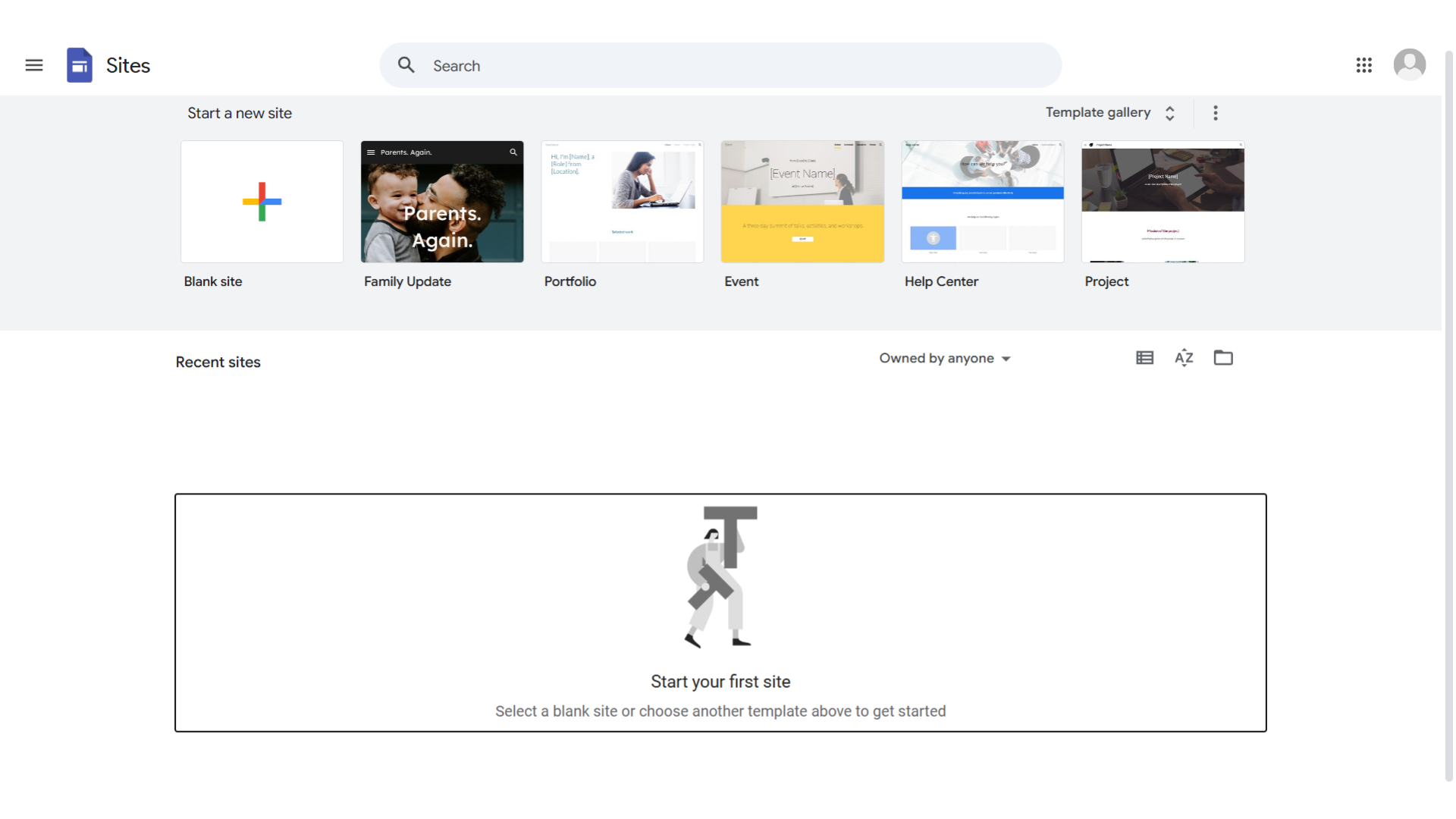
Google Sites is a user-friendly platform for creating websites without extensive technical skills. It integrates with Google Workspace, offering customizable templates and responsive design, ideal for businesses, educators, nonprofits, and individuals.

Google Sites Overview

What is Google Sites?

N/A
0
Reviews
75%
Subscribed Score

Available for Claim - This listing is available to be claimed
Claim Profile For Free

Unclaimed

Manage profile with subsig, and unlock 23+ social and review monitoring. Get partnership options with

Claim Profile For Free

Why teams choose Google Sites

Key Features

Scales with You
Scales with You
Grows with your business needs.
Collaborate Easily
Collaborate Easily
Built for teams and communication.
Secure by Design
Secure by Design
Data protection and compliance built in.

Who is Google Sites for?

Build and Share with Ease on Google Sites – The Simple Website Creation Platform

Google Sites in the Project Management category empowers users to create websites effortlessly for team projects or personal use. With easy integration into Google Workspace, it’s perfect for collaboration. Check out exclusive Google Sites deals and explore similar tools like JiraTrello, and Smartsheet.

Why Use Google Sites?

In the realm of website creation tools, Google Sites stands out by:

  1. Ease of Use: Google Sites offers an intuitive interface that allows users to create websites quickly without needing coding knowledge, making it accessible for everyone from beginners to experienced users.
  2. Seamless Integration: It integrates smoothly with Google Workspace, allowing users to easily incorporate documents, calendars, and other Google tools into their websites, enhancing collaboration and functionality.
  3. Customizable Templates: Google Sites provides a variety of customizable templates, enabling users to design professional-looking websites tailored to their specific needs and preferences.
  4. Responsive Design: Websites created with Google Sites are automatically optimized for different devices, ensuring a consistent and user-friendly experience across desktops, tablets, and smartphones.

Who is Google Sites For?

Google Sites caters to a wide range of users:

  1. Businesses: Businesses use Google Sites for creating internal team sites, project hubs, and company intranets, facilitating communication and collaboration within the organization.
  2. Educators: Educators leverage Google Sites to build class websites, share resources, and create interactive learning environments for students.
  3. Nonprofits: Nonprofits utilize Google Sites to create informative websites that promote their mission, share updates, and engage with supporters.
  4. Individuals: Individuals use Google Sites for personal projects, portfolios, and event websites, benefiting from its simplicity and integration with Google services.

In conclusion, Google Sites is a versatile tool for creating websites with ease and efficiency. Whether you’re a business, educator, nonprofit, or individual, Google Sites provides the tools needed to build and share impactful websites.


Google Sites Summary

Build and Share with Ease on Google Sites – The Simple Website Creation Platform

Google Sites in the Project Management category empowers users to create websites effortlessly for team projects or personal use. With easy integration into Google Workspace, it’s perfect for collaboration. Check out exclusive Google Sites deals and explore similar tools like JiraTrello, and Smartsheet.

Why Use Google Sites?

In the realm of website creation tools, Google Sites stands out by:

  1. Ease of Use: Google Sites offers an intuitive interface that allows users to create websites quickly without needing coding knowledge, making it accessible for everyone from beginners to experienced users.
  2. Seamless Integration: It integrates smoothly with Google Workspace, allowing users to easily incorporate documents, calendars, and other Google tools into their websites, enhancing collaboration and functionality.
  3. Customizable Templates: Google Sites provides a variety of customizable templates, enabling users to design professional-looking websites tailored to their specific needs and preferences.
  4. Responsive Design: Websites created with Google Sites are automatically optimized for different devices, ensuring a consistent and user-friendly experience across desktops, tablets, and smartphones.

Who is Google Sites For?

Google Sites caters to a wide range of users:

  1. Businesses: Businesses use Google Sites for creating internal team sites, project hubs, and company intranets, facilitating communication and collaboration within the organization.
  2. Educators: Educators leverage Google Sites to build class websites, share resources, and create interactive learning environments for students.
  3. Nonprofits: Nonprofits utilize Google Sites to create informative websites that promote their mission, share updates, and engage with supporters.
  4. Individuals: Individuals use Google Sites for personal projects, portfolios, and event websites, benefiting from its simplicity and integration with Google services.

In conclusion, Google Sites is a versatile tool for creating websites with ease and efficiency. Whether you’re a business, educator, nonprofit, or individual, Google Sites provides the tools needed to build and share impactful websites.

Google Sites reviews and insights

Learn what people say about Google Sites

N/A
0 Reviews
75%
Subscribed Score

Lear more here about the Subscribed score on how it is composed. Learn more Click here

Overall rating

5
4
3
2
1
CX 4/6

How good is the customer support based on subscribed’s assessment

CX Icon
Security 5/6

How secure is the product based on Subscribed’s assessment?

Security Icon
Ease of Use 5/6

How easy is the product to use, based on Subscribed’s assessment?

EOU Icon
Value 5/6

What is the value for money based on Subscribed’s assessment?

coin Icon
Integration 4/6

How many integrations does the product offer?

gear Icon
Popularity 5/6

How popular is the product?

star

No Reviews Yet!

Be the first to share your experience and help others in the community.

Google Sites User Reviews

0 User Reviews

Reviews from G2, Capterra, Trustpilot
info Icon

These ratings come directly from third-party platforms like G2, Capterra, and Trustpilot. They reflect real user feedback collected independently on those sites.

Google Sites pricing

Pricing model

No Pricing Yet

We’re still collecting pricing info for this product, Check the website for the latest details.

Deals Available

This product comes with a special deal, see details

Visit Now
✨ Ask AI about pricing
75% Subscribed Score
info Icon

The Subscribed Score is an independent rating that combines user reviews, features, and value-for-money from multiple trusted sources. It’s designed as a quick benchmark, not a guarantee of individual experience.

Overview

Build and Share with Ease on Google Sites – The Simple Website Creation Platform

Google Sites in the Project Management category empowers users to create websites effortlessly for team projects or personal use. With easy integration into Google Workspace, it’s perfect for collaboration. Check out exclusive Google Sites deals and explore similar tools like JiraTrello, and Smartsheet.

Why Use Google Sites?

In the realm of website creation tools, Google Sites stands out by:

  1. Ease of Use: Google Sites offers an intuitive interface that allows users to create websites quickly without needing coding knowledge, making it accessible for everyone from beginners to experienced users.
  2. Seamless Integration: It integrates smoothly with Google Workspace, allowing users to easily incorporate documents, calendars, and other Google tools into their websites, enhancing collaboration and functionality.
  3. Customizable Templates: Google Sites provides a variety of customizable templates, enabling users to design professional-looking websites tailored to their specific needs and preferences.
  4. Responsive Design: Websites created with Google Sites are automatically optimized for different devices, ensuring a consistent and user-friendly experience across desktops, tablets, and smartphones.

Who is Google Sites For?

Google Sites caters to a wide range of users:

  1. Businesses: Businesses use Google Sites for creating internal team sites, project hubs, and company intranets, facilitating communication and collaboration within the organization.
  2. Educators: Educators leverage Google Sites to build class websites, share resources, and create interactive learning environments for students.
  3. Nonprofits: Nonprofits utilize Google Sites to create informative websites that promote their mission, share updates, and engage with supporters.
  4. Individuals: Individuals use Google Sites for personal projects, portfolios, and event websites, benefiting from its simplicity and integration with Google services.

In conclusion, Google Sites is a versatile tool for creating websites with ease and efficiency. Whether you’re a business, educator, nonprofit, or individual, Google Sites provides the tools needed to build and share impactful websites.

Subscribed Score Metrics
28/36 Metric achieved
MetricsScore
Customer Support4/6
Security5/6
Ease of Use5/6
Value of Money5/6
Integration4/6
Popularity5/6
Radar Chart Table View
Ease of Use
Measures how simple and intuitive the product is to use, including setup, navigation, and overall user experience
5/6 Metric Checks
Security
Compares the product`s features, quality, and pricing to determine its overall cost-effectiveness.
5/6 Metric Checks
Value of Money
Assesses the product`s ability to protect data, prevent breaches, and comply with industry standards.
5/6 Metric Checks
Customer Support
Reflects the responsiveness, helpfulness, and quality of assistance provided by the product`s support team.
4/6 Metric Checks
Integrations
Evaluates how well the product connects with other tools and platforms, enabling seamless workflows.
4/6 Metric Checks
Google Sites Pricing Range
No Pricing Yet

Google Sites in action
info Icon

A curated gallery of real screenshots and use cases from the product, so you can see how it works before trying it.

Google Sites screenshot Full Screen Icon
https://www.youtube.com/watch?v=_UhfWpIgSnM?feature=oembed
Full Screen Icon
Video thumbnail
Google Sites screenshot

Alternatives to Google Sites
info Icon

A list of platforms similar to Google Sites, helping you evaluate which tool best matches your needs.

empty stats

No Alternatives Found

Looks like we cannot found any other relevant product at this moment

✨ Ask All alternative with AI

How to cancel Google Sites

Need to cancel Google Sites? Here is how
info Icon

Thinking about how to cancel Google Sites this is how you do it!

Steps to Cancel Google Sites Subscription.

Canceling your Google Sites Subscription is a straightforward process. You can follow a few simple steps to initiate the cancellation or explore options to switch to a different plan. For detailed instructions, refer to Google Sites Cancellation Guide.

How to Cancel the Google Sites

Steps to Cancel Google Sites Subscription.

Canceling your Google Sites Subscription is a straightforward process. You can follow a few simple steps to initiate the cancellation or explore options to switch to a different plan. For detailed instructions, refer to Google Sites Cancellation Guide.

FAQs about Google Sites

Every else you need to know about Google Sites
info Icon

A collection of FAQs, guides, alternatives, and comparisons to help you quickly understand if Google Sites is right for you.

Manage your Google Sites profile

Create profile

Want to list your product on Subscribed.fyi? Create a profile to reach more buyers.

No Pricing Yet

Ask Curious AI
Visit Now
Deals Available

This product comes with a special deal, see details

This product comes with a special deal, see details