Kanban Tool Reviews 2026: Details, Pricing, & Features | Subscribed.fyi
Sign in to review
Join our community of software reviewers on Subscribed.fyi

Continue With Google
Continue With LinkedIn
Continue Review with Email
Continue with Email
Enter your email to continue.
Continue
Enter your password
Enter your password to finish setting up your account.
Continue
Activate your email
Enter activation code we sent to your email.
Submit
Reset your password
Enter activation code we sent to your email.
Submit
Set your new password
Enter a new password for your account.
Submit
✨ Ask AI Search
Categories
For Business
Log in
Provide My Insights

Kanban Tool

Kanban Tool is a visual project management and workflow optimization software, perfect for enhancing team collaboration and productivity. Its customizable Kanban boards allow users to track progress, automate processes, and manage recurring tasks effortlessly. Available as a cloud or on-premise solution, it offers flexibility, ease of use, and powerful features tailored to teams of all sizes. Ideal for organizations seeking an efficient, user-friendly platform to streamline work.

Kanban Tool

N/A
0
Reviews
71%
Subscribed Score

Available for Claim - This listing is available to be claimed
Claim For Free

Unclaimed

Curated and listed by Subscribed Team

Claim For Free
Built for Flexibility
Adaptable for multiple use cases.
Works Anywhere
Works Anywhere
Accessible from any device, anytime.
Affordable Pricing
Affordable Pricing
Transparent plans to fit any budget.

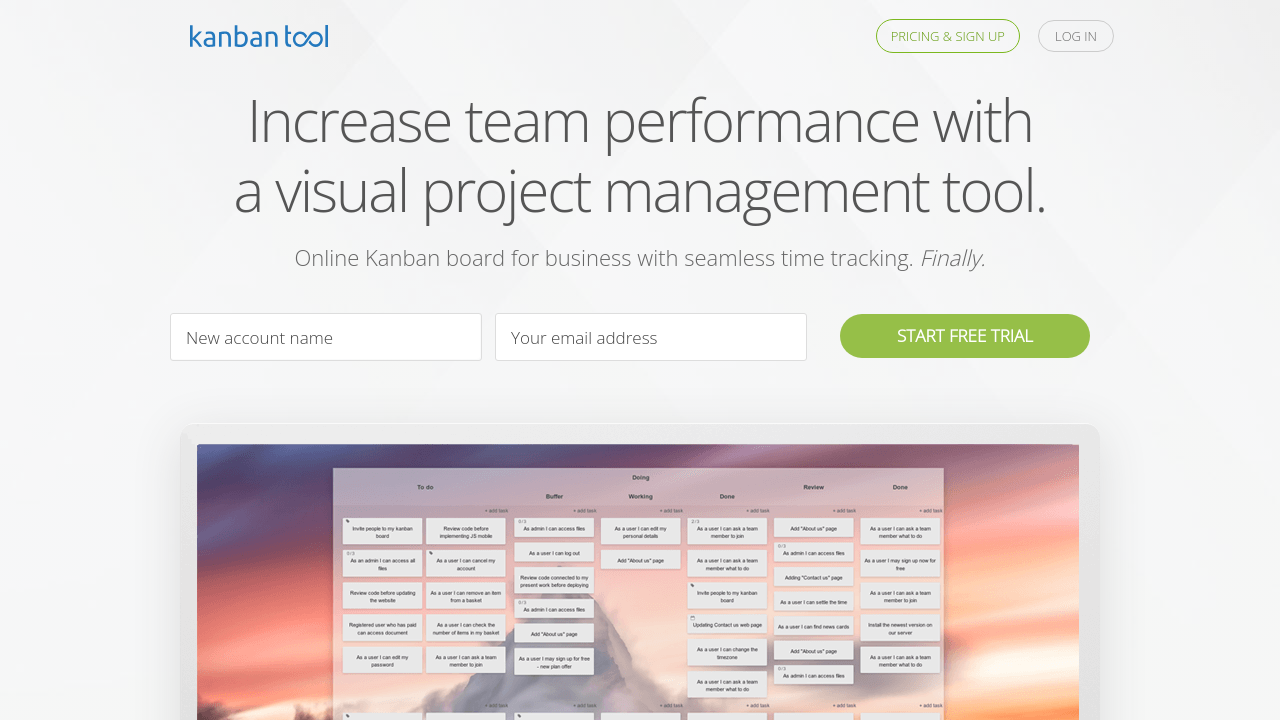
Kanban Tool is a versatile solution in the Project Management category, offering a user-friendly platform for visual workflow management and real-time team collaboration. Its intuitive Kanban boards provide a clear view of project progress, allowing teams to effectively prioritize tasks and optimize their processes. Whether hosted in the cloud or on-premise, Kanban Tool caters to businesses of all sizes, ensuring smooth operations with customizable features and integrations. Take advantage of exclusive deals to elevate your project management experience. For alternatives, consider ClickUp.

Why Use Kanban Tool?

Choosing Kanban Tool comes with numerous advantages, making it a strong contender in the project management landscape:

  • Customizable Kanban Boards: Tailor your boards with swimlanes, column designs, and preferred color schemes to suit team needs and personal preferences.
  • Real-Time Collaboration: Ensure seamless communication and task updates within your team, with changes reflected instantly on shared boards.
  • Optional Advanced Features: Use power-ups such as recurring tasks, process automation, and checklist templates for enhanced efficiency.
  • Deployment Flexibility: Cloud-hosted solutions or on-premise options (ideal for 10+ users) cater to your operational preferences and compliance requirements.
  • Built-In Time Tracking: Leverage time reporting tools to analyze task durations and improve productivity across projects.

Who is Kanban Tool For?

Kanban Tool is ideally suited for:

  • Small to Medium Businesses: Looking for an intuitive, cost-effective solution to manage workflows without complex onboarding.
  • Agile Teams: Seeking to optimize task tracking and enhance delivery pipelines with lean methodologies.
  • Project Managers: Requiring data-driven insights to improve efficiency and oversee multiple projects concurrently.
  • Remote and Distributed Teams: Needing real-time collaboration to maintain task alignment across different time zones.

Kanban Tool provides an intuitive and scalable framework to meet diverse project management needs, offering the flexibility necessary to handle personal, team, or company-wide workflows. Explore the features, and streamline your projects today with Kanban Tool. For alternatives, explore ClickUp.


Kanban Tool Summary

Kanban Tool is a versatile solution in the Project Management category, offering a user-friendly platform for visual workflow management and real-time team collaboration. Its intuitive Kanban boards provide a clear view of project progress, allowing teams to effectively prioritize tasks and optimize their processes. Whether hosted in the cloud or on-premise, Kanban Tool caters to businesses of all sizes, ensuring smooth operations with customizable features and integrations. Take advantage of exclusive deals to elevate your project management experience. For alternatives, consider ClickUp.

Why Use Kanban Tool?

Choosing Kanban Tool comes with numerous advantages, making it a strong contender in the project management landscape:

  • Customizable Kanban Boards: Tailor your boards with swimlanes, column designs, and preferred color schemes to suit team needs and personal preferences.
  • Real-Time Collaboration: Ensure seamless communication and task updates within your team, with changes reflected instantly on shared boards.
  • Optional Advanced Features: Use power-ups such as recurring tasks, process automation, and checklist templates for enhanced efficiency.
  • Deployment Flexibility: Cloud-hosted solutions or on-premise options (ideal for 10+ users) cater to your operational preferences and compliance requirements.
  • Built-In Time Tracking: Leverage time reporting tools to analyze task durations and improve productivity across projects.

Who is Kanban Tool For?

Kanban Tool is ideally suited for:

  • Small to Medium Businesses: Looking for an intuitive, cost-effective solution to manage workflows without complex onboarding.
  • Agile Teams: Seeking to optimize task tracking and enhance delivery pipelines with lean methodologies.
  • Project Managers: Requiring data-driven insights to improve efficiency and oversee multiple projects concurrently.
  • Remote and Distributed Teams: Needing real-time collaboration to maintain task alignment across different time zones.

Kanban Tool provides an intuitive and scalable framework to meet diverse project management needs, offering the flexibility necessary to handle personal, team, or company-wide workflows. Explore the features, and streamline your projects today with Kanban Tool. For alternatives, explore ClickUp.

Kanban Tool reviews

Learn what people say about Kanban Tool

N/A
0 Reviews
71%
Subscribed Score

Lear more here about the Subscribed score on how it is composed. Learn more Click here

Overall rating

5
4
3
2
1
CX 5/6

How good is the customer support based on subscribed’s assessment

CX Icon
Security 0/6

How secure is the product based on Subscribed’s assessment?

Security Icon
Ease of Use 6/6

How easy is the product to use, based on Subscribed’s assessment?

EOU Icon
Value 6/6

What is the value for money based on Subscribed’s assessment?

coin Icon
Integration 3/6

How many integrations does the product offer?

gear Icon
Popularity 5/6

How popular is the product?

star

No Reviews Yet!

Be the first to share your experience and help others in the community.

Kanban Tool User Reviews

0 User Reviews

Reviews from G2, Capterra, Trustpilot
info Icon

These ratings come directly from third-party platforms like G2, Capterra, and Trustpilot. They reflect real user feedback collected independently on those sites.

Kanban Tool

Pricing Range
info Icon

This only an estimated pricing range, visit Kanban Tool pricing page to access all the information by clicking “Visit Now”.

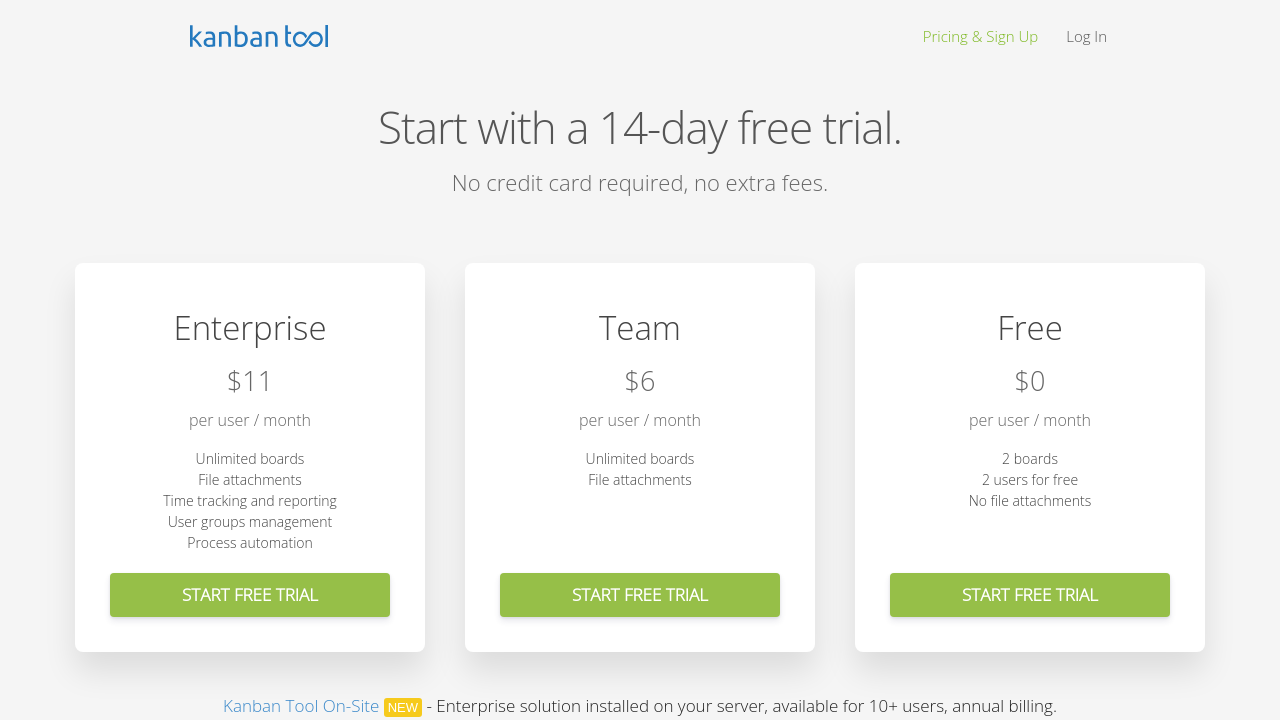
$6-$11 / Month
Deals Available

This product comes with a special deal, see details

Visit Now
✨ Ask AI about pricing
71% Subscribed Score
info Icon

The Subscribed Score is an independent rating that combines user reviews, features, and value-for-money from multiple trusted sources. It’s designed as a quick benchmark, not a guarantee of individual experience.

Analysis

Kanban Tool is a versatile solution in the Project Management category, offering a user-friendly platform for visual workflow management and real-time team collaboration. Its intuitive Kanban boards provide a clear view of project progress, allowing teams to effectively prioritize tasks and optimize their processes. Whether hosted in the cloud or on-premise, Kanban Tool caters to businesses of all sizes, ensuring smooth operations with customizable features and integrations. Take advantage of exclusive deals to elevate your project management experience. For alternatives, consider ClickUp.

Why Use Kanban Tool?

Choosing Kanban Tool comes with numerous advantages, making it a strong contender in the project management landscape:

  • Customizable Kanban Boards: Tailor your boards with swimlanes, column designs, and preferred color schemes to suit team needs and personal preferences.
  • Real-Time Collaboration: Ensure seamless communication and task updates within your team, with changes reflected instantly on shared boards.
  • Optional Advanced Features: Use power-ups such as recurring tasks, process automation, and checklist templates for enhanced efficiency.
  • Deployment Flexibility: Cloud-hosted solutions or on-premise options (ideal for 10+ users) cater to your operational preferences and compliance requirements.
  • Built-In Time Tracking: Leverage time reporting tools to analyze task durations and improve productivity across projects.

Who is Kanban Tool For?

Kanban Tool is ideally suited for:

  • Small to Medium Businesses: Looking for an intuitive, cost-effective solution to manage workflows without complex onboarding.
  • Agile Teams: Seeking to optimize task tracking and enhance delivery pipelines with lean methodologies.
  • Project Managers: Requiring data-driven insights to improve efficiency and oversee multiple projects concurrently.
  • Remote and Distributed Teams: Needing real-time collaboration to maintain task alignment across different time zones.

Kanban Tool provides an intuitive and scalable framework to meet diverse project management needs, offering the flexibility necessary to handle personal, team, or company-wide workflows. Explore the features, and streamline your projects today with Kanban Tool. For alternatives, explore ClickUp.

Pros
  • Easy to use and intuitive interface
  • Highly customizable boards and features
  • Effective task visualization and tracking
  • Improves workflow and team collaboration
Cons
  • Limited integrations with other tools
  • Mobile functionality could be improved
  • Recurring task management is restricted
  • Board editor lacks size adjustment options
Subscribed Score Metrics
25/36 Metric achieved
MetricsScore
Customer Support5/6
Security0/6
Ease of Use6/6
Value of Money6/6
Integration3/6
Popularity5/6
Radar Chart Table View
Ease of Use
Measures how simple and intuitive the product is to use, including setup, navigation, and overall user experience
6/6 Metric Checks
Security
Compares the product`s features, quality, and pricing to determine its overall cost-effectiveness.
0/6 Metric Checks
Value of Money
Assesses the product`s ability to protect data, prevent breaches, and comply with industry standards.
6/6 Metric Checks
Customer Support
Reflects the responsiveness, helpfulness, and quality of assistance provided by the product`s support team.
5/6 Metric Checks
Integrations
Evaluates how well the product connects with other tools and platforms, enabling seamless workflows.
3/6 Metric Checks
Kanban Tool Pricing Range
$6-$11 / Month

Kanban Tool Showcase
info Icon

A curated gallery of real screenshots and use cases from the product, so you can see how it works before trying it.

Kanban Tool Full Screen Icon
https://www.youtube.com/watch?v=dd0GxD3e3G8
Full Screen Icon
https://www.youtube.com/watch?v=FDXd0KwzWNk
Full Screen Icon
Kanban Tool
Kanban Tool

What else exists next to Kanban Tool
info Icon

A list of platforms similar to Kanban Tool, helping you evaluate which tool best matches your needs.

Need to cancel Kanban Tool? Here is how
info Icon

Thinking about how to cancel Kanban Tool this is how you do it!

To cancel a Kanban Tool subscription, navigate to Account Administration. Go to Account Details and click "Please cancel my account" or downgrade to the Free plan via Plan & Billing details. Contact support if needed.

How to Cancel the Kanban Tool

To cancel a Kanban Tool subscription, navigate to Account Administration. Go to Account Details and click "Please cancel my account" or downgrade to the Free plan via Plan & Billing details. Contact support if needed.

Every else you need to know about Kanban Tool
info Icon

A collection of FAQs, guides, alternatives, and comparisons to help you quickly understand if Kanban Tool is right for you.

Pricing Range
info Icon

This only an estimated pricing range, visit Kanban Tool pricing page to access all the information by clicking “Visit Now”.

$6-$11 / Month
Visit Now
Deals Available

This product comes with a special deal, see details

This product comes with a special deal, see details