Tandem Reviews 2026: Details, Pricing, & Features | Subscribed.fyi
Sign in to review
Join our community of software reviewers on Subscribed.fyi

Continue With Google
Continue With LinkedIn
Continue Review with Email
Continue with Email
Enter your email to continue.
Continue
Enter your password
Enter your password to finish setting up your account.
Continue
Activate your email
Enter activation code we sent to your email.
Submit
Reset your password
Enter activation code we sent to your email.
Submit
Set your new password
Enter a new password for your account.
Submit
Categories
For Business
Log in
Provide My Insights
Tandem
Tandem

Tandem Reviews, Pricing, Features & Alternatives (2026)

4.7/5
(3)

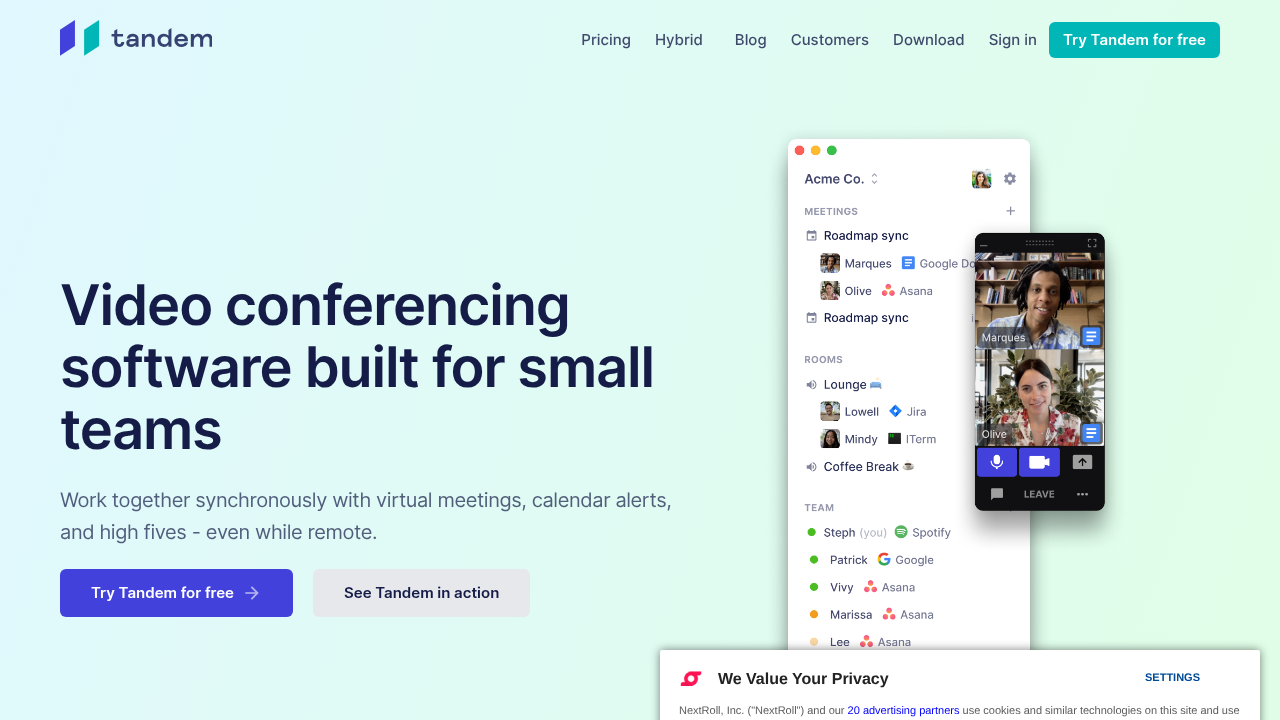
Tandem is a virtual office platform that recreates the in-person collaborative environment for remote teams. It enables real-time visibility of team members’ online status and activities. Users can initiate spontaneous audio/video calls, screen shares, and integrate with popular tools for seamless teamwork.

Tandem
Tandem
Tandem

Tandem Overview

What is Tandem?

4.7
3
Reviews
68%
Subscribed Score

Available for Claim - This listing is available to be claimed
Claim Profile For Free

Unclaimed

Manage profile with subsig, and unlock 23+ social and review monitoring. Get partnership options with

Claim Profile For Free

Why teams choose Tandem

Key Features

Exclusive Perks
Exclusive Perks
Special offers and discounts available.
Fully Customizable
Fully Customizable
Tailor it to your brand and workflow.
Scales with You
Scales with You
Grows with your business needs.

Who is Tandem for?

Tandem

Tandem is a virtual office platform designed to mimic the spontaneous interactions of a physical office for distributed teams. By providing real-time visibility into who’s online and what they’re working on, it fosters natural collaboration through one-click audio/video calls, screen sharing, and integrations with tools like Slack, Google Docs, and Notion.

Why Use Tandem?

  • Spontaneous Communication: Enables quick calls and chats without scheduling, preserving the fluidity of in-office interactions.
  • Office-Like Presence: Visual interface shows team availability and work modes (e.g., focus or open for chats).
  • Seamless Integrations: Connects with everyday tools to fit into existing workflows.
  • Team Culture Preservation: Bridges remote work gaps by promoting casual, real-time engagements.

Who is Tandem For?

  • Remote and hybrid teams seeking to maintain organic collaboration.
  • Small to medium-sized businesses with distributed members.
  • Organizations prioritizing productivity through visibility and instant access.

Key Features and Benefits

  • Real-Time Visibility: See colleagues’ status, location in virtual office rooms, and current tasks.
  • One-Click Collaboration: Join conversations, share screens, or enter discussion rooms instantly.
  • Custom Work Modes: Set focus or available status to manage interruptions effectively.
  • Multi-Platform Support: Works on web and desktop for flexible access.

Tandem stands out by recreating serendipitous office moments digitally, reducing communication friction and boosting team cohesion without complex setups.

Tandem Summary

Tandem

Tandem is a virtual office platform designed to mimic the spontaneous interactions of a physical office for distributed teams. By providing real-time visibility into who’s online and what they’re working on, it fosters natural collaboration through one-click audio/video calls, screen sharing, and integrations with tools like Slack, Google Docs, and Notion.

Why Use Tandem?

  • Spontaneous Communication: Enables quick calls and chats without scheduling, preserving the fluidity of in-office interactions.
  • Office-Like Presence: Visual interface shows team availability and work modes (e.g., focus or open for chats).
  • Seamless Integrations: Connects with everyday tools to fit into existing workflows.
  • Team Culture Preservation: Bridges remote work gaps by promoting casual, real-time engagements.

Who is Tandem For?

  • Remote and hybrid teams seeking to maintain organic collaboration.
  • Small to medium-sized businesses with distributed members.
  • Organizations prioritizing productivity through visibility and instant access.

Key Features and Benefits

  • Real-Time Visibility: See colleagues’ status, location in virtual office rooms, and current tasks.
  • One-Click Collaboration: Join conversations, share screens, or enter discussion rooms instantly.
  • Custom Work Modes: Set focus or available status to manage interruptions effectively.
  • Multi-Platform Support: Works on web and desktop for flexible access.

Tandem stands out by recreating serendipitous office moments digitally, reducing communication friction and boosting team cohesion without complex setups.

Tandem reviews and insights

Learn what people say about Tandem

4.7
3 Reviews
68%
Subscribed Score

Lear more here about the Subscribed score on how it is composed. Learn more Click here

Overall rating

5
4
3
2
1
CX 4/6

How good is the customer support based on subscribed’s assessment

CX Icon
Security 4/6

How secure is the product based on Subscribed’s assessment?

Security Icon
Ease of Use 5/6

How easy is the product to use, based on Subscribed’s assessment?

EOU Icon
Value 5/6

What is the value for money based on Subscribed’s assessment?

coin Icon
Integration 4/6

How many integrations does the product offer?

gear Icon
Popularity 3/6

How popular is the product?

star
Steven Dianala Organic
Marketing
3 months ago
Share
How has it made your work/life easier?
It made compliance tracking and documentation way more organized instead of handling everything manually. I don’t have to worry as much about missing requirements because everything is already structured in the system.
What’s been frustrating in your experience?
Some parts of the setup can feel a bit complex and take time to fully understand. It’s not the kind of tool you can just open and instantly use without onboarding.
What problem did this product solve for you?
It solved the chaos of managing compliance tasks across spreadsheets and scattered documents. Now everything is centralized, which makes audits and reporting a lot smoother.
Final thoughts, wrap up what you think
I’d recommend it to IT and security teams that deal with compliance regularly because it really improves workflow. It might be too heavy for small teams, but for structured environments it’s very useful.
Upvote (2)
Share
How has it made your work/life easier?
It made my work easier by allowing quick communication with teammates as if we were in the same office. It improves collaboration through instant calls and real-time visibility of who is available.
Have you experienced any bugs or errors?
I haven’t experienced major bugs or errors while using it. It generally works smoothly, though occasional minor glitches or connection delays can happen depending on network stability.
If you could change one thing, what would it be?
If I could change one thing, I would improve the focus and notification controls so users can manage availability more easily and avoid unnecessary interruptions during deep work.
Final thoughts, wrap up what you think
I would recommend it because it improves team communication and makes remote work feel more connected. I would rate it around 9 out of 10.
Upvote (1)
Jackie Liezel Jane Broniola Organic
Social Media Manager | Graphic Designer | Content Creator | Coding Instructor | Digital Marketing Specialist
See My Portfolio
3 months ago
Share
What’s the biggest benefit you’ve noticed?
Tandem basically made staying connected with my team feel way more natural and less forced than any other tool ive used for that same purpose. the kind of casual presence it creates is something you dont realize you needed until you have it
What’s been frustrating in your experience?
there were moments where Tandem felt a little noisy with notifications but i hadnt taken the time to adjust my settings to match how i actually like to work. once i customized those it stopped being an issue pretty much immediately
If you could change one thing, what would it be?
id make the initial team setup in Tandem a little more guided bc figuring out the best way to organize everyone took some back and forth on our end. once we got the structure right tho it made the whole experience way more seamless
Final thoughts, wrap up what you think
already got a few people in my network to try Tandem after talking about it and the ones who stuck with it have been really positive about it since. easy recommendation to stand behind
Upvote (2)
Tandem

Tandem User Reviews

3 User Reviews

Reviews from G2, Capterra, Trustpilot
info Icon

These ratings come directly from third-party platforms like G2, Capterra, and Trustpilot. They reflect real user feedback collected independently on those sites.

Tandem pricing

Pricing model

Tandem
Pricing Range
info Icon

This only an estimated pricing range, visit Tandem pricing page to access all the information by clicking “Visit Now”.

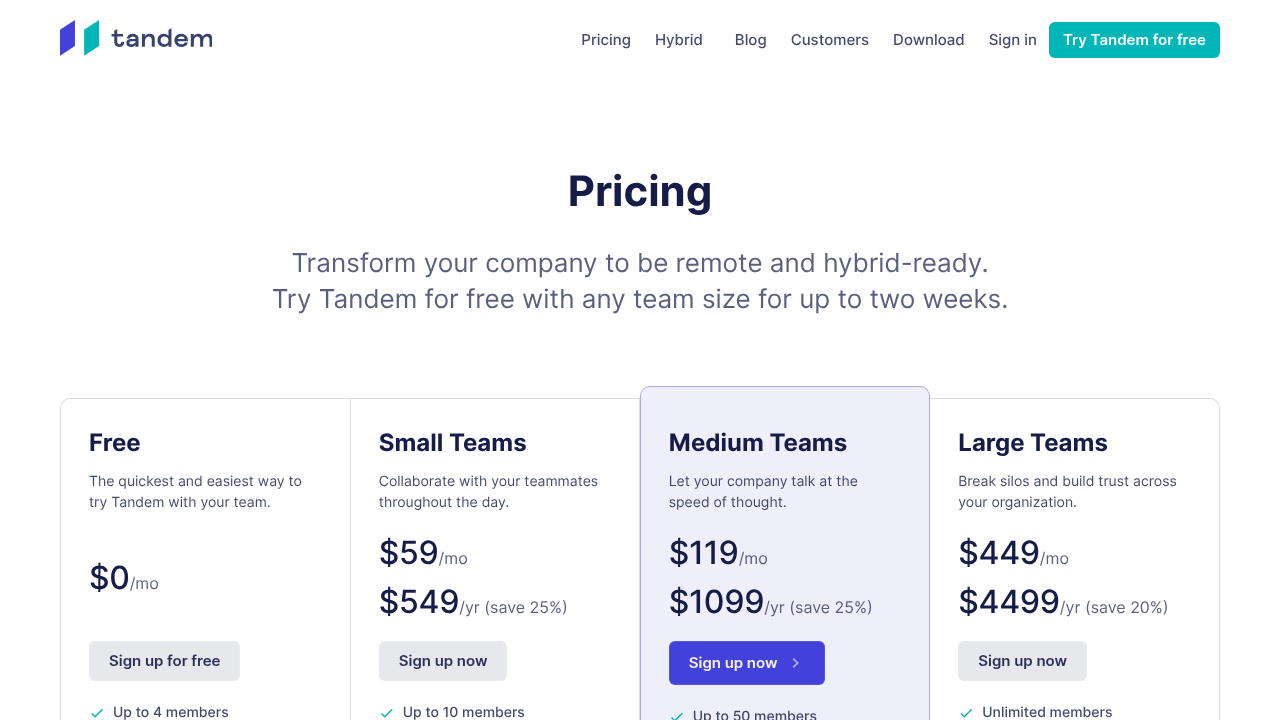
Free - $549 / yr
Deals Available

This product comes with a special deal, see details

Visit Now
✨ Ask AI about pricing
68% Subscribed Score
info Icon

The Subscribed Score is an independent rating that combines user reviews, features, and value-for-money from multiple trusted sources. It’s designed as a quick benchmark, not a guarantee of individual experience.

Overview

Tandem

Tandem is a virtual office platform designed to mimic the spontaneous interactions of a physical office for distributed teams. By providing real-time visibility into who’s online and what they’re working on, it fosters natural collaboration through one-click audio/video calls, screen sharing, and integrations with tools like Slack, Google Docs, and Notion.

Why Use Tandem?

  • Spontaneous Communication: Enables quick calls and chats without scheduling, preserving the fluidity of in-office interactions.
  • Office-Like Presence: Visual interface shows team availability and work modes (e.g., focus or open for chats).
  • Seamless Integrations: Connects with everyday tools to fit into existing workflows.
  • Team Culture Preservation: Bridges remote work gaps by promoting casual, real-time engagements.

Who is Tandem For?

  • Remote and hybrid teams seeking to maintain organic collaboration.
  • Small to medium-sized businesses with distributed members.
  • Organizations prioritizing productivity through visibility and instant access.

Key Features and Benefits

  • Real-Time Visibility: See colleagues’ status, location in virtual office rooms, and current tasks.
  • One-Click Collaboration: Join conversations, share screens, or enter discussion rooms instantly.
  • Custom Work Modes: Set focus or available status to manage interruptions effectively.
  • Multi-Platform Support: Works on web and desktop for flexible access.

Tandem stands out by recreating serendipitous office moments digitally, reducing communication friction and boosting team cohesion without complex setups.

Where Tandem performs best

What users like
  • Real-time team visibility
  • One-click calls & screen share
  • Slack & Docs integrations
  • Free plan available

Where Tandem falls short

What users dislike
  • Limited reviews available
  • No mobile app
  • Scaling costs for large teams
  • Basic free tier limits
Subscribed Score Metrics
25/36 Metric achieved
MetricsScore
Customer Support4/6
Security4/6
Ease of Use5/6
Value of Money5/6
Integration4/6
Popularity3/6
Radar Chart Table View
Ease of Use
Measures how simple and intuitive the product is to use, including setup, navigation, and overall user experience
5/6 Metric Checks
Security
Compares the product`s features, quality, and pricing to determine its overall cost-effectiveness.
4/6 Metric Checks
Value of Money
Assesses the product`s ability to protect data, prevent breaches, and comply with industry standards.
5/6 Metric Checks
Customer Support
Reflects the responsiveness, helpfulness, and quality of assistance provided by the product`s support team.
4/6 Metric Checks
Integrations
Evaluates how well the product connects with other tools and platforms, enabling seamless workflows.
4/6 Metric Checks
Tandem Pricing Range
Free - $549 / yr

Tandem in action
info Icon

A curated gallery of real screenshots and use cases from the product, so you can see how it works before trying it.

Tandem Full Screen Icon
Tandem
Tandem
Tandem
Tandem

Alternatives to Tandem
info Icon

A list of platforms similar to Tandem, helping you evaluate which tool best matches your needs.

How to cancel Tandem

Need to cancel Tandem? Here is how
info Icon

Thinking about how to cancel Tandem this is how you do it!

Log into your Tandem account, navigate to billing settings, and select cancel subscription. Confirm via email; access continues until cycle end. Downgrade to free plan as alternative.

How to Cancel the Tandem

Log into your Tandem account, navigate to billing settings, and select cancel subscription. Confirm via email; access continues until cycle end. Downgrade to free plan as alternative.

FAQs about Tandem

Every else you need to know about Tandem
info Icon

A collection of FAQs, guides, alternatives, and comparisons to help you quickly understand if Tandem is right for you.

Manage your Tandem profile

Create profile

Want to list your product on Subscribed.fyi? Create a profile to reach more buyers.

Pricing Range
info Icon

This only an estimated pricing range, visit Tandem pricing page to access all the information by clicking “Visit Now”.

Free - $549 / yr
Visit Now
Deals Available

This product comes with a special deal, see details

This product comes with a special deal, see details