Zoom Reviews 2026: Details, Pricing, & Features | Subscribed.fyi
Sign in to review
Join our community of software reviewers on Subscribed.fyi

Continue With Google
Continue With LinkedIn
Continue Review with Email
Continue with Email
Enter your email to continue.
Continue
Enter your password
Enter your password to finish setting up your account.
Continue
Activate your email
Enter activation code we sent to your email.
Submit
Reset your password
Enter activation code we sent to your email.
Submit
Set your new password
Enter a new password for your account.
Submit
Categories
For Business
Log in
Provide My Insights

Zoom Reviews, Pricing, Features & Alternatives (2026)

4.6/5
(14)

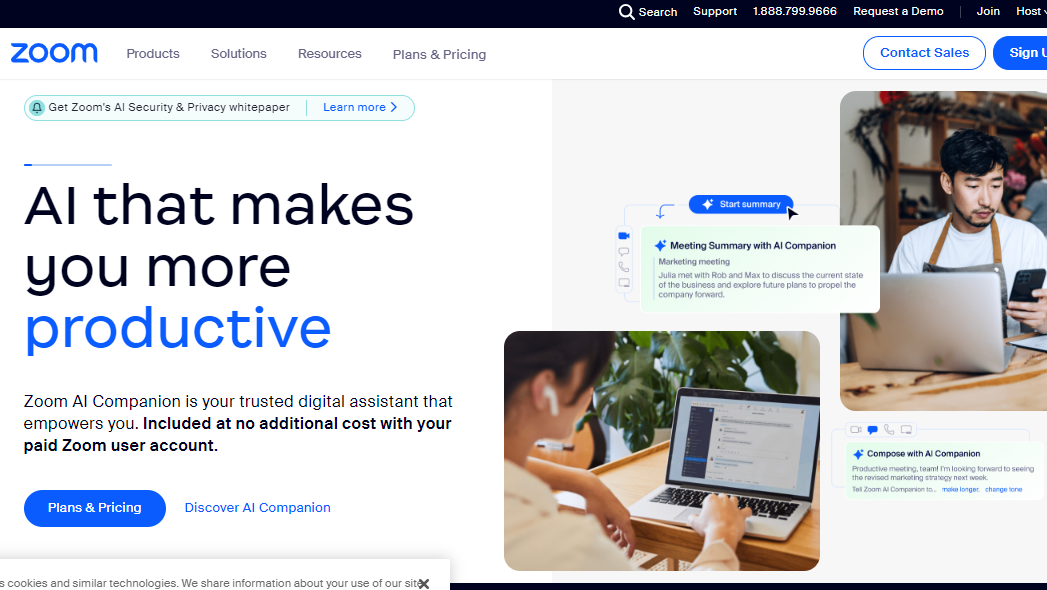
Zoom is a leading video conferencing platform, offering seamless virtual meetings. With features like HD video, screen sharing, and collaboration tools, it connects teams and individuals worldwide, fostering efficient communication and collaboration.

Zoom Overview

What is Zoom?

4.6
14
Reviews
88%
Subscribed Score

Available for Claim - This listing is available to be claimed
Claim Profile For Free

Unclaimed

Manage profile with subsig, and unlock 23+ social and review monitoring. Get partnership options with

Claim Profile For Free

Why teams choose Zoom

Key Features

Built for Flexibility
Adaptable for multiple use cases.
Trusted by Thousands
Proven by professionals worldwide.
Affordable Pricing
Affordable Pricing
Transparent plans to fit any budget.

Who is Zoom for?

What is Zoom?

Zoom is a widely used and versatile video conferencing platform that facilitates virtual meetings, webinars, and collaborative sessions. Recognized for its simplicity, reliability, and rich feature set, Zoom has become a popular choice for individuals, businesses, and educational institutions looking to connect remotely in real-time.

Key Features of Zoom:

  • Video Conferencing: Zoom provides high-quality video and audio conferencing, allowing participants to join meetings from desktops, laptops, tablets, and smartphones.
  • Screen Sharing: Facilitate effective collaboration by sharing screens, enabling participants to view presentations, documents, or demonstrations in real time.
  • Webinars: Host engaging webinars with Zoom, allowing hosts to present to a large audience and interact through Q&A sessions, polls, and participant feedback.
  • Recording and Playback: Record meetings and webinars for later reference or sharing. Zoom allows users to play back recorded sessions, making it convenient for those who couldn’t attend live.
  • Chat and Messaging: Enable real-time communication through chat and messaging features, fostering instant communication and collaboration among participants.
  • Integration with Third-Party Apps: Zoom seamlessly integrates with various third-party applications and tools, enhancing productivity and providing a connected ecosystem.
  • Security Measures: Zoom prioritizes security with features like password protection, waiting rooms, and end-to-end encryption, ensuring the confidentiality of virtual discussions.
  • Breakout Rooms: Facilitate smaller group discussions within a larger meeting by creating breakout rooms, enhancing collaboration and engagement.

Who Uses Zoom?

Zoom caters to a diverse user base, including:

  • Business Professionals: Conduct virtual meetings, team collaborations, and client presentations to enhance communication and productivity.
  • Educators: Facilitate online classes, lectures, and interactive sessions, connecting with students and participants from various locations.
  • Healthcare Professionals: Utilize Zoom for telehealth consultations and virtual healthcare meetings, ensuring remote patient care.
  • Social and Personal Use: Individuals use Zoom for social gatherings, family meetings, and staying connected with friends and loved ones.

In conclusion, Zoom stands as a leading video conferencing solution that offers a reliable and feature-rich platform for virtual communication and collaboration. Its widespread adoption across various sectors highlights its effectiveness in meeting the diverse needs of users seeking seamless and high-quality virtual interactions.

Zoom Summary

What is Zoom?

Zoom is a widely used and versatile video conferencing platform that facilitates virtual meetings, webinars, and collaborative sessions. Recognized for its simplicity, reliability, and rich feature set, Zoom has become a popular choice for individuals, businesses, and educational institutions looking to connect remotely in real-time.

Key Features of Zoom:

  • Video Conferencing: Zoom provides high-quality video and audio conferencing, allowing participants to join meetings from desktops, laptops, tablets, and smartphones.
  • Screen Sharing: Facilitate effective collaboration by sharing screens, enabling participants to view presentations, documents, or demonstrations in real time.
  • Webinars: Host engaging webinars with Zoom, allowing hosts to present to a large audience and interact through Q&A sessions, polls, and participant feedback.
  • Recording and Playback: Record meetings and webinars for later reference or sharing. Zoom allows users to play back recorded sessions, making it convenient for those who couldn’t attend live.
  • Chat and Messaging: Enable real-time communication through chat and messaging features, fostering instant communication and collaboration among participants.
  • Integration with Third-Party Apps: Zoom seamlessly integrates with various third-party applications and tools, enhancing productivity and providing a connected ecosystem.
  • Security Measures: Zoom prioritizes security with features like password protection, waiting rooms, and end-to-end encryption, ensuring the confidentiality of virtual discussions.
  • Breakout Rooms: Facilitate smaller group discussions within a larger meeting by creating breakout rooms, enhancing collaboration and engagement.

Who Uses Zoom?

Zoom caters to a diverse user base, including:

  • Business Professionals: Conduct virtual meetings, team collaborations, and client presentations to enhance communication and productivity.
  • Educators: Facilitate online classes, lectures, and interactive sessions, connecting with students and participants from various locations.
  • Healthcare Professionals: Utilize Zoom for telehealth consultations and virtual healthcare meetings, ensuring remote patient care.
  • Social and Personal Use: Individuals use Zoom for social gatherings, family meetings, and staying connected with friends and loved ones.

In conclusion, Zoom stands as a leading video conferencing solution that offers a reliable and feature-rich platform for virtual communication and collaboration. Its widespread adoption across various sectors highlights its effectiveness in meeting the diverse needs of users seeking seamless and high-quality virtual interactions.

Zoom reviews and insights

Learn what people say about Zoom

4.6
14 Reviews
88%
Subscribed Score

Lear more here about the Subscribed score on how it is composed. Learn more Click here

Overall rating

5
4
3
2
1
CX 4/6

How good is the customer support based on subscribed’s assessment

CX Icon
Security 5/6

How secure is the product based on Subscribed’s assessment?

Security Icon
Ease of Use 6/6

How easy is the product to use, based on Subscribed’s assessment?

EOU Icon
Value 5/6

What is the value for money based on Subscribed’s assessment?

coin Icon
Integration 5/6

How many integrations does the product offer?

gear Icon
Popularity 6/6

How popular is the product?

star
LAIRIN LACBAOAN Organic
Salesforce Administrator/Devops Support
2 months ago
Share
What feature do you use most often?
Video conferencing is the feature I used most often. Efficient collaboration platform. Never failed me. I used it to present, screen share and other tasks to be done.
What’s been frustrating in your experience?
It crashes if there are many participants. Loads slow sometimes too especially during presentation.
What’s still missing for your needs?
The ability to create on demand videos. Would be more helpful if we have it on Zoom
Final thoughts, wrap up what you think
My go to video conferencing tool. Easy to use.
Upvote
Organic
4 months ago
Share
How has it made your work/life easier?
Ability to host large scale webinars and meetings, organize sprints, testing with main rooms and breakout rooms
What feels confusing or hard to use?
Occasional crashes and errors
If you could change one thing, what would it be?
UX can be better, I prefer teams meeting interface but the functionalities on Zoom
Final thoughts, wrap up what you think
Could be a 10 if UX improves and reduced crashes
Upvote
Irfan Ali Invitation
Developer
4 months ago
Share
What exceeded your expectations?
like this for my meetings and classes, better than meet, and has ease of use, it has high quality calling and better performance, has virtual backgrounds and its cool for changing background while doing meeting feature is cool,
What do you dislike about this product?
not popular but is a good software for meetings, apk is way larger then other, the 40 min limit for free plan is limitation in zoom, which interrupts mid meeting when discussing important topic, it can be resource heavy for large meetings when multiple users joins or screens are shared
Is there a workflow that could be simpler?
Integrate ai tools for notes takings , for managing meetings , tracking points with in app notes tracker, it can add extra security built-in securiryt andencruption for all meetings default, can improve ai assited features like notes takings transcriptions smart noise cancellation,
Final thoughts, wrap up what you think
Zoom is overall good software among other meetings and online calling tools, but it's limit of free video calling is shorter than that of google meet, but its better than than, its best for remote work online classes which need reliable meeting and large scale video conferencing
Upvote
SAIF ULLAH Invitation
4 months ago
Share
What do you like best about this product?
Best platform for online meeting and classes. It provide standard video call system for online meeting.
What’s been frustrating in your experience?
Its premium is too much expensive, we cant afford. so make it cost effective.
What new feature would you love to see added?
For online meeting it is more preferable platform for meetings and it also provide good experience in meeting.
Final thoughts, wrap up what you think
Mostly student use it for online lecture and this is good for those students that are attending online classes.
Upvote

Zoom User Reviews

14 User Reviews

Reviews from G2, Capterra, Trustpilot
info Icon

These ratings come directly from third-party platforms like G2, Capterra, and Trustpilot. They reflect real user feedback collected independently on those sites.

Zoom pricing

Pricing model

Pricing Range
info Icon

This only an estimated pricing range, visit Zoom pricing page to access all the information by clicking “Visit Now”.

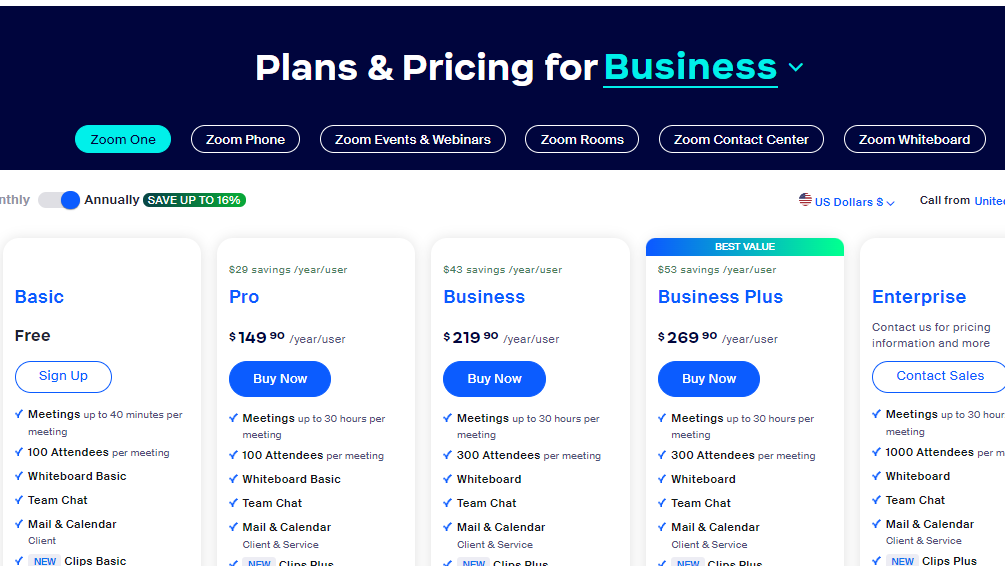
$14.99-$21.99 / Month
Deals Available

This product comes with a special deal, see details

Visit Now
✨ Ask AI about pricing
88% Subscribed Score
info Icon

The Subscribed Score is an independent rating that combines user reviews, features, and value-for-money from multiple trusted sources. It’s designed as a quick benchmark, not a guarantee of individual experience.

Overview

What is Zoom?

Zoom is a widely used and versatile video conferencing platform that facilitates virtual meetings, webinars, and collaborative sessions. Recognized for its simplicity, reliability, and rich feature set, Zoom has become a popular choice for individuals, businesses, and educational institutions looking to connect remotely in real-time.

Key Features of Zoom:

  • Video Conferencing: Zoom provides high-quality video and audio conferencing, allowing participants to join meetings from desktops, laptops, tablets, and smartphones.
  • Screen Sharing: Facilitate effective collaboration by sharing screens, enabling participants to view presentations, documents, or demonstrations in real time.
  • Webinars: Host engaging webinars with Zoom, allowing hosts to present to a large audience and interact through Q&A sessions, polls, and participant feedback.
  • Recording and Playback: Record meetings and webinars for later reference or sharing. Zoom allows users to play back recorded sessions, making it convenient for those who couldn’t attend live.
  • Chat and Messaging: Enable real-time communication through chat and messaging features, fostering instant communication and collaboration among participants.
  • Integration with Third-Party Apps: Zoom seamlessly integrates with various third-party applications and tools, enhancing productivity and providing a connected ecosystem.
  • Security Measures: Zoom prioritizes security with features like password protection, waiting rooms, and end-to-end encryption, ensuring the confidentiality of virtual discussions.
  • Breakout Rooms: Facilitate smaller group discussions within a larger meeting by creating breakout rooms, enhancing collaboration and engagement.

Who Uses Zoom?

Zoom caters to a diverse user base, including:

  • Business Professionals: Conduct virtual meetings, team collaborations, and client presentations to enhance communication and productivity.
  • Educators: Facilitate online classes, lectures, and interactive sessions, connecting with students and participants from various locations.
  • Healthcare Professionals: Utilize Zoom for telehealth consultations and virtual healthcare meetings, ensuring remote patient care.
  • Social and Personal Use: Individuals use Zoom for social gatherings, family meetings, and staying connected with friends and loved ones.

In conclusion, Zoom stands as a leading video conferencing solution that offers a reliable and feature-rich platform for virtual communication and collaboration. Its widespread adoption across various sectors highlights its effectiveness in meeting the diverse needs of users seeking seamless and high-quality virtual interactions.

Where Zoom performs best

What users like
  • Intuitive interface and ease of use
  • High-quality video and audio
  • Wide range of integrations
  • Reliable for large meetings

Where Zoom falls short

What users dislike
  • Free version has time limits
  • Expensive for large teams
  • Occasional connectivity issues
  • AI tools need improvement
Subscribed Score Metrics
31/36 Metric achieved
MetricsScore
Customer Support4/6
Security5/6
Ease of Use6/6
Value of Money5/6
Integration5/6
Popularity6/6
Radar Chart Table View
Ease of Use
Measures how simple and intuitive the product is to use, including setup, navigation, and overall user experience
6/6 Metric Checks
Security
Compares the product`s features, quality, and pricing to determine its overall cost-effectiveness.
5/6 Metric Checks
Value of Money
Assesses the product`s ability to protect data, prevent breaches, and comply with industry standards.
5/6 Metric Checks
Customer Support
Reflects the responsiveness, helpfulness, and quality of assistance provided by the product`s support team.
4/6 Metric Checks
Integrations
Evaluates how well the product connects with other tools and platforms, enabling seamless workflows.
5/6 Metric Checks
Zoom Pricing Range
$14.99-$21.99 / Month

Zoom in action
info Icon

A curated gallery of real screenshots and use cases from the product, so you can see how it works before trying it.

Zoom screenshot Full Screen Icon
https://www.youtube.com/watch?v=VV3DTAsljaQ?feature=oembed
Full Screen Icon
Video thumbnail
Zoom screenshot
Zoom screenshot

Alternatives to Zoom
info Icon

A list of platforms similar to Zoom, helping you evaluate which tool best matches your needs.

How to cancel Zoom

Need to cancel Zoom? Here is how
info Icon

Thinking about how to cancel Zoom this is how you do it!

Steps to Cancel Zoom Subscription

To cancel your Zoom subscription or add-ons, sign in to the Zoom web portal, go to Plans and Billing > Plan Management, choose the plan, click Manage, and then Cancel Plan. Confirm the cancellation, and note that it takes effect at your next renewal date. Access to cloud recordings is lost, and they are permanently deleted 30 days post-cancellation. For more details, Click here.

How to Cancel the Zoom

Steps to Cancel Zoom Subscription

To cancel your Zoom subscription or add-ons, sign in to the Zoom web portal, go to Plans and Billing > Plan Management, choose the plan, click Manage, and then Cancel Plan. Confirm the cancellation, and note that it takes effect at your next renewal date. Access to cloud recordings is lost, and they are permanently deleted 30 days post-cancellation. For more details, Click here.

Manage your Zoom profile

Create profile

Want to list your product on Subscribed.fyi? Create a profile to reach more buyers.

Pricing Range
info Icon

This only an estimated pricing range, visit Zoom pricing page to access all the information by clicking “Visit Now”.

$14.99-$21.99 / Month
Visit Now
Deals Available

This product comes with a special deal, see details

This product comes with a special deal, see details