Sign in to review
Join our community of software reviewers on Subscribed.fyi

Continue With Google
Continue With LinkedIn
Continue Review with Email
Continue with Email
Enter your email to continue.
Continue
Enter your password
Enter your password to finish setting up your account.
Continue
Activate your email
Enter activation code we sent to your email.
Submit
Reset your password
Enter activation code we sent to your email.
Submit
Set your new password
Enter a new password for your account.
Submit
Log in
Provide My Insights
TestingBot logo
TestingBot logo

TestingBot Reviews, Pricing, Features & Alternatives (2026)

TestingBot is a robust cloud-based platform offering automated, manual, and visual testing across 5200+ browsers and devices. Ideal for ensuring compatibility, it supports tools like Selenium, Appium, Puppeteer, and Cypress. Its intuitive interface and flexible pricing plans cater to businesses of all sizes, enabling high-concurrency testing and seamless debugging.

TestingBot logo
TestingBot logo
TestingBot logo

TestingBot Overview

What is TestingBot?

N/A
★ ★ ★ ★ ★
0
Reviews

Available for Claim - This listing is available to be claimed
Claim Profile

Unclaimed

Claim this profile to manage it.

Claim Profile

Why teams choose TestingBot

Key Features

Real-Time Updates
Real-Time Updates
See changes instantly, no delays.
Works Anywhere
Works Anywhere
Accessible from any device, anytime.
Affordable Pricing
Affordable Pricing
Transparent plans to fit any budget.

Who is TestingBot for?

TestingBot is a comprehensive solution in the Automated Testing Tools category. Designed to meet the demands of modern web and mobile development, TestingBot offers a cloud of over 5200 browsers, platforms, and real devices—empowering teams to run automated, visual, and manual tests seamlessly. Whether you’re a developer, QA engineer, or product manager, TestingBot enables you to ensure that your websites and mobile applications function flawlessly across all environments.

TestingBot supports popular testing frameworks including Selenium, Appium, Puppeteer, Playwright, and Cypress, which makes integration into your existing workflows straightforward. Its flexible infrastructure allows for both interactive live testing and fully automated test executions. Users can record tests, replay them across multiple environments, and debug issues fast. With options tailored for different testing needs, you have the power to run tests with high concurrency, leverage unlimited manual testing sessions, and capture screenshots for later analysis. This flexibility helps reduce development time and improves the overall quality of your digital products.

Why Use TestingBot?

  • Extensive Device and Browser Coverage: Tap into a cloud that covers an extensive range of browsers, operating systems, and real mobile devices. This ensures your applications deliver consistent experiences across various platforms.
  • Seamless Integration and Flexibility: TestingBot supports multiple testing frameworks while enabling test recording and replay features, simplifying integration with continuous integration pipelines and agile workflows.
  • Multiple Testing Modes: Choose between interactive live testing on remote browsers and physical devices or fully automated testing for efficient, large-scale test runs, depending on your project needs.
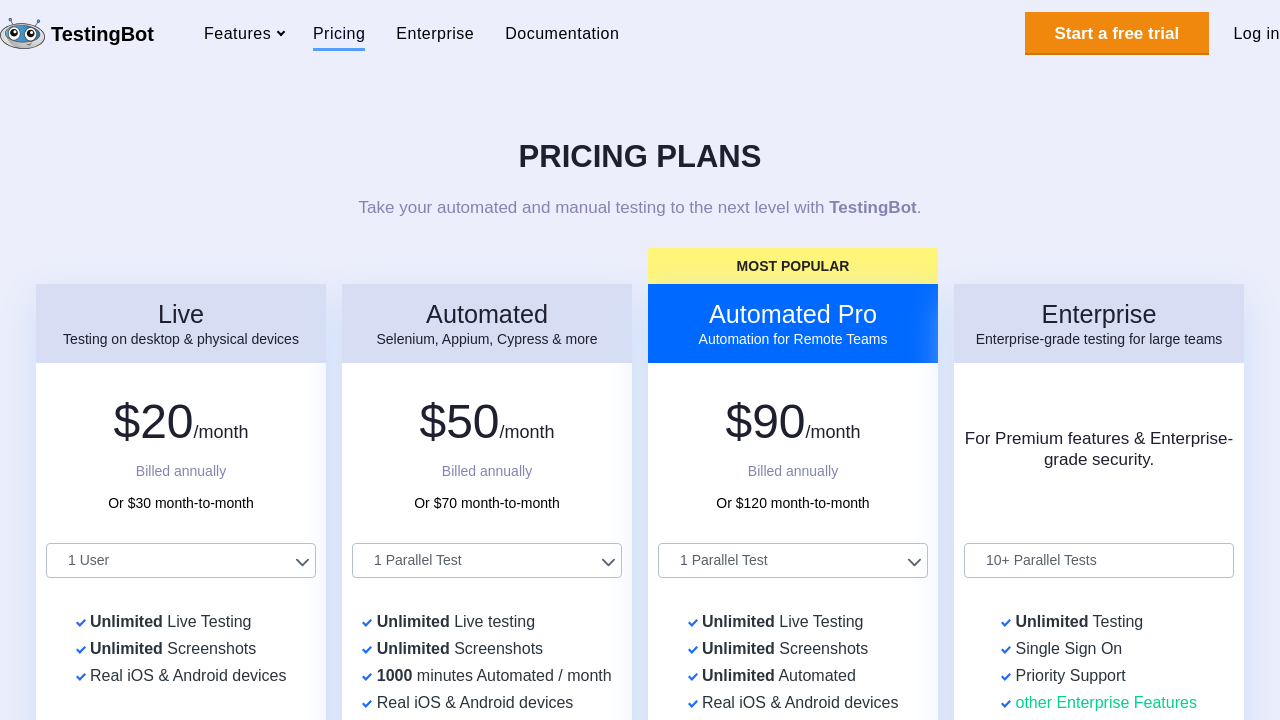
  • Scalable Solutions: With pricing plans designed to suit individual developers up to enterprise-level organizations, TestingBot grows with your business, offering plans such as Live, Automated, and Automated Pro.

Who is TestingBot For?

  • Developers: Quickly integrate testing into your development cycle to catch issues early and streamline releases.
  • QA Engineers: Leverage extensive device coverage to validate user experiences across diverse platforms.
  • Product Managers: Ensure consistent performance and functionality, thereby reducing time to market.
  • Agile Teams: Benefit from flexible testing plans that adapt to rapidly changing project requirements.

Ready to boost your testing efficiency? Visit the TestingBot homepage for more information or check out the latest exclusive deals to get started. If you’re exploring alternative options, consider solutions like accelQ, Postman, and BrowserStack—each offering unique features that might fit your specific testing needs. Embrace a solution that simplifies cross-browser testing and helps you deliver flawless digital experiences every time.

TestingBot Summary

TestingBot is a comprehensive solution in the Automated Testing Tools category. Designed to meet the demands of modern web and mobile development, TestingBot offers a cloud of over 5200 browsers, platforms, and real devices—empowering teams to run automated, visual, and manual tests seamlessly. Whether you’re a developer, QA engineer, or product manager, TestingBot enables you to ensure that your websites and mobile applications function flawlessly across all environments.

TestingBot supports popular testing frameworks including Selenium, Appium, Puppeteer, Playwright, and Cypress, which makes integration into your existing workflows straightforward. Its flexible infrastructure allows for both interactive live testing and fully automated test executions. Users can record tests, replay them across multiple environments, and debug issues fast. With options tailored for different testing needs, you have the power to run tests with high concurrency, leverage unlimited manual testing sessions, and capture screenshots for later analysis. This flexibility helps reduce development time and improves the overall quality of your digital products.

Why Use TestingBot?

  • Extensive Device and Browser Coverage: Tap into a cloud that covers an extensive range of browsers, operating systems, and real mobile devices. This ensures your applications deliver consistent experiences across various platforms.
  • Seamless Integration and Flexibility: TestingBot supports multiple testing frameworks while enabling test recording and replay features, simplifying integration with continuous integration pipelines and agile workflows.
  • Multiple Testing Modes: Choose between interactive live testing on remote browsers and physical devices or fully automated testing for efficient, large-scale test runs, depending on your project needs.
  • Scalable Solutions: With pricing plans designed to suit individual developers up to enterprise-level organizations, TestingBot grows with your business, offering plans such as Live, Automated, and Automated Pro.

Who is TestingBot For?

  • Developers: Quickly integrate testing into your development cycle to catch issues early and streamline releases.
  • QA Engineers: Leverage extensive device coverage to validate user experiences across diverse platforms.
  • Product Managers: Ensure consistent performance and functionality, thereby reducing time to market.
  • Agile Teams: Benefit from flexible testing plans that adapt to rapidly changing project requirements.

Ready to boost your testing efficiency? Visit the TestingBot homepage for more information or check out the latest exclusive deals to get started. If you’re exploring alternative options, consider solutions like accelQ, Postman, and BrowserStack—each offering unique features that might fit your specific testing needs. Embrace a solution that simplifies cross-browser testing and helps you deliver flawless digital experiences every time.

TestingBot reviews and insights

Learn what people say about TestingBot

N/A ★ ★ ★ ★ ★
0 Reviews

No Reviews Yet!

Be the first to share your experience and help others in the community.

TestingBot logo

TestingBot User Reviews

0 User Reviews

Reviews from G2, Capterra, Trustpilot
info Icon

These ratings come directly from third-party platforms like G2, Capterra, and Trustpilot. They reflect real user feedback collected independently on those sites.

TestingBot pricing

Pricing model

TestingBot logo
Pricing Range
info Icon

This only an estimated pricing range, visit TestingBot pricing page to access all the information by clicking “Visit Now”.

$20-$90 / Month
Deals Available

This product comes with a special deal, see details

Visit Now

Overview

TestingBot is a comprehensive solution in the Automated Testing Tools category. Designed to meet the demands of modern web and mobile development, TestingBot offers a cloud of over 5200 browsers, platforms, and real devices—empowering teams to run automated, visual, and manual tests seamlessly. Whether you’re a developer, QA engineer, or product manager, TestingBot enables you to ensure that your websites and mobile applications function flawlessly across all environments.

TestingBot supports popular testing frameworks including Selenium, Appium, Puppeteer, Playwright, and Cypress, which makes integration into your existing workflows straightforward. Its flexible infrastructure allows for both interactive live testing and fully automated test executions. Users can record tests, replay them across multiple environments, and debug issues fast. With options tailored for different testing needs, you have the power to run tests with high concurrency, leverage unlimited manual testing sessions, and capture screenshots for later analysis. This flexibility helps reduce development time and improves the overall quality of your digital products.

Why Use TestingBot?

  • Extensive Device and Browser Coverage: Tap into a cloud that covers an extensive range of browsers, operating systems, and real mobile devices. This ensures your applications deliver consistent experiences across various platforms.
  • Seamless Integration and Flexibility: TestingBot supports multiple testing frameworks while enabling test recording and replay features, simplifying integration with continuous integration pipelines and agile workflows.
  • Multiple Testing Modes: Choose between interactive live testing on remote browsers and physical devices or fully automated testing for efficient, large-scale test runs, depending on your project needs.
  • Scalable Solutions: With pricing plans designed to suit individual developers up to enterprise-level organizations, TestingBot grows with your business, offering plans such as Live, Automated, and Automated Pro.

Who is TestingBot For?

  • Developers: Quickly integrate testing into your development cycle to catch issues early and streamline releases.
  • QA Engineers: Leverage extensive device coverage to validate user experiences across diverse platforms.
  • Product Managers: Ensure consistent performance and functionality, thereby reducing time to market.
  • Agile Teams: Benefit from flexible testing plans that adapt to rapidly changing project requirements.

Ready to boost your testing efficiency? Visit the TestingBot homepage for more information or check out the latest exclusive deals to get started. If you’re exploring alternative options, consider solutions like accelQ, Postman, and BrowserStack—each offering unique features that might fit your specific testing needs. Embrace a solution that simplifies cross-browser testing and helps you deliver flawless digital experiences every time.

Where TestingBot performs best

What users like
  • Wide variety of devices and browser options.
  • Offers a monthly subscription and free trial.
  • Easy to use with quick onboarding.
  • Useful for testing across multiple environments.

Where TestingBot falls short

What users dislike
  • Interaction speed can be slow at times.
  • Monthly subscription may not suit occasional users.
  • Issues with outdated or unavailable devices.
  • UI experience could be improved.
TestingBot Pricing Range
$20-$90 / Month

TestingBot in action
info Icon

A curated gallery of real screenshots and use cases from the product, so you can see how it works before trying it.

TestingBot screenshot 1 Full Screen Icon
TestingBot screenshot 2 Full Screen Icon
TestingBot screenshot 1
TestingBot screenshot 2
TestingBot screenshot 1
TestingBot screenshot 2

Alternatives to TestingBot
info Icon

A list of platforms similar to TestingBot, helping you evaluate which tool best matches your needs.

How to cancel TestingBot

Need to cancel TestingBot? Here is how
info Icon

Thinking about how to cancel TestingBot this is how you do it!

To cancel a TestingBot product:

  • Go to your account settings.
  • Find the "Cancel Subscription" option.
  • Confirm cancellation.

How to Cancel the TestingBot

To cancel a TestingBot product:

  • Go to your account settings.
  • Find the "Cancel Subscription" option.
  • Confirm cancellation.

Manage your TestingBot profile

Create profile

Want to list your product on Subscribed.fyi? Create a profile to reach more buyers.

Pricing Range
info Icon

This only an estimated pricing range, visit TestingBot pricing page to access all the information by clicking “Visit Now”.

$20-$90 / Month
Visit Now
Deals Available

This product comes with a special deal, see details

This product comes with a special deal, see details