WebinarGeek Reviews 2026: Details, Pricing, & Features | Subscribed.fyi
Sign in to review
Join our community of software reviewers on Subscribed.fyi

Continue With Google
Continue With LinkedIn
Continue Review with Email
Continue with Email
Enter your email to continue.
Continue
Enter your password
Enter your password to finish setting up your account.
Continue
Activate your email
Enter activation code we sent to your email.
Submit
Reset your password
Enter activation code we sent to your email.
Submit
Set your new password
Enter a new password for your account.
Submit
Categories
For Business
Log in
Provide My Insights
Collaboration & Remote Work Most Loved Award award

WebinarGeek Reviews, Pricing, Features & Alternatives (2026)

4.7/5
(7)
Miraj Jivani User Test Enabled
5 months ago
Share
Whatโ€™s the biggest benefit youโ€™ve noticed?
WebniarGeek has an easy account signup process by linking existing Google or Microsoft Accounts or creating your own account by using your custom email address. I like that WebniarGeek has a few clicks to schedule live or schedule automated Webinars and see what devices attendees used to join the webinar. There is also opportunity to integrate with popular marketing platforms such as HubSpot Synchronize webinar activity.
Have you experienced any bugs or errors?
I did not expereince any bugs or errors while testing WebinarGeek. WebniarGeek is great for scheduling webniar and when you're looking to share information to large amount of people. I wish that it had capability to schedule 1:1 meetings and AI note-taking to compete with Zoom and Microsoft Teams.
What problem did this product solve for you?
Webninar Geek provides a platform where you can schedule webinars with ease and analyze insights for beginners to experts. It is beneficial for small businesses, entrepreneurs, and anyone else looking to share information with large audiences.
Final thoughts, wrap up what you think
It is easier to schedule webinars for live audiances provides features such as playing recorded webinar and you can also see how your audience joined webinar Ex. phone or computer.
Upvote

WebinarGeek is an intuitive webinar platform designed for live, automated, and on-demand webinars. It offers seamless integrations with over 5000 tools, customization options for branding, and interactive features like polls and live chat. With excellent reliability, scalability for up to 5000 live viewers, and a focus on security, itโ€™s ideal for professional and engaging webinar experiences. Trusted by users for its ease of use and top-rated customer support.

Collaboration & Remote Work Most Loved Award award

WebinarGeek Overview

What is WebinarGeek?

Collaboration & Remote Work Most Loved Award award
Collaboration & Remote Work
Most Loved Award
2026

All Awards

Collaboration & Remote Work
Most Loved Award
2026
4.7
โ˜… โ˜… โ˜… โ˜… โ˜…
7
Reviews
90%
Subscribed Score

Available for Claim - This listing is available to be claimed
Claim Profile For Free

Unclaimed

Manage profile with subsig, and unlock 23+ social and review monitoring. Get partnership options with

Claim Profile For Free

Why teams choose WebinarGeek

Key Features

Smart Automation
Smart Automation
Save time with AI-powered workflows.
Data-Driven Insights
Make better decisions with analytics.
Plug & Play Setup
Plug & Play Setup
Get started in minutes, not weeks.

Who is WebinarGeek for?

WebinarGeek is a powerful solution in the Webinar and Event Management category, designed to make hosting webinars seamless for businesses and entrepreneurs. This browser-based software offers live, automated, and on-demand webinars, enabling businesses to interact effectively with their audiences. WebinarGeek supports up to 5,000 live viewers, multiple presenters, and includes valuable marketing features like custom branding and marketing integrations. With a focus on simplicity and efficiency, it empowers users to deliver professional webinars that captivate audiences. Explore exclusive deals. For other options, consider Livestorm or GoTo Webinar.

Why Use WebinarGeek?

Choosing WebinarGeek for your webinar needs offers multiple advantages:

  • Simple to Use: WebinarGeek simplifies event creation and management with an intuitive design, making it easy for anyone to host professional webinars.
  • Custom Branding: Enhance your webinarโ€™s appearance with custom branding options, ensuring your audience experiences a cohesive brand identity.
  • Interactivity: Engage attendees with live chat, polls, surveys, and an option to invite viewers to join presenters on stage for added interaction.
  • Marketing Integrations: Connect with tools like HubSpot and Salesforce to maximize the effectiveness of your campaigns and simplify attendee follow-ups.
  • Advanced GDPR Compliance: Ensure data security with GDPR-compliant features, particularly critical for businesses operating in privacy-sensitive regions.
  • Comprehensive Analytics: Access robust analytics on attendee behavior, session performance, and registration data to refine future strategies.

Who is WebinarGeek For?

WebinarGeek caters to a wide range of users and industries:

  • Small Businesses and Startups: Perfect for businesses looking for cost-efficient tools to expand their customer reach.
  • Marketing Teams: Simplifies the process of engaging with customers and generating leads through interactive webinars.
  • Coaches and Trainers: Offers tools to support on-demand and live sessions, enabling broader reach for training and development content.
  • Large Enterprises: Supports scaling with advanced features like RTMP streaming, unlimited moderators, and security compliance tailored for large audiences.

WebinarGeek is an excellent choice for professionals and organizations aiming to enhance their webinar experience while leveraging interactive and analytical tools to build stronger audience connections.


WebinarGeek Summary

WebinarGeek is a powerful solution in the Webinar and Event Management category, designed to make hosting webinars seamless for businesses and entrepreneurs. This browser-based software offers live, automated, and on-demand webinars, enabling businesses to interact effectively with their audiences. WebinarGeek supports up to 5,000 live viewers, multiple presenters, and includes valuable marketing features like custom branding and marketing integrations. With a focus on simplicity and efficiency, it empowers users to deliver professional webinars that captivate audiences. Explore exclusive deals. For other options, consider Livestorm or GoTo Webinar.

Why Use WebinarGeek?

Choosing WebinarGeek for your webinar needs offers multiple advantages:

  • Simple to Use: WebinarGeek simplifies event creation and management with an intuitive design, making it easy for anyone to host professional webinars.
  • Custom Branding: Enhance your webinarโ€™s appearance with custom branding options, ensuring your audience experiences a cohesive brand identity.
  • Interactivity: Engage attendees with live chat, polls, surveys, and an option to invite viewers to join presenters on stage for added interaction.
  • Marketing Integrations: Connect with tools like HubSpot and Salesforce to maximize the effectiveness of your campaigns and simplify attendee follow-ups.
  • Advanced GDPR Compliance: Ensure data security with GDPR-compliant features, particularly critical for businesses operating in privacy-sensitive regions.
  • Comprehensive Analytics: Access robust analytics on attendee behavior, session performance, and registration data to refine future strategies.

Who is WebinarGeek For?

WebinarGeek caters to a wide range of users and industries:

  • Small Businesses and Startups: Perfect for businesses looking for cost-efficient tools to expand their customer reach.
  • Marketing Teams: Simplifies the process of engaging with customers and generating leads through interactive webinars.
  • Coaches and Trainers: Offers tools to support on-demand and live sessions, enabling broader reach for training and development content.
  • Large Enterprises: Supports scaling with advanced features like RTMP streaming, unlimited moderators, and security compliance tailored for large audiences.

WebinarGeek is an excellent choice for professionals and organizations aiming to enhance their webinar experience while leveraging interactive and analytical tools to build stronger audience connections.

WebinarGeek reviews and insights

Learn what people say about WebinarGeek

4.7 โ˜… โ˜… โ˜… โ˜… โ˜…
7 Reviews
90%
Subscribed Score

Lear more here about the Subscribed score on how it is composed. Learn more Click here

Overall rating

5
4
3
2
1
CX 6/6

How good is the customer support based on subscribedโ€™s assessment

CX Icon
Security 5/6

How secure is the product based on Subscribedโ€™s assessment?

Security Icon
Ease of Use 6/6

How easy is the product to use, based on Subscribedโ€™s assessment?

EOU Icon
Value 5/6

What is the value for money based on Subscribedโ€™s assessment?

coin Icon
Integration 4/6

How many integrations does the product offer?

gear Icon
Popularity 6/6

How popular is the product?

star
Arbab Qayyum Invitation
4 weeks ago
Share
How has it made your work/life easier?
Managing webinars is pretty straightforward. It's very easy to find everything in one place, especially the registrations and attendee tracking. The dashboard is very intuitive and makes it easy to see the upcoming events.
Is there something that almost made you stop using it?
The webinar editing flow felt a bit unclear. There is no save option, which made me second-guess whether the changes were actually applied.
What could make it even better?
Adding clear action buttons and a more guided webinar setup process would make the experience smoother, especially for first-time users. Other than that, I think it's a great platform.
Final thoughts, wrap up what you think
It is very easy to schedule webinars, and the dashboard gives a clear overview at a glance. Features like polls and live Q&A during sessions are also really helpful for keeping things interactive.
Upvote
Monica Teope User Test Enabled
QA Eng
4 months ago
Share
What do you like best about this product?
Iโ€™ve had a really positive experience with WebinarGeek so far. Itโ€™s straightforward to set up webinars, and the platform runs smoothly most of the time. The features are reliable and do exactly what theyโ€™re supposed to, which makes the whole process feel stress-free.
What do you dislike about this product?
That said, thereโ€™s one thing that could be improved. In the live webinar view, I couldnโ€™t find a clear โ€œexitโ€ button. I had to close the browser tab using the โ€œX,โ€ which wasnโ€™t very intuitive. A visible and easy-to-find exit option within the webinar would definitely improve the user experience.
Is there a workflow that could be simpler?
Maybe lessen the buttons on the homepage. As sometimes it becomes confusing? And I think it's hard for other people especially older once to navigate through the website.
Final thoughts, wrap up what you think
Because of one thing that can be improved. In the live webinar view, I couldnโ€™t find a clear โ€œexitโ€ button. I had to close the browser tab using the โ€œX,โ€ which wasnโ€™t very intuitive. A visible and easy-to-find exit option within the webinar would definitely improve the user experience.
Upvote
Laura T Incentivized
Instructional Technologist
4 months ago
Share
Whatโ€™s the biggest benefit youโ€™ve noticed?
I used the trial version and it had more features than my usual Zoom webinars have. It was one step beyond Zoom. It has some features that can take a webinar from being just a normal webinar given by one person to one that would be appropriate for a larger virtual conference.
Have you experienced any bugs or errors?
No but I thought some of the interface elements should be moved to other places.
What could make it even better?
Reorganizing some of the interface would help. I had to search for where to find some features but then once I found them, I was easily able to use them.
Final thoughts, wrap up what you think
I liked having the additional features but found it frustrating to have to search for them. If they reorganize a bit, it will be great and I will recommend it to colleagues.
Upvote
Miraj Jivani User Test Enabled
5 months ago
Share
Whatโ€™s the biggest benefit youโ€™ve noticed?
WebniarGeek has an easy account signup process by linking existing Google or Microsoft Accounts or creating your own account by using your custom email address. I like that WebniarGeek has a few clicks to schedule live or schedule automated Webinars and see what devices attendees used to join the webinar. There is also opportunity to integrate with popular marketing platforms such as HubSpot Synchronize webinar activity.
Have you experienced any bugs or errors?
I did not expereince any bugs or errors while testing WebinarGeek. WebniarGeek is great for scheduling webniar and when you're looking to share information to large amount of people. I wish that it had capability to schedule 1:1 meetings and AI note-taking to compete with Zoom and Microsoft Teams.
What problem did this product solve for you?
Webninar Geek provides a platform where you can schedule webinars with ease and analyze insights for beginners to experts. It is beneficial for small businesses, entrepreneurs, and anyone else looking to share information with large audiences.
Final thoughts, wrap up what you think
It is easier to schedule webinars for live audiances provides features such as playing recorded webinar and you can also see how your audience joined webinar Ex. phone or computer.
Upvote

WebinarGeek User Reviews

7 User Reviews

Reviews from G2, Capterra, Trustpilot
info Icon

These ratings come directly from third-party platforms like G2, Capterra, and Trustpilot. They reflect real user feedback collected independently on those sites.

WebinarGeek pricing

Pricing model

Collaboration & Remote Work Most Loved Award award
Pricing Range
info Icon

This only an estimated pricing range, visit WebinarGeek pricing page to access all the information by clicking โ€œVisit Nowโ€.

$39-349 / Month
Deals Available

This product comes with a special deal, see details

Visit Now
โœจ Ask AI about pricing
90% Subscribed Score
info Icon

The Subscribed Score is an independent rating that combines user reviews, features, and value-for-money from multiple trusted sources. Itโ€™s designed as a quick benchmark, not a guarantee of individual experience.

Overview

WebinarGeek is a powerful solution in the Webinar and Event Management category, designed to make hosting webinars seamless for businesses and entrepreneurs. This browser-based software offers live, automated, and on-demand webinars, enabling businesses to interact effectively with their audiences. WebinarGeek supports up to 5,000 live viewers, multiple presenters, and includes valuable marketing features like custom branding and marketing integrations. With a focus on simplicity and efficiency, it empowers users to deliver professional webinars that captivate audiences. Explore exclusive deals. For other options, consider Livestorm or GoTo Webinar.

Why Use WebinarGeek?

Choosing WebinarGeek for your webinar needs offers multiple advantages:

  • Simple to Use: WebinarGeek simplifies event creation and management with an intuitive design, making it easy for anyone to host professional webinars.
  • Custom Branding: Enhance your webinarโ€™s appearance with custom branding options, ensuring your audience experiences a cohesive brand identity.
  • Interactivity: Engage attendees with live chat, polls, surveys, and an option to invite viewers to join presenters on stage for added interaction.
  • Marketing Integrations: Connect with tools like HubSpot and Salesforce to maximize the effectiveness of your campaigns and simplify attendee follow-ups.
  • Advanced GDPR Compliance: Ensure data security with GDPR-compliant features, particularly critical for businesses operating in privacy-sensitive regions.
  • Comprehensive Analytics: Access robust analytics on attendee behavior, session performance, and registration data to refine future strategies.

Who is WebinarGeek For?

WebinarGeek caters to a wide range of users and industries:

  • Small Businesses and Startups: Perfect for businesses looking for cost-efficient tools to expand their customer reach.
  • Marketing Teams: Simplifies the process of engaging with customers and generating leads through interactive webinars.
  • Coaches and Trainers: Offers tools to support on-demand and live sessions, enabling broader reach for training and development content.
  • Large Enterprises: Supports scaling with advanced features like RTMP streaming, unlimited moderators, and security compliance tailored for large audiences.

WebinarGeek is an excellent choice for professionals and organizations aiming to enhance their webinar experience while leveraging interactive and analytical tools to build stronger audience connections.

Where WebinarGeek performs best

What users like
  • Easy to use and user-friendly
  • Outstanding customer support
  • Automated and on-demand webinars
  • Effective for lead generation and follow-ups

Where WebinarGeek falls short

What users dislike
  • Limited customization for emails and templates
  • Issues with multiple presenters' quality
  • Price could be more affordable
  • Mobile usability could be improved
Subscribed Score Metrics
32/36 Metric achieved
MetricsScore
Customer Support6/6
Security5/6
Ease of Use6/6
Value of Money5/6
Integration4/6
Popularity6/6
Radar Chart Table View
Ease of Use
Measures how simple and intuitive the product is to use, including setup, navigation, and overall user experience
6/6 Metric Checks
Security
Compares the product`s features, quality, and pricing to determine its overall cost-effectiveness.
5/6 Metric Checks
Value of Money
Assesses the product`s ability to protect data, prevent breaches, and comply with industry standards.
5/6 Metric Checks
Customer Support
Reflects the responsiveness, helpfulness, and quality of assistance provided by the product`s support team.
6/6 Metric Checks
Integrations
Evaluates how well the product connects with other tools and platforms, enabling seamless workflows.
4/6 Metric Checks
WebinarGeek Pricing Range
$39-349 / Month

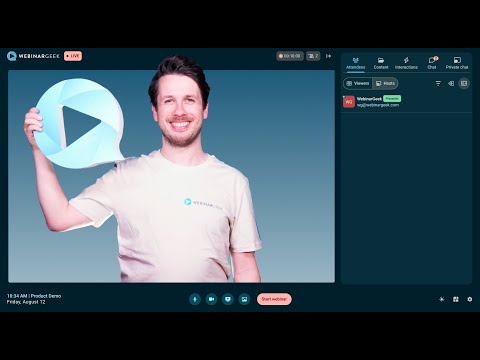
WebinarGeek in action
info Icon

A curated gallery of real screenshots and use cases from the product, so you can see how it works before trying it.

WebinarGeek Full Screen Icon
https://www.youtube.com/watch?v=d1sTyhdnmaE
Full Screen Icon
https://www.youtube.com/watch?v=qHfcjlNQ-4o
Full Screen Icon
WebinarGeek
WebinarGeek
Video thumbnail
Video thumbnail
WebinarGeek
WebinarGeek

Alternatives to WebinarGeek
info Icon

A list of platforms similar to WebinarGeek, helping you evaluate which tool best matches your needs.

How to cancel WebinarGeek

Need to cancel WebinarGeek? Here is how
info Icon

Thinking about how to cancel WebinarGeek this is how you do it!

To cancel a WebinarGeek subscription:

  • Click on ‘Account’ in the top right.
  • Select ‘Subscription’ from the dropdown menu.
  • Choose ‘Cancel’ and complete the cancellation process.
  • Use the service until the end of the paid period; data will be deleted afterward.

How to Cancel the WebinarGeek

To cancel a WebinarGeek subscription:

  • Click on ‘Account’ in the top right.
  • Select ‘Subscription’ from the dropdown menu.
  • Choose ‘Cancel’ and complete the cancellation process.
  • Use the service until the end of the paid period; data will be deleted afterward.

FAQs about WebinarGeek

Every else you need to know about WebinarGeek
info Icon

A collection of FAQs, guides, alternatives, and comparisons to help you quickly understand if WebinarGeek is right for you.

Manage your WebinarGeek profile

Create profile

Want to list your product on Subscribed.fyi? Create a profile to reach more buyers.

Pricing Range
info Icon

This only an estimated pricing range, visit WebinarGeek pricing page to access all the information by clicking โ€œVisit Nowโ€.

$39-349 / Month
Visit Now
Deals Available

This product comes with a special deal, see details

This product comes with a special deal, see details