Zoom Reviews 2026: Details, Pricing, & Features | Subscribed.fyi
Sign in to review
Join our community of software reviewers on Subscribed.fyi

Continue With Google
Continue With LinkedIn
Continue Review with Email
Continue with Email
Enter your email to continue.
Continue
Enter your password
Enter your password to finish setting up your account.
Continue
Activate your email
Enter activation code we sent to your email.
Submit
Reset your password
Enter activation code we sent to your email.
Submit
Set your new password
Enter a new password for your account.
Submit
✨ Ask AI Search
Categories
For Business
Log in
Provide My Insights

Zoom

4.5/5
(12)

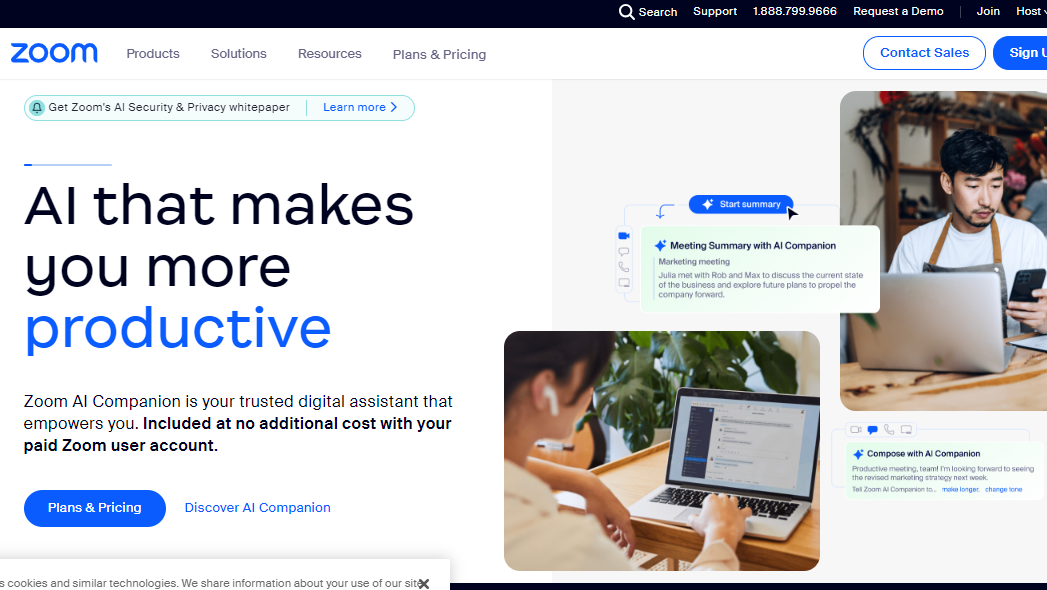
Zoom is a leading video conferencing platform, offering seamless virtual meetings. With features like HD video, screen sharing, and collaboration tools, it connects teams and individuals worldwide, fostering efficient communication and collaboration.

Zoom

4.5
12
Reviews
88%
Subscribed Score

Available for Claim - This listing is available to be claimed
Claim For Free

Unclaimed

Curated and listed by Subscribed Team

Claim For Free
Smart Automation
Smart Automation
Save time with AI-powered workflows.
Plug & Play Setup
Plug & Play Setup
Get started in minutes, not weeks.
Eco-Friendly
Eco-Friendly
Designed with sustainability in mind.

What is Zoom?

Zoom is a widely used and versatile video conferencing platform that facilitates virtual meetings, webinars, and collaborative sessions. Recognized for its simplicity, reliability, and rich feature set, Zoom has become a popular choice for individuals, businesses, and educational institutions looking to connect remotely in real-time.

Key Features of Zoom:

  • Video Conferencing: Zoom provides high-quality video and audio conferencing, allowing participants to join meetings from desktops, laptops, tablets, and smartphones.
  • Screen Sharing: Facilitate effective collaboration by sharing screens, enabling participants to view presentations, documents, or demonstrations in real time.
  • Webinars: Host engaging webinars with Zoom, allowing hosts to present to a large audience and interact through Q&A sessions, polls, and participant feedback.
  • Recording and Playback: Record meetings and webinars for later reference or sharing. Zoom allows users to play back recorded sessions, making it convenient for those who couldn’t attend live.
  • Chat and Messaging: Enable real-time communication through chat and messaging features, fostering instant communication and collaboration among participants.
  • Integration with Third-Party Apps: Zoom seamlessly integrates with various third-party applications and tools, enhancing productivity and providing a connected ecosystem.
  • Security Measures: Zoom prioritizes security with features like password protection, waiting rooms, and end-to-end encryption, ensuring the confidentiality of virtual discussions.
  • Breakout Rooms: Facilitate smaller group discussions within a larger meeting by creating breakout rooms, enhancing collaboration and engagement.

Who Uses Zoom?

Zoom caters to a diverse user base, including:

  • Business Professionals: Conduct virtual meetings, team collaborations, and client presentations to enhance communication and productivity.
  • Educators: Facilitate online classes, lectures, and interactive sessions, connecting with students and participants from various locations.
  • Healthcare Professionals: Utilize Zoom for telehealth consultations and virtual healthcare meetings, ensuring remote patient care.
  • Social and Personal Use: Individuals use Zoom for social gatherings, family meetings, and staying connected with friends and loved ones.

In conclusion, Zoom stands as a leading video conferencing solution that offers a reliable and feature-rich platform for virtual communication and collaboration. Its widespread adoption across various sectors highlights its effectiveness in meeting the diverse needs of users seeking seamless and high-quality virtual interactions.

Zoom Summary

What is Zoom?

Zoom is a widely used and versatile video conferencing platform that facilitates virtual meetings, webinars, and collaborative sessions. Recognized for its simplicity, reliability, and rich feature set, Zoom has become a popular choice for individuals, businesses, and educational institutions looking to connect remotely in real-time.

Key Features of Zoom:

  • Video Conferencing: Zoom provides high-quality video and audio conferencing, allowing participants to join meetings from desktops, laptops, tablets, and smartphones.
  • Screen Sharing: Facilitate effective collaboration by sharing screens, enabling participants to view presentations, documents, or demonstrations in real time.
  • Webinars: Host engaging webinars with Zoom, allowing hosts to present to a large audience and interact through Q&A sessions, polls, and participant feedback.
  • Recording and Playback: Record meetings and webinars for later reference or sharing. Zoom allows users to play back recorded sessions, making it convenient for those who couldn’t attend live.
  • Chat and Messaging: Enable real-time communication through chat and messaging features, fostering instant communication and collaboration among participants.
  • Integration with Third-Party Apps: Zoom seamlessly integrates with various third-party applications and tools, enhancing productivity and providing a connected ecosystem.
  • Security Measures: Zoom prioritizes security with features like password protection, waiting rooms, and end-to-end encryption, ensuring the confidentiality of virtual discussions.
  • Breakout Rooms: Facilitate smaller group discussions within a larger meeting by creating breakout rooms, enhancing collaboration and engagement.

Who Uses Zoom?

Zoom caters to a diverse user base, including:

  • Business Professionals: Conduct virtual meetings, team collaborations, and client presentations to enhance communication and productivity.
  • Educators: Facilitate online classes, lectures, and interactive sessions, connecting with students and participants from various locations.
  • Healthcare Professionals: Utilize Zoom for telehealth consultations and virtual healthcare meetings, ensuring remote patient care.
  • Social and Personal Use: Individuals use Zoom for social gatherings, family meetings, and staying connected with friends and loved ones.

In conclusion, Zoom stands as a leading video conferencing solution that offers a reliable and feature-rich platform for virtual communication and collaboration. Its widespread adoption across various sectors highlights its effectiveness in meeting the diverse needs of users seeking seamless and high-quality virtual interactions.

Zoom reviews

Learn what people say about Zoom

4.5
12 Reviews
88%
Subscribed Score

Lear more here about the Subscribed score on how it is composed. Learn more Click here

Overall rating

5
4
3
2
1
CX 4/6

How good is the customer support based on subscribed’s assessment

CX Icon
Security 5/6

How secure is the product based on Subscribed’s assessment?

Security Icon
Ease of Use 6/6

How easy is the product to use, based on Subscribed’s assessment?

EOU Icon
Value 5/6

What is the value for money based on Subscribed’s assessment?

coin Icon
Integration 5/6

How many integrations does the product offer?

gear Icon
Popularity 6/6

How popular is the product?

star
Irfan Ali Invitation
Developer
5 days ago
Share
What exceeded your expectations?
like this for my meetings and classes, better than meet, and has ease of use, it has high quality calling and better performance, has virtual backgrounds and its cool for changing background while doing meeting feature is cool,
What do you dislike about this product?
not popular but is a good software for meetings, apk is way larger then other, the 40 min limit for free plan is limitation in zoom, which interrupts mid meeting when discussing important topic, it can be resource heavy for large meetings when multiple users joins or screens are shared
Is there a workflow that could be simpler?
Integrate ai tools for notes takings , for managing meetings , tracking points with in app notes tracker, it can add extra security built-in securiryt andencruption for all meetings default, can improve ai assited features like notes takings transcriptions smart noise cancellation,
Final thoughts, wrap up what you think
Zoom is overall good software among other meetings and online calling tools, but it's limit of free video calling is shorter than that of google meet, but its better than than, its best for remote work online classes which need reliable meeting and large scale video conferencing
Upvote
SAIF ULLAH Invitation
5 days ago
Share
What do you like best about this product?
Best platform for online meeting and classes. It provide standard video call system for online meeting.
What’s been frustrating in your experience?
Its premium is too much expensive, we cant afford. so make it cost effective.
What new feature would you love to see added?
For online meeting it is more preferable platform for meetings and it also provide good experience in meeting.
Final thoughts, wrap up what you think
Mostly student use it for online lecture and this is good for those students that are attending online classes.
Upvote
ruhimirpuri Organic
Freelancer
6 days ago
Share
What was your first impression when you started using it?
Zoom is very easy to use and makes hosting or joining meetings simple. The video and audio quality are usually reliable, and features like screen sharing and recording are very useful. My first impression was that the platform was clean, intuitive, and quick to set up.
Have you experienced any bugs or errors?
Sometimes there can be connection or audio issues depending on internet quality. The free version also has time limits on meetings, which can be inconvenient. Occasionally the app requires updates before joining meetings.
What’s still missing for your needs?
Zoom could improve by adding more built-in collaboration tools for teams, such as better document sharing and real-time editing during meetings. More AI-powered meeting summaries and productivity features would also make it more valuable.
Final thoughts, wrap up what you think
I would recommend Zoom because it is reliable, easy to use, and widely supported across devices. It’s a great solution for remote meetings, online classes, and team collaboration.
Upvote
Hamza Rauf Organic
Full Stack Developer
See My Portfolio
6 days ago
Share
What exceeded your expectations?
Zoom's AI companion 2.0 is now available for free and can join our Google or Teams meetings to take notes for us. If we join a meeting 10 minutes late, we can privately ask the AI to summarize what we missed without interrupting anyone.
What slows you down when using it?
Zoom’s performance can be hit-or-miss, with noticeable lag in breakout rooms, fuzzy audio, and screen-sharing glitches when our connection isn't perfect.
What could make it even better?
If Zoom's time limit on the free tier can be increased, it would be a game-changer. It will save us the trouble of making another meeting for the same session.
Final thoughts, wrap up what you think
I would highly recommend Zoom for scheduling meetings and taking online classes. The video and audio quality are clear, and features like screen sharing and breakout rooms are very helpful.
Upvote

Zoom User Reviews

12 User Reviews

Irfan Ali Invitation
Developer
5 days ago
Share
What exceeded your expectations?
like this for my meetings and classes, better than meet, and has ease of use, it has high quality calling and better performance, has virtual backgrounds and its cool for changing background while doing meeting feature is cool,
What do you dislike about this product?
not popular but is a good software for meetings, apk is way larger then other, the 40 min limit for free plan is limitation in zoom, which interrupts mid meeting when discussing important topic, it can be resource heavy for large meetings when multiple users joins or screens are shared
Is there a workflow that could be simpler?
Integrate ai tools for notes takings , for managing meetings , tracking points with in app notes tracker, it can add extra security built-in securiryt andencruption for all meetings default, can improve ai assited features like notes takings transcriptions smart noise cancellation,
Final thoughts, wrap up what you think
Zoom is overall good software among other meetings and online calling tools, but it's limit of free video calling is shorter than that of google meet, but its better than than, its best for remote work online classes which need reliable meeting and large scale video conferencing
Upvote
SAIF ULLAH Invitation
5 days ago
Share
What do you like best about this product?
Best platform for online meeting and classes. It provide standard video call system for online meeting.
What’s been frustrating in your experience?
Its premium is too much expensive, we cant afford. so make it cost effective.
What new feature would you love to see added?
For online meeting it is more preferable platform for meetings and it also provide good experience in meeting.
Final thoughts, wrap up what you think
Mostly student use it for online lecture and this is good for those students that are attending online classes.
Upvote
ruhimirpuri Organic
Freelancer
6 days ago
Share
What was your first impression when you started using it?
Zoom is very easy to use and makes hosting or joining meetings simple. The video and audio quality are usually reliable, and features like screen sharing and recording are very useful. My first impression was that the platform was clean, intuitive, and quick to set up.
Have you experienced any bugs or errors?
Sometimes there can be connection or audio issues depending on internet quality. The free version also has time limits on meetings, which can be inconvenient. Occasionally the app requires updates before joining meetings.
What’s still missing for your needs?
Zoom could improve by adding more built-in collaboration tools for teams, such as better document sharing and real-time editing during meetings. More AI-powered meeting summaries and productivity features would also make it more valuable.
Final thoughts, wrap up what you think
I would recommend Zoom because it is reliable, easy to use, and widely supported across devices. It’s a great solution for remote meetings, online classes, and team collaboration.
Upvote
Hamza Rauf Organic
Full Stack Developer
See My Portfolio
6 days ago
Share
What exceeded your expectations?
Zoom's AI companion 2.0 is now available for free and can join our Google or Teams meetings to take notes for us. If we join a meeting 10 minutes late, we can privately ask the AI to summarize what we missed without interrupting anyone.
What slows you down when using it?
Zoom’s performance can be hit-or-miss, with noticeable lag in breakout rooms, fuzzy audio, and screen-sharing glitches when our connection isn't perfect.
What could make it even better?
If Zoom's time limit on the free tier can be increased, it would be a game-changer. It will save us the trouble of making another meeting for the same session.
Final thoughts, wrap up what you think
I would highly recommend Zoom for scheduling meetings and taking online classes. The video and audio quality are clear, and features like screen sharing and breakout rooms are very helpful.
Upvote
M Raza Akhter Organic
QA Engineer
7 days ago
Share
What exceeded your expectations?
Zoom is user-friendly, and it provides stable video conference allowing good audio quality. Its screen sharing as well as meeting controls were also more effective than I imagined.
What do you dislike about this product?
The desktop app can feel heavy at times and uses a noticeable amount of system resources. Some settings and controls are also harder to find than they should be.
What new feature would you love to see added?
After meetings, Zoom can be enhanced even more with smarter AI summaries and automatic updates on the action items. I would desire to see more integrated project management.
Final thoughts, wrap up what you think
I would also consider it to be very high since Zoom is stable and can be used in small and large meetings. I would recommend it to any person that requires a stable and convenient virtual communication.
Upvote
saiprasanna sabinikari Invitation
Senior Test Engineer
1 week ago
Share
What exceeded your expectations?
Zoom actually helps a lot for meetings, screen sharing and chats which makes most of our lives easy.
Have you experienced any bugs or errors?
I haven't noticed any bugs so far.
What’s still missing for your needs?
None
Final thoughts, wrap up what you think
9/10 as it's easy to use and understandable.
Upvote
Krystyn Cereno User Test Enabled
1 week ago
Share
What exceeded your expectations?
Zoom is very easy to use and makes online communication convenient. I like the clear video and audio quality during meetings. Features like screen sharing, chat, and recording are very useful for school discussions, presentations, and group work. Breakout rooms are also helpful because they allow smaller group conversations during meetings. Overall, Zoom makes it easy to stay connected and collaborate with others even when people are in different places.
What feature doesn’t work as expected?
Sometimes Zoom can use a lot of internet data and may lag or freeze when the internet connection is weak. Audio or video delays can also happen during meetings. Another issue is that the free version has a 40-minute limit for group meetings, which can interrupt longer discussions or classes.
Is there a workflow that could be simpler?
Zoom has the potential to improve by adding more tools for collaboration, such as better shared whiteboards, easier file sharing, and more interactive features for classes or team projects. It could also improve performance for users with slower internet connections. Simplifying meeting controls and adding more customization for backgrounds and layouts could also make the experience better for users.
Final thoughts, wrap up what you think
I would recommend Zoom to colleagues and friends because it is reliable and easy to use for online meetings, classes, and group discussions. The video and audio quality are usually clear, and features like screen sharing and breakout rooms are very helpful. However, I gave it an 8 instead of a 10 because the free version has a 40-minute time limit for group meetings and sometimes the connection can lag if the internet is slow. Overall, it is still a very useful platform for communication and collaboration.
Upvote
Heidie Botastas Invitation
Nursing assistant
1 week ago
Share
How has it made your work/life easier?
it made my work/life easier by helping me to connect with my teammates/friends whenever we have meetings or something we need to talk about.
Is there something that almost made you stop using it?
so far none.
How could the product save you more time or money?
they save my time and money by making our meeting possible to do on line because we didn't need to go onsite and we don't need to spend money for transpo.
Final thoughts, wrap up what you think
because it's accessible and it will make my friend's life easier like what it did to me.
Upvote
Jessa Pasaje Organic
Engineer
2 weeks ago
Share
How has it made your work/life easier?
Zoom made online classes easier with all its features such as screen sharing and breakout rooms.
What’s been frustrating in your experience?
Zoom can sometimes be slow which may disrupt classes or meetings. This delay can make communication harder and interrupt the flow of discussions. Another issue happens when someone shares their screen, as it may suddenly stop or lag.
What new feature would you love to see added?
A useful feature for Zoom would be a focus mode that helps reduce distractions during meetings. Many people multitask during online meetings which can lower attention and participation. This feature could hide other apps and reduce notifications while the meeting is ongoing.
Final thoughts, wrap up what you think
Overall, Zoom is a good product to try because it does what it intends to do. It is also user-friendly and easy to navigate.
Upvote (1)
Kris Castillo Invitation
Quality Assurance Engineer
See My Portfolio
1 month ago
Share
How has it made your work/life easier?
I use it daily for standups and team calls. Screen sharing is reliable, doesnt lag when showing test failures. Works well across devices too
What feature doesn’t work as expected?
Breakout rooms lag a little for me. Background noise reduction is inconsistent, sometimes sound fuzzy. These are small things but noticeable during long sessions.
What’s still missing for your needs?
Not sure if it already exists, but maybe having a follow cursor function or making the cursor more obvious when sharigng screen. SOmetimes it is hard for me to follow demos/bug issues
Final thoughts, wrap up what you think
reliable and easy to use. Honestly equally as good as google meet, dont have much issue for both
Upvote
Melville Invitation
1 month ago
Share
What was your first impression when you started using it?
Joining meetings wasfast. Audio quality was reliable even on weaker connections. Screen sharing felt smooth, which is important when walking through dashboards or SQL.
What do you dislike about this product?
Managing recordings can also be messy across teams. I have had trouble finding older recordings when I needed context.
If you could change one thing, what would it be?
Better tools to support follow ups would help. For example, clearer summaries or action tracking after calls.
Final thoughts, wrap up what you think
8/10. It is reliable and easy to use for daily collaboration.
Upvote
Batrisyia K Invitation
Product Owner
See My Portfolio
1 month ago
Share
What do you like best about this product?
I like how the joins are honestly frictionless. The application handles large calls well, and AV quality is consistently solid. Dependable and reliable product
What do you dislike about this product?
Notes, decisions, and action items often live outside the product, but it isn't a huge pain point for me. I treat this app purely for communication, and note-taking is done elsewhere.
What new feature would you love to see added?
Built-in, lightweight meeting summaries capture decisions & open questions, then make them easy to share or link to product tools. This would help turn meetings into lasting context instead of one-off conversations.
Final thoughts, wrap up what you think
Zoom is reliable, easy to join, and works consistently well for both internal and external meetings. However, I don't particularly prefer it over Google Meets.
Upvote
Reviews from G2, Capterra, Trustpilot
info Icon

These ratings come directly from third-party platforms like G2, Capterra, and Trustpilot. They reflect real user feedback collected independently on those sites.

Zoom

Pricing Range
info Icon

This only an estimated pricing range, visit Zoom pricing page to access all the information by clicking “Visit Now”.

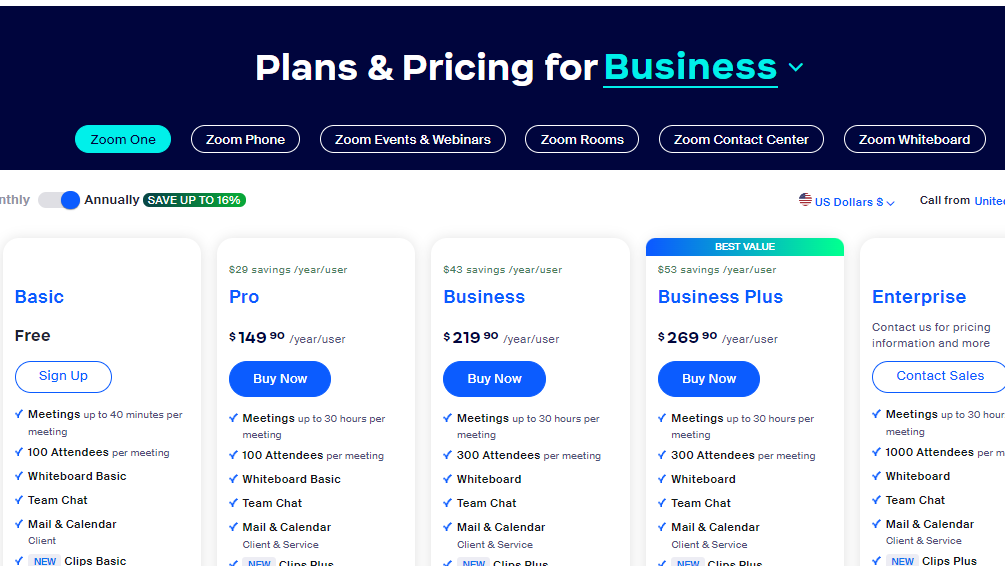
$14.99-$21.99 / Month
Deals Available

This product comes with a special deal, see details

Visit Now
✨ Ask AI about pricing
88% Subscribed Score
info Icon

The Subscribed Score is an independent rating that combines user reviews, features, and value-for-money from multiple trusted sources. It’s designed as a quick benchmark, not a guarantee of individual experience.

Analysis

What is Zoom?

Zoom is a widely used and versatile video conferencing platform that facilitates virtual meetings, webinars, and collaborative sessions. Recognized for its simplicity, reliability, and rich feature set, Zoom has become a popular choice for individuals, businesses, and educational institutions looking to connect remotely in real-time.

Key Features of Zoom:

  • Video Conferencing: Zoom provides high-quality video and audio conferencing, allowing participants to join meetings from desktops, laptops, tablets, and smartphones.
  • Screen Sharing: Facilitate effective collaboration by sharing screens, enabling participants to view presentations, documents, or demonstrations in real time.
  • Webinars: Host engaging webinars with Zoom, allowing hosts to present to a large audience and interact through Q&A sessions, polls, and participant feedback.
  • Recording and Playback: Record meetings and webinars for later reference or sharing. Zoom allows users to play back recorded sessions, making it convenient for those who couldn’t attend live.
  • Chat and Messaging: Enable real-time communication through chat and messaging features, fostering instant communication and collaboration among participants.
  • Integration with Third-Party Apps: Zoom seamlessly integrates with various third-party applications and tools, enhancing productivity and providing a connected ecosystem.
  • Security Measures: Zoom prioritizes security with features like password protection, waiting rooms, and end-to-end encryption, ensuring the confidentiality of virtual discussions.
  • Breakout Rooms: Facilitate smaller group discussions within a larger meeting by creating breakout rooms, enhancing collaboration and engagement.

Who Uses Zoom?

Zoom caters to a diverse user base, including:

  • Business Professionals: Conduct virtual meetings, team collaborations, and client presentations to enhance communication and productivity.
  • Educators: Facilitate online classes, lectures, and interactive sessions, connecting with students and participants from various locations.
  • Healthcare Professionals: Utilize Zoom for telehealth consultations and virtual healthcare meetings, ensuring remote patient care.
  • Social and Personal Use: Individuals use Zoom for social gatherings, family meetings, and staying connected with friends and loved ones.

In conclusion, Zoom stands as a leading video conferencing solution that offers a reliable and feature-rich platform for virtual communication and collaboration. Its widespread adoption across various sectors highlights its effectiveness in meeting the diverse needs of users seeking seamless and high-quality virtual interactions.

Pros
  • Intuitive interface and ease of use
  • High-quality video and audio
  • Wide range of integrations
  • Reliable for large meetings
Cons
  • Free version has time limits
  • Expensive for large teams
  • Occasional connectivity issues
  • AI tools need improvement
Subscribed Score Metrics
31/36 Metric achieved
MetricsScore
Customer Support4/6
Security5/6
Ease of Use6/6
Value of Money5/6
Integration5/6
Popularity6/6
Radar Chart Table View
Ease of Use
Measures how simple and intuitive the product is to use, including setup, navigation, and overall user experience
6/6 Metric Checks
Security
Compares the product`s features, quality, and pricing to determine its overall cost-effectiveness.
5/6 Metric Checks
Value of Money
Assesses the product`s ability to protect data, prevent breaches, and comply with industry standards.
5/6 Metric Checks
Customer Support
Reflects the responsiveness, helpfulness, and quality of assistance provided by the product`s support team.
4/6 Metric Checks
Integrations
Evaluates how well the product connects with other tools and platforms, enabling seamless workflows.
5/6 Metric Checks
Zoom Pricing Range
$14.99-$21.99 / Month

Zoom Showcase
info Icon

A curated gallery of real screenshots and use cases from the product, so you can see how it works before trying it.

Full Screen Icon
Full Screen Icon
https://www.youtube.com/watch?v=VV3DTAsljaQ?feature=oembed
Full Screen Icon

What else exists next to Zoom
info Icon

A list of platforms similar to Zoom, helping you evaluate which tool best matches your needs.

Need to cancel Zoom? Here is how
info Icon

Thinking about how to cancel Zoom this is how you do it!

Steps to Cancel Zoom Subscription

To cancel your Zoom subscription or add-ons, sign in to the Zoom web portal, go to Plans and Billing > Plan Management, choose the plan, click Manage, and then Cancel Plan. Confirm the cancellation, and note that it takes effect at your next renewal date. Access to cloud recordings is lost, and they are permanently deleted 30 days post-cancellation. For more details, Click here.

How to Cancel the Zoom

Steps to Cancel Zoom Subscription

To cancel your Zoom subscription or add-ons, sign in to the Zoom web portal, go to Plans and Billing > Plan Management, choose the plan, click Manage, and then Cancel Plan. Confirm the cancellation, and note that it takes effect at your next renewal date. Access to cloud recordings is lost, and they are permanently deleted 30 days post-cancellation. For more details, Click here.

Pricing Range
info Icon

This only an estimated pricing range, visit Zoom pricing page to access all the information by clicking “Visit Now”.

$14.99-$21.99 / Month
Visit Now
Deals Available

This product comes with a special deal, see details

This product comes with a special deal, see details